






AudioPod AI
AudioPod AI – makes AI-based audio processing more efficient and simpler.
Tags:AI audio toolsWhat is AudioPod AI?
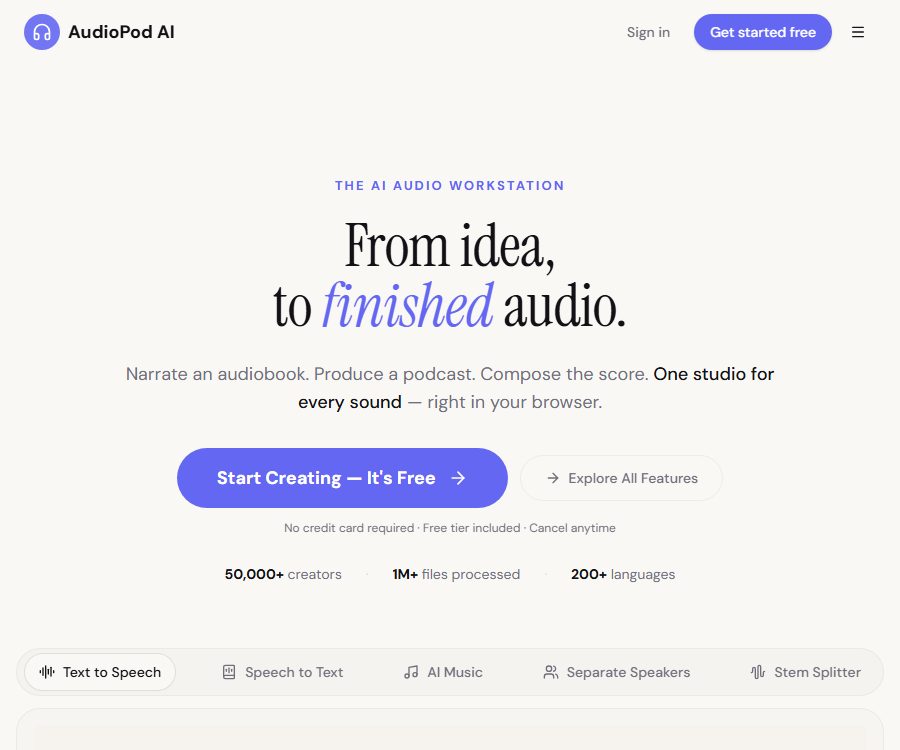
AudioPod AI is an integrated AI audio workstation designed for content creators, audio professionals, and developers. It brings together functions such as voice generation, sound cloning, music creation, transcription, track separation, noise reduction, audiobook production, and a browser-based DAW in one platform.
The platform offers both web applications that can be used without installation, as well as APIs, Python SDKs, Node.js SDKs, and MCP Servers. The subscription system for applications differs from that of API wallets; it is necessary to determine one’s own usage pattern before making a choice.
Main functions of AudioPod AI
Text-to-speech and Voice Studio
Users can select voices from a library of sounds in over 200 languages to synthesize text into narration. Voice Studio also offers controls for mood, pauses, pronunciation, voice tags, and timestamps, making it suitable for creating podcasts, courses, and character voices.
Voice cloning and voice conversion
The platform allows users to create custom sound models using authorized samples, and to convert recordings into the desired sound. The authorities require explicit consent from those who wish to clone such sounds; in some cases, random passwords and live verification are also needed to confirm the origin of the sound.
Transcription is separated from the speaker.
AudioPod AI can convert audio to text and identify or separate different speakers. For meetings, interviews, and multi-speaker podcasts, manual review is still required for names, terms, timestamps, and overlapping voices.
Audio translation
Audio translation converts speech into other languages while striving to retain the original speaker’s vocal characteristics. The coverage of languages, lip-sync accuracy, and the precision of proper nouns vary depending on the model and the source material used.
Separation of tracks for 45 different musical instruments
The paid version allows users to select 45 different instruments from mixed audio in order to separate them into individual tracks, while the free version offers standard settings for vocals, drums, bass, etc. It can be used for extracting accompaniments, preparing mixes, analyzing samples, and creating practice materials.
Karaoke and voice processing
The platform can separate the vocal track from the accompaniment and offer functions related to karaoke. Files with low bitrates, live recordings, and multiple reverb effects may result in hum or distortion.
Noise reduction and echo processing
Noise reduction tools are used to reduce background noise, wind sounds, and room echoes, and they are useful for improving the quality of interviews, online lectures, and remote recordings. Excessive use of these tools can damage the details in audio signals such as hiss and musical elements; it is therefore advisable to listen to the audio before exporting it to assess the effects.
AI music generation
Users can create music based on textual descriptions and continue working on it in the same workspace. Before using it for commercial purposes, it is necessary to review the terms associated with the account to determine the licensing rules regarding the generated content, the input materials, and any brand-related elements.
Audio book and podcast studio
Audiobook Studio allows text to be organized by chapter, voices to be assigned, and audiobook files to be exported; Podcast Studio is designed for voiceovers and the production of podcasts. For longer works, it is necessary to proofread names, numbers, tone, and chapter markers on a chapter-by-chapter basis.
Browser DAW and media conversion
The browser-based DAW is used for arranging, editing, and combining audio, without the need to install any desktop software. The platform also supports the conversion of common audio and video formats, as well as the import of content from online media or cloud resources that the user has permission to access.
Supported inputs and formats
- Audio formats such as WAV, MP3, FLAC, OGG, OPUS, AAC, and M4A can be uploaded.
- It can handle video formats with audio tracks such as MP4, WEBM, MOV, and AVI.
- It supports importing assets from local files, cloud storage, and certain online video sources.
- The text-to-speech service included in the paid plans supports over 200 languages; the specific voices and languages available depend on the voice library.
- The maximum duration and size of a single file increase as the package level rises.
AudioPod AI Usage Guide
- After registering an account, use the free credits to test the target language, voice, and processing effects first.
- Confirm that the audio, video, or text belongs to you, or that you have permission to upload and process it.
- Depending on the task, you can access the text-to-speech, transcription, track separation, noise reduction, music, or studio modules.
- Upload a file or enter text, and select the language, voice, track mode, and output parameters.
- Before performing voice cloning, it is necessary to obtain the explicit consent of the person whose voice is to be cloned, as well as to complete the verification required by the platform.
- After it is generated, listen to the beginning, middle, and end sections to check the quality of sound, the terminology used, any cross-talk, and the timestamps.
- If necessary, reduce the processing intensity, revise the manuscript, or split long files before generating it again.
- Download the finished product and save the original materials, parameters, and authorization records.
- In scenarios involving batch processing or product integration, it is possible to create separate API keys and top up the API wallet accordingly.
Methods to improve the quality of finished products
- The voice cloning samples should be quiet, with only one person speaking and a consistent volume.
- Reduce noise before transcription, but be careful not to remove too many high-frequency elements and breathing details.
- Long texts are divided into paragraphs and sections; a short sample is first created to verify the sound and pronunciation.
- Add pronunciation guides for names, abbreviations, numbers, and foreign words.
- For track separation, high-quality source files without secondary compression are preferred.
- Before publishing, listen to it using headphones and speakers separately, and conduct manual verification.
Which users are it suitable for
- Content creators who produce voiceovers, podcasts, short videos, and audio for courses.
- Audio professionals who need track separation, noise reduction, transcription, and browser-based editing.
- The authors and publishing team that transform the manuscript into an audiobook with multiple chapters.
- A team that creates multilingual voice content for games, educational purposes, and products designed for accessibility.
- Developers and AI application teams that generate or process audio in bulk through APIs.
- Music users who wish to extract accompaniments, practice playing an instrument, or analyze arrangements.
The advantages of AudioPod AI
- Bring together a variety of generation and post-processing tools in one workspace.
- The free version does not require a credit card and is suitable for testing the core functionality first.
- The premium version offers more than 200 languages and 45 instrument tracks.
- In addition to subscription points, it is also possible to purchase usage-based points that do not expire.
- It also offers web workstations, APIs, SDKs, and MCP connection methods.
- Official statements support rules regarding privacy and responsible AI.
Usage restrictions and precautions
- AI transcription, translation, track separation, and noise reduction can all result in errors or a loss of sound quality.
- Free points are refreshed on a monthly basis and do not carry over; only points purchased on a pay-as-you-go basis are marked as non-expiring.
- The subscription quota is an estimate; different tools and parameters require varying amounts of credits.
- Importing online materials does not mean that the platform automatically grants rights to download, adapt, or publish them.
- Voice cloning requires authorization, and it must not be used for impersonation, deception, or the creation of harmful deepfake content.
- The cloning of voices by politicians, public officials, and those who do not wish to be public figures is subject to official restrictions.
- Before a customer project is launched commercially, it is necessary to verify the applicable license and account terms at that time.
- A risk assessment must be conducted before uploading confidential recordings, unpublished works, and regulated data.
Price of AudioPod AI
The prices and quotas listed below were verified on August 26, 2026. The official website allows for selection between monthly and annual payment options; taxes, exchange rates, promotions, points usage, and prices may vary depending on the region, with the details shown on the settlement page at the time of purchase being the final authority.
| Plan | Price | Monthly points | Primary interests | File restrictions |
|---|---|---|---|---|
| Basic | Free | 1,000 | About 3 minutes for text-to-speech, about 1 minute for music, about 4.5 minutes for transcription; standard track separation, and 3 custom voices. | Single file: 30 minutes, up to 500MB |
| Pay-as-you-go | 1 dollar is equivalent to 7,500 points. | Buy as needed | The points do not expire; deductions continue even after the subscription points are used up. | Subject to account and tool limitations |
| Creator | $ | 200,000 | Approximately 600 minutes for text-to-speech conversion, 15 hours for transcription, 200 minutes for music processing; unlimited custom voices available, as well as an API. | Single file: 2 hours, up to 2048MB |
| Pro | $ | 600,000 | Approximately 1,800 minutes of text-to-speech conversion, 45 hours of transcription, 600 minutes for music processing, support for 45 different track types, with priority handling. | Single file: 5 hours, up to 4096 MB |
| Studio | $ | 1,250,000 | Approximately 3,750 minutes of text-to-speech conversion, 95 hours of transcription, 1,260 minutes of music conversion, as well as dedicated support. | Single file: 10 hours, up to 5115 MB |
| Enterprise | Contact sales | Custom or unrestricted | Batch pricing, comprehensive API, custom integration, SLA, and priority support | In accordance with the terms of the contract |
On the annual payment page, the costs for Creator, Pro, and Studio are calculated as $16.67, $41.67, and $83.33 per month respectively, with the full annual fee being charged in one go. The official website states that the payment plan includes a 30-day refund guarantee; however, the actual eligibility criteria and procedures for refunds are subject to the terms at the time of purchase.
API billing
API top-ups are done using a separate wallet, and there is no need to purchase a web subscription first. The reference prices listed in the official getting-started guide range from $0.01 to $0.40 per minute, but the documentation for certain features does not always present consistent information regarding transcription credits and their conversion into dollars.
Developers should not estimate production costs based solely on the price listed on the promotional pages. Before launching the product, it is necessary to check the actual cost associated with point deductions in the control panel; small-scale tests using representative samples should be conducted, and a budget should also be set aside for retries, long-duration audio files, and abnormal tasks.
APIs and developer capabilities
- Use API keys to access audio functions such as text-to-speech, track separation, transcription, and noise reduction.
- Python and Node.js SDKs are provided to facilitate integration on the server side.
- The sandbox can issue short-term keys for use in text-to-speech conversions of short texts.
- It offers Webhook and wallet management, making it suitable for asynchronous audio tasks.
- The official documentation also provides an MCP Server to facilitate calls from AI clients that use this protocol.
In a production environment, API keys should be stored in secure server-side configurations, rather than being included in web pages or public repositories. It is also necessary to restrict the permissions of these keys, implement monitoring of their usage levels, and verify the origin of the callback requests.
Data, Privacy, and Voice Security
The privacy policy was last updated on June 10, 2026. The platform handles account information, payment details, device data, usage records, uploaded content, as well as audio data; audio cloning samples typically range from 30 to 60 seconds in length.
Officials state that data transmission is carried out using HTTPS, and static data is encrypted with AES-256; customer voices are not used for sharing or for training third-party models unless the customers have agreed to it. Stripe is responsible for processing payment information.
Account deletion and data retention
After the account is deleted, a 7-day grace period applies; once this period expires, the personal data, voice models, recordings, generated audio files, and related usage data are removed. Certain payment records, summary data, and anti-abuse identifiers may be retained for legal, security, and auditing purposes.
The service is intended for account holders over 18 years of age. Children can listen to content in environments supervised by adults, but they should not create their own accounts or submit sensitive audio samples.
Is AudioPod AI open source?
The core platform of AudioPod AI does not have its source code made public, so it should be considered a closed-source commercial service. Its official GitHub repository is intended for support, issue reporting, and providing information on features and formats; it is not a repository containing the source code that can be used for self-deployment.
The fact that official SDKs and MCP integration documents are provided does not mean that the entire web platform is open source. When evaluating private deployment, it is necessary to contact the company’s sales team for confirmation; one should not rely solely on the public GitHub repositories to make a decision.
Frequently Asked Questions
Can AudioPod AI be used for free?
Yes. Basic provides 1,000 points per month, allowing access to text-to-speech, music generation, transcription, standard track separation, and three custom voice models.
Does AudioPod AI support voice cloning?
It is supported, but explicit consent from the owner of the voice is required, along with completion of the necessary verification processes. The platform prohibits the cloning of voices belonging to political figures, public officials, and public figures who have not given their consent.
How much does the AudioPod AI subscription cost?
The monthly fees for Creator, Pro, and Studio are 20, 50, and 100 dollars respectively; the annual fees are 200, 500, and 1,000 dollars respectively. The actual taxes and discounts are subject to those indicated on the payment page.
Do points purchased on a pay-as-you-go basis expire?
The official website states that the pay-as-you-go points do not expire and can be used on going after the monthly subscription points are used up; whereas the free monthly points are not carried over.
Does AudioPod AI offer APIs?
Available. Developers can use the API, Python SDK, Node.js SDK, and MCP Server; however, the costs associated with the API wallet and web subscriptions must be calculated separately.
Is AudioPod AI an open-source tool?
No. The official GitHub account is designed for reporting issues; the source code of the core platform is not made available publicly, and SDKs or interface documents do not imply that the product is open-source.
Tools similar to AudioPod AI




 Guigong Network Security Registration No. 45132202000164