






AlbumCoverAI
AlbumCoverAI – makes AI audio processing more efficient and simpler.
Tags:AI audio toolsWhat is AlbumCoverAI?
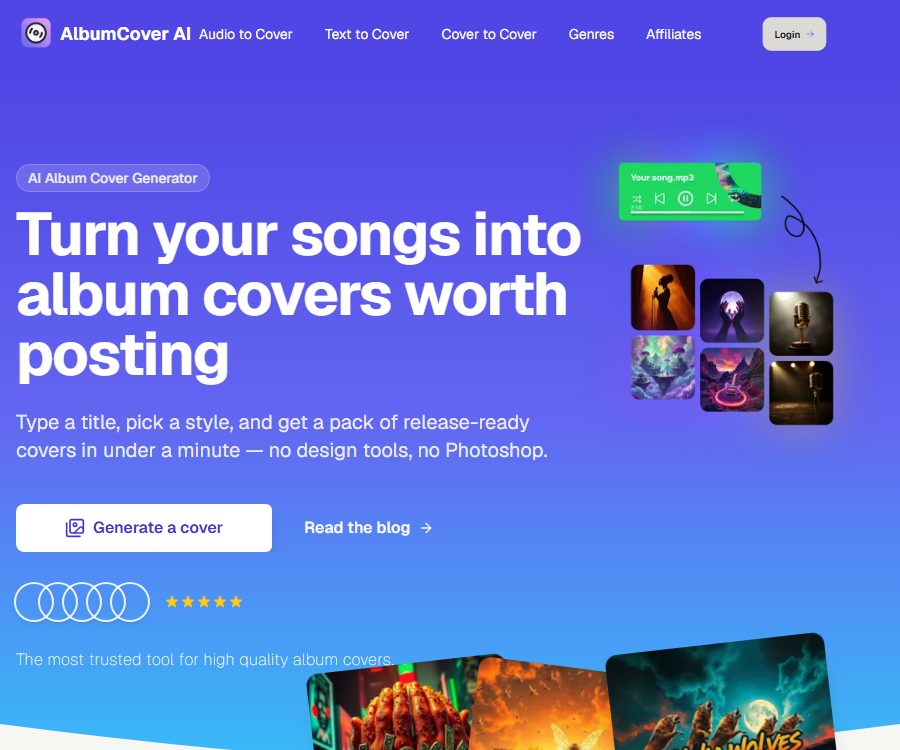
AlbumCoverAI is an AI tool designed specifically for creating visual covers for music releases. Users can upload songs, enter textual descriptions, or provide existing covers, and the system will generate square artwork suitable for singles, EPs, full albums, and playlists.
It emphasizes that it is possible to obtain multiple alternative designs quickly, without the need for Photoshop or professional design skills. The output generated by AI still requires manual verification of fonts, characters, copyright elements, and the specifications of the distribution platform; therefore, completing the generation process does not mean that the content is ready for safe publication.
Main functions
1. Generate an audio cover
After the user uploads an audio file, AlbumCoverAI analyzes the mood, genre, and energy of the song, and then generates a set of visual concepts based on that analysis. This process is suitable for creators who have already composed the music but still do not have a clear idea for the album cover.
- Upload song files as creative input.
- Match the image theme and colors to the musical atmosphere.
- Select a visual style and generate multiple candidate covers.
- Select, save, and download the preferred solutions from the results.
Audio analysis is merely an algorithmic assessment; it may not be able to grasp the metaphors in the lyrics, the cultural context, or the artist’s long-term brand identity. It is advisable to specify the album’s theme, target audience, and any elements that should be avoided before generating the content.
2. Generate a cover using text
When there is no audio to upload, users can still create a cover using the title, concept, mood, colors, and description of the scene. The text-based approach is suitable for initial planning, previews of individual songs, or for quickly exploring visual styles for different musical styles.
The more specific the instructions are, the more controllable the results usually are. It is possible to specify the music genre, the main subject, the composition, the color palette, the sense of era, the style of photography or illustration, as well as whether a clear title is needed.
3. Generate a cover from the cover image
The Cover to Cover mode allows users to create new visual variations using existing images as a reference. It can be used to maintain the same colors, composition, or texture in a series of images, or it can be employed to experiment with different artistic styles.
Before uploading a reference image, it is necessary to ensure that you have the right to use it. Copying content from others’ albums, photographic works, trademarks, or characters in a similar manner can lead to issues related to copyright, trademark rights, or unfair competition.
4. Various models and visual styles
The official website offers model and style suggestions based on different music genres; examples include image model series such as Flux, Recraft, and Ideogram. These various models are suited respectively for photography, illustration, graphic design, or text presentation.
- Professional photography and cinematic visuals.
- Semi-illustration, dreamy, and black-light style.
- A text generation model suitable for title formatting.
- Patterns, characters, and vector-style designs.
- From quick sketches to high-quality finished products.
The model names and available options may change as the platform is updated. Users should refer to what is actually displayed on the generation page, and not assume that all models are included under the same plan or at the same price.
5. Music genre templates
AlbumCoverAI currently offers around 40 pages dedicated to different music genres, aiming to assist users in creating artwork by starting with common visual styles. The categories include pop, rock, hip-hop, electronic, classical, jazz, metal, K-Pop, J-Pop, and world music.
Type templates serve as a starting point for creativity; they are not rules that must be followed. Over-reliance on fixed cultural symbols can lead to stereotypes, and when designing across cultures it is necessary to ensure that the use of patterns, clothing, and text is appropriate.
6. Title and layout design
Some models are better suited for incorporating the song title or album title directly into the visual design. Users can specify the style of the font, the position of the title, the size of the text, and whether to include the artist’s name.
AI may still produce spelling errors, garbled text, or inconsistent character styles. It is recommended to reformat the content in a design software before official release, and to check whether it is clear and readable at thumbnail size.
7. Parental Advisory label
The platform offers a one-click function for adding or removing the Parental Advisory label, which facilitates the creation of standard cover labels for works that contain explicit lyrics. The system handles the scaling and positioning of these labels for you.
This tag cannot replace the content declarations provided by the publisher or the streaming platform; musicians still need to indicate explicit content in accordance with the actual lyrics and the rules of the distribution channels.
8. Collection and cover sheets
Each generation yields multiple candidate options; users can save their favorite images and compare different versions. Envelopes are suitable for using as a unified visual element in single-song promotions, on social media, and on publication pages.
Before downloading, it is necessary to confirm the output resolution, file format, color space, and whether a watermark will be included. When using it for physical printing, it is also important to check for bleed, cropping, and print clarity.
Which users is it suitable for?
- Independent musicians with limited budgets who need to create album covers quickly.
- Producers who test the visual aspect of singles, EPs, or albums.
- Labels and distribution teams that manage multiple music projects.
- Creators who need artwork for playlists, podcasts, or music channels.
- Users who hope to draw design inspiration automatically from the emotion in songs.
- Graphic designers who need draft covers for different music genres.
How to use AlbumCoverAI?
- Register an account and choose between audio, text, or reference cover mode.
- Upload audio or images for which you have usage rights, or enter a complete textual description.
- Enter the song title, artist name, music genre, mood, and color scheme preferences.
- Choose the appropriate style or model, and identify the elements that you do not want to appear.
- Generate multiple sets of options and compare the readability of the layout, text, and thumbnails.
- Save the available results, continue to modify the prompts, or switch to a different model for further iteration.
- Add explicit content hint tags when necessary.
- After downloading, manual typesetting as well as checks for copyright and distribution specifications are carried out.
How to write prompt words?
- Indicate the purpose, such as single, EP, album, or playlist.
- Specify the music genre, mood, rhythm, and target audience.
- Describe the subject, environment, camera angle, lighting, and colors.
- Specify styles such as photography, illustration, collage, vintage, or minimalist.
- Indicate whether the title and the artist’s name need to appear on the screen.
- List the words, characters, brands, and sensitive elements that are prohibited.
Don’t just write “create a nice cover”. For example, you could describe it as “a nighttime city scene, with cool blue and purple neon lights; a mood that is lonely yet strong; space reserved in the center for the album title; a square format”.
Prices and payment methods
As of August 25, 2026, the official website of AlbumCoverAI does not display any verifiable fixed packages, prices for credit points, or costs associated with a single generation. Logging in is required to carry out the generation process; the actual free quota and available purchase options can be found on the account’s dashboard.
Therefore, it is not appropriate to use the prices of Album Cover generators from other similar domains, nor should the pricing of apps with the same name in the App Store be used as a reference for this website’s prices. Before making a payment, one should check the name of the service, the vendor, the number of credit points, the expiration rules, as well as the conditions for automatic renewal and refunds.
Rights to the work and considerations for commercial use
The official terms state that users retain the right to create covers using the service, while granting the platform a non-exclusive license to use those covers for displaying, storing, and improving the service. This wording does not guarantee that each resulting creation will not infringe on third-party rights.
- Do not request copies of specific works by living artists or covers of famous albums.
- Do not use real people’s portraits, brand logos, or protected characters without permission.
- The audio files, photos, and reference images uploaded must have legitimate rights for use.
- Check the text, trademarks, and similar designs before official release.
- Retain the prompt, generation date, and records of subsequent modifications.
- Labels or commercial projects should seek professional advice in line with the region where they are to be released.
Privacy and data storage
The privacy policy states that the platform collects the email address used for logging in, as well as information related to the creation of covers, prompts, and preferences; it uses this data to provide and improve services, to get in touch with account holders, and to analyze usage patterns.
Officials state that the data is stored using Supabase, and the images generated are retained for 30 days before being automatically deleted. Users can request access to or deletion of their personal data, export the images, and opt out of marketing communications.
The privacy page does not provide clear information regarding the duration for which uploaded audio files are stored, nor does it detail the procedures involved in processing them by third-party services. Before uploading unreleased songs, master recordings, or sensitive material, it is necessary to consult the authorities to understand the mechanisms for processing and deleting such files.
Content and security restrictions
- It is not allowed to generate illegal, unauthorized, infringing, or inappropriate content.
- AI outputs do not guarantee meeting specific quality or design requirements.
- Account holders are responsible for maintaining login security and for all activities carried out on their accounts.
- The platform may adjust, restrict, or suspend its services.
- The generated images may contain distorted figures, garbled text, or elements with inaccurate information.
- Permits for public display or service improvements should be included in the business confidentiality assessment.
Is API or open source support available?
The current official website does not provide any developer APIs, SDKs, or batch automation interfaces, nor is there any official GitHub repository available. AlbumCoverAI should be classified as a commercial online generation tool, rather than an open-source image model.
Models such as Flux, Recraft, and Ideogram mentioned on the page are sources of generative capabilities or model options; they do not mean that AlbumCoverAI possesses or makes the source code for these models available.
Product advantages
- When it comes to music cover design, the areas of application are more specific compared to general drawing tools.
- It supports three types of input: audio, text, and reference images.
- It offers a large number of pages featuring different music genres as well as suggestions regarding visual design.
- It is possible to generate multiple sets of candidate and favorite results, as well as add explicit content tags.
- It is suitable for independent musicians to quickly explore creative ideas.
Product limitations
- The public page does not clearly display the current prices and the rules regarding credit points.
- Text formatting and brand consistency still require manual adjustments.
- The specifics regarding where the uploaded audio is stored and how it is processed by third parties are not clear enough.
- Generating content does not mean that third-party copyrights or trademarks will not be infringed.
- No public APIs, SDKs, or official open-source versions were found.
Frequently Asked Questions
Can AlbumCoverAI analyze songs?
Yes. In audio mode, the system analyzes the mood, genre, and energy of the music in order to generate candidate covers that match these characteristics, but the artist still needs to provide more specific creative directions.
Can it be created using only text?
Yes. Users can enter the song title, style, scene, color, and composition requirements, without needing to upload an audio file.
Can I upload an existing cover to create variations?
The Cover to Cover mode can be used, but one must have legitimate rights to use the reference image; it is not allowed to use it to copy other people’s protected works.
Can the generated cover be used for commercial purposes?
The terms state that users retain the right to create covers, but commercial use is still subject to restrictions related to the input materials, third-party models, trademarks, portraits, and the laws of the region where the content is distributed.
What is the price on the official website?
The current public page does not display the verifiable prices of the packages. You should log in to view the actual credit amount and settlement details; do not use the pricing rates from websites with similar names.
Is AlbumCoverAI open source?
No. Currently, no official open-source code, SDKs, or self-deployment versions are available; it is an online commercial generation service.
Tools similar to AlbumCoverAI




 Guigong Network Security Registration No. 45132202000164