






AI Music API
The AI Music API makes working with AI audio more efficient and simpler.
Tags:AI audio toolsWhat is the AI Music API?
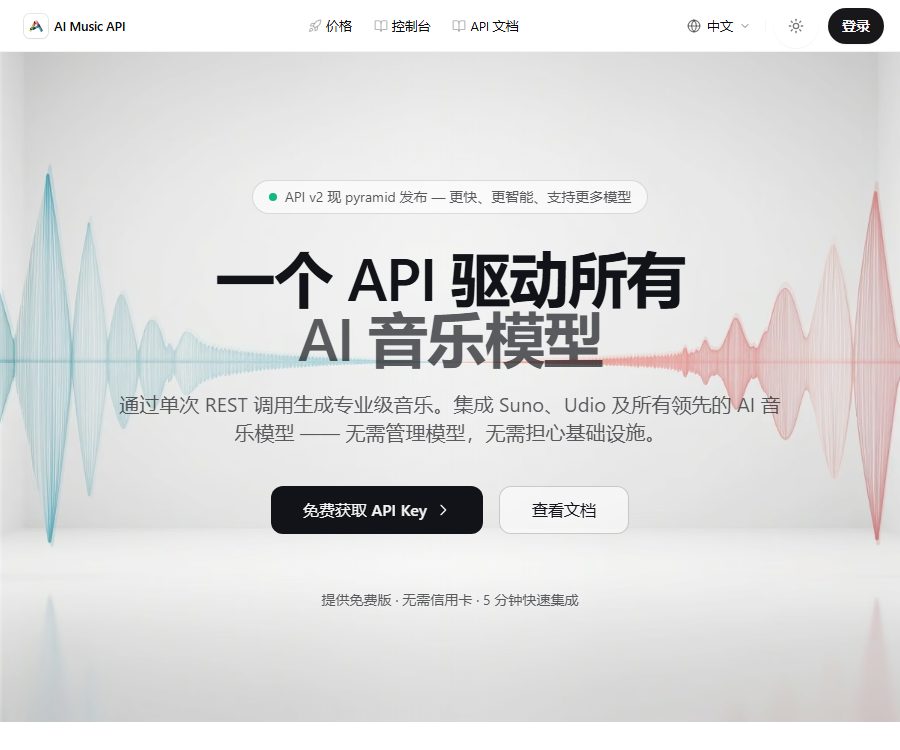
The AI Music API is a third-party generative music interface provided by audioapi.pro, intended for developers who need to integrate AI-based music composition into their applications, games, or content creation workflows. It offers capabilities such as music generation, extension, cover creation, management of lyrics timelines, and file conversion, all through a unified REST API.
The website claims to provide access to models or services such as Suno, Udio, and MiniMax, but it is not the official developer site of Udio. It should be regarded as an independent API gateway before using it, and it is necessary to verify the upstream authorization, brand relationships, and service continuity.
Main API capabilities
Text to music
In the Inspiration mode, simply provide a description of the music, and the system will create the lyrics, title, and audio. The Custom mode allows users to submit the lyrics, style, and title, as well as set parameters such as whether to generate instrumental music and whether a male or female voice is preferred.
- Generate songs or instrumental music based on the prompts.
- Set the style, mood, rhythm, and negative tags.
- Adjust the style weight, degree of creative deviation, and audio feature weight.
- Select different models and available generation durations.
Track extension and upload of covers
The Extend interface enables the addition of content to existing music, with the option to retain the original parameters or use new settings. The Upload & Cover interface allows audio files to be uploaded, after which a cover version can be created using a different sound, style, and lyrics.
The audio uploaded must be owned by the user or for which adequate authorization has been obtained. Do not create misleading imitations using unauthorized songs, artist voices, or protected recordings.
Timestamped lyrics and WAV conversion
The timestamp lyrics interface provides information on the timing of each word, the waveform, and the alignment confidence level; this data can be used to highlight lyrics in a player or to achieve karaoke effects. The WAV conversion interface converts the generated audio output into WAV format, which is suitable for further editing and processing.
Cover image generation
Developers can use the music task ID to create corresponding cover images, and then poll the task status to retrieve those images. The trademarks, characters, and style elements present in the covers still require copyright and brand verification.
Asynchronous tasks and Webhooks
Music generation typically does not return the complete audio file synchronously; instead, it first provides a task_id or workId. The application can check the status of the task at regular intervals, or it can provide a publicly accessible callback address to receive POST notifications at stages such as when the text is ready, when the first part of the audio is available, and when the task is completed.
Which developers are it suitable for
- Application teams that create background music for short videos, podcasts, or games.
- Content platforms that require the bulk creation of soundtracks, melody drafts, and instrumental music.
- Products that display synchronized lyrics word by word in the player are desired.
- A music workflow that requires converting the generated audio to WAV in order to proceed with further processing.
- Developers who wish to test multiple music providers through a single interface.
Package price
The prices listed below are those on the official website as of August 25, 2026; they do not include taxes. The annual payment page shows the monthly average price and allows for payment of the entire year at once; the subscription is automatically renewed, and the final price is subject to what is displayed on the payment page.
| Plan | Monthly payment | Annual equivalent | Integration | Files and licenses |
|---|---|---|---|---|
| Free | $ | $ | Initial points and daily sign-in points | Available for 15 days, no commercial license included |
| Basic | 10 dollars per month | $ | 1000 points | The subscription remains valid indefinitely, including the commercial license. |
| Pro | $ | 16 dollars per month | 2000 points | Priority handling and support, including commercial licensing. |
| Max | $ | $ | 5000 points | Top priority and dedicated support, including a commercial license |
The current English-language pricing page includes images and video models within the same points system, so these points can be used not only for music. The option of permanently storing the files listed under the paid plans is valid only as long as the subscription is active; once the subscription is canceled, it is necessary to download any assets that need to be retained in advance.
Points consumption
| Capability or model | Reference consumption |
|---|---|
| chirp-v3-5 music | 5 points per attempt |
| Chirp-V4 music | 8 points per attempt |
| chirp-v4-5 and plus | 10 points per attempt |
| chirp-v5 and v5-5 | 12 points per attempt |
| MiniMax Music 2.5 | 30 points per session |
| Timestamp lyrics | 2 points per attempt |
| Music cover image | 1 point per transaction |
Resolution, quality, duration, and advanced modes may increase consumption; it should be determined through small-scale tests whether points are refunded in case of failure. The credits purchased once are said to be valid indefinitely, and requests are suspended when the balance reaches zero.
Refund rules
The website’s FAQ states that new subscriptions come with a 7-day window for a refund without any reason given; in case of issues with renewals, it is necessary to contact the support team within 72 hours for review. Cancellations or downgrades take effect at the end of the current subscription period, while upgrades usually result in charging according to the applicable rate immediately.
API Integration Tutorial
- Create an account and generate an API key; do not include this key in the frontend code or in public repositories.
- First, use the balance interface to check the available points, and set up a reminder for low balances within the application.
- Use the generation interface to submit prompts, models, styles, lyrics, and other parameters.
- Save the returned task ID and query it via the status interface every 5 to 10 seconds, in order to avoid frequent polling.
- In a production environment, an HTTPS Webhook can be configured to return a success status promptly and to handle the results asynchronously.
- Verify the callback task ID, account ownership, and request origin to prevent fake notifications from being inserted into the system.
- Download the audio, cover image, and metadata immediately after completion; do not rely on temporary file addresses for long-term storage.
- Record the points earned for each request, the time taken, the reasons for failure, and the model version, in order to enable cost monitoring.
Security recommendations for Webhooks
- The callback address must be accessible from the public internet, but internal management interfaces should not be made available.
- Use random paths, signatures, or secondary queries to verify the authenticity of callbacks.
- Implement idempotent handling for repeated callbacks to prevent duplicate charges or repeated publications.
- Limit the size of the request body and verify field types, audio addresses, and task status.
- Hide API keys, song lyrics, and the URLs of audio files uploaded by users in the logs.
Copyright and commercial use
The pricing page states that the paid plans include commercial usage rights and licensing certificates, while the free plan does not provide commercial licensing nor any guarantee of long-term ownership. This is a statement made by the platform regarding its services; it does not automatically resolve any rights issues related to user-generated lyrics, uploaded recordings, voice imitations, trademarks, or the terms associated with the underlying models.
Before releasing content for advertising, films, games, or music, it is necessary to keep records of the creation date, prompt words, task ID, proof of subscription, and license documents. When dealing with specific singers or protected songs, additional authorization is required; it is not sufficient to rely solely on the platform’s general commercial license.
Data and file saving
The current pricing page states that assets created by free users and users on a pay-as-you-go basis are stored for 15 days, while paid subscription users can keep their assets for an extended period throughout the duration of their subscription. The older version of the quick start guide mentioned that files were stored for 30 days; in case of any discrepancy between these two statements, the newer rule of 15 days should be applied, and backups should be made regularly.
The upload for cover versions feature sends the user’s audio to third-party services for processing. For sensitive, confidential, or unpublished recordings, it is necessary to determine the location where the data will be stored, its intended use for training, the procedures for deleting it, and a list of the subcontractors involved before uploading them.
The relationship between open source and brands
As of this verification, no official open-source repository for the uaudioapi.pro commercial gateway has been found. It does provide public API documentation, but the server-side implementation and models are not made available in an open-source format.
Product domain names and pages often make use of names such as Udio API and Suno API; the official website describes itself as a unified third-party interface. Developers should not imply in their products that they have official authorization from Udio or other model providers, unless there is verifiable evidence of such cooperation.
Product advantages
- A unified REST interface provides various capabilities for music generation and post-processing.
- It supports task polling and Webhooks, facilitating the creation of production workflows.
- The integration cost is made public through the model, facilitating the estimation of the cost per transaction.
- It supports features such as a lyric timeline, WAV conversion, and cover images.
- Free points can be used for access testing.
Usage restrictions
- It belongs to a third-party gateway, and is not the official Udio API that has been approved.
- The relationships between upstream models, interfaces, and brand licensing may change.
- The free plan does not provide a commercial license, and assets are only stored temporarily.
- Asynchronous generation carries risks of failure, delays, duplicate callbacks, and expired addresses.
- The current pricing page incorporates music, images, and videos; it is necessary to calculate the points carefully.
- Uploading covers and voice imitations carries high risks related to copyright and personality rights.
Frequently Asked Questions
Is this the official Udio API?
It is not an official Udio developer service that has been verified, but rather a third-party unified API operated by uaudioapi.pro. It claims to aggregate the capabilities of Udio, Suno, and other service providers.
Can I try it for free?
The Free plan offers initial points for new users as well as points for daily sign-ins; no credit card is required. Generated files are stored for only 15 days, and the free version does not include any commercial license.
How many points are required to create a song?
The default music model requires approximately 5 to 12 points per use, while MiniMax Music 2.5 needs 30 points per use. The duration, mode, and future models may affect the actual amount of points required.
Can paid content generation be used for commercial purposes?
The platform claims that its paid plans offer commercial licenses and certifications, but users still need to ensure that they have legitimate rights to the lyrics, uploaded audio, sounds, and other materials, and must comply with the terms of the underlying models.
Tools similar to the AI Music API




 Guigong Network Security Registration No. 45132202000164