






dodocs.ai
dodocs.ai: an intelligent tool specialized in AI-based audio processing.
Tags:AI audio toolsA one-sentence summary
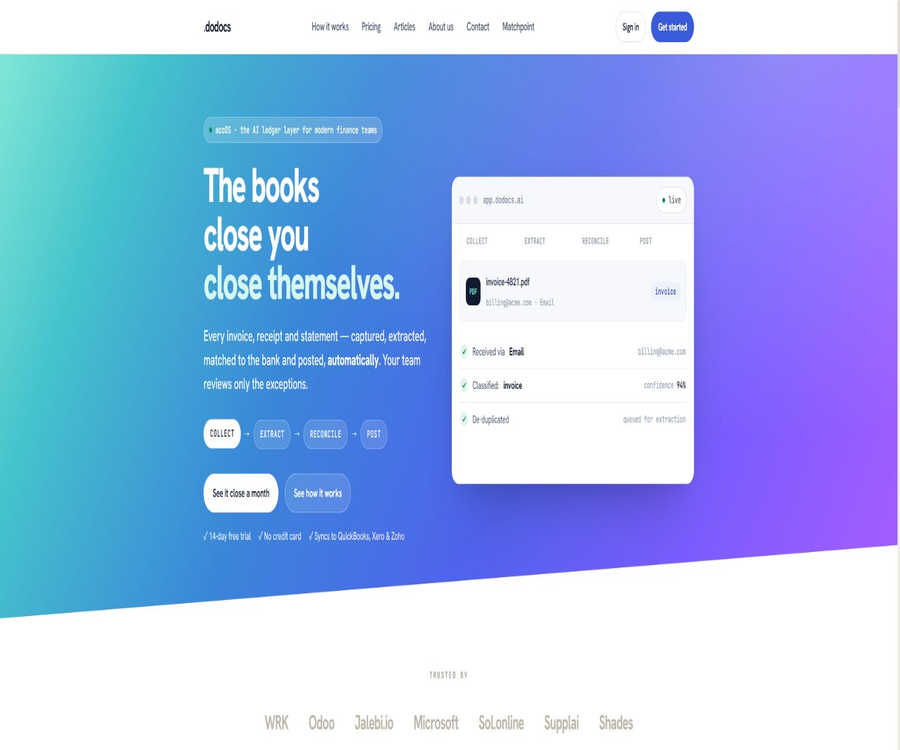
DoDocs is an AI-based platform for accounting and automation of financial documents; it can continuously collect invoices, receipts, and bank statements, and carry out tasks such as data extraction, ledger coding, bank account matching, anomaly detection, and data submission to accounting systems.
Tool Introduction
DoDocs is operated by the American team behind DoDocs; its current purpose is to serve as an AI-based tool for financial teams in companies and accounting firms. It is not a single OCR tool, but rather a system that enables multiple agents to work together to carry out tasks such as data collection, extraction, reconciliation, and dissemination.
The system sends fields with low confidence levels, duplicate invoices, supplier-related issues, and codes that require evaluation to a queue for manual review. It is possible to gradually increase the level of automation, rather than allowing AI to enter data into the accounts from day one without any restrictions.
Core workflow
| Phase | Main inputs | Automatic processing | Output |
|---|---|---|---|
| Collect | Email, WhatsApp, mobile upload, and bank channels | Remove duplicates, categorize, and add to the queue | Financial documents pending processing |
| Extract | Invoices, receipts, statements, and pictures | OCR, field recognition, GL coding, and confidence level | Structured accounting data |
| Reconciliation | Documents, bank transactions, and historical rules | Amount matching, duplication, and anomaly detection | Matching records or exceptions found |
| Review | Low confidence and rule conflicts | Present the original evidence and suggestions. | Manual approval or correction |
| Publish | Approved data | Synchronize to the accounting platform and save the transaction history. | Bookkeeping records and audit evidence |
Main functions
Multi-channel document collection
Customers can submit materials via email, WhatsApp, mobile photos, or direct upload; the system will automatically remove duplicates and arrange the submissions in order. Accountants do not need to require all customers to learn how to use the new portal.
Extraction of invoice and receipt data
The Extractor agent is capable of identifying suppliers, amounts, dates, tax amounts, line items, and other accounting fields, and it can calculate a confidence level for the results. The official website claims that it can process PDFs, images, handwritten documents, or damaged files; however, complex samples still require testing.
Intelligent classification and general ledger coding
The system suggests categories and general ledger accounts based on the semantics of the business documents and existing correction records. The finance team should review the account list, tax rules, and customer-specific differences, rather than relying solely on the model’s decisions.
Automatic bank reconciliation
The Reconciler agent matches invoices or receipts with bank transactions, and checks details such as amounts, suppliers, and dates. Those cases that cannot be verified – such as one-to-many relationships, split payments, or abnormal transactions – are sent for manual processing.
Warnings regarding repetition and fraud risks
The platform identifies suspicious patterns such as duplicate invoices, abnormalities in supplier behavior, and invoices that have been split into multiple pieces. These risk alerts are intended to help narrow down the scope of investigation; they do not mean that the system has confirmed the existence of fraud.
Automatic follow-up for missing documents
The Chaser agent can carry out predefined follow-up procedures via email and WhatsApp, track responses, and escalate the matter to a human agent after multiple attempts without a reply. It first checks existing bank and accounting records to avoid repeated requests.
Manual review queue
Readings with low confidence, anomalies, and encoding decisions are displayed together, with the original document evidence attached next to the suggestions. Users can modify, approve, or reject them, and then decide whether to synchronize them to the ledger.
Multi-level automated control
| Level | System behavior | Appropriate stage |
|---|---|---|
| Shadow | Background processing and scoring, but no publication. | Initial connection and accuracy assessment |
| Suggest | A draft is generated; everything awaits manual approval. | Establishing rules and building team trust |
| Auto-post | Items that exceed the threshold are published automatically; the rest are reviewed. | Stable documentation and mature processes |
| Aggressive | Try to carry out automatic publishing, showing only obvious anomalies. | Scenarios where risks are controllable and rules are adequate |
Accounting software synchronization
The official website lists QuickBooks, Xero, and Zoho as systems that can be synchronized; it also mentions additional enterprise system integrations on some pages. Specific connectors, regional versions, field mappings, and available packages need to be verified one by one using a trial account.
Audit trail
Each publication record can retain the channel documentation, extraction results, matching evidence, and the personnel who conducted the review, which facilitates checks and audit inquiries at the end of the month. Enterprises still need to determine the retention period and access permissions in accordance with their own regulatory requirements.
Features for releasing content and making previews are now available.
| module | Current status | Explanation |
|---|---|---|
| Document extraction | Available now | Read, classify, encode, and calculate confidence levels |
| Chase Loops | Available now | Follow up on missing materials via email and WhatsApp |
| Reconciliation | Available now | Bank matching, duplicate, and anomaly detection |
| Client Health | Coming soon | Customer profitability, deadlines, and the health status of missing documents |
| Period Close | Coming soon | End-of-month tasks, accrued items, and closing packages |
| Team Performance | Coming soon | Team load and efficiency analysis |
| Payroll Agent | Coming soon | Salary drafts are published on the accounting platform |
Which users are it suitable for
- Financial staff in small businesses: Automatically organize daily invoices, receipts, and bank records, reducing the need for repetitive data entry.
- Accounting firm: Handles the collection of invoices, reconciliation, and review of anomalies in multi-client work environments.
- Outsourced bookkeeping team: Sets an automation level based on the client’s requirements and retains evidence of each transaction carried out.
- Finance department in growing companies: Connect the document entry system to QuickBooks, Xero, or Zoho accounting software.
- Software development team: Uses the MatchPoint API to extract invoices and documents and integrate them into its own processes.
Typical use cases
- Once the supplier’s invoice is sent to the public email address, it is automatically extracted, matched with the bank transactions, and a draft accounting entry is generated.
- The system detects that there are no receipts at the end of the month, and it uses WhatsApp to remind the customer to take a photo and send it back, after which the receipt is automatically archived.
- Duplicate invoices or invoices with abnormal supplier amounts are blocked; financial staff approve them after reviewing the relevant evidence.
- The office monitors the processing queues of multiple clients in a centralized manner, while clients still submit their documents through the communication channels they are familiar with.
- Convert PDF, JPG, text files, and certain handwritten documents into data that can be used by inventory, logistics, or accounting systems.
Usage tutorial
Initial configuration of the enterprise
- Register for a 14-day trial account, select the corporate plan, and create corporate details.
- Connect to the currently used accounting system, the email address for receiving messages, and the required bank data source.
- Starting with the Shadow mode, the agent is tasked with processing a batch of historical documents without entering them into the official ledger.
- Verify fields, GL codes, bank matches, tax processing, and duplicate detection results.
- Set thresholds for high-risk fields and amounts, so that uncertain results are automatically sent for manual review.
- Once the accuracy stabilizes, switch gradually to Suggest or Auto-post, while continuing to conduct sample checks.
Accounting firms assign clients to them
- Select the Firm solution and create multiple client workspaces, assigning separate ledgers and permissions to each client.
- Import customer data, and provide collection methods such as email, WhatsApp, or mobile uploads.
- Configure the frequency of document collection, the conditions for cessation, and the contact person for manual escalation.
- Set automation levels, account rules, and approvers tailored to different customers.
- First, conduct parallel verification using representative months, and then expand the scope of automatic distribution for each individual customer.
Access via the MatchPoint API
- Apply for interface access and create a key; the credentials are stored securely only on the server side.
- Define the document entry point, target fields, and structured output format based on the business type.
- Upload actual test files that cover different suppliers, languages, levels of clarity, and multi-page scenarios.
- Low confidence levels, parsing failures, and field conflicts are included in the review and retry process.
- Deploy to the production environment only after completing permission settings, log masking, usage monitoring, and exception handling.
Prices and packages
DoDocs offers a 14-day free trial; the official website states that no credit card is required. The monthly price in dollars, as of August 2026, is shown below. All official plans may incur additional charges based on usage, and the final amount will be indicated on the billing page.
| Package | Price | Billing cycle | Core rights and interests | Suitable for users |
|---|---|---|---|---|
| BASE | 19 dollars | Monthly | Automated document processing, bank reconciliation, QuickBooks Online, email invoicing, anomaly detection, profit reports, 1 seat | A single company |
| Salaries additional items | 69 dollars | Monthly | Salary processing, payrolls, tax calculations, employee portal, and compliance reporting; not yet available. | Companies that will need a salary module in the future |
| Doc Exchange & Reports | 99 dollars | Monthly | Customer document portal, automated reporting, white labeling, scheduled delivery, and templates; not yet available. | Teams that require clients to deliver the portal |
| Firm Starter | 39 dollars | Monthly | No fee for the top 10 customers; a customer panel, a customer portal, and 1 seat are provided for them. Starting from the 11th customer, the fee is $10 per month per customer. | Small accounting firm |
| Firm Professional | 69 dollars | Monthly | Details on no customer restrictions, priority AI processing, priority support, 1 seat, and 10% lifetime discount. | An expanding law firm |
Trial, cancellation, and additional fees
The public pricing page states that cancellations can be made at any time, and all prices are in US dollars. The BASE and Firm plans indicate “consumption rates apply”; therefore, the monthly fee is not the total cost for unlimited usage. It is necessary to check the documentation, the number of pages, as well as the actual costs related to communication and integration before starting the trial period.
Cashback and customer billing
The Firm plan promises a 5% lifetime rebate, while the Starter plan specifies that the first 10 customers receive the service free of charge; from the 11th customer onward, a fee is applied. The criteria for qualifying for a rebate, the method of payment, and how \"customers\" are defined are all subject to the settlement terms.
Support for platforms and input/output.
| Category | Supported content | Precautions |
|---|---|---|
| Management platform | Web workspace | Used for configuration, review, customer management, and auditing. |
| Collection channels | Email, WhatsApp, mobile upload, and direct upload | Communication channels may incur usage fees. |
| Enter | PDF, JPG, text, photos, invoices, receipts, bank statements, etc. | Handwritten or damaged documents require manual verification. |
| Accounting connection | QuickBooks, Xero, Zoho | Regional versions and synchronization fields require actual testing. |
| Development and integration | MatchPoint API | Suitable for document extraction and structured integration |
| Output | Structured fields, accounting drafts, exception queues, published records, and audit trails | Critical data should require manual approval. |
APIs, SDKs, and open-source status
| Project | Status | Explanation |
|---|---|---|
| MatchPoint API | Provide | Designed for the extraction and structuring of invoices, receipts, and business documents. |
| Public development documentation | Limited information available | Before accessing, an application for permission must be submitted, along with confirmation of authentication details, quotas, and response parameters. |
| Official SDK | No public SDK was found. | It is not possible to determine whether an installation package for a specific language is available. |
| Official GitHub | No public product repository was found. | Third-party projects with similar names cannot be considered official. |
| Open-source product | No | DoDocs is a commercial cloud service; the enterprise version allows for locally deployed or isolated setups, and these options can be negotiated. |
Product advantages
- It covers collection, extraction, encoding, reconciliation, and publication, and is thus closer to a complete accounting process than single OCR.
- Customers can submit materials via email and WhatsApp, reducing the communication costs associated with using the new portal.
- The level-4 trust model allows the team to first observe, then offer suggestions, and finally make automatic releases, facilitating a gradual rollout.
- The original documents, supporting evidence, and decisions are stored side by side, facilitating review and audit tracing.
- The corporate version and the agency version are priced separately, making them suitable for businesses that handle individual projects or have multiple clients.
Usage restrictions and precautions
- The automation rate and accuracy rates stated on the official website are part of the product promotion or specific examples, and they cannot replace verification using the company’s own data.
- The BASE and Firm packages incur additional charges based on usage; the number of documents, pages, and communication attempts can result in final costs that are higher than the monthly fee.
- Payroll, Client Health, Period Close, Team Performance, and some of the reporting modules have not yet been officially launched.
- AI may misread amounts, suppliers, tax amounts, or account details; therefore, thresholds and amount controls must be set for automated releases.
- WhatsApp, email, banking, and accounting software expand the data connections; therefore, the principle of minimum permissions and regular revocation should be applied.
- Tax, payroll, and fraud assessments require final confirmation by certified professionals or authorized employees.
- The terms state that payments are usually made in advance and are non-refundable, unless required by law.
Privacy and data security
The privacy policy specifies that account details, uploaded documents, usage patterns, IP addresses, as well as information about browsers and devices are collected; these data are used to provide services, improve processing efficiency, facilitate communication, ensure security, and comply with regulatory requirements. The data may be processed in other countries, and companies should verify the arrangements for cross-border data transfer.
The policy states that both transmitted and static data are encrypted, and documents are typically deleted within 30 days after processing, unless the user requests a longer retention period. The official website lists information related to SOC 2 Type II, ISO 27001, GDPR, CCPA, and HIPAA; nevertheless, purchasers should request current valid certificates and contractual proofs.
Data training and control
Public privacy texts only state that the data is used to provide and improve services, without clearly outlining the mechanisms for stopping the training of generative models. Before uploading customers’ financial information, it is necessary to obtain written confirmation from the authorities regarding the policies related to model training, sub-processors, data retention, deletion, and isolation.
Basic information
| Project | Content |
|---|---|
| Tool name | DoDocs |
| Product positioning | AI-based bookkeeping, financial document processing, and accounting automation |
| Operating regions | United States |
| Price pattern | 14-day trial, monthly company fee, monthly agency fee, usage fees and additional modules |
| Is registration required? | It is necessary. |
| Is Chinese supported? | It can handle multiple types of documents, but the Chinese interface and the accuracy of translation in Chinese require actual testing. |
| Whether API is provided | Yes, the MatchPoint API. |
| Is an SDK provided? | No public official SDK was found. |
| Is it open source? | The product is not open-source. |
| Main platforms | Web, email, WhatsApp, mobile upload, and accounting system integration |
Recommendation score
Recommendation score: 4.1 / 5. DoDocs creates a clear workflow that integrates document collection, extraction, reconciliation, anomaly verification, and publication, making it particularly suitable for companies and accounting firms that use mainstream cloud accounting software.
The main points deducted stem from the fact that the costs associated with additional usage are not clearly presented, several important modules are still in the preview stage, and high-risk financial data must be verified using actual samples and contract documents.
Frequently Asked Questions
Is DoDocs free?
There is no publicly available permanent free plan, but a 14-day free trial is offered without the need for a credit card. The official plans start at $19 per month on BASE, with possible additional charges based on usage.
Will the data be automatically written into the ledger?
It is possible, but the level of automation is controlled by the user. It is recommended to use Shadow or Suggest first; once stability is confirmed, only those items with a high degree of confidence should be allowed to be published automatically.
Which accounting software is supported?
The official website currently lists QuickBooks, Xero, and Zoho; some pages also mention additional systems. The specific connectors and regional versions should be checked in the account.
Does DoDocs provide an API?
The MatchPoint API is available for extracting and structuring data from invoices, receipts, and other documents. The rate limits, pricing, authentication methods, and service guarantees must be confirmed with the official sources.
Is DoDocs open source?
It is not open source. No official source code for the product or SDK repositories have been made available; the options for API integration and commercial deployment do not equate to open-source availability.
Is support for Chinese documents available?
The product claims to support various formats and multiple languages, but there is no detailed information provided regarding the accuracy of handling Chinese text. Tests should be carried out using genuine Chinese invoices, bank statements, and handwritten samples.
Will the data be used to train models?
The existing public privacy policy does not provide clear enough instructions regarding training and usage, as well as the process for withdrawing from such activities. Before processing customers’ financial data, it is necessary to obtain written terms from the relevant authorities that outline how the data will be processed and how models will be trained.
Are the salary and end-of-month settlement functions available yet?
On the public page, Payroll Agent and Period Close are still indicated as features to be released soon, and therefore cannot be purchased as functions that are already available. Although prices are shown for the Salaries add-ons, they too are marked as not yet available.
Summary
The core value of DoDocs is to enable the finance team to handle only abnormal cases, while AI takes over tasks such as data collection, entry, matching, and follow-up. For accounting firms that serve multiple clients, its approach to collecting data through various channels and automating its classification and distribution is highly practical.
Before making a purchase, it is essential to carefully check the unit price per unit of consumption, the range of connectors available, the prediction modules, the data training policies, and the security certifications. Any automatic billing system should be tested first in read-only mode, so that the level of automation can be determined based on accuracy and audit requirements.
Tools similar to dodocs.ai




 Guigong Network Security Registration No. 45132202000164