






Business Phone System & AI Voice Agents
Business Phone System & AI Voice Agents – intelligent tools focused on AI-powered audio solutions
Tags:AI audio toolsA one-sentence summary
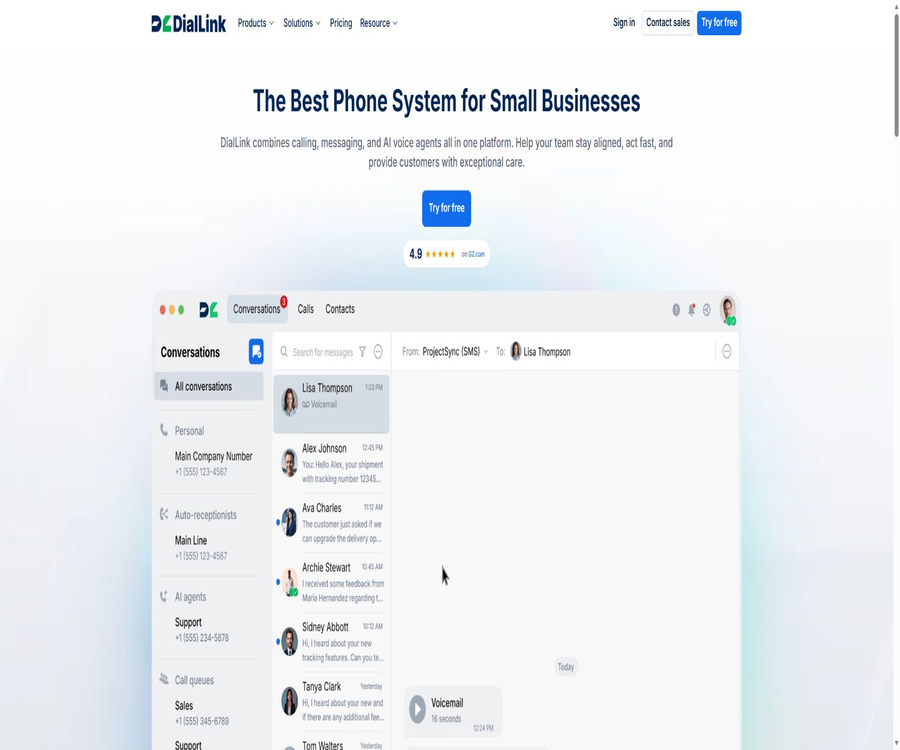
DialLink is a cloud-based phone system designed for small and medium-sized enterprises as well as startup teams; it brings together voice calls, corporate messaging, contacts, call routing, call analysis, and AiVA voice assistants in one single workspace.
Users can answer business calls from web pages, desktops, mobile phones, or compatible landlines, and let AI handle common inquiries, lead collection, scheduling, and transfers to human agents.
What is DialLink?
DialLink is operated by the American company DialLink Corp., and it operates on a subscription-based model with charges based on the number of users and the volume of communication. Each paid user receives a local number in the United States; additional numbers, international calls, voice assistants, and certain AI features may incur extra costs.
The product is not just an AI operator; at its core it remains a complete enterprise phone and messaging system. Essential is suitable for basic communication needs, Professional offers advanced routing, AI-powered calling functions, as well as AiVA, while Enterprise includes RCS, professional deployment options, and service level agreements.
Main functions
Cloud-based business phone service
The team can make and receive business calls over the Internet, and access contacts, call histories, and voicemails across different devices. The system supports high-definition audio, call forwarding, simultaneous ringing, business hours settings, and number blocking.
Automatic switchboard and IVR
The automatic switchboard can direct incoming calls in accordance with business hours and menu options; the basic version supports a single-level IVR. Professional versions and higher include multiple-level IVR, call queues, status indicators for staff on duty, handling of overflow calls, hold music, and seamless call transfers.
Team and queue management
Numbers can be assigned to individual users, ring groups, call queues, automatic switchboards, or AI agents. The queue holds incoming calls when the agents are busy, and assigns them to available agents based on their status.
Corporate messages
The platform supports SMS, MMS, and automated replies; Professional plans and above offer WhatsApp Business as well as AI-powered suggested replies. RCS is an Enterprise feature that requires approval from the brand and the service provider.
AI analysis of calls
For the Professional tier and above, call transcriptions, summaries, action items, tags, and sentiment analysis can be generated to help teams quickly review customer conversations. AI-generated results may contain errors, and they cannot replace audio verification, manual recording, or formal compliance reviews.
Voice mailbox transcription and voice generation
All available packages include voicemail transcription, text-to-speech greetings, and spam call detection. Text-to-speech and voice-to-text services are charged per minute; it cannot be assumed that they are unlimited and free just based on the name of the package.
Contact persons and unified conversations
Enterprise contacts can be shared within a team and synchronized with Google or Microsoft 365. The conversation view aggregates calls, voicemails, text messages, and WhatsApp messages by customer, facilitating follow-up across different channels.
AiVA Voice Intelligence Agent
AiVA is a real-time voice intelligence agent built into DialLink, available only in the Professional and Enterprise versions. It can act as a front-line receptionist, answering common questions, recording messages, filtering inquiries, sending text messages, scheduling appointments, and connecting callers to a human agent when necessary.
The system uses real-time voice-to-voice models to process incoming call audio and generate natural-sounding responses. An unlimited number of agents can be created, but calls are billed based on their duration; therefore, the ability to use an unlimited number of agents does not mean that there is no limit on the number of minutes used.
What can AiVA do?
- Custom greeting: Set the introductory message according to the brand and the context of the call.
- Business Q&A: Answers questions regarding business hours, services, prices, and policies based on the knowledge base.
- Messages and clues: Collect names, phone numbers, requirements, and context for the team to follow up on later.
- Appointment scheduling: After connecting to the calendar, check available times, create appointments, and confirm the details.
- SMS sending: During a call, press a keyword to send a link, route details, or reservation information.
- Manual routing: Directing specific intents to users, ringing groups, automatic switchboards, queues, or other AI agents.
- Multilingual answering: Supports English, Spanish, Portuguese, German, French, Dutch, and Italian.
- External system actions: Connect to business tools such as HubSpot, Cal.com, and Intercom via the MCP server.
Knowledge base and business information
The AiVA knowledge base allows the use of uploaded documents, public web pages, and manually entered text, so that the AI agents can provide responses based on the company’s own data. Pages that require login, areas protected by passwords, the internal backend, and content behind paywalls cannot be accessed directly.
| Content format | Support range | Main limitations |
|---|---|---|
| Document upload | PDF, Word, RTF, Text, Markdown, CSV, TSV, Web files, XML, and PowerPoint | The maximum size for a single file is 4.5MB. |
| Public web page | Business pages that can be accessed without logging in | Restricted pages, internal systems, and paid content are not supported. |
| Manual text | Frequently asked questions, policies, hours of operation, and service information | Each page shall not exceed 50,000 characters. |
| The text in the image | It may not be possible to read reliably. | The key content should be provided in a copyable text format. |
The knowledge base should contain only the information that allows the agent to provide responses to external requests; passwords, tokens, internal notes, or customer privacy data must not be included in it. After updating prices and policies, the knowledge base must also be updated accordingly and retested.
Call routing workflow
- Set the company’s main phone number, business hours, holiday schedule, and default voice mailbox.
- Decide whether the call should go first to the user, the ringing group, the automatic switchboard, the call queue, or AiVA.
- Set different departments, waiting strategies, overflow handling, and unattended operation for menus or queues.
- Configure manual transfer keywords and targets for AiVA to cover common intents such as sales, support, and billing.
- Use internal staff to simulate normal, ambiguous, angry, and urgent calls in order to test each route.
- After going live, check for missed calls, failed transfers, waiting times, and the agent’s call records.
- Adjust keywords, the knowledge base, and staff scheduling continuously based on the language of actual calls.
Create an AiVA tutorial
- Go to the AI section in the settings and activate the AI agents tab.
- Choose templates such as receptionist or appointment assistant, or create a custom intelligent agent from scratch.
- Set the name, model, language, and voice, and listen to see if the voice fits the brand.
- Fill in the clear role, operation instructions, greeting phrases, and flexibility of responses.
- Assign one or more phone numbers, and then connect to the organized knowledge base.
- Configure manual transfer, SMS triggering, and connections to external systems according to business needs.
- Use test numbers to conduct multiple rounds of calls in order to check recognition accuracy, costs, call routing, and message recording.
- Confirm compliance prompts and manual backup before proceeding to the official call process.
How to write agent instructions
- Clear role definition: Specify whether the agent is responsible for reception, screening, scheduling, or after-sales support; avoid using descriptions such as \"all-in-one assistant\".
- Specific process: Clearly outline the sequence of questions, required information, confirmation methods, and termination conditions.
- Permission boundaries: It is stipulated that no discounts may be offered, no refunds can be processed, and no professional advice can be provided.
- Manual upgrade: Lists the conditions under which calls are routed in cases of complaints, emergencies, complex invoices, and failed identity verification.
- Knowledge first: It is required to answer only based on the available information; if uncertain, the question should be noted and passed on to a human.
- Action confirmation: Repeat the key information before creating an appointment, entering it into CRM, or sending a message.
- The recording indicates that, in accordance with the laws of the respective region, it is necessary to include the appropriate AI identity and a statement regarding the recording in the greeting.
MCP business system connection
AiVA can access external business tools via MCP servers in order to retrieve data or carry out actions during calls. The current documentation focuses on HubSpot, Cal.com, and Intercom; trial accounts do not allow MCP connections to be enabled.
- First, prepare a valid account for external tools, administrator privileges, and the necessary credentials.
- The DialLink workspace Owner or Admin connects to the corresponding MCP server within the AI settings.
- Assign the connected server to the target AiVA agent.
- In the agent’s Instructions, specify when to call it, what to read, and which actions are allowed to be performed.
- Verify queries, creation, updates, and failure handling using test clients and a test calendar.
- Delete unused connections, rotate the credentials that are exposed, and regularly review permissions.
Tutorial for regular users
- Register for a 7-day trial and select a plan; note that once the trial ends, it will automatically switch to the selected paid plan.
- Set company details, main number, business hours, and user and role permissions.
- Initiate a test call from the dialer or contacts to check the microphone, network, and caller ID.
- Create automatic switchboards, ringing groups, and voice mailboxes, and verify the routing during working hours.
- To have AI handle the calls, select Professional or Enterprise to configure AiVA and the knowledge base.
- Enable US business SMS, WhatsApp, or RCS only after completing the verification with the enterprise and the service provider.
- Continuously check the bill balance, call quality, AI minutes, and costs related to additional numbers.
Which users are it suitable for
- Small and medium-sized enterprises: Use a single system to manage calls, text messages, and communication with customers.
- Startup team: Obtain a U.S. business number and an automatic switchboard quickly, without the need to install local telephone switching equipment.
- Sales team: Records calls, filters leads, generates summaries, and synchronizes with CRM.
- Customer service team: Uses call queues, warm handoffs, emotion analysis, and action items to minimize omissions.
- Scheduled services: Allow AiVA to answer questions and arrange schedules outside regular working hours.
- Cross-regional teams: Share numbers and contacts from different locations via desktop and mobile clients.
- Development and automation team: Uses REST APIs, Zapier, and MCP for communication and workflow integration.
Typical use cases
- AI front desk: Answers common calls around the clock, records requests, and forwards complex issues to human agents.
- Sales hotline: Ask about budgets and requirements; requests are routed to the sales team based on relevant keywords or an appointment for a demonstration is arranged.
- After-sales support: Answering basic questions, sending assistance information, and escalating faults to the on-duty staff.
- Multiple store numbers: Assign numbers to each user or location, allowing for a centralized view of call records.
- Marketing messages: Send compliant SMS, MMS, or RCS messages after completing operator registration.
- Call review: Organize customer feedback using transcripts, summaries, tags, emotions, and action items.
- CRM automation: Connect phone events and customer information to other systems using APIs, Zapier, or MCP.
Product advantages
- Integrate traditional cloud telephony, enterprise messaging, and AI voice agents into a unified workspace.
- Numbers can be assigned flexibly to individuals, ringing groups, queues, automatic switchboards, or AI agents.
- AiVA supports knowledge bases, live agent transfer, text messages, scheduling, and actions in external systems, rather than just playing pre-recorded messages.
- There are official ways to use it on web browsers, Windows, macOS, iOS, and Android, making it suitable for remote teams.
- The public pricing shows seats, additional numbers, AI minutes, and various other fees, making it easy to make estimates.
- It provides official REST API documentation, API keys, as well as Zapier and MCP, offering comprehensive capabilities for developers.
- The 7-day trial allows you to retain the configurations and test the AI, but you must be aware of its communication and time limits.
Usage restrictions and precautions
- There is no limit to the number of AiVA accounts that can be created, but calls are charged per minute in addition to the standard call fees.
- The pricing page and the latest help documents provide different information regarding 100 minutes; before making a purchase, it is necessary to refer to the account bill and the contract for confirmation.
- Unlimited calls and messages in the United States and Canada are subject to fair use policies, and unusually high usage levels may lead to adjustments.
- The trial version is available only with U.S. numbers; it does not allow sending messages, transferring numbers, or using international numbers, MCP, or landline settings.
- The total trial time for AiVA is limited to 20 minutes, and after 7 days it will automatically switch to the selected paid plan.
- For business text messaging in the United States, it is necessary to complete A2P 10DLC registration and pay one-time as well as monthly fees to the service provider.
- RCS and WhatsApp require verification by enterprises or brands, and the approval process and timing are influenced by third parties.
- AI transcription, emotion detection, summarization, and agent responses may be inaccurate; critical commitments and sensitive operations must be reviewed manually.
- The knowledge base cannot directly access content that is protected by login credentials, passwords, internal portals, or paywalls.
- Some landline phones do not support conference features, voicemail management, or new voice message alerts; full functionality is available only with a software client.
- Call recordings, AI-based identity verification, outbound calls, text messages, and automated decision-making are subject to regional laws and carrier regulations.
Prices and packages
As of August 20, 2026, DialLink offers three subscription plans: Essential, Professional, and Enterprise, all of which come with a 7-day trial period. The monthly rates when paying annually are 15, 25, and 40 dollars respectively, while the monthly rates for monthly payments are 20, 35, and 50 dollars respectively.
| Package | Monthly payment | Monthly price equivalent to annual payment | Minimum number of users | Core functions | Suitable for users |
|---|---|---|---|---|---|
| Essential | $ | $ | 1 person | Basic calls, messaging, single-level IVR, ring groups, voicemail transcription | Small teams that only need the phone number of the core company |
| Professional | $ | $ | 1 person | Queues, multi-layer IVR, call AI, WhatsApp, AiVA, APIs, and Salesforce | Enterprises that need AI automation and advanced routing |
| Enterprise | $ | $ | 5 people | Automatic callback, RCS, telephone support, professional deployment, and SLA | Organizations that require compliance, deployment, and service support |
The annual payment plan is based on a settlement for the entire year; the discounted price cannot be considered as one that allows payment on a monthly basis. Taxes, operator registration, phone numbers, international communications, AI usage, and certain deployment services are not included in the price of the subscription.
AiVA and metering fees
| Project | Current reference price | Explanation |
|---|---|---|
| AiVA inbound or outbound calls | $ | The standard call charge is added and deducted from the credit balance. |
| AI voice-to-text | $ | Used for calls and voicemail transcription |
| AI text-to-speech | $ | Used for greetings and IVR voice generation |
| Call recording | $ | The responsibility for ensuring compliance with recording regulations lies with the company. |
| Additional local numbers | $ | Each paid user is provided with a local U.S. number. |
| Additional free phone numbers | $ | Usage may still incur call charges. |
| International number registration | $ | There are also monthly fees and communication costs that vary by country. |
| Professional settings | $100 | This service is included in Enterprise’s public plans. |
The pricing page states that AiVA provides 100 minutes per month, but the billing details updated in April 2026 indicate that calls with AI agents are charged separately and do not use up the minutes included in the package. Due to this contradiction between the two official statements, the 100 minutes cannot be considered a confirmed free quota.
U.S. text message and carrier fees
| Fees or restrictions | Reference values | Explanation |
|---|---|---|
| A2P 10DLC registration | $ | It needs to be completed before enabling business text messaging in the United States. |
| Monthly fee for businesses with an EIN | $ | Ongoing compliance costs for operators |
| Monthly fee for sole proprietors | $ | Applicable to the corresponding registration type |
| Enterprise message limit | Up to 6,000 segments per day | Among them, up to 2,000 segments per day are sent to T-Mobile. |
| Upper limit for sole proprietors | Up to 3,000 segments per day | Among them, up to 1,000 segments per day are sent to T-Mobile. |
| Resubmit additionally | Charged based on the number of failures | The first few reconnections are free, but fees may apply thereafter. |
Long messages are divided into multiple segments, so a single message that is visible to the user can consume multiple quota units. The operator’s approval process, the way the brand is displayed, and the delivery rate are not guaranteed by DialLink on its own.
7-day trial limitation
| Project | Trial status | After payment |
|---|---|---|
| Registration portal | You can only create an account via the Web first. | The desktop and mobile clients can still be used. |
| Phone number | Only U.S. numbers are available; no addition or change is possible. | It is possible to add, transfer in, or apply for international numbers. |
| Corporate SMS | Cannot be sent | It will be enabled after completing the operator registration. |
| WhatsApp and RCS | Unavailable | Enabled based on the package and verification results |
| AiVA | A total of up to 20 minutes. | Charged according to Professional or Enterprise pricing rules |
| MCP connection | Unavailable | Enable it after upgrading and configuring the external system. |
| Landline configuration | Unavailable | After payment, you can purchase or configure compatible devices. |
| Trial period ended | Automatically switch to the selected payment plan. | If you do not wish to continue using it, you must cancel in advance. |
Supported platforms
| Platform | Support status | System requirements or instructions |
|---|---|---|
| Web page version | Support | All packages are available. |
| Windows desktop version | Support | Provides x64 standard installation package and enterprise MSI version |
| macOS desktop version | Support | Apple chip and Intel version are available separately. |
| iPhone and iPad | Support | iOS 15.1 or higher is required. |
| Android | Support | Requires Android 7.0 or higher version |
| VoIP landline | Support | Pre-configured devices are available for purchase; some functions are limited by the hardware. |
| Linux desktop version | Not listed | The web version can be used depending on browser compatibility. |
APIs and developer capabilities
DialLink offers a formal REST API that provides access to resources such as the phone system, call queues, accounts and permissions, subscriptions, contacts, calls, and files. The Professional and Enterprise pricing plans include an Open API, while the Essential plan does not offer this feature.
Developers can use API keys or Bearer tokens for authentication; by default, an API key is valid for 365 days and inherits the permissions of its creator. The full value of the key is displayed only once, and it should be stored securely using a dedicated account with limited permissions.
- Phone System API: Access to telephone resources such as contacts, calls, recordings, and auto-attendants.
- Account Hub API: Manage tenants, users, roles, permissions, products, and subscription settings.
- Call Queue API: Reads and manages objects related to the call queue.
- Object Bucket Storage API: Handles document and file resources in DialLink.
- Filtering, pagination, and sorting: It supports queries on list resources using basic conditions or combined conditions.
- Zapier: Uses OAuth or API keys to connect triggers and actions.
- MCP: Allows AiVA to access specified business systems during calls and carry out authorized operations.
SDK, GitHub, and open-source status
The development documentation provides request examples for Shell, Java, PHP, Node, Python, Go, and C#, but these code examples are not equivalent to the official SDKs. As of now, there is no officially released DialLink SDK package that comes with a commitment to maintenance.
As of the time of verification, no official GitHub repository or license for the product’s source code could be found. The DialLink platform, its clients, and AiVA are all closed-source commercial services.
Data and Privacy
DialLink handles accounts, bills, devices, sessions, locations, calls, recordings, videos, transcriptions, messages, and integrated data. Permanent contacts, call histories, recordings, and transcriptions are stored by default in U.S. cloud infrastructure, though administrators can choose other locations as well.
The data transmitted during calls, as well as any temporary data, may pass through other data centers and is retained for a maximum of 72 hours. Enterprise customers are usually the ones in control of their end-users’ data, while DialLink acts as the service provider that handles the communication processes.
- DialLink claims that it does not sell or share personal data in accordance with the definitions set forth by California law.
- Customers need to obtain the appropriate permissions for recording, transcription, messages, AI-powered answering, and third-party integration.
- Users may request access to, correction of, or deletion of their personal data, although legal and security obligations may impose exceptions.
- Third-party integrations will process CRM, communication, or other system data in accordance with the authorized permissions.
- The platform does not guarantee permanent storage of communication logs, voice mail, and messages; businesses should establish their own strategies for retention and backup.
- When it comes to the transfer of data between the EU, the UK, and Switzerland, official mechanisms based on appropriate contracts are employed, along with data processing agreements.
DialLink AI training and exit
According to the privacy policy, with an appropriate legal basis or consent, DialLink may store and analyze certain audio, video recordings of calls or transcripts, in order to train and improve its AI language models. The processing is carried out automatically for the most part, but a small amount of the training data may be reviewed manually.
Users can contact official support to opt out of manual review, or they can completely refrain from having their personal data used for the training of DialLink AI. Before going live, companies should check the status of their accounts, rather than assuming that none of their calls will be used to improve the model.
Safety and compliance considerations
- Determine the requirement for one-party or two-party recording consent based on the location of the caller.
- In the greeting, clearly state the identity of the AI, as well as the purpose of the recording and the data collected, in order to avoid misleading the caller.
- Restrict agents’ access to CRM, calendars, and customer service systems, granting only the permissions necessary to complete tasks.
- AiVA is prohibited from making independent decisions regarding high-risk payments, medical, legal, or authentication matters.
- Regularly check the knowledge base to ensure it does not contain outdated prices, internal information, or sensitive data.
- API keys should be separated by environment, rotated regularly, and revoked immediately when employees leave the company.
- Enterprise can request information regarding HIPAA, BAA, and SOC 2 reports; however, the sales representative listed on the pricing page does not guarantee that all accounts will be in compliance automatically.
Subscription, renewal, and refunds
Monthly and annual subscriptions can be canceled, but they will remain active until the end of the current billing cycle. The fees already paid for seats, any unused time, call credits, additional top-ups, promotional credits, as well as professional setup services are generally not refundable, nor can the subscription be suspended.
Users who opt for an annual subscription and decide to terminate it early are still required to pay the fees specified in the terms for that year, and any unused portion of the subscription will not be refunded. A charge is made automatically after 7 days of the trial period, so it is necessary to cancel it in advance if you do not intend to continue using it.
Basic information
| field | Content |
|---|---|
| Tool name | DialLink |
| AI voice agent | AiVA |
| Operating entity | DialLink Corp. |
| Tool type | Cloud calling, enterprise messaging, and AI voice assistants |
| Target users | Small and medium-sized enterprises, startup teams, sales and customer service departments |
| Price pattern | 7-day trial, with pricing based on user subscriptions and usage |
| Starting price | The annual rate translates to 15 dollars per user per month. |
| AiVA package | Professional and Enterprise |
| Chinese pronunciation | The current seven languages supported by AiVA do not include Chinese. |
| Main platforms | Web, Windows, macOS, iOS, Android, and some landline phones |
| Public API | Yes, Professional and Enterprise. |
| Authentication method | API keys and Bearer tokens |
| Official SDK | No independent official software packages have been identified. |
| Is it open source? | No |
| Official GitHub | No findings were detected. |
Recommendation score
Its rating is 4.4 out of 5 points. DialLink offers a comprehensive set of functions that include corporate phone services, cross-device clients, messaging capabilities, routing options, AI for calls, voice assistants, APIs, and business integration – making it suitable for small and medium-sized enterprises that wish to handle calls and automate various processes in one platform.
The deductions stem mainly from conflicts in the AiVA minute descriptions, high additional communication costs, significant restrictions during the trial period, the lack of support for Chinese voice input, and the need for companies to take active measures regarding recording and AI training. Before making a purchase, it is necessary to develop a cost model based on the actual volume of calls.
Frequently Asked Questions
Is DialLink free?
There is no permanently free plan, but a 7-day trial is available. The trial automatically converts to the selected paid plan, and features such as messaging, international numbers, number porting, MCP, and landline services are limited.
How much is the DialLink package?
The annual pricing is $15 for Essential, $25 for Professional, and $40 per user per month for Enterprise; the monthly rates are $20, $35, and $50 respectively. Taxes and various communication fees are additional.
Which package includes AiVA?
Only Professional and Enterprise plans offer AiVA, a knowledge base, and related integrations. There is no limit to the number of agents that can be created, but actual calls are charged per minute from the credit balance.
Does AiVA offer 100 minutes of free usage per month?
The official pricing page indicates 100 minutes per month, but the latest billing documentation states that AiVA calls are charged separately and do not count toward the minutes included in the package; there is a conflict between these two statements. The account billing page or any written confirmation from sales should be taken as the authoritative source.
Does AiVA support Chinese?
The seven languages listed in the current help documentation do not include Chinese. Companies that need voice service in Chinese should not assume automatic support is available; they should wait for the official addition of this feature or opt for alternative solutions.
Can I upload my own knowledge base?
It is possible to upload various types of documents, add public web pages, and enter manual text. The maximum size for a single file is 4.5 MB, and the maximum number of characters for a manual page is 50,000; logged-in or paid content cannot be retrieved directly.
Can AI calls be connected to a real person?
Calls can be routed to individuals, ringing groups, automatic call centers, call queues, or other AI agents based on keywords and intent. Before going live, scenarios such as synonyms, false triggers, and unanswered calls should be taken into account.
Is it compatible with iPhone and Android?
Supported. iOS requires version 15.1 or higher, Android requires version 7.0 or higher; there are also dedicated desktop clients for Windows and macOS.
Can I keep my original phone number?
Paid accounts allow number porting, but this cannot be done during the trial period. Whether a number can be ported, as well as the required documents and processing time, depend on the carrier and the region of the number.
Does DialLink offer APIs?
Official REST APIs and development documentation are provided; access to resources such as the phone system, accounts, queues, and files can be obtained using API keys or Bearer tokens. The public plans include Open API as part of the Professional and Enterprise benefits.
Is there an official SDK?
The development documentation provides request examples in various languages, but no officially released SDKs are currently available. Code examples and maintained software development packages should be labeled separately.
Is DialLink an open-source product?
No. The platform, the client, and AiVA all fall under commercial services; as of now, no official GitHub open-source repository has been identified.
Will the calls be used for AI training?
With the appropriate legal basis or consent, certain audio, video, or transcription clips may be used to improve AI systems, and a limited amount of human review may be applied. Users can contact support to request exemption from such human review or to completely avoid the use of their data for AI training.
Will I get a refund if I cancel my subscription?
Usually, this does not happen. After a monthly or annual subscription is canceled, it can still be used until the end of its cycle; however, the amounts already paid, any remaining credit balance, and unused services are not refunded, and it is not possible to suspend the subscription.
Summary
DialLink is suitable for small and medium-sized teams that need a corporate phone number, call routing, communication across different devices, and AI-powered answering; AiVA can handle common questions, scheduling, lead filtering, and routing calls to human agents. Its API, Zapier, and MCP also facilitate integration with other business systems.
When making a decision, it is not sufficient to compare only the cost of the seats; factors such as AI minutes, recording, transcription, phone numbers, operator registration, and international communication costs also need to be taken into account. Before going live, it is necessary to conduct tests on call routing, set up recording mechanisms, decide on the parameters for AI training, and configure the minimum required permissions.
Tools similar to Business Phone System & AI Voice Agents




 Guigong Network Security Registration No. 45132202000164