






ZOOOP
ZOOOP, an intelligent tool focused on AI-powered audio.
Tags:AI audio toolsWhat is ZOOOP?
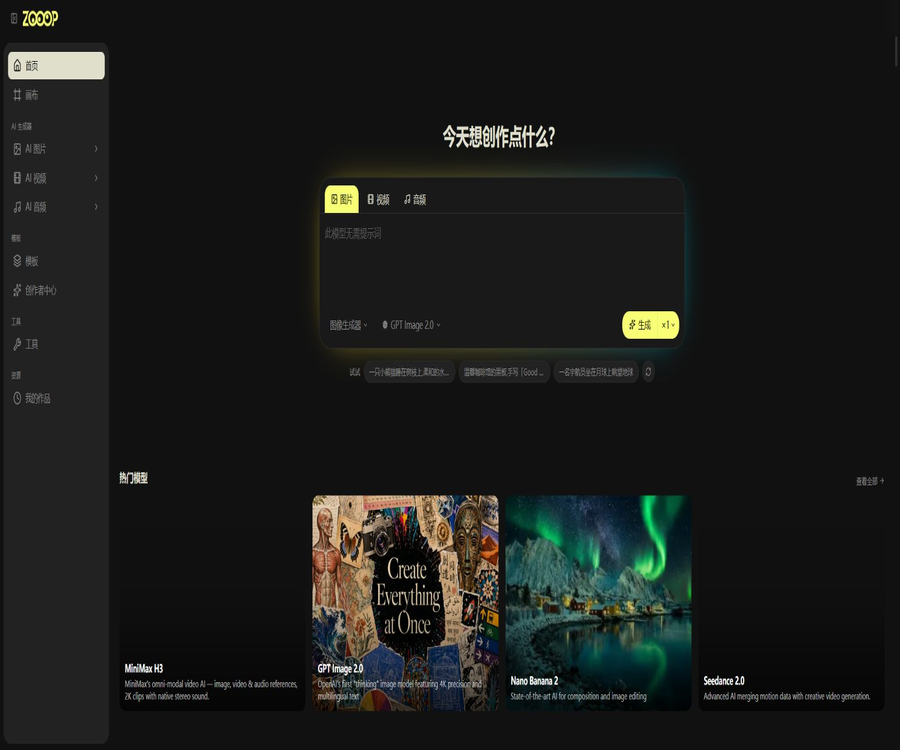
ZOOOP is an AI-native creation platform that runs in the browser, bringing together image, video, voice, and music models in a single workspace. Users can generate images quickly using the dedicated creation page, or they can combine multiple model workflows within an infinite canvas.
The platform also offers image processing tools, ready-to-use templates, team spaces, earnings for creators, and REST APIs. ZOOOP is a model aggregation platform; it is not an official product of OpenAI, Google, Kuaishou, ByteDance, or any other model providers.
Main functions
- Generate images, videos, audio, and music from text prompts.
- Use the reference image to carry out editing, style transfer, and video generation from images.
- Combine multiple models and media nodes on an infinite canvas.
- Use start and end frames, lip-sync, video extension, and video editing.
- Use specialized tools for background removal, high-definition enhancement, image restoration, and virtual try-on.
- Create portraits, product images, and short videos quickly using ready-made templates.
- Collect, group, and manage historically generated results.
- Create an unlimited number of personal projects and canvases.
- Publish templates and earn points when others use them.
- Real-time collaboration in the team space, sharing of points, and management of roles.
- Use the REST API and official Skills to have the AI Agent submit generation tasks.
Three creation interfaces
| Entrance | Main features | Suitable for tasks |
|---|---|---|
| Generator | Centralized parameters for quick submission of single-model tasks | Fast image generation, video creation from images, and audio generation |
| Infinite canvas | Freely connect image, video, and audio nodes | Storyboarding, ad concepts, and multi-phase workflows |
| AI tools | For fixed functions such as background removal and restoration | Process existing materials |
| Template | Package prompts, parameters, and reference effects | Quickly replicate a specific creative style |
Supported model types
ZOOOP continuously incorporates models from various suppliers; the current list includes GPT Image, Nano Banana, Seedream, Flux, Kling, Seedance, Veo, Grok Imagine, Wan, PixVerse, Vidu, ElevenLabs, MiniMax, and Lyria, among others. The specific models available may change rapidly.
| Media type | Public examples | Common uses |
|---|---|---|
| Image | GPT Image, Nano Banana, Seedream, Flux and Grok Imagine | Text-to-image generation, editing, and visual design |
| Video | Seedance, Veo, Kling, Wan, PixVerse and Vidu | Video generation from text, video generation from images, and starting/ending frames |
| Voice | ElevenLabs, MiniMax, Qwen and Inworld | Text-to-speech, voice cloning, and lip synchronization |
| Music and sound effects | Lyria, CassetteAI, Sonauto, and others | Music, songs, and sound effects |
Image generation and editing
- Generate realistic, illustrated, and designed images from textual descriptions.
- Upload an image to perform partial redrawing and content replacement.
- Compare the composition, text, and stylistic elements across different models.
- Generate up to 4 result variants in bulk for exploration.
- Use style transfer, age adjustment, and hairstyle change tools.
- Restore old photos, change materials, and try on clothes virtually.
Image generation tutorial
- Create a project and open the image generator or a new canvas.
- Choose a model based on text accuracy, realism, or editing capabilities.
- Describe the subject, environment, composition, camera angle, lighting, and style.
- When editing is required, upload the reference image for which you have usage rights.
- Confirm the resolution, quantity, and the integral consumption displayed before operation.
- Generate low-cost samples first and compare multiple models.
- Mark satisfactory results with stars, group them, or connect them to video nodes.
- Check for risks related to text, characters, trademarks, and copyrights before commercial use.
Video generation and editing
- Create short videos from text or a single image.
- Use the first and last frames to control the starting and ending images of the shot.
- Extend existing videos or edit specific segments.
- Synchronize the lip movements for characters or roles.
- Convert the storyboard images into a video one after another on the canvas.
- Combined with voice, music, and sound effects to create a complete video.
Video creation tutorials
- First, determine the frame size, duration, camera angle, and distribution channel.
- Create stable characters and keyframes using image models.
- Select a model that supports the desired resolution, audio, or initial and final frames.
- Describes the movement of the subject, the movement of the camera, and changes in the environment.
- View the integrals corresponding to the model, duration, and resolution.
- Use short-duration tests to confirm the direction before increasing the specifications.
- Place multiple lenses on the canvas and add voice or music.
- Before exporting, check for character consistency, flickering, as well as synchronization of subtitles and audio/video.
Audio, voice, and music
- Convert text into speech in different languages and styles.
- Create voice clones after obtaining proper authorization.
- Generate ambient sounds, transition sounds, and other audio effects.
- Generate music based on emotion, rhythm, and instruments.
- Generate dialogue for video characters and synchronize lip movements.
- Manage audio and video materials on the same canvas.
Infinite canvas
The infinite canvas is ideal for placing images, videos, audio files, and music in a single visual space. Creators can keep prompts, reference materials, and different versions, and switch between models at any point without having to rebuild the entire project.
- Compare the results of multiple models and parameters side by side.
- Connect from the character sheet to storyboards, videos, and lip-sync.
- Retaining the failed directions and different versions facilitates rollback.
- Multiple people can view and edit the same canvas in real time.
- Role permissions are used to control who can create content or only read it.
- Collect, share, and download project results in one place.
The difference between AI tools and templates
| Dimension | AI tools | Template |
|---|---|---|
| Goal | Complete the specific tasks related to material processing. | Quickly replicate a creative effect |
| Enter | Usually, it’s the user’s existing pictures or videos. | Prompt words, reference images, and preset parameters |
| Example | Remove background, enhance resolution, repair, and locally redraw | Portrait style, product images, and short video effects |
| Publisher | Primarily provided by the platform. | Both platforms and ordinary creators can publish. |
| Revenue | Usually, there are no templates for division. | The creator earns points when others use it. |
Earnings for template creators
Users can, in the Creator Center, package prompts and parameters into image or video templates; after submitting them for approval, these templates can be made public. According to the website’s guidelines, each use of an image template costs approximately 2 points, while each use of a video template costs around 5 points; the final amount will be displayed at the time of publication.
- Go to the Creator Center and select the image or video base model.
- Configure the verified prompts, parameters, and input requirements.
- Fill in clear titles, descriptions, and usage instructions.
- Use the genuinely generated results to create the cover.
- Submit for review and wait for the template to go live.
- Optimize the title, cover, and parameters based on usage feedback.
- After being locked for 7 days, the earnings are converted into regular points at a ratio of one to one.
Precautions for publishing templates
- Do not copy other people’s prompt packs or paid templates.
- Do not use unauthorized characters, trademarks, or portraits.
- The cover must reflect the actual effect that can be achieved.
- Specify the types of images that need to be uploaded and the requirements regarding composition.
- Avoid making promises in misleading titles about results that cannot be reliably reproduced.
- Points earnings can only be used for tasks on the platform; they are not equivalent to cash.
Individual point price
The personal version of ZOOOP does not require a monthly or annual subscription; users can purchase credits as needed. On the pricing page, a slider is available to select the desired quantity, and it is indicated that 1000 credits equal $10. Additionally, tiered discounts are offered for larger purchases.
| Project | Current rules | Explanation |
|---|---|---|
| New users | Free launch points provided | The quantity is subject to the registration page. |
| 1000 points | 10 dollars | Sample price page tiers |
| Large discounts | The page shows tiered discounts. | Changes with the quantity purchased |
| Validity period of points | Points purchased never expire. | It remains in place until it is used or the account is canceled. |
| Refund | No refunds after purchase | For digital products, it is recommended to try them out with a small amount of money first. |
| Failed tasks | Automatic return of points | Only to enable successful payment generation. |
| Payment | Stripe | Credit cards and debit cards are supported, among others. |
The price page provides estimates based on the most cost-effective model: 1,000 points are sufficient to generate around 500 images, 40 videos, or 3,334 seconds of audio. Different models, duration, resolution, and the number of outputs result in varying consumption of points, so these estimates should not be regarded as fixed prices for all models.
Cloud storage prices
Each individual user is entitled to 5GB of free cloud storage per month for storing the images, videos, and audio files they create. Beyond this free quota, a tiered pricing system applies; any unused monthly storage space is not carried over to subsequent months.
- Regularly download and back up the finished products that need to be preserved for a long time.
- Delete duplicate, failed, and useless large videos.
- The team establishes protocols for archiving and retaining materials.
- Be aware of the risk of suspension or deletion due to unpaid storage fees.
Free and Pro versions of the team feature
| Ability | Team Free Version | Team Pro Version |
|---|---|---|
| Maximum number of team members | 20 people | 500 people |
| Free creator account | 10 | 10 |
| Additional creators | Not supported | $ |
| Viewer | Free within the member limit | Free within the member limit |
| Points for paid seats | None | 1000 points per seat per month |
| Integration pool | Team sharing | Team sharing |
| Concurrent quota | Foundation | Higher |
| Support | Standard | Priority customer support |
Creators can submit AI tasks, edit the canvas, and use up team points; viewers can only view and download the works. If paid seats are added later, a charge will be made based on the remaining days, and points will be awarded, with no refund for those seats for the current period.
Team cancels subscription
The cancellation takes effect at the end of the billing period by default; during that time, the benefits that have been paid for can still be used. After that deadline, the team is downgraded to the free version, and creators who are not owners become viewers, while the remaining points in the team pool are retained.
Team collaboration and permissions
- The owner is responsible for bills, members, and the lifecycle of the team.
- Administrators can approve members and manage certain team settings.
- Creators can generate content, edit the canvas, and use points.
- Viewers can view and download, but cannot submit for creation.
- The invitation link can have a validity period and a limit on the number of times it can be used.
- Ownership can only be transferred to the administrator in the team.
- The team API key remains the property of the team even after its creator leaves.
REST API and Agent Skills
ZOOOP offers REST APIs, and its official Agent Skills are available on GitHub. These Skills enable Claude Code, Codex, Cursor, or custom Agents to discover models, upload files, submit tasks, check on their status, and receive the generated results.
| API capabilities | Uses |
|---|---|
| Model findings | Query image, video, and audio models and parameters |
| File upload | Submit reference images, videos, or audio. |
| Task creation | Initiate tasks such as creation, editing, and lip-syncing. |
| Status polling | Query task progress, successful results, and errors |
| Project binding | Fix the tasks and outputs and write them into the specified project. |
| Integral control | Deduct fees from the individual or team balance, with a daily limit set. |
API Key Usage Tutorial
- Log in and create an API key in the personal center or team management section.
- Select the project to which the task output should be assigned.
- Set a reasonable daily score limit and expiration time for the key.
- Copy the complete key, which is displayed only once, and save it securely.
- It is passed to a trusted Agent or backend program via environment variables.
- First, query the model parameters and test them with small-scale tasks.
- Poll the status at reasonable intervals and handle throttling responses.
- Once a leak is detected, it should be revoked immediately and a new key created.
API throttling
| Operation | Single-key restriction |
|---|---|
| Submit task | 60 times per minute |
| Upload file | 30 times per minute |
| Check status | 120 times per minute |
| Default concurrency | 3 PAT tasks, the rest are in queue |
API security recommendations
- Do not include the keys in the frontend code or in public repositories.
- Personal automation uses personal keys, while team processes use team keys.
- Set a daily score limit for the script to prevent uncontrolled charges.
- Different projects use different keys for auditing purposes.
- When an employee leaves, their personal key is revoked and the team’s permissions are checked.
- The log only saves the key prefix and does not record the full token.
- For 429 responses, the Retry-After mechanism is followed, and backoff is implemented.
What use cases are suitable?
- Designers compare the visual approaches of various image models.
- The short-video team is responsible for creating the storyboards, the videos, the voiceovers, and the music.
- Advertising studios create concept boards with multiple people on the same canvas.
- The e-commerce team creates product images and virtual try-on content.
- Independent creators purchase credits as needed without wanting to subscribe.
- The team shares points, projects, and a history of creations.
- Template creators accumulate prompts and earn points on the platform.
- Developers and AI Agents generate media automatically through APIs.
Tasks that are not suitable for completion directly
- Production pipelines that require all generated results to be identical and reproducible.
- Projects that require local offline models and data to remain entirely off the cloud.
- Cloning voices without authorization, creating deepfakes of individuals.
- It ensures that the generated content possesses exclusive copyright and absolute uniqueness.
- Full-length films and high-end commercial productions that can be delivered without further post-production work.
- Handling sensitive information related to patients, customers, or unreleased products.
- A creator program that allows users to exchange their accumulated points for cash directly.
Product advantages
- Models for images, videos, audio, and music are fairly comprehensive.
- Multiple media and models can be combined on the same canvas.
- Individual users do not need to subscribe; the purchased points never expire.
- The points consumed are displayed before execution, and failed tasks are automatically refunded.
- Generators, tools, and templates are suited to different levels of proficiency.
- There is no limit on the number of projects and canvases.
- The free team version includes 10 creator seats.
- It supports real-time canvas collaboration and fine-grained roles.
- The official REST API and Agent Skill documentation are quite comprehensive.
- It allows templates to be published and earns points as a reward.
Usage restrictions and precautions
- Third-party models and versions are continuously adjusted or taken offline.
- The integral consumption of different models can vary greatly.
- Credits purchased cannot be refunded or exchanged for cash.
- The generated result may exhibit flickering, distortions, spelling errors, and a mismatch between audio and video.
- Commercial use is still subject to the constraints imposed by the model providers and local laws.
- Similar prompts may generate similar content for different users.
- Pure AI-generated content may not be eligible for copyright protection in some regions.
- Uploading materials sends them to the cloud and to the relevant model providers.
- Template earnings must be locked for 7 days and can only be converted into platform points.
- Uncontrolled API scripts can quickly deplete an individual’s or a team’s points.
- Free storage is reset on a monthly basis; any excess usage is charged on a pay-as-you-go basis.
- Minors do not meet the eligibility requirements under current regulations.
Privacy and Content Rules
The privacy policy states that the platform handles account information, tasks, points transactions, as well as content uploaded and created, along with device and Cookie data; it also shares necessary information with payment service providers, login systems, storage solutions, and AI model providers. Payments are processed by Stripe, and the platform does not store credit card numbers directly.
- Do not upload ID cards, medical records, contracts, or customer confidential information.
- Clear authorization must be obtained for voice cloning and character assets.
- Remove EXIF, location, and personal information before making the template public.
- Set minimum permissions for team projects and conduct regular audits of team members.
- Export the materials that need to be retained before deleting the account.
- The remaining points after account cancellation become invalid and no refund is provided.
- The platform’s terms state that content will not be used to train models without separate consent.
GitHub and the open-source status
The official Skill-Zooop repository provides guidance on Agent integration, references for REST APIs, and utility scripts, and is licensed under the MIT license. This open-source scope covers only the Skill components and related integration materials; it does not mean that the ZOOOP website, the backend platform, or the aggregate models as a whole are open source.
Basic information
| field | Content |
|---|---|
| Tool name | ZOOOP |
| Tool type | Multi-model AI platform for creating images, videos, and audio content |
| Main entrance | Generators, infinite canvases, AI tools, and templates |
| Platform | Modern desktop and mobile browsers |
| Individual price | Integration on demand, no subscription required |
| Integration example | 1000 points equal 10 dollars |
| Team Pro | $ |
| Whether API is provided | Yes, REST API and official Agent Skill |
| Is it open source? | The platform is not open-source; the official Skill is licensed under the MIT license. |
| Commercial use | The terms permit it, but compliance with the model and third-party rights is still required. |
Recommendation score
4.6 / 5. ZOOOP offers a comprehensive integration of multi-model media generation, infinite canvases, team collaboration, and Agent APIs; its point-based system is suitable for sporadic creative work. However, the costs associated with models, cloud data, and copyright issues still need to be managed by the project owners themselves.
Frequently Asked Questions
Is a subscription required for ZOOOP?
Individual users do not need to subscribe; they can purchase credits as needed. A Pro account can be acquired if there are more than 10 team creators.
Will the purchased points expire?
No. The points purchased as well as those allocated monthly by Team Pro remain available for use, but deleting the account results in the loss of any remaining credits.
Will points be deducted if generation fails?
The official website states that points are automatically refunded in full for failed tasks; payment is only made for tasks that are completed successfully.
Can content be generated for commercial use?
The terms permit use by both individuals and businesses, but users still need to check the terms regarding third-party models, as well as the licenses for copyrights, portraits, voices, and trademarks.
How many creators are there in the free version of the team?
It includes 10 free creator spots; the total number of members in a team can be up to 20, with the remaining members able to join as viewers.
Does ZOOOP provide an API?
Available. Users can create personal or team API keys associated with a project, and submit tasks through the REST API as well as the official Skill interface.
What to do if an API key is leaked?
Revoke it immediately on the key management page; this reversal is irreversible, after which you need to create the Agent again and update the backend environment variables.
Is ZOOOP open source?
The platform itself is not open source. The official Agent Skill and related integration materials are available on GitHub under the MIT license.
Tools similar to ZOOOP




 Guigong Network Security Registration No. 45132202000164