






Mubert
Mubert: an intelligent tool focused on AI-powered audio.
Tags:AI audio toolsWhat is Mubert?
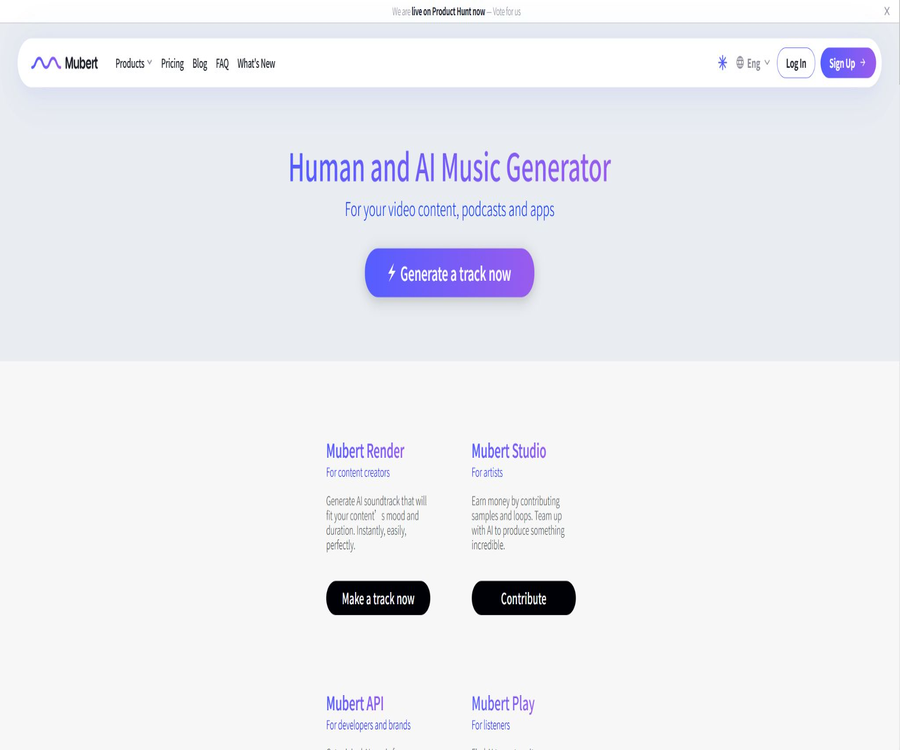
Mubert is a platform for AI-based music generation and licensing; its core product, Mubert Render, can create background music based on text, images, genre, mood, theme, and duration. It is designed more for use as music in videos, podcasts, live streams, and advertisements, rather than being a tool that allows users to create complete songs and claim ownership of those songs.
Mubert also offers APIs for software and content platforms, a continuous music experience for listeners, as well as an ecosystem that enables musicians to contribute their material. Before using it, it is not enough to focus only on the sound quality; rather, it is necessary to verify whether the current license covers the specific method of distribution.
Composition of Mubert products
| Products | Primary uses | Suitable for users | Billing and authorization |
|---|---|---|---|
| Mubert Render | Generate and download background music | Video creators, podcasters, and marketers | Free or subscription license |
| Mubert API | Generate or play music in applications, games, and platforms | Developers and enterprises | Contact sales for customization |
| Mubert Play | Listen to generative music continuously | Regular listeners and scene playback | It is subject to the current application privileges. |
| Mubert Studio | Musicians upload materials and contribute to this ecosystem. | Producers and musicians | Guided by the rules of contribution and benefits. |
| Business services | Client projects, applications, and custom licenses | Agents, brands, and software teams | Custom quote |
Main functions
1. Convert text to music
Users can describe emotions, scenes, rhythm, and purpose in natural language, and the system generates an appropriate instrumental background based on that description. The more precise the instructions, the easier it is to obtain a result that matches the video’s rhythm and the brand’s identity.
2. Convert images to music
After an image is uploaded, Mubert creates background music based on the colors, atmosphere, and theme of the image. This feature is suitable for photos and videos, art displays, and social media content; however, a human still needs to determine whether the resulting music fits the narrative context.
3. Type, emotion, and theme filtering
The platform offers genres such as electronic, jazz, and folk, as well as mood tags like calm, dreamy, joyful, and scary. Users can also select music based on topics such as podcasts, documentaries, tutorials, travel, and corporate content.
4. Duration and generation mode
Render supports generation modes such as Track, Jingle, Loop, and Mix, and it is possible to set the duration according to the requirements of each project. Different modes should be chosen for long videos, looped playback, and short video intros, in order to avoid disruptions in the rhythm caused by forced cropping.
5. Quick Remix and track editing
Quick Remix allows for the adjustment or re-generation of certain instrument stems from existing results, while preserving the original version. The official FAQ states that such remixing uses up the monthly quota for generating content, and no separate stems or MIDI files are provided for download.
6. Search for and reference tracks
Users can find music in a similar style by using tags, playlists, and reference tracks. The reference track feature is intended to help identify similar styles, but it does not permit the copying of copyrighted works or the imitation of a particular artist’s unique style of expression.
7. Download and license verification
The paid plans offer higher-quality files as well as licenses corresponding to the plan selected; a license certificate is included with each download. In case of any copyright claims regarding the platform, users should keep track of the time of download, their subscription status, and the license document.
What use cases are suitable?
- YouTube and short videos: Background music for explanations, Vlogs, and program productions.
- Podcast: Configure instrumental background for intros, intros, and content sections.
- Live streaming: Generates continuous music over a long period of time, reducing the sense of repetition.
- Social media: Matches different emotional music to individual users or content that can be monetized.
- Digital advertising: Use Pro or higher licenses to create online advertising materials.
- Brand content: Music for product introductions, corporate videos, and event promotions.
- Games and applications: Integration of music functionality through Business licenses or APIs.
- Agent: Applies for custom authorization for multiple client projects.
What situations are not very suitable
- Upload the generated track as a separate song to streaming platforms such as Spotify for distribution.
- Register the audio track with Content ID or other content recognition systems.
- Upload the audio tracks to a material website for resale, redistribution, or for others to download.
- Create advertising, branding, or monetization content under the free Ambassador license.
- Purchasing only a Creator license while using it for digital advertising, client projects, or software.
- Claiming to possess the rights to create music or to register it as a sound trademark.
- A professional production process requiring a separate Stem, MIDI, or a complete project file.
Mubert usage tutorial
Generate video background music
- Decide on the video length, narrative pace, platform for release, and whether it will be commercialized.
- Select text, image, or tag as the starting point for generation.
- Indicate the mood, type, rhythm, instruments, and styles that should be avoided.
- Select Track, Jingle, Loop, or Mix and set the appropriate duration.
- Generate multiple versions and examine the beginning, climax, transition, and ending separately.
- Verify that the package license covers the publishing platform and the methods of generating revenue.
- Download the music and the license certificate, then edit them in sync with the video.
- Save the project files, subscription records, and authorization certificates after publishing.
Handle copyright statements
- First, confirm under which package and within which subscription period the track was downloaded.
- Check whether the current use of the video falls outside the scope permitted by this license.
- Find the corresponding download record and license proof.
- Submit the authorization certificate in accordance with the procedures of the publishing platform, and specify the source of the music.
- Do not register the audio track with Content ID or claim ownership of its copyright.
- If the license is used incorrectly, upgrade it or purchase the proper authorization and then proceed with the project.
- If the issue cannot be resolved, contact Mubert and the platform’s support team.
To enable access to music for applications
- Specify the application type, user base size, region, and method of music interaction.
- Do not embed directly the tracks downloaded from a Render subscription into the software.
- Apply to Mubert for an API or Business license, and explain the use case.
- Confirm the number of generations, concurrency, caching, data, and end-user rights.
- Use the testing environment to verify playback, latency, and abnormal fallback behaviors.
- Complete the assessments for licenses, privacy, content security, and costs before going live.
Subscription plans and reference prices
As of August 2026, Mubert Render offers several subscription plans: free Ambassador, Creator, Pro, and Business tiers. The reference monthly prices are $0, $14, $39, and $199 respectively; an annual payment option allows for a maximum savings of 25%. The actual amount due, along with any taxes and benefits, will be indicated on the settlement page.
| Package | Monthly reference price | Primary uses | Core limitations |
|---|---|---|---|
| Ambassador | Free | Personal, non-commercial social content requires attribution. | Unrealizable value; use for advertising, branding, applications, or websites |
| Creator | 14 dollars per month | Publishing and monetizing personal videos, podcasts, and social content | Digital advertising, apps, and customer projects are not covered. |
| Pro | 39 dollars per month | Digital advertising, brand content, e-commerce websites, and online platforms | For digital use only; does not apply to applications, television, radio, or live broadcasts. |
| Business | $ | Used by brands, agents, customer projects, and the broader business operations | The specific rights are determined by the order and the custom license. |
| API / Enterprise | Contact sales | Applications, games, platforms, and large-scale generation | Limits, concurrency, and authorization are specified in the contract. |
The pricing page also offers a permanent license for individual tracks, which is suitable for projects that require only a few tracks. Digital content is delivered immediately and refunds are generally not provided; it is necessary to check the plan, currency, auto-renewal options, and the terms of the license before making a purchase.
Comparison of authorization scopes
| Uses | Ambassador | Creator | Pro | Business or API |
|---|---|---|---|---|
| Personal, non-commercial social videos | Allowed, but a signature is required. | Allow | Allow | In accordance with the contract |
| Monetizing social content | Not allowed | Allow | Allow | In accordance with the contract |
| Promotion or heating videos | Not allowed | Allow | Allow | In accordance with the contract |
| Digital advertising and brand content | Not allowed | Not allowed | Allow | Allow or as per the contract |
| Customer projects | Not allowed | Not allowed | Proxy re-authorization is usually not covered. | A corresponding business license is required. |
| Applications, games, and software | Not allowed | Not allowed | Not allowed | API or custom license required |
| Television, radio, and live broadcasts | Not allowed | Not allowed | Not allowed | A custom license is required. |
Uses prohibited for all packages together
- Upload the audio track as standalone music to streaming platforms.
- Place the music on material websites or music libraries for resale.
- Register Content ID, audio trademarks, or claim ownership of music copyrights.
- Provide download links for the audio tracks or allow end users to extract the files.
- Make minor modifications to circumvent the restrictions on resale and redistribution.
- Using music in applications or software for which the license does not grant explicit permission.
Rights after subscription ends
Derivative works that have been created and released during the subscription period in accordance with the appropriate license can generally continue to be used under that same license. Once the subscription ends, it is no longer possible to download music, nor can new derivative works be created using the existing tracks.
Different rules apply to permanent single-track licenses and subscription licenses. For long-term projects, it is necessary to keep the purchase receipts and certificates, and the official terms at the time of download shall prevail.
Audio format and generation quota
The number of generations, downloads, available formats (WAV or MP3), and maximum duration for free and paid plans may change as the product is updated. Public real-time information indicates that the free plan allows around 25 generations per month along with a limited number of downloads, while paid plans offer more generations and higher-quality downloads.
| Project | Free plan | Paid plans | Precautions |
|---|---|---|---|
| Number of generations | About 25 times per month | A higher limit is provided under the current plan. | Quick Remix may also consume one usage. |
| Download | The quantity and format are limited. | More downloads available in high-quality formats | Each time the license is saved |
| Custom duration | May be restricted. | Supports more flexible duration settings | Very long tasks may still be subject to product limitations. |
| WAV | It is usually not included. | Available under the current plan | Please refer to the download page for details. |
| Stem and MIDI | Not available | No separate download available. | Partial Stem remixing is available on the platform. |
API and enterprise integration
The Mubert API is intended for developers who need to generate, play, or personalize music within their products; its pricing does not follow the standard subscription rates of Render. Companies must describe their specific use cases, and sales representatives will then provide a quote based on factors such as the volume of usage, concurrency levels, caching requirements, location, and scope of authorization.
- Confirm whether end users are allowed to choose the emotion, type, and duration.
- Clarify whether the generated music can be cached, saved, and played repeatedly.
- Ask about request rate, concurrency, retry on failure, and service availability.
- Check the authorization scope for applications, games, hardware, and public areas.
- Confirm whether users are allowed to export audio or only play it within the product.
- Set cost limits, enable abnormal downgrade handling, and implement log monitoring.
Product advantages
- Focused on background music, its generation process is suitable for use as music in videos and content.
- It supports text, images, types, emotions, themes, and links to reference tracks.
- The duration can be controlled, and Track, Jingle, Loop, and Mix modes are available.
- Quick Remix allows for adjusting certain instruments without altering the original result.
- The free version makes it easy to test the sound quality and workflow.
- Creator, Pro, and Business correspond to different levels of commercial use.
- The download includes a license certificate, which facilitates handling the platform’s copyright statements.
- It offers APIs and custom authorization, enabling integration into applications, games, and services.
Usage restrictions and precautions
- Royalty-free simply means that no further payment is required based on the number of plays, as long as the license is followed.
- Users will not obtain any copyright or exclusive rights to the music created in this way.
- The free plan requires attribution and is intended only for non-commercial use.
- Creator and Pro have different limits regarding ads, client projects, and software usage.
- The standard Render license prohibits embedding music in applications or software.
- None of the plans allow Content ID, independent distribution, or the resale of materials.
- The same music may have been created or used by other users; it is not an exclusive work.
- The generated results may be repetitive, have a uniform structure, or not match the image accurately.
- Purchases of instant digital content are usually non-refundable.
- The authorization terms can be adjusted, but important versions must be retained as they were at the time.
GitHub and the open-source status
The official MubertAI team has released a sample project for text-to-music generation using Mubert; it demonstrates how to use the Mubert API to create music based on given prompts, and this is shown via Colab. This repository has around 2,700 stars and comes with custom terms of use.
The example repository does not mean that the models, platforms, or all music materials created by Mubert are made available under an open-source license. Mubert Render, its API, and its core generation system should be considered closed-source commercial services, and the use of those audio tracks is still subject to licensing rules.
Basic information
| field | Content |
|---|---|
| Tool name | Mubert |
| Core products | Mubert Render |
| Tool type | AI background music generation and licensing platform |
| Generation method | Text, images, tags, and reference tracks |
| Free plan | Ambassador: requires a signature and is intended for non-commercial use only. |
| Paid plans | Creator, Pro, Business |
| Enterprise API | Available; contact sales for a quote. |
| Is a license certificate provided? | Yes |
| Is independent distribution allowed? | No |
| Is it fully open source? | No |
Recommendation score
4.4 / 5. Mubert is well-developed in terms of background music generation, duration control, and licensing structures; it is also suitable for integration into products via API. However, the licensing rules are complex, and the fact that a license is royalty-free does not mean that copyright is granted or that unrestricted commercial use is allowed.
Frequently Asked Questions
Is Mubert free?
The Ambassador program allows for the free creation and download of a limited number of tracks, but attribution is required, and it is only applicable to personal, non-commercial projects. Higher-level licenses are needed for commercial use, advertising, branding, or integration in applications.
Can it be used to generate income on YouTube?
The Creator license allows for the publication of derivative content on social media platforms and the generation of revenue from it. The free Ambassador license does not permit monetization, while advertising and brand-related uses require a Pro or higher license.
Can music be uploaded to Spotify?
The Mubert track cannot be released as a separate song on music streaming services, nor can it be uploaded to music asset websites. It is primarily used as background music to accompany videos, podcasts, and other content.
Does the Mubert concert have a copyright notice?
Automatic copyright systems can still generate false alerts. Users should keep the license certificates and subscription records, and verify that their projects do not exceed the scope of authorization allowed under their respective plans.
Can it still be used after unsubscribing?
Works that were created using the correct license during a valid subscription period can generally continue to be used, but it is no longer possible to download them or to create new works using those old audio tracks. The terms applicable at the time of purchase govern these rules.
Can it be used in games or apps?
A standard Render subscription does not allow the use of audio tracks in applications or software; developers must apply for an API or Business custom license.
Is Mubert open source?
The core platform and the generation models have not been made fully open source; the official GitHub page only provides example projects for using the API, under separate terms of use.
Tools similar to Mubert




 Guigong Network Security Registration No. 45132202000164