






Sponge Music
A domestic AI music agent that turns textual inspiration and reference music into complete songs quickly
Tags:AI audio toolsWhat is Sponge Music?
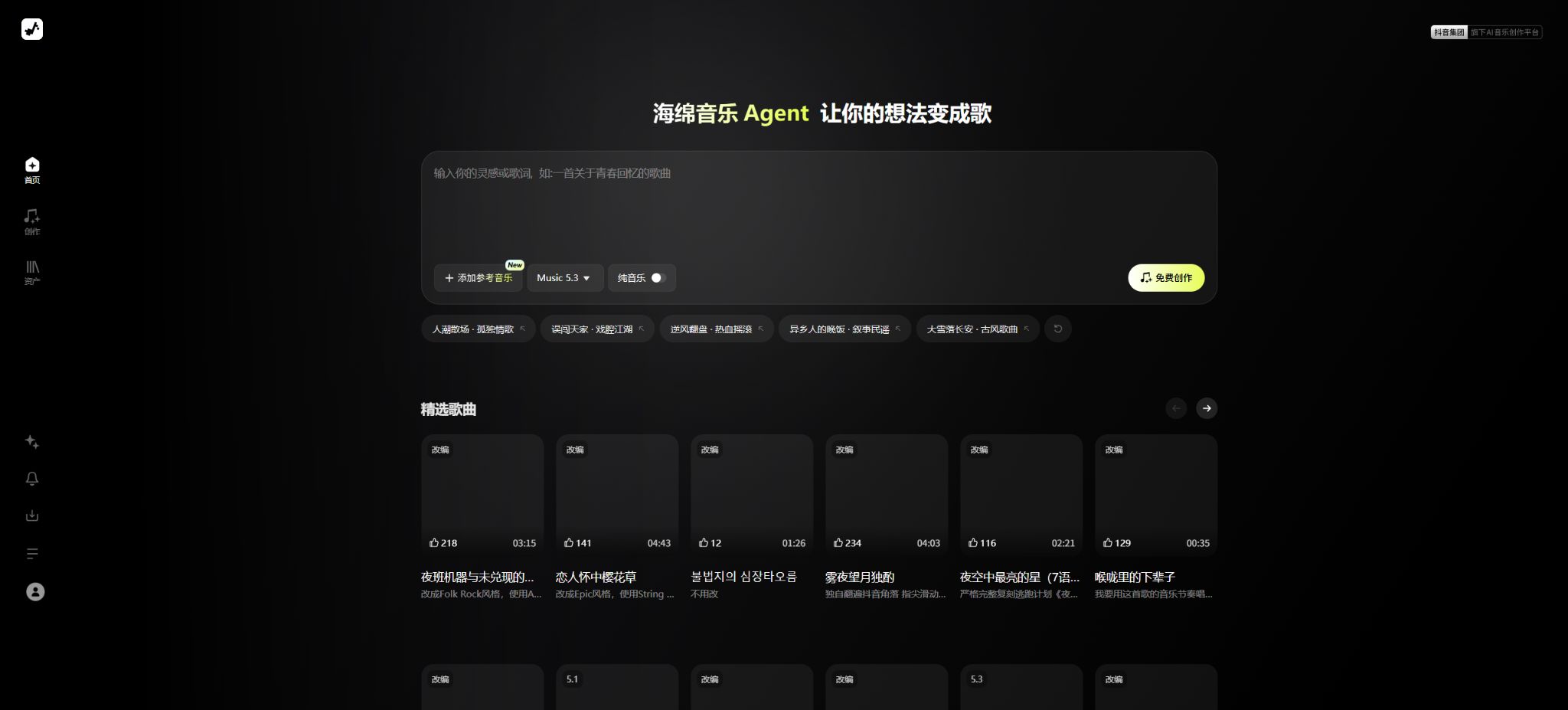
Sponge Music is an AI-based Chinese music creation tool owned by ByteDance, provided by Beijing Yanxuan Technology Co., Ltd. Users can input an idea, a piece of lyrics, or other creative material, and the system will then generate the lyrics, melody, arrangement, and singing version.
The product is not designed as a professional digital audio workstation; rather, its purpose is to lower the barriers to creating complete songs. Users without any experience in composition or arrangement can still generate a listenable version of a song first, and then make adjustments to the style, singing method, vocals, and lyrics as needed.
The main functions of Sponge Music
- Enter a theme, a story, or an emotion, and a complete song will be created through inspiration.
- Enter your own lyrics, and the AI will handle the composition, arrangement, and virtual singing.
- With AI-assisted lyric writing, fragmented ideas can be transformed into structured lyrics;
- Upload images or album contents to turn the visual content into songs;
- Add reference music to guide the style and auditory character of the new work;
- Switch between styles, moods, singing techniques, and vocals to create different versions;
- Changing the words, adapting, or replacing the melody of existing works;
- Generate instrumental music for use as an atmospheric soundtrack or background music for videos;
- You can listen to samples, save and share works, and also post them on TikTok.
Inspiration turns into music
Inspiration to Music is designed for users who have only a theme but no lyrics. By entering details such as characters, scenes, stories, emotions, and the desired style, the AI transforms these brief descriptions into lyrics and complete music.
The more specific the instructions are, the more stable the resulting output tends to be. Instead of simply saying “compose a love song,” it’s better to provide details such as the narrative perspective, the historical context, the emotional changes, the musical style, and the way in which it should be sung.
Composing lyrics into songs and AI-generated lyrics
When lyrics are already available, one can use the songwriting function to have the system create the melody, arrangement, and vocals. If only an idea for the lyrics exists, AI can be used to complete the verses, choruses, and other sections first, after which the rhyme, semantics, and narrative coherence can be checked.
Lyrics generated by AI may contain clichés, repetitions, or logical inconsistencies; in particular, character relationships and timelines can become confusing. Before being released officially, the creator should revise each line carefully, ensuring that their own original contributions remain intact.
Image playlists and album playlists
On mobile devices, it is possible to read images selected by the user, turning pictures of trips, anniversaries, pets, or everyday moments into ideas for songs. This feature is useful for creating background music for albums, greeting songs, and content for social media.
Image recognition can only extract limited visual clues and is unable to understand the full narrative behind a particular scene. By providing information about character relationships, locations, emotions, and the message that wants to be conveyed before generating the content, it is possible to reduce mismatches between the lyrics and the photos.
Personalized adaptations and reference music
The current creation interface on the official website offers options such as adding reference music, Music 5.3, and pure music. The mobile version’s specifications also list style, singing method, and voice switching, enabling multiple versions of the same creative idea to be created.
Reference music can help determine the rhythm, instrumentation, and atmosphere, but it should not be used to replicate the voice of a specific living singer or to create an exact copy of a song protected by copyright. Before releasing something, it is necessary to check whether there is any risk of significant similarity in terms of melody, lyrics, and vocals.
Who is Sponge Music suitable for?
| User | Common uses | Suggested working methods |
|---|---|---|
| Music beginners | Turn stories or emotions into songs quickly. | First, create a melody based on inspiration, then compare multiple versions. |
| Lyricist | Finding melodies and arrangements for original lyrics | Keep the original wording and check the pronunciation of each segment. |
| Short-video creators | Creating video BGM, theme songs, and account music | First, confirm the commercial rules and platform review requirements. |
| Brand and Operations | Create promotional videos, creative proposals, and internal presentations | Complete copyright and licensing reviews prior to official release. |
| Regular users | Create songs for birthdays, anniversaries, and photo albums | Avoid uploading others’ private information and unauthorized portraits. |
| Musicians | Quickly verify lyrics, style, and arrangement concepts | Use the AI-generated results as a draft and continue to create it manually. |
Sponge Music prices
The official website lists Sponge Music as a free AI music creation tool, stating that its related functions are available at no cost for a limited time. No fixed membership pricing or commitment to permanent free access was found during verification; therefore, the current free status cannot be considered a permanent policy.
| Usage method | Current price status | Available capacity | Precautions |
|---|---|---|---|
| Web page version | Free access for a limited time | Inspiration, lyrics, reference music, Music 5.3, and composition of instrumental music | The number of generations and the queuing rules are determined by the page after logging in. |
| iPhone app | Free download of the app | Turning inspiration into music, writing lyrics for songs, making personalized adaptations, and sharing works. | The fact that it can be downloaded for free does not mean that all generation services will remain free in the future. |
| Android client | Free download of the app | Inspiration, images, lyrics, custom styles, and work management | Functions vary depending on the version and the app store channel. |
| Corporate or business partnerships | The standard package has not been made public. | It is necessary to confirm based on specific authorization and collaboration scenarios. | A commercial license for enterprises cannot be assumed based on an individual’s free use. |
If there are subsequent options such as points, subscriptions, generation quotas, or commercial licensing packages, the information provided on the product’s purchase page and the latest agreements shall prevail. The member prices shown on third-party websites, cracked versions, or claims of permanent free access cannot be considered as official references.
Sponge Music Usage Guide
Create a song from a single idea.
- Go to the official website or mobile app, log in, and then access the creation interface.
- Specify the theme, story, emotions, scenes, and narrative perspective;
- Select available options such as genre, vocals, singing style, or instrumental music;
- Submit a complete preview of the lyrics, melody, pronunciation, and structure once it has been created;
- Keep the version that satisfies you, then modify the words, change the style, or regenerate it;
- Confirm authorization and privacy before saving or sharing the work.
Turn one’s own lyrics into a song.
- Organize the lyrics and distinguish between verses, choruses, bridges, and other sections;
- Check the length, rhythm, rhyme of each sentence, as well as any words that may be easily misread;
- Select to turn the lyrics into a melody and paste the approved lyrics;
- Describe the desired style, tempo, mood, instrumentation, and vocals;
- Listen to multiple versions to focus on memorizing the chorus and paying attention to the pronunciation in Chinese;
- Continue to manually modify the lyrics and save different versions of the iterations.
Songs for creating pictures or photo albums
- Choose photos that do not contain sensitive information and for which authorization has been obtained;
- Upload materials from the options for creating tracks from images or from album-related entries;
- Add information on character relationships, background of events, locations, and desired emotions.
- Choose a musical style suitable for memorial, travel, or congratulatory occasions;
- After creation, check whether the lyrics misrepresent the characters and events;
- Share publicly only after obtaining the consent of the people in the photos.
The advantages of Sponge Music
- Designed for Chinese lyrics, singing, and common Chinese music styles;
- The barrier to going from a single sentence to a complete song is low;
- It also supports the input of ideas, lyrics, images, and reference music;
- It is possible to adjust the style, singing method, and vocals to create multiple versions;
- Multiple access options are available, including web pages, iPhone, and Android;
- The works can be integrated with the creation and sharing features on TikTok;
- It is currently available for free on a limited time basis, to facilitate testing.
Usage restrictions and precautions
- AI-generated results are random; the same description does not always yield the same song.
- Mispronunciations may occur with Chinese characters that have multiple pronunciations, long sentences, and special names.
- Songs generated may have repetitive structures, monotonous instrumentation, or abrupt endings;
- A temporary free offer does not mean permanent free access; the quotas and features may be changed at any time.
- The functionality and the pace of version updates may differ between the web version and the mobile version.
- No public API for developers was found.
- AI drafts still require manual screening, editing, and copyright verification.
Copyright and Commercial Use Notes
AI-generated songs involve various rights related to prompts, lyrics, melodies, arrangement, voice models, and training data. The fact that such songs can be created for free does not automatically mean that they can be used without restrictions in advertisements, for distribution, for sale, or on music platforms.
- For original lyrics, a record of their creation must be kept, while third-party lyrics require permission before use;
- Do not attempt to imitate the voice of a specific singer or replicate the melody of popular songs;
- Reference music is used solely to describe the style, in order to avoid creating a substantial similarity;
- Before using it for commercial purposes, check the latest agreements and the scope of licensing for the works in the account.
- Keep records of manual review when it comes to brands, films, games, or customer projects;
- When releasing to the public, indicate whether it was generated by AI or assisted by AI in accordance with the platform’s rules.
Different judicial jurisdictions may have varying approaches to determining the copyright status of purely AI-generated content, and whether such works are protected also depends on the degree of human creative input. High-value commercial projects should undergo specialized reviews regarding music copyrights and personality rights.
Privacy and Permissions Overview
The official privacy page states that music generation may require the use of the camera, photo album, or microphone once the user grants explicit permission. The Android permissions section also mentions the ability to read images, videos, or files, which is used to import materials for creating music and music videos.
| Data or permissions | Possible uses | User suggestions |
|---|---|---|
| Albums and files | Importing images as tracks, albums, and materials | Select only the content needed this time. |
| Microphone | Enter audio, sound, or related creative materials | Turn off permissions when not in use to prevent the entry of sensitive conversations. |
| Camera | Filming footage for use in music or music video production | Verify that the background contains no private or identifying information. |
| User content | Save, create, display, and share works | Do not upload confidential, unpublished works, or unauthorized content. |
| Identifiers and usage data | Accounts, security, statistics, and product optimization | View privacy settings and latest policies |
Information on supported platforms, APIs, and open source solutions
- On the web version, one can access the pages for creating content and managing assets directly.
- For the iPhone app, iOS 14.1 or a later version is required at present;
- Mac computers with Apple chips can run compatible versions, but the official team has not verified them for macOS.
- The Android client is available through the major official app stores;
- The application interface and main services are primarily in Simplified Chinese.
During the verification, no official API provided by Sponge Music for use by ordinary developers was found, nor was there any official GitHub repository containing the source code for its core products. Sponge Music is a commercial product hosted online; third-party websites that offer downloads of the same name or GitHub projects cannot be considered official versions.
Frequently Asked Questions
Is Sponge Music free?
The official website indicates that creation is free at the moment, and it states that all related functions are available for free for a limited time. As for whether fees will be charged in the future, any restrictions on the number of uses, and the corporate licensing policies, these details can be found on the page specific to each account.
Can Sponge Music use its own lyrics?
Yes, it is possible to create music from lyrics – existing lyrics can be used as a basis, and the AI will then generate the melody, arrangement, and vocals. Users must ensure that the lyrics are original or that they have proper licensing for using them.
Can Sponge Music generate pure music?
Yes, the creation tool on the official website offers a pure music option. Before generating the music, it is possible to describe the scene, mood, speed, style, and main instruments to be used.
Can songs generated by Sponge Music be used for commercial purposes?
It cannot be assumed that content generated for free can be used for commercial purposes; it is necessary to consult the latest user agreement, licensing terms, and specific usage guidelines. Special verification is required for use in advertising, distribution, client projects, and on music platforms.
Is Sponge Music open-source software?
No, the core product does not have its source code made available publicly. GitHub projects with the same name found on the Internet, or third-party installation packages, cannot be used as the official open-source version.
Tools similar to Sponge Music




 Guigong Network Security Registration No. 45132202000164