






Mureka
An AI-based music creation platform that supports editing of songs, lyrics, background music, and individual audio tracks.
Tags:AI audio toolsWhat is Mureka?
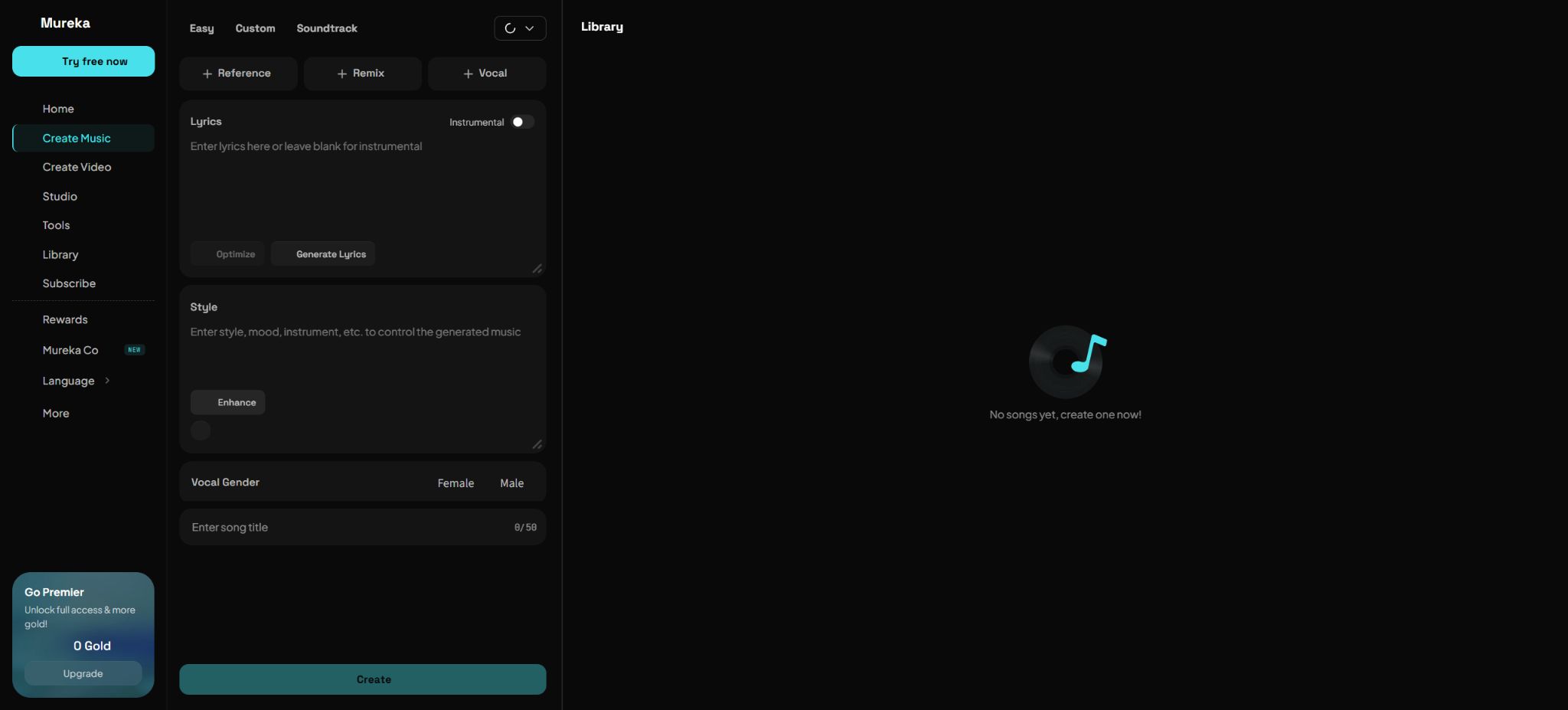
Mureka is an AI music generation platform designed for musicians, video creators, brands, and developers. Users can input a song’s theme, style, and lyrics to create a complete song that includes vocals, melody, arrangement, and mixing; they can also produce instrumental music, background music, and music videos.
The platform offers creation options for both web and mobile devices, a professional editing workspace called Mureka Studio, as well as developer APIs with separate pricing.
What sets Mureka apart is that it doesn’t merely convert text into audio; it allows users to upload reference tracks, hum melodies, select or create singing voices, extend songs, rewrite certain sections, remix the track, and separate the individual instrument tracks. AI is useful for quickly testing ideas and creating initial drafts, but the pronunciation of lyrics, the structure of the music, mixing, sound licensing, and final copyright issues still require human oversight.
Mureka’s core functions
Generating complete songs from text and lyrics
Users can simply describe the theme and style, allowing the system to assist in creating the lyrics and music; they can also enter their own complete lyrics and control aspects such as structure, language, mood, rhythm, and style of singing.
The current model versions include V9.5, V9, V8, O2, etc.; different members have access to different models and control capabilities.
Pure music and background music
The Instrumental and BGM modes allow for the creation of music without a vocalist, making them suitable for short videos, podcasts, advertisements, game prototypes, and setting the atmosphere in stores. The instructions should specify the scene, mood, speed, main instruments, dynamic changes, and whether seamless looping is required; it is not enough to simply mention a general genre name.
Reference audio and humming of melodies
Reference can extract the style, atmosphere, and energy level from uploaded audio in order to create new works; Melody can develop humming, whistling, or melodic fragments into complete songs.
The reference function does not grant users the right to copy the original music; they can only upload music that is their own or for which they have permission, in order to avoid imitating the recognizable melodies and recordings of protected works.
AI singers and voice input
Users can choose the voice used to sing the songs, and Premier also emphasizes the use of voice input to create AI singers. Any real human voice, character voice, or recognizable timbre is related to issues of personality, privacy, and vocal rights; one may only use their own voice or one that has been explicitly authorized, and it is not allowed to pretend to be a singer, public figure, or someone else in order to publish content.
Continuation, partial editing, and Remix
After a song is created, it is possible to extend its length, modify the lyrics or certain parts of its structure, and change its style through Remix. Multiple rounds of edits can affect the melody, harmony, and consistency of the vocals; it is best to save the original version first and then address the specific sections that need modification within defined time frames.
Mureka Studio and track separation
Mureka Studio offers timeline editing, stretching, and tracking capabilities that are closer to those used in actual music production processes. The Splitter function allows a song to be divided into up to 12 separate stems, making it easier to work on the vocals, drums, bass, and other instruments individually.
Automatic track separation can result in crosstalk and high-frequency loss; a proper mix still needs to be checked in a DAW.
Mureka Co and DAW workflows
Mureka Co focuses on using natural language to generate melodies, arrange music, and automate production processes within digital audio workstations. It is suitable for users with some experience in music production to speed up the creation of drafts and musical materials; however, it cannot replace the processes of selecting sound colors, recording, mixing, or making final mastering decisions.
Music video creation
The platform enables the creation of AI-generated music videos for songs, offering both a quick one-click method and a more controlled storyboard approach. Video generation consumes a significant amount of Gold; it is therefore advisable to finalize the song first, and then create a low-cost preview to check the characters, subtitles, continuity of the shots, and the platform’s formatting rules.
Comparison of Mureka individual plans
The current subscription page offers three plans: Free, Pro, and Premier, with the option to choose between monthly or annual payment; the annual payment option indicates a 20% savings.
The prices and Gold amounts are dynamically determined based on region, sales channel, event, and login status; the amounts displayed on public pages may not be accurate, so it is advisable to refer to the official details regarding current benefits. It is necessary to check the settlement page before making a payment.
| Package | Price | Core competencies | Copyright and export direction |
|---|---|---|---|
| Free | Free of charge; the quota is as specified on the account page. | Experience the base model, song generation, and limited Gold. | For internal, non-commercial use only; Mureka is indicated according to the terms. |
| Pro | Refer to the real-time settlement page. | Advanced models such as V9.5, V9, V8, O2, etc., for song continuation and standard editing | Paid output is available for commercial use and offers more download privileges. |
| Premier | Refer to the real-time settlement page. | Mureka Studio: up to 12 separate tracks, remixes in any style, AI singers and professional control options | Professional export options such as MIDI and WAV, along with a complete production workflow |
Subscriptions are automatically renewed on a monthly or annual basis; cancellation must be requested at least 24 hours before the end of the current period, through the same payment method used initially. Package prices may change, and renewals are typically charged at the prevailing price along with any applicable taxes.
When a refund is required, the request should be made in accordance with the rules of the original payment method, such as Apple, Google, or Stripe.
Comparison of Mureka’s individual copyright rules
| Account type | Output equity | Can it be used for commercial purposes? | Important restrictions |
|---|---|---|---|
| Free tier | Mureka retains the rights related to output and grants users a limited license. | Not for commercial use | For legitimate internal, non-commercial use only; Mureka must be indicated. |
| Buy points or a paid subscription | Within the scope of these terms, the rights and benefits resulting from the output belong to the user. | Commercially available | The input must be valid; the platform does not guarantee that the work is unique or that its copyright can necessarily be registered. |
| Paid API calls | The official FAQ provides information on full usage rights and commercial licensing options. | Commercially available | Subject to API protocols, input authorization, and applicable laws. |
“Royalty-free” or commercial licensing does not imply that the work is necessarily protected by copyright, nor does it mean that there is no similarity to other people’s works. The terms make it clear that AI-generated content may be similar to other users’ works, and no guarantee is provided regarding the possibility of registering such content as copyrighted.
Before release, advertising, or delivery to customers, it is still necessary to conduct reviews of the melody, lyrics, samples, sounds, and trademarks.
Mureka API Recharge Packages
The developer platform utilizes a separate system for top-ups and points, and credits from web members and Gold members cannot be transferred to the API. The following are the top-up options displayed on the official API pricing page during verification.
Large-scale promotions, the percentage of items given as gifts, and the rules regarding concurrent transactions may change.
| Gear | One-time top-up | Concurrent requests | Validity period and instructions |
|---|---|---|---|
| Trial | 10 dollars, once per account | 1 | Valid for 12 months; full model and API access available |
| Basic | 1,000 dollars | 5 | Valid for 12 months, including the complete model, API, and Agent Skills |
| Standard | 3,000 dollars | 15 | Valid for 12 months; points may be awarded during the promotional period. |
| Business | 5,000 dollars | 25 | Valid for 12 months, suitable for large-scale use of products |
| Enterprise | 30,000 dollars | 150 | Valid for 12 months; suitable for high-concurrency applications |
| Custom | Custom quote | According to the agreement | Bulk discounts and exclusive technical support |
API top-ups are not automatic recurring subscriptions. Each top-up activates a validity period of 12 months starting from the date of purchase, and subsequent top-ups extend the validity period of the existing balance in the account.
Points are used according to the rule that they are awarded upon payment, with those from earlier batches given priority.
No refund is provided after purchasing the API; downloading songs does not incur any additional cost, but processing such as stem extraction may result in separate charges. The concurrency level associated with each payment plan is calculated based on a single purchase, and it is not possible to simply add up multiple small payments together.
Mureka Song Generation Tutorial
- Selection mode:To select the full song, choose Create Music; for background music, simply select Instrumental or Soundtrack.
- Organizing lyrics:Divide it into sections such as verses, pre-choruses, choruses, and bridges, and check for names, numbers, English words, and rhyme.
- Describe the music:Specify the musical style, mood, tempo, instruments used, historical period, gender of the singer, and dynamic changes; avoid asking for direct imitation of living singers.
- Select model:Select a model based on member benefits and desired style, then generate a small number of versions to compare the melody with the vocals.
- Use a reference or melody:Only upload audio for which you have the rights; the humming should be done in a clear rhythm, the background should be quiet, and the original recording must be preserved.
- Local modification:Perform editing, Extend, or Remix on sections with incorrect lyrics, abrupt structure, or overly short endings.
- Later stage of track separation:When professional production is required, export WAV, MIDI, or stems, and adjust harmonics, equalization, and volume in a DAW.
- Pre-release review:Check the similarity of lyrics and melodies, sound licensing, cover artwork, AI identifiers, and the distribution rules for the target platform.
Mureka API and MCP
Mureka offers a formal developer platform that enables the creation of API keys, as well as access to functions for generating lyrics, songs, and background music. The official SkyworkAI organization has also made the Mureka MCP Server available, allowing clients or agents that are compatible with MCP to use tools for generating lyrics, songs, and background music.
This project is licensed under the MIT license, but it actually relies on cloud APIs, keys, and paid credits.
When connecting, the API Key should be placed in the server-side environment variables, and limits on concurrency, timeouts, retry mechanisms, as well as routines for checking task status should be established. Since the generation of songs takes a considerable amount of time, it is not possible to keep the requests blocked in the web page’s threads.
A task queue should be used, and the audio should be saved in one’s own storage once the task is completed.
For publicly available products, it is also necessary to record the model used in each output, the prompt words, the input authorization details, and the time of generation.
Is Mureka open source?
The Mureka web platform, its core music modeling capabilities, and API services are not open-source products. The official Mureka MCP client is licensed under the MIT license; it merely serves as an interface for accessing cloud services.
Other TypeScript, .NET, or third-party API projects on GitHub are not the official platform source code; it is necessary to check the maintainers and licensing terms for each of them before using them.
Mureka Usage Guide
Create reusable professional workflows
- A test set is created using real noise, accents, and multi-person segments;
- Compare the differences in the processing of generating complete songs from text and lyrics, instrumental music and background music, as well as reference audio and melodic humming.
- Retain the original recordings and the unmodified transcripts;
- Arrange for a manual hearing before releasing it to the public;
- Statistically analyze processing time, error rate, and quota consumption;
- Regularly update the glossary, sound licensing, and deletion policies;
Notes on sound, copyright, and privacy
- The lyrics, reference music, recordings, melodies, and audio data uploaded by the user must be owned by the user or for which the user has full permission;
- It is not allowed to upload unauthorized songs, commercial samples, or the voices of other people, nor to use them for cloning or impersonation.
- The terms also state that user content submitted to the platform should not be considered confidential information.
- Unpublished works, client master recordings, and sensitive audio materials should be uploaded with caution;
- When releasing AI-generated music, it is necessary to comply with the rules regarding the disclosure of AI-related content, music distribution, as well as copyright and personality rights in the target region and on the respective platform.
- The free tier cannot be used for commercial distribution;
- Although the paid tier offers commercial options, it still cannot bypass third-party rights.
- When creating content for brands or customers, it is necessary to retain subscription information, input authorization details, and generation records.
Which users are it suitable for
- Creators who wish to turn lyrics or musical ideas into complete songs quickly;
- Content teams that need background music for short videos, podcasts, advertisements, or games;
- Musicians who wish to continue post-production using track separation, MIDI, and WAV;
- Developers who need to generate music in bulk and integrate it into their products;
- A business team capable of handling audio licensing, copyright verification, and AI labeling.
Frequently Asked Questions
Is Mureka free?
Registration is free and allows you to try out a limited amount of functionality; however, the free output is intended for internal, non-commercial use only, and it is necessary to include the mention of Mureka in accordance with the terms.
Can the songs generated by Mureka be used for commercial purposes?
Purchasing credits, paid subscriptions, or paid API calls provides options for commercial use, provided that the input data is valid and the relevant terms are followed. The platform does not guarantee that the output will be unique or that copyright can be established over it.
What is the difference between Pro and Premier?
Pro offers advanced models, commercial use options, text expansion functions, and standard editing tools; Premier is designed for more professional-level production, featuring Mureka Studio, up to 12 separate audio tracks, the ability to create remixes in any style, AI singers, as well as advanced export options such as MIDI and WAV.
Can website members be used with the Mureka API?
No. Website memberships, Gold memberships, as well as the features related to recharging, points, and concurrent usage on the API platform are independent of one another; they must be purchased separately.
Which languages is Mureka compatible with?
The languages in which songs can be generated, as listed in the official API FAQ, include Chinese, English, Japanese, Korean, Portuguese, Spanish, German, French, Italian, and Russian.
Is Mureka open source?
The core platform and models are not open source; the official Mureka MCP Server is licensed under the MIT license and is used to connect to cloud APIs.
Tools similar to Mureka




 Guigong Network Security Registration No. 45132202000164