






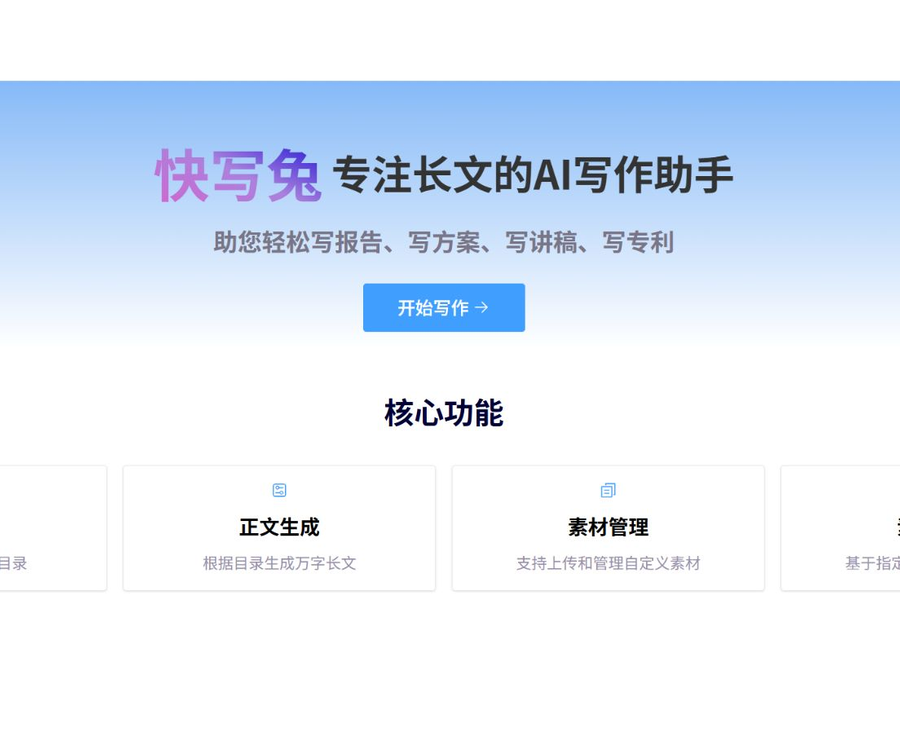
Quick Write Rabbit – A helper for writing long texts
It is an intelligent writing assistant developed by Yunfu Technology specifically for handling long texts; it can generate outlines and the main text with just one click, helping you to write reports, proposals, papers, official documents and other lengthy texts easily.
Tags:AI writing toolsWhat is a Quick Write Rabbit?
KuaiXieTu is an AI-powered tool for writing long texts, developed by Yunfu Technology; it is designed to help with the creation of outlines and multiple sections of text.
It is designed for long texts that require a well-structured format, such as reports, plans, speeches, and patent applications.
Core functions
| Functions | Main function | Human liability |
|---|---|---|
| Table of contents generation | Plan the chapter structure based on the title. | Adjust the logic and focus points |
| Text generation | Generate a multi-chapter long article based on the table of contents. | Verify facts and repeatable content |
| Material management | Upload and organize custom materials | Confirm authorization and confidentiality level |
| Material synthesis | Generate the main text based on the specified material. | Verify references and original intent |
| Model essay for reference | Provide examples of partially publicly available long texts. | Check expiration date and copyright. |
Table of contents generation
After the user enters the article title, the system can generate a chapter-based outline to help establish the structure before writing the main text.
- Identify the type of document and the target audience.
- Explain the writing objectives and usage scenarios.
- List the items that must be covered.
- Remove duplicate or irrelevant sections.
- Adjust the order and hierarchy of sections.
A table of contents is merely a writing framework; it cannot automatically ensure that the argument is complete or that it follows organizational standards.
Generation of long texts of ten thousand characters
The official website lists “generating long articles of ten thousand words based on a table of contents” as one of its core capabilities, making it suitable for drafting content chapter by chapter.
- First, determine the purpose and length of each chapter.
- Generate in sections and conduct timely reviews.
- Unify terminology, data, and narrative perspectives.
- Check for repetitions across sections and inconsistencies.
- In the end, the author rewrote the key conclusions.
The nominal word count capacity does not mean that a fixed number of words will always be generated, nor does it imply that the content can be delivered immediately.
Material upload and management
Users can upload custom materials and use them to create writing materials for the project.
- Only upload files for which you have permission to handle.
- Classified by project, chapter, and purpose.
- Remove irrelevant personal information and account keys.
- Label the data with dates and versions.
- Confidential documents must not be uploaded to public services.
Compose the text based on materials.
The material synthesis function allows for the creation of content based on specified materials, thereby reducing the tendency of the model to act independently and outside the context of the project.
- Specify the materials to be used for the current chapter.
- It is required to distinguish between original facts and generated suggestions.
- Check whether the model has misinterpreted the data.
- Retain necessary citations and supporting documents.
- Missing information must not be left to the model to guess.
Report writing
QuickWrite Rabbit can generate a draft based on the report outline and reference materials; it is suitable for materials related to research, summarization, and analysis.
- Provide accurate data and statistical metrics.
- Distinguish between observational results and subjective judgments.
- Check the time, location, and sample range.
- Avoid fabricating interview and research findings.
- The official version is confirmed by the business manager.
Proposal writing
The preliminary draft of the plan can be used to organize objectives, measures, schedule, resources, budget, and risks.
- Define the responsible parties and objectives.
- Enter the actual resources and budget constraints.
- Assign a responsible person for each measure.
- Check whether the time schedule is feasible.
- Add supplementary risks and emergency response plans.
Speech writing
The system can generate chapter headings and a preliminary draft of the text based on the topic of the presentation, making it suitable for use in reports, training sessions, and speeches at events.
- Indicate the audience and the duration of the speech.
- Use the speaker’s real experiences and opinions.
- Remove vague slogans and false examples.
- Adjust to natural spoken expression.
- Time the reading and adjust the rhythm.
First draft of the patent specification
QuickWrite Rabbit can assist in organizing patent applications, but AI is unable to determine novelty, inventiveness, or the scope of the ultimate rights.
- The inventor provides the actual technical solution.
- Describe the existing technologies and the problems that need to be solved.
- Provide a complete description of the implementation methods and alternative approaches.
- Do not disclose undisclosed technologies before applying.
- Have it reviewed by a patent agent or lawyer.
Quick Write Rabbit Usage Guide
- Register for a Kuaishu Rabbit account to receive a free amount of characters.
- Select the report, plan, presentation, or patent scenario.
- Enter the accurate title and writing objective.
- Generate a table of contents and modify the chapter structure.
- Upload authorized reference materials.
- Assign appropriate materials to each chapter.
- Generate the text chapter by chapter according to the table of contents.
- Check facts, data, and citations.
- Remove duplicate, vague, and fictional content.
- Standardize terminology and formatting throughout the text.
- The review is carried out by business or professional personnel.
- Save and export the final draft.
Price and number of free characters
The official website currently states that registration comes with 20,000 characters for free, but it does not display in a consistent manner the actual amount of the package, which could be verified in real time.
| Services | Public price or quota | Confirmation method |
|---|---|---|
| New user registration | 20,000 characters as a gift | Check the amount credited and expiration date after registration. |
| Long text generation | By word count or package | The information provided on the price page is to be taken as the authoritative source. |
| Material management | Not yet made public | View account storage benefits |
| Material synthesis | Not yet made public | Check the character count before generation. |
| Used by teams or enterprises | Not yet made public | Contact the authorities to confirm. |
The price information was verified on August 30, 2026; the screenshots of third-party packages from 2024 do not reflect the current official prices.
What needs to be confirmed before making a purchase?
- The amount of characters included as a gift, as well as its validity period.
- How much space is used by the table of contents and the main text respectively.
- Whether to refund the quota in case of generation failure.
- The number of assets, their size, and the duration of storage.
- Document export format and number of times.
- Validity period of the package, refund policies, and invoice rules.
- The ability to isolate team members from data.
Content authenticity verification
- Verify the names of individuals, organizations, and projects.
- Verify the date, numbers, and statistical methodology.
- Remove cases and quotes that cannot be verified.
- Distinguish between facts, assumptions, and suggestions.
- Use the latest policies and industry standards.
- It must be signed and approved by the person in charge before being released to the outside.
Precautions for using model essays
The model texts available on the official website can help one understand the structure, but some of these examples were published a long time ago and therefore cannot be considered up-to-date information.
- Do not copy the sample text directly and just change the names.
- Check whether the policies and industry information are outdated.
- When citing content, verify the authorization and source.
- Remove content that is not related to the current project.
- The final version should reflect the actual business conditions.
Data security and confidentiality
- Classified and unpublicized materials must not be uploaded.
- Control the scope of disclosure of technical information prior to patent application.
- For business proposals, remove sensitive quotes first.
- Personal information is processed in accordance with the principle of minimum necessity.
- Do not save passwords and keys in the material.
- Keep local backups of important documents.
API and open-source status
As of the time of verification, no API documentation, official SDK, or pricing information for FastWrite Rabbit available to the public was found.
- The web page writing feature is not equivalent to an open API.
- No source code repository that can be confirmed as official was found.
- The use of domestic large models does not mean that the product is open source.
- Third-party projects with the same name cannot be considered official code.
Which users are it suitable for
- Professionals who need to draft reports quickly.
- Operations and management personnel responsible for drafting project plans.
- Users who are preparing speech and training materials.
- The invention team responsible for organizing the patent disclosure documents.
- Creators who need to produce long articles based on materials.
Product advantages
- Focused on generating directory structures and long articles with multiple chapters.
- It supports reporting, plans, presentations, and patent-related use cases.
- It is possible to upload and manage custom assets.
- It is capable of synthesizing a text based on specified materials.
- New users are entitled to a specific number of free characters.
Usage restrictions and precautions
- The price page does not display the current amount of the packages in a stable manner.
- The official website occasionally experiences server errors.
- Long texts may contain repetitions or inconsistencies.
- Material synthesis may still lead to a misinterpretation of the original text.
- Patents and official reports require professional review.
- No public APIs or official source code were found.
- An AI-generated draft cannot replace the author’s responsibility.
Frequently Asked Questions
What can the Quick Write Rabbit mainly be used for?
It is primarily used for drafting long texts such as reports, plans, speeches, and patent applications, and it supports the creation of tables of contents.
Can the QuickWrite Rabbit generate texts of ten thousand words?
The official website states that the system is capable of generating texts of tens of thousands of words; however, the actual length and quality depend on the outline, the materials used, and the system’s rules.
Can QuickWrite Rabbit be used for free?
The official website indicates that a registration bonus of 20,000 characters is provided; the details regarding the amount credited, its validity period, and the available functions need to be checked within the account.
How much does Kuaixiě Tù charge?
The current public page does not display the package price consistently; the exact number of characters included, the validity period, and any discounts are specified on the pricing page.
Does QuickWrite Rabbit allow users to upload their own materials?
It supports the uploading, management, and targeted synthesis of materials, but only files that can be processed and are suitable for cloud storage can be uploaded.
Does QuickWrite Rabbit provide APIs or open-source code?
As of the time of verification, no public APIs, official SDKs, source code repositories, or open model weights were found.
Can the patent application document be submitted directly?
No, it is necessary for the inventor and patent professionals to review the technical details, confidentiality aspects, and scope of rights.
A tool similar to QuickWrite Rabbit – an assistant for writing long texts.




 Guigong Network Security Registration No. 45132202000164