






H-supertools AI Writer
H-supertools AI Writer, an intelligent tool focused on AI-driven writing.
Tags:AI writing toolsA one-sentence summary
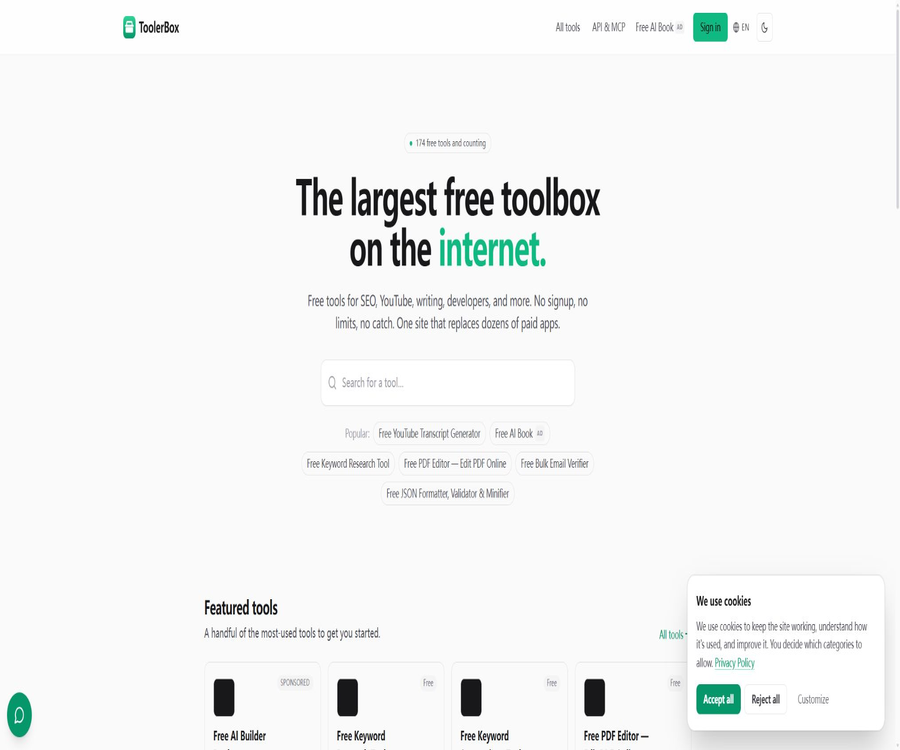
H-Supertools AI Writer was once a free AI writing tool that generated short articles based on specific topics; however, its original entry point now redirects to the ToolerBox homepage, and the older versions of this tool can no longer be accessed using the previous methods.
Currently, ToolerBox is a platform that offers 174 free online tools; it includes utilities for writing assistance, SEO, image processing, PDF handling, and development tasks, but it lacks a general AI Writer equivalent to the older versions of this product.
Current status description
| Project | Historical status | Verification status as of August 2026 | How should it be understood? |
|---|---|---|---|
| Product name | H-Supertools AI Writer | ToolerBox tool platform | The original entry name merely refers to historical products. |
| Original writer entry point | You can enter a topic and generate a short article. | Go to the ToolerBox homepage | The old version of the writer can no longer be used. |
| General AI writing | Provided in history | The current tool directory does not list a function with the same name. | Old capabilities cannot be written as current capabilities. |
| Current writing tools | Primarily uses AI to generate short texts. | 71 tools for inspection, statistics, formatting, and text processing | The functional direction has changed significantly. |
| Current operator | The old materials are related to the H-Educate system. | ToolerBox is operated by LearnWithHasan. | The current terms and privacy policy shall prevail. |
There are still websites on the Internet with similar names such as H SuperTools, but their domain names, operators, and product lists differ from those of the old service referred to in this entry. One cannot assume that they represent the same product or an official continuation just because of their similar names.
The H-Supertools AI Writer in history
Early public trials showed that the older version of the tool used the short-text generation method from the GPT-3 era: users would enter a topic consisting of no more than 50 characters, select a level of intelligence, and choose an output length of 50 to 150 words, after which the content would be generated.
The old tool used AI Coins to control usage, offering 30,000 free coins per month for renewal. Different levels of intelligence and different durations of use resulted in varying amounts of coins consumed, but these quotas, models, and rules are now part of historical information.
| Historical projects | Old version public description | Current validity |
|---|---|---|
| Enter | Theme, keywords, questions, or brief writing requirements | The old entrance is no longer available. |
| Theme length | Up to 50 characters | Merely a historical limitation. |
| Output length | 50, 100 or 150 words | Merely a historical limitation. |
| Quality settings | Four intelligent levels | It cannot be verified or used at the moment. |
| Free quota | 30,000 AI Coins per month | It’s not part of the current ToolerBox benefits. |
| Common content | Article paragraphs, emails, product descriptions, and marketing copy | It does not indicate the current functionality. |
| Model | Early sources indicated the use of GPT-3. | It is obsolete and should not be presented as a current model. |
Why can’t we continue to use the old tutorials?
- The old product page no longer displays the theme input field, the intelligence level, and the generate button.
- Regardless of whether you access the home page or the AI Writer page using the old path, you will eventually end up on the ToolerBox home page.
- The current ToolerBox tool catalog does not contain H-Supertools AI Writer or any generic article generator with the same name.
- The old version of AI Coins and the current API points represent two different billing systems, and they cannot be converted into one another.
- The free offer for older products, as well as the limits on models and character count, do not constitute part of the current terms of service.
What is ToolerBox?
ToolerBox is a collection of online tools designed for ordinary users, creators, marketers, and developers. The official website lists 174 free tools across 12 categories, and it offers REST API and MCP for users who need to perform operations in bulk.
| Classification | Number of tools | Representative task |
|---|---|---|
| SEO | 10 | Keyword research, ranking checks, site audits, and sitemaps |
| YouTube | 3 | Subtitle extraction, thumbnail download, and post cards |
| Writing | 71 | Word count statistics, text checking, format conversion, and character tools |
| Marketing | 1 | UTM parameter link generation |
| Developer | 7 | JSON, regular expressions, API testing, and key generation |
| Internet | 7 | DNS, IP, port, and SSL diagnostics |
| Safety | 2 | JWT decoding and password strength checking |
| 3 | Batch verification, temporary email detection, and delivery testing | |
| Image | 40 | Format conversion, compression, Base64, and prompt generation |
| 22 | Split, compress, rotate, extract, and edit | |
| Generator | 3 | QR codes, invoices, and website icons |
| Calculator | 5 | Mathematics, BMI, loans, mortgage loans, and gold prices |
Most website tools can be used without the need for registration; the homepage states that there is no trial period expiration or credit card requirement. Certain features, once accessed, allow an increase in the number of characters, saving of history, or access to complete results, so the fact that registration isn’t required does not mean that all functions are identical.
Current writing-related functions
AI Essay Checker
AI Essay Checker does not rewrite the entire text for the user; instead, it highlights issues related to grammar, spelling, punctuation, word choice, and clarity, while explaining the reasons behind those issues. The inspection results include a letter grade, a percentage score, and suggestions for improvement.
- When used anonymously, a maximum of 50 words can be checked at a time, and only the first set of questions is displayed.
- After logging in for free, you can check 500 words at a time, and view all errors, suggestions, as well as the complete scoring criteria.
- The evaluation criteria include grammar, clarity, structure, and vocabulary.
- It supports English, Spanish, French, German, Arabic, and most major languages.
- The tool emphasizes that users should make modifications on their own based on the given suggestions; it is suitable for providing feedback to aid learning, rather than allowing someone to write the content for them with just one click.
English and Spanish AI translation
The current translator supports two-way conversion between English and Spanish, automatic text recognition, selection of formal or informal tone, as well as Latin American Spanish, Spanish from Spain, and neutral Spanish. Anonymous users can process shorter texts; after logging in for free, the character limit increases to 5,000 characters.
Text tools in the browser
Many writing tools process input directly in the browser, such as word and character counting, case conversion, list sorting, deduplication, text comparison, readability checks, and Unicode formatting. These tools are suitable for light editing tasks, but they are not equivalent to AI-powered tools for generating long texts.
Images, PDFs, and developer tools
- The image tool supports conversion of common formats such as PNG, JPG, WebP, AVIF, SVG, GIF, ICO, and Base64.
- Multiple image conversions take place within the browser; it supports processing either a single image or multiple images at once, and there is no need to upload files.
- PDF tools include splitting, page extraction, rotation, compression, page deletion, watermark addition, unlocking, and text extraction.
- The invoice generator allows for the inclusion of company details, customer information, taxes, discounts, and item specifics, with the option to download a PDF.
- The developer tools include JSON formatting and validation, regular expression testing, API testing, code to image conversion, and random key generation.
- Network tools can be used to check DNS records, IP addresses, ports, SSL settings, and domain name information.
- Some SEO, subtitle, email, and site screenshot tools rely on servers or external services; it should not be assumed that all data is processed locally only.
Usage tutorial
Use AI Essay Checker to check the essay.
- Open ToolerBox’s writing tool directory and select AI Essay Checker.
- Paste papers, paragraphs, or practice texts; when using them anonymously, keep the content within 50 words.
- Run the check to view the highlighted locations, error types, explanations, and suggestions for corrections.
- Modify the text as indicated, and do not consider the score as the final evaluation by the teacher or examination authority.
- Run the check again and compare the scores for grammar, clarity, structure, and vocabulary.
- To check texts of up to 500 words or to view the full score, you can log in for free using the magic link via email or through the supported OAuth methods.
- In cases related to academic integrity, admissions, or formal submissions, the material is reviewed manually by teachers or professional editors.
Use local images or PDF tools
- Select the tool corresponding to the target format from the image or PDF category.
- Read the page for specific details on local processing, methods of uploading, formats, and file size.
- First, use a small file that does not contain sensitive information to test the output quality and page order.
- Select conversion, compression, splitting, rotation, or extraction parameters and process them in the browser.
- After downloading the result, check the resolution, transparency, font, page numbers, and ensure that the file is complete.
- Save the results before closing the page, as anonymous local tools usually do not provide cloud-based history.
Access REST API
- Register an account and create a separate API key in the dashboard; the plain text of the key is displayed only once, at the time of creation.
- Select the desired capabilities from the six available endpoints, and verify the request structure, the cost in terms of points, and whether the processing is asynchronous.
- Send requests via Bearer authentication on the server side; do not embed the key in the browser frontend or in public repositories.
- After the asynchronous task returns its task number, the status should be checked every four to five seconds.
- Handle responses such as authentication failures, insufficient points, parameter errors, rate limiting, and task failures.
- Wait according to the Retry-After value and retry after a delay, in order to prevent continuous requests from triggering further restrictions.
- Monitor usage on the dashboard, and split, rotate, and revoke keys by environment.
API endpoints and points
As of August 23, 2026, the public API catalog lists 6 endpoints. Paid endpoints require an API key and credits, while free endpoints allow anonymous calls, but they are still subject to rate limits and access rules.
| Endpoint | Uses | The document shows the costs. | Precautions |
|---|---|---|---|
| bulk-keyword-metrics | Batch query for search volume, click cost, and competition level | The list label states that 1 point is awarded for every 5 keywords, while the main text indicates that 1 point is given for each keyword. | There are different descriptions for the upper limit quantity: 20 and 100. |
| disposable-email-checker | Check up to 100 email addresses for their domain names and whether they are able to receive messages. | 1 point per time | Only the domain name part is persisted; the local part of the email address is not saved. |
| domain-info | Return the domain name information of the verified items. | Free | The project’s verification conditions must be met first. |
| get-job-status | Query the status and results of asynchronous tasks | Free | It is recommended to poll every four to five seconds. |
| website-screenshot | Generate a screenshot of an entire page or viewport. | The list label states 1 point per item, while the main text indicates 2 points per item. | Asynchronous query after returning the task number |
| youtube-transcript | Extract subtitle text along with time stamps. | 1 point per time | The video must have available subtitles. |
There is an internal inconsistency between the number of keywords in the public endpoint catalog and the figures indicated for scoring based on screenshots; therefore, it is not possible to commit to any specific amount to be charged based on either of these figures. Before proceeding with an official bulk integration, it is necessary to confirm the costs using the dashboard available after logging in as well as through actual testing.
MCP capabilities
ToolerBox makes the same set of endpoints available as MCP tools for AI clients that support this protocol. Users can connect using OAuth, custom URL tokens, or Bearer keys; points are consumed each time a tool is called, based on the corresponding endpoint.
| Connection method | Authentication | Applicable clients | Precautions |
|---|---|---|---|
| Remote OAuth | Magic Link login and authorization | Web AI client that supports custom connectors | Reduces the need for manual key copying |
| Remote MCP | Bearer API key | Cursor and clients that support remote protocols | The key should be stored in a controlled configuration. |
| Localstdio bridging | The key is transmitted via a remote bridge. | Only desktop clients with localstdio are supported. | A Node runtime environment and third-party bridging components are required. |
| URL token | Token embedding dedicated connection address | Trusted Personal Connection | Revealing the full address is equivalent to revealing credentials. |
The basic process for configuring MCP
- Confirm that the AI client being used supports remote MCP, OAuth, or localstdio bridging.
- On the ToolerBox dashboard, select OAuth, API key, or URL token authentication.
- Save the credentials only in a controlled configuration; do not copy them into chats, web scripts, or public documents.
- Restart the client and check whether the six endpoints appear as tools.
- Use the free endpoint to conduct the initial connection test, and then try using the credit system.
- Check the actual charges, task status, and throttling situation on the dashboard.
- Revoke the key, URL token, or OAuth authorization immediately when it is no longer in use.
Throttling, authentication, and Webhooks
| Ability | Free tier | Pro layer | Explanation |
|---|---|---|---|
| Default rate | 30 times per minute | 120 times per minute | Share token buckets per user and endpoint |
| Anonymous call | Share by IP | Not applicable | Applicable only to endpoints with a zero integration cost. |
| Higher upper limit | No public self-service setup is available. | You can contact support for adjustments. | Different endpoints may also have separate limits. |
| Throttling response | Return 429 along with the number of seconds to wait. | Return 429 along with the number of seconds to wait. | A successful response does not display the remaining quota header. |
Creating multiple keys does not increase the rate limit for the same user. API keys are stored in SHA-266 hash format; the plain text version is shown only at the time of creation. It is recommended by the authorities to use separate keys for different environments and to rotate them regularly.
Webhooks can be used to deliver events related to subscriptions, points, keys, and invoices, and they are signed using HMAC-SHA256. Failed tasks will be attempted again six times with increasing lengths; the recipient should verify the timestamp, the original request body, and the event identifier.
Prices and packages
As of August 23, 2026, the public page of ToolerBox does not display the API subscription fees or the costs associated with credit packs that can be verified directly. The billing page requires login; the public documentation only provides information on the cost of using certain endpoints, as well as the free and Pro pricing tiers, and it is not advisable to estimate the prices in RMB or USD on one’s own.
| Product or level | Price | Scope of use | Limits or restrictions | Purchase method |
|---|---|---|---|---|
| Free website tools | Free | Personal and commercial use | Subject to reasonable use, character limits per tool, and anti-abuse restrictions. | Use it directly; some enhancements require a free login. |
| Anonymous version of AI Essay Checker | Free | Short text inspection | 50 words per time, only the first set of questions is displayed. | No account is required. |
| AI Essay Checker Premium Version | Free | Comprehensive inspection and scoring dimensions | 500 words each time | Free login |
| Free REST API endpoints | Free | Domain name information and task status | The default value is 30 times per minute, and this is subject to the constraints imposed by the endpoint settings. | Use anonymously or by logging in |
| REST API and MCP points endpoints | Currency prices are not listed on the public page. | Keywords, email addresses, screenshots, subtitles, etc. | Points are calculated based on the endpoints; there are discrepancies in certain numbers within the document. | Log in to the billing page to confirm. |
| Pro rate tier | The subscription price is not listed on the public page. | Higher frequency of API or MCP calls | The default value is 120 times per minute. | Verify after logging in or contact support. |
| Higher enterprise throttling | Customization | High concurrency and specific endpoints | Configure by customer and endpoint | Contact support |
Rules for refunds and points
Points are deducted before a payment request is processed; failed requests that meet the criteria defined in the documentation have their points refunded to the account balance. Points that have been used are generally not refundable, while unused points may expire according to the conditions specified at the time of purchase.
The prices and the cost per endpoint in terms of points may change; payments are processed by Stripe. Before making a purchase, it is necessary to check on the billing page the currency used, any taxes, the validity period of the points, as well as the conditions for renewal, cancellation, and refunds, and to keep a record of the transaction.
Privacy and data processing
The current privacy policy applies to free tools, APIs, MCP, and dashboards. The platform collects the email address associated with an account, OAuth credentials, input and output data from the tools, IP addresses, User-Agent information, request logs, key audits, usage analytics, point records, and Webhook configurations.
| Project | Current policies | Usage suggestions |
|---|---|---|
| Infrastructure areas | Postgres and Redis in Canadian managed clouds | Confirm the cross-border and regional requirements of the organization you are part of. |
| Third-party processing | Some tools submit only the minimum necessary input to trusted upstream services. | For sensitive content, the processing pathway specific to the tool in question must be determined first. |
| Primary service providers | Stripe, email services, Sentry, and Google Analytics | Read the data rules for the corresponding service at the same time. |
| Advertising data | Data is not sold, nor is it shared with advertisers. | Analysis and anti-abuse signals may still exist. |
| Audit events | Ordinary events are retained for 180 days, while compliant events are kept on file for an extended period. | Account and billing records do not necessarily disappear immediately upon deletion. |
| Request logs | Rolling retention based on operational strategy | The policy does not specify a uniform number of days. |
| Account deletion | Credentials and Webhooks are disabled immediately, while personal identification data is anonymized or removed after a one-year grace period. | When immediate deletion is required, first confirm with the operation team. |
| Encryption and backend | Sensitive fields are statically encrypted, and the operational backend requires TOTP two-factor authentication. | You still need to protect the inputs and credentials on your own. |
- Some tools built into browsers explicitly state that files are not uploaded, but this characteristic cannot be applied to all 174 tools.
- Keywords, web addresses, domain names, email addresses, images, and other inputs may be processed by external services.
- Anonymous tools may use reCAPTCHA, and websites may also load analysis components.
- Customer data, identification documents, medical records, or confidential business information that cannot be processed with appropriate authorization should not be uploaded.
- API keys, MCP tokens, and Webhook signature keys should all be managed with the same level of security as passwords.
- Users can request data export or delete it through their account settings, but the policy provides a one-year grace period.
Safety and usage restrictions
ToolerBox has published a vulnerability disclosure policy that applies to its website, REST API, MCP, free tools, and login dashboard. The company promises to acknowledge legitimate reports within three working days, but it does not offer any financial rewards for reported vulnerabilities.
- It is not allowed to circumvent measures such as traffic limits, quota restrictions, point deductions, authentication processes, or anti-robot systems.
- It is not allowed to use the platform to send spam, to illegally obtain data from third parties, or to submit content for which one does not have the authority to handle it.
- Access cannot be resold without written permission, nor can it be used to create directly competitive products.
- The results provided by these tools may be incomplete, outdated, or incorrect; they cannot be used as legal, financial, or professional advice.
- The free tools are provided as they are, and they may experience speed restrictions, modifications, or be taken offline.
- ToolerBox does not guarantee the availability of third-party payment services, email, analytics, and upstream APIs.
- For high-risk uses, the results must be manually verified, and records of inputs, outputs, and decisions should be kept.
GitHub and the open-source status
As of the verification date, neither the ToolerBox official website nor its development documentation contained links to an official GitHub organization or a complete product code repository that could be identified as belonging to this product. Nor could the ownership of any third-party projects be determined merely by searching for the name “LearnWithHasan” in public repositories.
The current API documentation provides examples using Python requests, JavaScript fetch, the command line, and MCP configurations; however, these are just example calls and not standalone official SDKs. Neither the ToolerBox platform, nor the old H-Supertools AI Writer, nor the current website can be classified as open source.
| Project | Whether to make it public | License | Conclusion |
|---|---|---|---|
| ToolerBox website source code | No officially available repository was found. | Not disclosed | The product is not open-source. |
| Old H-Supertools AI Writer source code | No officially available repository was found. | Not disclosed | It cannot be claimed to be open source. |
| REST API | Public API documentation | Bound by the terms of service | A public API does not equate to open source. |
| MCP service | Public connection document | Bound by the terms of service | It is possible to establish a connection, but the server implementation is not open source. |
| Python example | The document provides examples of requests. | No separate SDK license specified. | It does not belong to a dedicated SDK. |
| JavaScript example | The document provides fetch examples. | No separate SDK license specified. | It does not belong to a dedicated SDK. |
Which users are it suitable for
- Students and language learners: Use Essay Checker to understand issues related to grammar, clarity, and structure.
- Content editing: counting characters, converting case, checking readability, comparing texts, and cleaning them up.
- SEO specialists: search for keywords, check rankings, audit pages, and generate site maps.
- Video creators: Extract the text from videos that contain subtitles or download thumbnails.
- Design and operation staff: Convert and compress images, process PDF files, and generate QR codes or invoices.
- Developer: Format JSON, test regular expressions and APIs, diagnose networks, and generate secure random values.
- Automation team: Batch calls to a small number of publicly available endpoints via REST API or MCP.
- Users looking for the old H-Supertools writer: Learn that the original tool is no longer available and choose the current alternative.
Product advantages
- 174 tools are gathered on the same website, so no need to install multiple applications for simple tasks.
- The vast majority of web tools are free, and many of their functions can be used without needing an account.
- The writing-related categories include tools for statistics, cleaning, formatting, checking, and various character operations.
- Image and PDF tools offer a wide range of options for local processing in the browser, which helps to reduce the need to upload files.
- AI Essay Checker provides explanatory feedback, making it suitable for learners to make corrections on their own.
- API and MCP reuse the same set of endpoints, facilitating integration of code and AI Agents.
- The documentation on authentication, rate limiting, asynchronous tasks, error codes, and Webhooks is quite comprehensive.
- The current terms specify that free tools can be used for both personal and commercial purposes, but they are still subject to reasonable use constraints.
Main shortcomings
- The original H-Supertools AI Writer is no longer available, and the current platform does not have any equivalent tool for generating long texts.
- The relationship between the old brand and the current ToolerBox can be easily confused with websites that share the same name in search results.
- There are only 6 API and MCP endpoints, which is far fewer than the 174 tools available on the web interface.
- The API public catalog provides contradictory descriptions regarding the maximum number of keywords, keyword scores, and screenshot scores.
- The public page does not list the price of the point packages in terms of currency, nor the cost of the Pro subscription; therefore, the purchase cost is not clear.
- Different tools handle data in various ways, and it is not possible to guarantee that all processing will take place solely within the browser.
- No specific number of days is specified for the rolling retention period of API request logs.
- There is no verifiable official open-source product repository or dedicated SDK.
- Free services may have speed limits, be modified, or removed, and are not suitable as critical production components that rely on no backup.
Supported platforms
| Platform or method | Support status | Primary uses | Precautions |
|---|---|---|---|
| Web page version | Support | Use 174 online tools | Some features offer a higher quota after logging in. |
| Windows | Supported through modern browsers | Text, images, PDFs, and developer tools | No native desktop client was found. |
| macOS | Supported through modern browsers | Same as the web version | No native desktop client was found. |
| Linux | Supported through modern browsers and APIs | Web tools and development integration | No native desktop client was found. |
| iPhone and iPad | Accessible via mobile browsers | Light viewing and processing | No official native applications were found. |
| Android | Accessible via mobile browsers | Light viewing and processing | No official native applications were found. |
| REST API | Support | Six public endpoints | The billing endpoint requires a key and credits. |
| MCP | Support | Calling tools from the AI client | Supports OAuth, keys, and URL tokens. |
| Browser extensions | Not confirmed | None | The web version cannot be written as an extension. |
| Dedicated Python or JS SDK | Not provided | Make calls using a generic request library. | The document example is not an SDK. |
Basic information
| Project | Content |
|---|---|
| Historical name | H-Supertools AI Writer |
| Current platform | ToolerBox |
| Current operator | LearnWithHasan |
| Historical product status | The original entry point has been redirected; the old AI Writer can no longer be used. |
| Current number of tools | Model 174 |
| Current number of categories | Category 12 |
| Writing tools | 71 models; currently, there is no generic AI Writer with the same name. |
| The closest AI writing feature | AI Essay Checker and English-Spanish translation |
| Prices of website tools | Free, subject to fair use and limits per tool. |
| API and MCP prices | Charging is based on points; the currency prices of the point packages are not listed on the public page. |
| API endpoint | 6 |
| Default throttling | The free tier allows 30 requests per minute, while the Pro tier allows 120 requests per minute. |
| Is registration required? | Most basic tools are not necessary; enhanced capacity, APIs, and MCP are required. |
| Supports Chinese interface | Chinese is not listed in the current language menu. |
| Is it open source? | No |
| Official GitHub | The official product warehouse has not been identified. |
| Native client | No findings were detected. |
| Verification date | August 23, 2026 |
Recommendation score
The original H-Supertools AI Writer rating was 1.5 / 5. Its old access link is no longer functional; it is therefore not suitable as a recommendation for current AI writing tools, nor can its historical free usage quotas be promoted any longer.
The current recommendation score for the ToolerBox platform is 4.1 / 5. It is suitable for carrying out a large number of simple tasks free of charge, but it lacks capabilities for general text generation, has limited API endpoints, and its pricing information is incomplete.
Frequently Asked Questions
Can H-Supertools AI Writer still be used?
It is no longer possible to use the old tutorials. Both the original homepage and the AI Writer section now lead to the Toolbox homepage; the interfaces for entering the old theme settings, setting the intelligence level, and managing AI Coins are no longer accessible.
Is ToolerBox still an AI writing tool?
It is not a single AI writing tool, but rather a comprehensive platform that includes 174 different tools. Its functions focus on checking, statistics, text formatting, and character handling; it does not have a general article generation feature equivalent to those of older products.
What AI writing-related functions are available today?
The currently verifiable functions include the AI Essay Checker and the AI translation tool for English and Spanish. The former explains the errors and assigns a score, but it does not rewrite the entire essay automatically.
Is AI Essay Checker free?
It’s free. Anonymously, up to 50 words can be checked per query; after logging in for free, this limit rises to 500 words, and access to all questions, suggestions, and full scoring criteria is granted.
Are the old version’s 30,000 AI Coins per month still valid?
Invalid. This refers to the historical quota of the old H-Supertools AI Writer; it is not the same as the current points system of the ToolerBox API.
Don’t all the tools in ToolerBox upload any data?
No. Many images, PDFs, texts, and developer tools are processed directly in the browser, but SEO, email functions, subtitles, screenshots, and AI features may rely on servers or external services.
Does ToolerBox provide an API?
Available. The public catalog currently features 6 REST endpoints, and it supports authentication, asynchronous tasks, rate limiting, error handling, and Webhooks.
Does ToolerBox support MCP?
Supported. The same endpoint can be used as an MCP tool to connect to compatible clients, with authentication via OAuth, API keys, or dedicated URL tokens.
How much are API and MCP?
The public page does not display the prices of the point packages or the Pro tier. Some endpoints require 1 to 2 points for use, but there are inconsistencies in the documentation; the information on the billing page after logging in and the actual charges incurred should be taken as the reference.
Is ToolerBox open source?
It cannot be labeled as open source. The official website does not provide access to a complete repository containing the product’s source code, and the public documentation for the API and MCP does not equate to the availability of the server-side source code.
Can ToolerBox be used for commercial purposes?
The current terms permit the use of free tools for both personal and commercial purposes, but it is still subject to restrictions such as fair use, intellectual property rights, prohibitions on resale, and the ban on creating competing products. Specific input and output rights remain to be determined by the user themselves.
Summary
H-Supertools AI Writer should be presented as an outdated tool from the past, rather than being described as a free GPT-3 writing tool that can be used immediately. The current entry point corresponds to the ToolerBox comprehensive tool platform; the roles, capabilities, and feature sets of the two are different.
ToolerBox remains useful if users need corrections of short texts, text organization, or processing of images or PDF files. If the goal is to create blogs, marketing articles, or emails, it is better to use AI writing tools that are still in operation and that clearly disclose their models, usage limits, privacy policies, and pricing.
Tools similar to H-supertools AI Writer




 Guigong Network Security Registration No. 45132202000164