






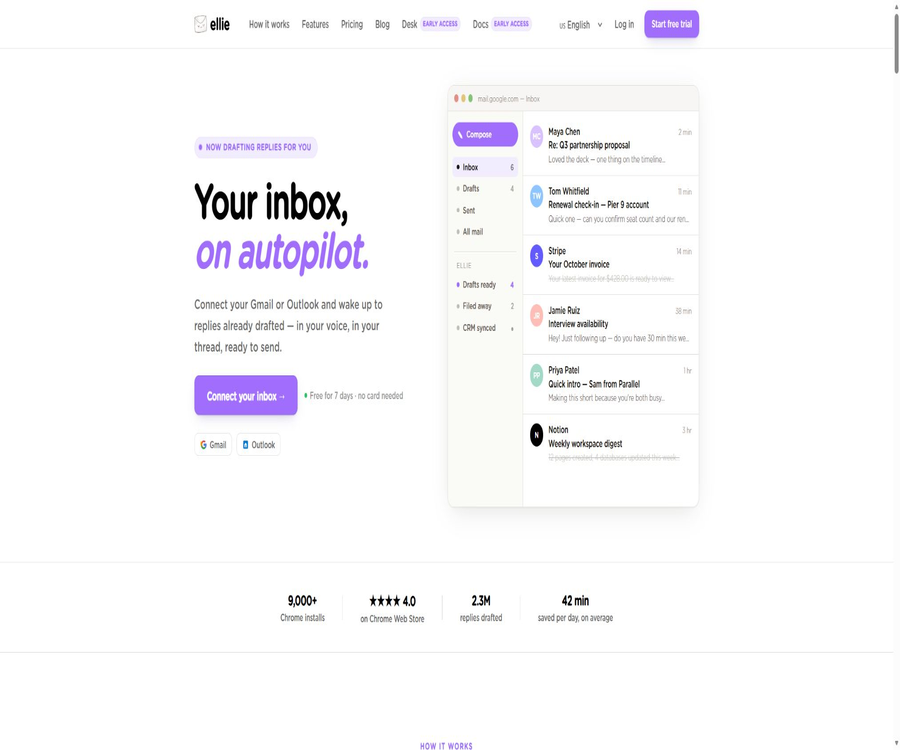
Ellie
Ellie, an intelligent tool focused on AI-driven writing.
Tags:AI writing toolsA one-sentence summary
Ellie is an AI-powered email response assistant designed for Gmail and Outlook; it learns the user’s tone and style of writing from existing emails, creates drafts for review by taking into account the entire conversation as well as relevant knowledge bases. In the premium versions, it automatically categorizes incoming messages and saves replies in the draft folder.
Tool Introduction
Ellie is operated by the British company Ellie Assist Ltd; it addresses issues such as repeated responses, writing anxiety, cross-lingual communication, and managing a large volume of emails in the inbox. It does not send emails on behalf of the user – all drafts must be reviewed, modified by the user, and sent manually.
The product offers three ways of use: connecting to email accounts, as a browser extension, and as a desktop add-in for Outlook. Casual is designed for manual creation on demand, while Business and Professional are better suited for allowing the system to handle connected email accounts in the background.
Three ways of use
| Usage method | Supporting environment | Working method | Main features |
|---|---|---|---|
| Connect to email account | Gmail, Google Workspace, Outlook, Microsoft 365, and Exchange Online | The backend reads new emails and creates drafts. | No additional installations are required; it is suitable for automatic drafting and categorization. |
| Browser extensions | Chrome, Edge, and Firefox | Generate on demand in Gmail Web or Outlook Web | The user can initiate the switch between roles. |
| Expanded popup | Other email clients within the browser | A reply is generated after pasting or selecting content. | It can be used with Fastmail and similar services, but manual copying is required. |
| Outlook add-ins | Classic Outlook, New Outlook, and Outlook Web | Generate as needed from the Outlook ribbon. | Can be deployed by Microsoft 365 administrators |
| Microsoft AppSource subscription | Microsoft 365 organizations | Purchase SaaS through the Microsoft Store | The bill can be integrated with Microsoft services. |
Main functions
Learn one’s own writing style
Ellie learns about tone, sentence rhythm, greetings, and closing conventions from the emails that have been sent with user authorization. The extension mode can also be trained by forwarding email attachments; as training samples, emails that truly reflect an individual’s style and do not contain any unnecessary sensitive information should be used.
Read the entire email thread
When generating a response, Ellie reads the relevant session context rather than focusing only on the last sentence. Longer conversations may still contain conflicting, outdated, or irrelevant information; it is necessary to check the facts and commitments before sending the response.
Generate responses as needed
Browser extensions add an Ellie button to the reply area in Gmail and Outlook Web, allowing users to manually initiate drafts. The Casual plan operates in this manner and does not include automatic drafting in the background after connecting to an email account.
Automatic draft
Business and Professional can be connected to Gmail or Outlook, allowing Ellie to read new messages and save suggested replies in the draft folder. The system does not send the messages automatically; users always retain ultimate control.
Automatic classification
The premium packages for connecting to email accounts allow for automatic classification of incoming messages, helping users determine which messages require a response and which role should be used for handling them. However, this classification system may misjudge the urgency, the identity of the sender, or the subject of the message; important emails should therefore be reviewed by a human.
Multilingual responses
Ellie can generate responses in any language and try to maintain the user’s tone. Content that is not in the user’s native language, or that relates to law, technology, or cultural sensitivity, still needs to be reviewed by someone who is familiar with the target language.
Knowledge base training
Users can upload files such as PDF, TXT, and DOCX, or have Ellie extract content from websites to use as knowledge related to products, policies, and processes. Business and Professional versions offer more comprehensive advanced knowledge base capabilities, while Casual is designed for training basic knowledge.
Structured data sources
The platform allows the upload of CSV files, spreadsheets, or files exported from business systems; it preserves the field structure of each record, which makes it possible to locate information such as renewal dates, packages, tickets, or orders. The current help documentation indicates that Data Sources can be used during the trial period, but this feature is restricted in the free tier.
Roles and different tones of voice
Roles allow different knowledge bases and tones to be set for roles such as support, sales, operations, finance, or founder. When connecting an email address, it is possible to assign categories to specific roles; alternatively, you can switch between these roles manually.
Calendar time suggestions
Users can grant additional permissions to Google Calendar, allowing Ellie to suggest available times for meetings in her responses. According to the official guidelines, only the start time, end time, status, number of attendees, and a few derived details are retrieved; moreover, the title, description, location, and identities of the attendees are removed before the information crosses the boundaries between different applications or AI systems.
Team sharing
Business and Professional can share knowledge bases, roles, and training outcomes, as well as manage email connections via members. Business offers 3 seats with 1 connected account per user, while Professional provides 5 seats allowing up to 3 accounts per user.
Automatic draft workflow
- Users connect their work email accounts to Ellie through Google or Microsoft authorization.
- Ellie reads the newly arrived relevant threads and determines their category as well as whether a response is needed based on their content.
- The system selects the appropriate tone and facts from the user’s sent emails, roles, and knowledge base.
- The necessary email fragments, knowledge content, and role instructions are sent to the AI service provider to generate text.
- The generated result is saved in the email draft folder, while the necessary drafts and metadata are retained.
- The user opens the draft to check the recipient, facts, tone, attachments, date, and commitments.
- Users send the revised version voluntarily, or delete unsuitable drafts.
- The team updates the roles, knowledge base, classification, and connection settings based on the incorrect samples.
Getting started guide
Connect to Gmail or Outlook
- To register for an Ellie account and take advantage of the 7-day trial, it is not necessary to have a credit card linked to the account.
- Choose to connect to Gmail, Google Workspace, Outlook, or Microsoft 365.
- Read the permission scope – only email functions necessary for work are allowed.
- If an enterprise account requires administrator approval, the application must first be reviewed by the IT team.
- Let Ellie learn her personal tone from representative sent emails.
- Set the first type of role along with a small amount of accurate, up-to-date knowledge content.
- Generate a draft using a non-sensitive test thread to check the language, addresses, and facts.
- After confirming that the system only saves drafts without sending them automatically, gradually expand the scope.
Use a browser extension
- Select the Chrome, Edge, or Firefox version from the official portal; do not install third-party extensions with the same name.
- After installation, log in using an Ellie account or license.
- Open a test email in Gmail Web or Outlook Web.
- Click the Ellie button in the reply area and select the appropriate character.
- Add the additional context, objectives, and tone requirements specific to this email.
- After it is generated, check each sentence carefully and make the necessary changes in the email client.
- Confirm the recipient, CC recipients, attachments, and history of citations before sending.
Training an individual’s tone of voice
- Select representative emails that were genuinely written by the individual in various contexts and situations.
- Delete passwords, identity information, contractual secrets, and content that is not necessary for training.
- Users connected to their email accounts can enable the system to learn from the sent folder.
- Users in extended mode should use forwarding as an attachment, rather than ordinary text forwarding.
- Make sure the attachment is in EML format; the MSG format specific to Outlook may not be compatible.
- Check the Processed, Pending, Failed, or Skipped statuses in the training log.
- Use the same test questions to compare drafts before and after training, in order to avoid relying solely on subjective impressions.
- If an inappropriate tone is detected, the sample is removed or the character description is adjusted.
Knowledge base and role tutorials
Establish a reliable knowledge base
- First, list the products that are frequently needed for responses, along with their prices, policies, procedures, and contact information.
- Only PDF, DOCX, TXT files, or structured files that have been approved and are still valid should be uploaded.
- When scraping websites, focus on authoritative pages and avoid mixing in outdated blogs and marketing content.
- Record the person in charge, date of release, applicable region, and review date for each document.
- Use real-world questions to test whether Ellie can identify the correct facts, and require her to admit uncertainty when she is unsure.
- After updating prices, terms, or products, re-index and retest promptly.
- Place customer-level data in structured channels with appropriate access controls, rather than making it available for all teams to share.
Set Roles for the team
- Create roles such as support, sales, operations, or finance based on job responsibilities.
- Specify the tone for each role, the range of responses allowed, and the questions that must be escalated.
- Only the knowledge bases and structured data required by that role are associated.
- Set mappings for different categories and roles, while retaining a manual switching option.
- Use the same thread to test different roles separately, in order to check whether facts and tone are mixed together.
- Regularly review shared materials, access by departing members, and feedback on erroneous drafts.
Input and output
| Input or data | Representative content | Uses | Risk control |
|---|---|---|---|
| Email thread | Body text, topic, sender, and time | Understand the context and generate a response. | Verify sensitive content and expired facts |
| Email has been sent. | Historical expressions, titles, and endings | Learn one’s own writing style | Select representative samples |
| Role instructions | Rules regarding identity, tone, and behavior | Switch expressions based on scenario | Explicitly prohibit making promises and setting upgrade conditions. |
| Knowledge base file | PDF, DOCX, and TXT | Provide facts about products and policies | Version management and minimum sharing |
| Website content | Help center, pricing, and product pages | Establish searchable knowledge | Prevent navigation to expired or third-party pages |
| Structured data | CSV, tables, and business exports | Search fields by customer or order | Field permissions and update frequency |
| Calendar availability information | Time, status, and number of attendees | Suggested meeting time | Independently authorize and verify the time zone. |
| Output | Drafts, categorization, and timing suggestions | Reduce redundant writing | Send after manual inspection |
Comparison of package features
| Project | Free | Casual | Business | Professional |
|---|---|---|---|---|
| Price | $ | $ | 39 dollars per month | $ |
| Daily replies | The current public limit is not specified. | 25 letters | 100 letters | Unlimited expression |
| Usage method | Limited manual ability | Manual creation of browser extensions | Connect the email account to the extension. | Connect the email account to the extension. |
| Automatic draft | Pause | Not included | Includes | Includes |
| Automatic classification | Not included | Not included | Includes | Includes |
| Email training | Locked after the trial period ends | Up to 200 messages | Up to 1000 messages | Train using email archiving |
| Knowledge base | Roles and knowledge content are retained. | Foundation | Advanced | Advanced |
| Team Seats | Not specified | Personal use | 3 seats | 5 seats |
| Each user connects to their email account. | No automatic connection included | Manual mode | 1 | Up to 3 |
| Support | Routine support | Routine support | Email support | Priority support |
The public page also states that the cost for additional team members starts at $5 per person; payments can be made in dollars, pounds, euros, or Australian dollars, with settlement being done in the local currency. The payment page may offer coupons for the first 3 months, and such promotions should not be considered as the standard price on a long-term basis.
Price and trial version
As of August 22, 2026, new accounts can enjoy a 7-day trial of the Business features without the need for a credit card. Up to 3 user accounts and 5 connected email addresses are available during this trial period; after it ends, the account moves to the Free tier. Existing drafts remain intact, but automatic drafting is suspended, and Data Sources as well as email training functions are locked out.
| Plan | Standard monthly price | Daily reply limit | Primary interests | Suitable for users |
|---|---|---|---|---|
| 7-day trial | $ | Based on trial restrictions | Business features, up to 3 seats and 5 connected email accounts | Individual or team assessment |
| Free | $ | The specific figures are not available at the moment. | Retain roles and knowledge content; automatically pause drafts. | Light usage after the trial period ends |
| Casual | 19 dollars | 25 letters | Manual expansion, 200 training emails, knowledge base, and roles | Individuals respond as needed. |
| Business | 39 dollars | 100 letters | Automatic drafts, automatic categorization, 1000 training emails, advanced knowledge base, and 3 seats | Small email team |
| Professional | 79 dollars | Unlimited expression | Automatic drafts, advanced training, 5 seats, up to 3 email accounts per user, and priority support | High-frequency teams and users with multiple email addresses |
| Additional members | Starting at $5 per person | Inherited team plan | Increase team seats | Organizations with more seats than available |
The annual payment option is cheaper than the monthly one, but the available search results do not always show the total cost for each annual plan. Differences in currency, taxes, promotions, and Microsoft’s billing practices can result in variations in the actual amount to be paid; it is therefore necessary to refer to the settlement page for accurate information.
How to choose a package
- If it is only needed to be generated occasionally in the web email, it is advisable to first use the manual mode of Casual for a trial evaluation.
- If you need to see the draft as soon as you wake up every day, you should compare Business and Professional.
- The 25, 100, or unlimited plan options are determined based on the actual number of drafts and revisions needed per day.
- The team should track the number of seats, the number of email accounts each member has access to, and the scope of shared knowledge.
- First, verify the quality of automatic classification and drafts, before deciding whether to maintain a connection to the work email on a permanent basis.
- Confirm cancellation, refund, downgrade, data retention, and additional member prices before annual payment.
Which users are it suitable for
- Founders and managers: Reduce repetitive responses to customers, partners, and internal emails.
- Salesperson: Create drafts in a tone that suits the individual, based on incoming inquiries and follow-ups.
- Customer support staff: Respond to common questions by referring to the help documents and relevant role guidelines.
- Recruiter: Handles communication with candidates, as well as scheduling and follow-up emails.
- Real estate agent: Respond quickly to inquiries while maintaining a personalized approach.
- Non-native writers: Draft the text in the target language and then manually check its semantics and level of politeness.
- Users with reading or writing difficulties: reduces the burden of starting to respond and organizing language.
- Small teams: Share product knowledge and roles, while preserving each member’s email address and communication style.
Typical use cases
- Draft a subsequent response that includes the proper context, based on the entire customer conversation.
- Allow sales professionals to use their knowledge of prices and solutions to answer incoming inquiries.
- Have the support role generate a draft for troubleshooting based on the help documentation.
- Drafts of responses required are automatically generated before starting work each day.
- Use different tones for financial, sales, and support emails depending on their category.
- After reading the information on available calendar time slots, two meeting times are suggested.
- Provides a unified draft and knowledge base process for the Gmail and Outlook teams.
- Generate a reply through a pop-up in Fastmail or other clients and paste it manually.
Product advantages
- Automatic drafts are sent directly to the existing Gmail or Outlook draft folder, without requiring users to move them to a new inbox.
- By integrating complete threads, personal style, roles, and a knowledge base, the generic AI tone is reduced.
- All emails must be sent manually to prevent the system from responding externally without confirmation.
- Connecting email accounts, browser extensions, and Outlook add-ins covers different control preferences.
- It supports multiple languages, which helps non-native speakers quickly create an editable draft.
- The team can share knowledge and roles, while each member has access to their own email address.
- A 7-day trial is available without a credit card, and it allows small teams to evaluate it together.
- The body of the email is not stored for an extended period after processing is completed, thereby reducing the risk associated with ongoing storage.
Usage restrictions and precautions
- Ellie is only used to write replies; it is not intended for sending unsolicited emails.
- Casual does not include automatic background drafts; they can only be created on demand through extensions.
- AI may fabricate facts, promises, dates, discounts, policies, or contents of attachments.
- Unlimited responses may still be subject to constraints such as fair use policies, system capacity, or contractual terms.
- Email connectivity expands the scope of accessibility; companies should first carry out administrator and privacy reviews.
- If the knowledge base becomes outdated, drafts will consistently repeat the incorrect policies.
- Automatic classification may miss emails related to emergencies, security issues, legal matters, or high-value customers.
- Browser extensions and email client updates may cause the interface buttons or injections to stop working.
- Multilingual drafts do not guarantee complete accuracy in terms of law, industry terminology, and cultural context.
- After the trial period ends, some functions will be locked; the team should decide in advance on the export and subscription options.
- Ellie Desk and Ellie Docs are still in early access phase and cannot be considered as fully functional packages that have been delivered.
Secure transmission check
- Ensure that the recipient, carbon copies, and blind copies have not been selected incorrectly due to the thread history.
- Check each item individually: names, companies, amounts, dates, time zones, as well as order and contract details.
- Check whether the draft promises any unreleased refunds, discounts, deliveries, or legal positions.
- Verify that the mentioned attachment indeed exists and is the correct version.
- Remove the placeholders generated by the model, repeated greetings, and unnatural phrases.
- Sensitive matters are assigned to the appropriate personnel, rather than being decided based on ordinary AI drafts.
- After sending, the severely erroneous samples are fed back into the processes for maintaining roles and knowledge bases.
Supported platforms
| Platform or client | Support status | Explanation |
|---|---|---|
| Gmail | Support | It is possible to connect to an email account or use a browser extension. |
| Google Workspace | Support | The organization may require administrator approval. |
| Outlook.com | Support | It allows connection to email accounts and the creation of automatic drafts. |
| Microsoft 365 | Support | Supports connection, market subscriptions, and administrator deployment. |
| Exchange Online | Support | It falls within the scope of supported email connections. |
| Gmail Web | Supports expansion | Chrome, Edge, and Firefox |
| Outlook Web | Supports extension and add-ons | It can be generated as needed. |
| Classic Outlook for Windows | Supports add-ons | Triggered from the Outlook ribbon |
| New Outlook desktop | Supports add-ons | Also available through official add-ons |
| Fastmail | Manual mode | Copy after expansion or pop-up is generated |
| Apple Mail | Indirect use | Generated through a pop-up and pasted manually |
| Native mobile apps | Not verified. | No standalone iOS or Android apps were found. |
Privacy and data processing
When used alone, Ellie reads only the email threads currently open in the browser; it does not save the actual text of those emails after processing them. Once connected to an email account, it reads new emails and analyzes existing sent emails to understand the writing style, while saving metadata such as the sender, subject, category, and time, as well as creating drafts. However, the full text of the emails is not retained after processing.
The relevant threads, knowledge base snippets, and role instructions are sent to OpenAI or Microsoft Azure OpenAI for processing. The providers claim that these data elements are not used for training general-purpose models, but organizations should still assess the situation by taking into account their own data classification, contractual agreements, and the terms set by the AI service providers.
| Data category | Handling method | Primary uses | User control |
|---|---|---|---|
| Email body | Readed at generation time; not stored for an extended period after processing. | Classification and draft generation | In extended mode, it is read-only for the current thread, and the email connection can be disconnected. |
| Email metadata | The connection mode stores only the minimum necessary information. | Synchronization, categories, and operating status | Delete the account or disconnect the integration. |
| Generate draft | Retain copies and necessary snippet hints | View, regenerate, and provide services | Manage in email and accounts |
| Knowledge base and roles | Stored in the service | Provide facts and tone for future responses. | Users can update or delete it. |
| OAuth refresh token | Save in encrypted format | Continuous access to authorized integrations | Disconnect Gmail, Calendar, or Tasks one by one. |
| Calendar information | The server first removes elements such as the title, location, and identity. | Suggest using free time | Separate authorization, read-only only |
| Analysis and logging | Collect device, browser, and usage information | Security, operations, and product analysis | Exercise rights in accordance with policies |
- The operational entity is located in the UK, while the main applications, databases, object storage systems, and analysis infrastructure are situated in Germany.
- Some sub-processors may process data outside the UK and the European Economic Area, and official mechanisms for such data transfer have been established.
- TLS is used for transmitting data, while AES-256 encryption is employed for static data such as sensitive tokens.
- Officials state that the Google CASA Tier 2 security review has been completed, but this does not equate to certification in all industries.
- After the account is deleted or the integration is discontinued, the cache data related to the active system is removed within 30 days, while backups are cleared on a rolling basis every 90 days.
- User emails, knowledge bases, and drafts will not be used to train Ellie or generic models for third parties.
- Companies can request a data processing agreement from the authorities and submit a security questionnaire.
- When it comes to medical, legal, financial information, or unpublished code or customer secrets, it is necessary to first determine whether it is permissible to send such data to external AI systems.
Checks before enabling the enterprise
- Confirm the types of email addresses allowed for connection, the departments involved, the categories of data, and the scenarios in which use is prohibited.
- Review Google or Microsoft licensing scopes, as well as the processes for administrator approval and revocation.
- Request the data processing agreement, sub-processors, and evidence regarding data location and security.
- Define the retention rules for knowledge bases, training emails, structured data, and generated drafts.
- Use test tenants to verify account deactivation, disconnection, data deletion, and recovery.
- Establish rules regarding the amounts that require manual review, as well as rules in the areas of law, human resources, security, and customer complaints.
- Train employees to identify AI-generated content, prompt injection, and malicious instructions in email threads.
API and integration capabilities
Ellie’s core integrations at the moment include Gmail, Outlook, Google Calendar, Google Tasks, browser extensions, and Microsoft AppSource. The official website states that real-time API integrations for customer management, support desks, billing, and e-commerce systems are still under development and cannot be considered as part of the existing official features.
| Project | Current status | Explanation |
|---|---|---|
| Gmail connection | Available now | Used for automatic drafting, categorization, and tone learning |
| Outlook connection | Available now | Covers individuals, Microsoft 365, and Exchange Online. |
| Google Calendar | Optional launch | Read-only limited free time information |
| Google Tasks | Optional launch | It is possible to create and synchronize follow-up tasks from Ellie’s task list. |
| Browser extensions | Available now | Chrome, Edge, and Firefox |
| Outlook add-ins | Available now | Can be deployed by Microsoft 365 administrators |
| CRM and help desk real-time APIs | Coming soon | At the moment, it is not possible to carry out formal integrated procurement. |
| Public API for developers | Not verified. | There are no public endpoints, keys, or pricing for calls. |
| Official SDK | Not verified. | There are no public software development packages available. |
GitHub and open source
Ellie has a public GitHub repository; the main branch of this repository currently contains only a README file. Its primary functions are to provide links to the product, to release new versions, and to collect issues. The latest version listed in the public release history is 2.5.0, dated November 2024, and it covers support for Outlook and Office 365.
The warehouse does not contain the complete source code of the products used to build the current service, nor are any open-source licenses available there. Assets that can be downloaded publicly do not necessarily mean they are open source; Ellie’s web services, model logic, as well as the components that connect to email servers and other extensions should be considered commercial, closed-source products.
| Project | Current conclusion | Explanation |
|---|---|---|
| Official GitHub repository | Yes | The Ellie warehouse under the Ellie-Assist organization |
| Warehouse contents | Focused on README, Issues, and Releases | The main branch does not display the complete source code of the application. |
| Public Release | Yes | It is possible to view the assets released in previous versions of the extension as well as the records of changes made. |
| Latest public release | 2.5.0 | Released in November 2024, with added support for Outlook and Office 365. |
| Open-source license | Not verified. | The warehouse page does not indicate the license. |
| Is the product open source? | No | Making the repository publicly available does not mean that the source code of the service is made available to everyone. |
| Self-hosting is allowed. | Not disclosed | There is no verifiable complete self-hosted solution. |
Ellie Desk and Ellie Docs
The official website is working on expanding two separate products, but as of the date of verification they are still in the early access stage or on the waiting list. They do not replace the existing email assistant, nor should they be included among the current features of Casual, Business, or Professional versions.
| Products | Positioning | Current status | Relationship with the email assistant |
|---|---|---|---|
| Ellie Email Assistant | Draft replies for individual and team emails | Officially available | The core products introduced in this article |
| Ellie Desk | AI supports shared inboxes. | Early Access | A standalone product that can be used in combination with Docs. |
| Ellie Docs | From the help center for applications, code, and existing content maintenance | Early Access | A standalone product that can be used on its own. |
Ellie Desk states explicitly that it supports the use of Chatwoot for basic inbox functions, but this does not mean that the entire Ellie Desk platform is open source. Ellie Docs covers aspects such as code integration, expiration detection, screenshot functionality, and a hosting help center; availability of these features depends on whether users have early access to them.
Basic information
| field | Content |
|---|---|
| Tool name | Ellie |
| Development company | Ellie Assist Ltd |
| Company region | United Kingdom |
| Tool type | AI-powered email replies, automatic drafts, and email sorting |
| Primary email address | Gmail, Google Workspace, Outlook, and Microsoft 365 |
| Usage method | Connect email accounts, browser extensions, and Outlook add-ins |
| Price pattern | 7-day trial, Free tier and monthly subscription |
| Minimum payment plan | Casual: 19 dollars per month |
| Team package | Business costs $39 per month, while Professional costs $79 per month. |
| Trial requirements | No credit card required |
| Language | Supports multi-language responses |
| Automatic sending | Not supported; the user must send it actively. |
| Public API | Not verified. |
| Official SDK | Not verified. |
| Official GitHub | There are repositories for releases and issues. |
| Is it open source? | No |
Recommendation score
The recommendation score is 4.5 out of 5. Ellie integrates complete threads, a personal tone, various roles, a knowledge base, and automated drafts into the existing Gmail and Outlook workflows of users, while insisting that humans be the ones to send the emails in the end; it is suitable for those who need to send emails frequently but still value personalization.
The main shortcomings are that automatic drafting is available only in higher-tier packages, the team pricing increases as more members are added, and real-time API integrations such as those with CRM have not yet been launched. Before connecting to a work email account, it is necessary to carefully assess the scope of authorization, third-party AI processing, and the policies regarding highly sensitive emails.
Frequently Asked Questions
What is Ellie?
Ellie is an AI-powered email response assistant that can learn the user’s tone, analyze the current conversation thread and existing knowledge base, and generate drafts for review in Gmail or Outlook.
Will Ellie send emails automatically?
No. Even when using automatic drafts, the content is only saved in the draft folder; the user must review it and send it manually.
Can Ellie write cold emails?
No. The officials have clearly specified that the product is intended for responding to existing emails, rather than for automatically generating marketing emails aimed at new users.
Is Ellie free?
New accounts enjoy a 7-day trial of the Business features, without the need for a credit card. After the trial period ends, the account switches to the limited Free tier; the current public page does not indicate the fixed number of replies available per day in the Free tier.
Why doesn’t Casual have an automatic draft feature?
The Casual plan is created manually through a browser extension, with 25 replies per day. If email connectivity, automatic drafting, and automatic sorting are required, then the Business or Professional plan should be chosen.
What is the difference between Business and Professional?
Business plan: 100 emails per day, 3 seats; each user can be connected to 1 email account. Professional plan: no limit on the number of replies, 5 seats; each user can have up to 3 email accounts, and it includes more advanced training and priority support.
Is support for Chinese emails available?
Multilingual responses are supported, including in Chinese. However, when professional terms, contracts, customer complaints, or cultural contexts are involved, manual verification is still required.
Can it be connected to Fastmail?
Fastmail can be used in manual mode to generate extensions or pop-ups, which can then be copied into email clients. The recommended email services for automatic connection are Gmail and Outlook.
Does Ellie save the body of the emails?
The full text of the official explanatory email is not retained for an extended period after it is generated. The connection mode stores the necessary metadata and draft versions, while the knowledge base, roles, and authorization tokens are saved as required by their functionality.
Will the emails be used to train the model?
Officials state that customer emails will not be used to train Ellie or any third-party models, and OpenAI as well as Azure OpenAI have been instructed not to use the submitted content for training foundational models. Users should still check the current contracts and organizational policies.
Are public APIs available?
No official public API or SDK for developers has been identified. CRM, support desk, billing, and e-commerce real-time connections are still marked as upcoming.
Is Ellie open source?
It is not open source. The official GitHub repository is used mainly for README files, issues, and assets from previous versions; it does not contain the complete source code of the product nor an approved open-source license.
Are Ellie Desk and Ellie Docs already available?
They have not yet been released as officially available products; both are currently in the early access phase and are on the waiting list. Moreover, they are separate products from the email assistant.
How long does it take for the data to be deleted after the account is removed?
The official privacy policy states that such tokens are removed immediately, the associated cache data in the event system is deleted within 30 days, and encrypted backups are erased on a rolling basis every 90 days.
Summary
Ellie does not take over the task of sending messages on behalf of the user; rather, it prepares replies in an email account that are closer to the user’s own style of writing. For individuals and small teams that handle a large number of Gmail or Outlook messages on a daily basis, automatic drafts, assigned roles, and knowledge bases can significantly reduce the need to write things over and over again.
When making a purchase, it is first necessary to distinguish between the Casual manual mode and the Business/Professional automatic modes; thereafter, the cost should be calculated based on the number of replies, the number of seats, and the number of email accounts. After connecting to a work email account, keeping the knowledge up to date, adhering to policies regarding sensitive data, and performing manual review of each message remain essential conditions for safe use.
Tools similar to Ellie




 Guigong Network Security Registration No. 45132202000164