






AFFiNE AI
AFFiNE AI: an intelligent tool focused on AI-driven writing.
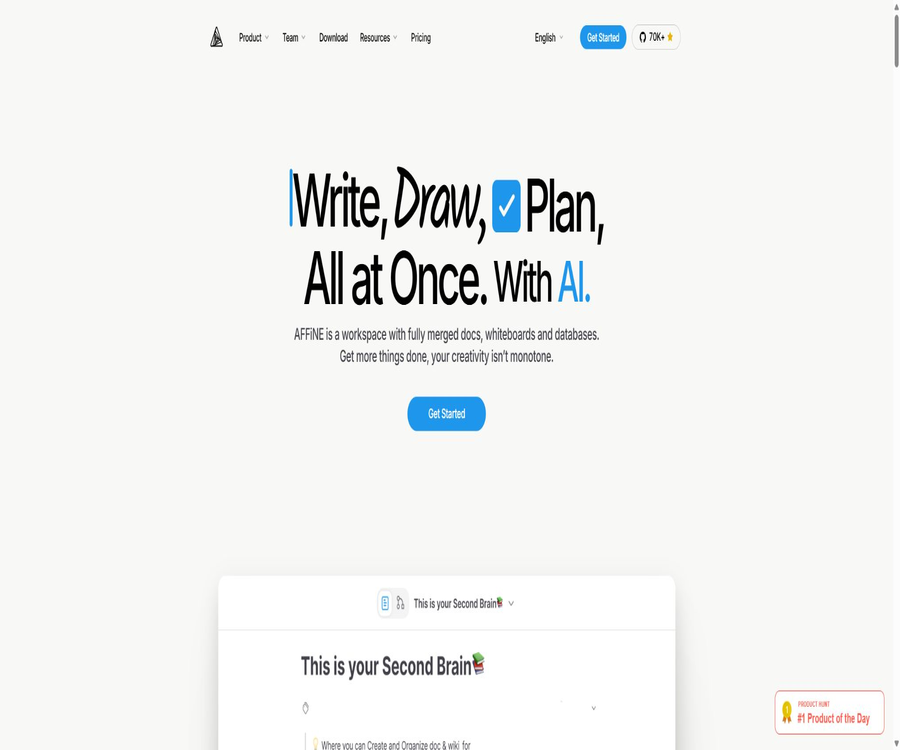
Tags:AI writing toolsAFFiNE AI is a locally-focused workspace that combines documents, borderless whiteboards, a knowledge base, and an AI assistant. Users can take notes, draw diagrams, and manage databases within the same interface, while the AI can handle tasks such as summarization, rewriting, creating mind maps, and generating presentations.
AFFiNE emphasizes storing data locally as a priority, while also offering optional cloud synchronization, multi-user collaboration, and self-hosting options. It is suitable for individuals and teams who wish to reduce the need to switch between different note-taking, whiteboard, and project planning tools.
What is AFFiNE AI?
AFFiNE can be regarded as a knowledge workspace that combines the features of Notion-style documents with those of Miro-style whiteboards; AI capabilities are integrated directly into the pages and Edgeless canvas. Content is organized in blocks, allowing for structuring it within pages, canvases, tables, and presentations.
- Record notes, plans, and knowledge documents on structured pages
- Place text, graphics, and related content freely on an infinite canvas.
- Use database views to manage tasks, materials, and project entries.
- Use AI for Q&A, summarization, rewriting, and content generation.
- Convert the outline into a mind map or presentation.
- Data is saved locally, with cloud synchronization and collaboration enabled as needed.
Document editing function
Page mode is suitable for writing, taking meeting minutes, keeping research notes, and maintaining team knowledge bases. The editor supports various types of content blocks, page links, and hierarchical structures, enabling the organization of disparate content into a knowledge system that can be maintained over time.
- Rich text, headings, lists, citations, and code blocks
- Page nesting, bidirectional links, and related knowledge
- Embedding of images, files, and web page content
- Task lists, tables, and multi-view databases
- Template reuse and centralized workspace management
Edgeless edgeless whiteboard
In Edgeless mode, document blocks are placed within a freely scalable canvas, making it suitable for brainstorming, process mapping, visual planning, and presentation design. Users do not need to transfer content back and forth between a whiteboard and formal documents.
- Freely arrange text, notes, graphics, and connection lines
- Use the page content as editable blocks within the canvas.
- Create flowcharts, concept diagrams, and project roadmaps
- Invoke AI to expand or organize around the selected element.
- Organize the visual results further into a document or presentation format.
Core functions of AFFiNE AI
AI chat and question-answering
Users can converse with the AI in the sidebar, asking questions about the current content, seeking insights, or organizing their thoughts. The AI can draw on the content of related pages, but important facts should still be verified by referring to the original sources.
Inline writing and rewriting
- Continue the paragraph and create a draft.
- Adjust the tone, clarity, and way of expression.
- Correct spelling and grammar errors.
- Translate the selected text
- Extract action items from the records.
- Compress long content and generate a summary.
AI mind map
AFFiNE AI can transform outlines or scattered notes into structured mind maps, which are useful for reviewing what has been learned, planning articles, and breaking down projects. Once created, it is still possible to adjust the nodes, layout, and relationships within the mind map.
AI presentation
Users can create the structure of presentations and the content of slides based on prompts or existing outlines, which reduces the time required to start from a blank slide. This feature is still in the testing phase; before using it for formal presentations, it is necessary to check the logic, accuracy of the information, and visual consistency.
Organization of PDF and video content
AFFiNE AI can help summarize PDF documents and video transcripts, saving the key points as reusable notes. The quality of the results depends on the file’s structure, the quality of the text, and its length.
How to use AI on a page
- Log in to your AFFiNE account and open a document.
- Select the text that needs to be processed, or one or more sections of content.
- Select Ask AI in the floating format toolbar.
- Choose options such as summarizing, rewriting, translating, etc., or enter custom requirements.
- After checking the generated results, insert them into the page; if necessary, keep the original text for comparison.
- You can continue chatting with the AI by expanding the sidebar in the upper right corner.
How to use AI on a whiteboard
- Enter the Edgeless mode of the document and prepare text, notes, or graphics.
- Select one or more canvas elements that need to be analyzed.
- Select Ask AI from the element menu, or right-click to access the relevant options.
- Ask AI to expand on ideas, summarize content, or generate mind maps.
- Rearrange the nodes and connection lines, and manually add missing relationships.
- When a report is needed, organize the results into a presentation format.
Local priority with cloud synchronization
AFFiNE’s local-first design allows users to create and edit workspaces on their devices, without the need to upload everything to the cloud first. Cloud services are used for synchronization across devices, real-time collaboration, version history, and online storage.
| Method | Data and collaboration features | Suitable situations |
|---|---|---|
| Local workspace | The content is mainly stored on the current device, allowing for offline editing. | Personal notes and privacy-sensitive drafts |
| AFFiNE Cloud | Provides synchronization, collaboration, storage, and version history. | For use across devices and small teams |
| Self-hosting | Run the complete service on your own server. | Organizations that place emphasis on data residency and operational control |
Local priority does not mean that all functions are completely offline. AFFiNE AI currently operates via the cloud and requires login to be used; starting with version 0.27, it is possible to set up an API key of one’s own, but it is still necessary to review the data policies of the model service chosen.
Real-time collaboration and version history
- Multiple people can edit documents and whiteboards simultaneously.
- Invite members by workspace and control the scope of collaboration.
- Synchronize pages and canvases across different devices
- Use Cloud Time Machine to view and restore previous versions.
- The team plan offers more members, administrator roles, and support services.
Supported platforms
| Platform | Usage method | Explanation |
|---|---|---|
| Web | The browser uses it directly. | Suitable for quick access and cloud collaboration |
| Windows | Desktop client | Supports local-first workflow |
| macOS | Desktop client | Suitable for desktop notes and whiteboards |
| Linux | Desktop client | The specific package format is subject to the download page. |
| iOS | Mobile apps | Used for viewing and editing on the go |
| Android | Mobile apps | For use on smartphones and tablets |
| Browser extensions | Web Clipper | Save the web page content to the workspace |
| Docker | Self-hosted deployment | It is necessary to maintain the server and make updates by oneself. |
Applicable scenarios
- Students organize course notes, reading materials, and knowledge maps.
- Researchers compile PDFs, key points from the literature, and research outlines.
- Content creators select topics, write content, create mind maps, and prepare presentations.
- The product team is responsible for documenting requirements, creating flowcharts, and planning the roadmap.
- Small teams build a shared knowledge base and collaborate in real time.
- Individuals create a locally-based secondary brain and task management system.
- The organization controls where knowledge data is stored through self-hosting.
Build a knowledge base from scratch
- Create a local workspace or a cloud workspace.
- Create top-level pages by project, course, or topic.
- Use page links to connect people, concepts, tasks, and materials.
- Create templates and unified fields for repetitive content.
- Use database views to manage status, dates, and responsible persons.
- Switch complex topics to the Edgeless canvas for organization.
- Regularly use AI to generate summaries and action items, followed by manual review.
- Independent backups of critical data should be created, rather than relying solely on synchronization services.
AFFiNE Cloud pricing
AFFiNE Cloud offers different packages based on storage capacity, file size, number of users, and version history. The public page currently lists the free, Pro, Team, Believer, and enterprise plans.
| Package | Public price | Storage and Files | Members and versions |
|---|---|---|---|
| Local FOSS + Cloud Basic | Free | 10 GB of cloud storage; 10 MB per file | Up to 3 people per workspace; 7 days of history; 3 connected devices |
| Pro | $ | 100 GB of cloud storage; 100 MB per file | Up to 10 people per workspace; 30 days of history |
| Team | $ | 100 GB as the initial capacity, with an additional 20 GB per seat; 500 MB per file | Minimum of 10 seats; no limit on the number of team members; multiple administrators allowed |
| Believer | One-time price: 499.99 dollars | 1 TB cloud storage | Lifetime personal access to Pro benefits |
| Enterprise | Custom quote | Determined in accordance with the contract and deployment requirements. | For organizations with 100+ seats and those that are subject to regulation |
The price page does not clearly indicate whether the monthly or annual payment option applies at the price of $6.75; the payment cycle and any taxes are specified on the purchase page. Team pricing is based on the number of seats, and it is intended for teams with 10 or more seats.
AFFiNE AI price
| Project | Public price or quota | Explanation |
|---|---|---|
| Free AI trial | 10 times per cloud user | You can try it out for free. |
| AFFiNE AI | The annual fee is equivalent to $8.9 per month. | AI capabilities for writing, summarizing, creating mind maps, and delivering presentations |
| Built-in API key | The cost of the model is calculated by the corresponding service provider. | Supported starting from version 0.27; the configurations and available models are subject to the specific product. |
The official page states that early-paying users are entitled to a greater amount of AI usage, but it also mentions that these restrictions may be changed. Therefore, “unlimited usage” should not be regarded as a permanent commitment under the contract.
How to choose between the free version and the paid version
- Personal notes can only be saved locally; you can start by using the free local workspace.
- Slight cross-device synchronization and collaboration among up to three people are sufficient; Cloud Basic can be used for this.
- Families or small teams that need larger files and a longer history can opt for Pro.
- For configurations with 10+ seats that require multiple administrators and priority support, a Team solution can be considered.
- The main requirements are AI-driven writing and mind mapping; an additional assessment is needed for the AFFiNE AI subscription.
- If data residency, purchase contracts, or dedicated deployment are required, please contact the enterprise sales team.
Self-hosting instructions
AFFiNE provides a path for self-hosting Docker; a complete server also includes components such as databases, caches, email systems, and object storage. Once deployed, the organization is responsible for managing the data, as well as handling tasks related to backups, upgrades, security configurations, and disaster recovery.
- Confirm the server, domain name, storage, and backup solutions before deployment.
- Use the official stable version and read the upgrade instructions.
- Set up persistent storage for databases and uploaded files.
- Configure email, authentication, and network access control.
- Back up the data before upgrading, and verify the migration in a testing environment.
- The business team checks the backend licensing and support scope before use.
Open source and licenses
AFFiNE cannot be simply described as a situation in which all code is licensed under the MIT license. According to the current licensing terms, the backend code and some of the codes in the native public directory are subject to the enterprise license defined by the backend server directory, while the remaining applicable code is licensed under the MIT license.
| Components | Current license status | Usage tips |
|---|---|---|
| The editor and most of the client code | MIT License | It can be used, modified, and distributed in accordance with the license. |
| Backend-related directories | AFFiNE Enterprise License | Without a commercial license, there are restrictions on modifying, compiling, or redistributing it. |
| Third-party dependencies | Continue to use their respective licenses | Each item must be checked individually before secondary distribution. |
| Cloud services | Commercial hosting services | Subject to package, terms, and account restrictions. |
| Enterprise code license | Custom contract | For OEM, white-label, and embedded use cases |
The rights for personal use, enterprise self-hosting, and redistribution based on the source code are not identical. When planning to modify the backend, use a white-label version, or integrate it into one’s own products, it is necessary to comply with the license terms of the current version as well as any official commercial licenses.
Privacy and AI data
According to the official statements, relevant data is sent to third-party AI providers only when AFFiNE AI is used. In cases involving confidential information, it is necessary to be aware of the scope of data transmission, the model selected, the policy for retaining logs, and the internal usage rules of the organization.
- The local workspace helps to reduce unnecessary cloud storage.
- Even after enabling cloud synchronization, it is still necessary to comply with the privacy policies of cloud services.
- Before invoking the AI, check whether the selected content contains sensitive information.
- When using a self-provided key, one is also subject to the terms set by the model provider.
- The team should establish procedures for member permissions, backups, and handover upon departure.
Product advantages
- Place documents, databases, and infinite whiteboards in the same workspace.
- The local-first design takes into account both offline editing and data control.
- AI acts directly on page elements and canvas components, enabling seamless operations.
- Supports mind maps, presentations, and visual planning.
- Available for Web, desktop, mobile, and self-hosted environments
- The amount of publicly available code is large, and the community as well as updates are quite active.
- The free version can be used by individuals to build a local knowledge base on a long-term basis.
Usage restrictions and precautions
- AFFiNE AI relies on the cloud and requires login; it is not a completely offline AI system.
- Summaries, facts, and demonstration content generated by AI can still contain errors.
- The free cloud plan imposes limits on the size of individual files, the number of users, the number of days of data retention, and the number of devices.
- AI subscriptions and workspace packages are separate products; it is necessary to check each one individually before making a purchase.
- The backend relies on a separate enterprise license, and it cannot be considered as part of the MIT open-source license as a whole.
- Self-hosting requires ongoing efforts for deployment, upgrading, backup, and security maintenance.
- New features and testing capabilities are updated rapidly, and the interface as well as various restrictions may change.
- For important knowledge bases, verifiable independent backup and export processes should still be established.
Basic information
| field | Content |
|---|---|
| Tool name | AFFiNE AI |
| Tool type | AI notes, knowledge bases, whiteboards, and collaborative workspaces |
| Core pattern | Page page mode and Edgeless borderless canvas |
| AI capabilities | Chat, summarization, rewriting, translation, mind mapping, and presentations |
| Data philosophy | Local priority; cloud synchronization is optional. |
| Supported platforms | Web, Windows, macOS, Linux, iOS, and Android |
| Self-hosting | Docker deployment is supported; the backend license must be verified. |
| Free plan | Local features are available for free; Cloud Basic offers limited cloud benefits. |
| AI trial | 10 trials per cloud user |
| Open-source status | Most of the client components use MIT licenses; the backend components are licensed under the enterprise version. |
Recommendation score
4.5 / 5. AFFiNE AI is suitable for users who value local data, visual thinking, and multi-device knowledge management; the integration of documents and whiteboards offers a distinctive user experience. However, it is necessary to be aware in advance of the reliance on AI cloud services, the way plans are structured, and the limitations related to backend licensing.
Frequently Asked Questions
Is AFFiNE AI free?
The local workspace and Cloud Basic can be used for free, while cloud users are granted 10 additional AI usage sessions; continuous use of AI typically requires a separate subscription or the use of an API key.
Can AFFiNE be used offline?
The local workspace allows for offline editing, but cloud synchronization, real-time collaboration, and the current AFFiNE AI features require an internet connection as well as an appropriate account.
Can AFFiNE AI generate presentations?
Yes, it can generate the structure of the presentation and the content of the pages based on prompts or outlines; however, human oversight is still required to verify the facts, the layout, and the narrative.
Does AFFiNE support mind maps?
Supported. Users can manually create mind maps on an edgeless canvas, or they can use AI to convert notes or outlines into mind maps.
Which platforms does AFFiNE support?
Official versions are available for Web, Windows, macOS, Linux, iOS, and Android, along with options for bookmarking web pages and self-hosting via Docker.
How large is the free cloud storage?
Cloud Basic currently provides 10 GB of cloud storage, with a maximum size of 10 MB per file; there are also restrictions on the number of members per workspace, the number of days of historical data that can be stored, and the devices that can be used to log in.
Can AFFiNE support multi-person collaboration?
Yes, the cloud platform supports real-time collaboration on documents and whiteboards; the number of users that can be invited, as well as features related to historical versions and management, depend on the plan selected.
Can AFFiNE be self-hosted?
It is possible to deploy using the official Docker method, but the organization is responsible for maintaining the servers itself, and must verify the enterprise license before making any changes or distributing the backend.
Is AFFiNE completely open source?
Not all directories are governed by the same open-source license. The editor and most of the client code use the MIT license, while the directories related to the backend employ a separate AFFiNE Enterprise license.
Is content uploaded when using AFFiNE AI?
When using AI, the relevant data is sent to third-party AI providers for processing; sensitive information must first have its scope of transmission and the corresponding service terms assessed.
Tools similar to AFFiNE AI




 Guigong Network Security Registration No. 45132202000164