






Storm
Storm, an intelligent tool focused on AI-driven writing.
Tags:AI writing toolsWhat is STORM?
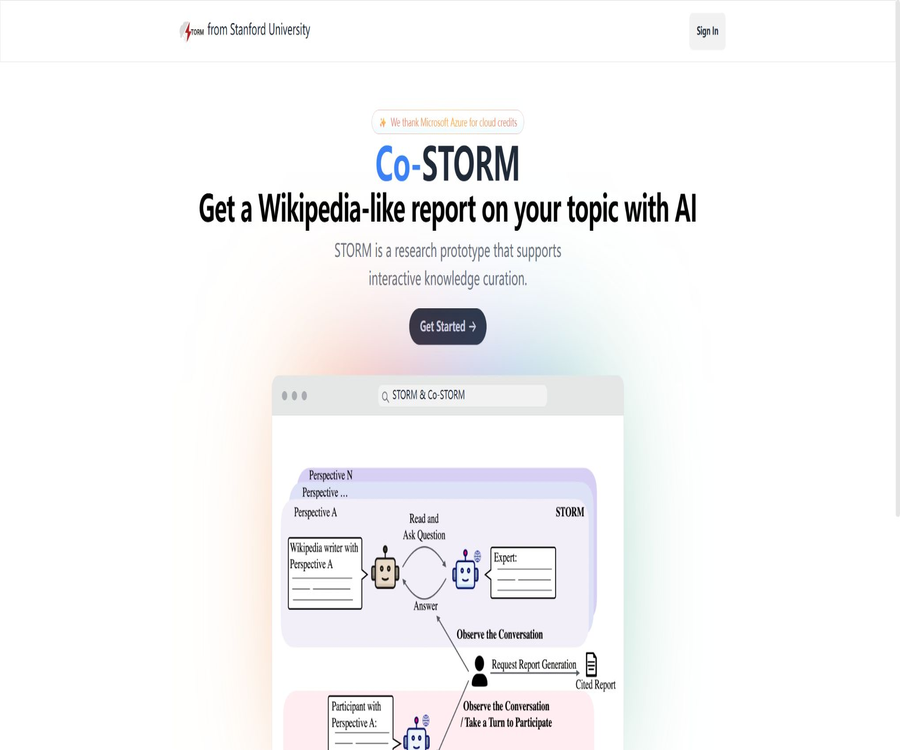
STORM, whose full name is Synthesis of Topic Outlines through Retrieval and Multi-perspective Question Asking, is an open-source knowledge organization system developed by Stanford’s OVAL team. It retrieves information from the web related to a given topic, forms questions from multiple perspectives, generates outlines, and writes detailed reports with citations.
STORM is primarily used in the research and drafting phase, rather than for producing articles ready for publication. The official source emphasizes that the results generated still require extensive editing and fact-checking.
The workflow of STORM
- Receive the research topic entered by the user.
- Find articles on similar topics and identify different viewpoints.
- Allow virtual authors to raise questions from multiple perspectives.
- Simulate a series of interviews between the author and subject experts.
- Retrieve information through search engines or custom corpora.
- Organize the collected evidence and create a hierarchical outline.
- Write a complete article based on the outline and sources.
- Add supplementary citations and abstracts, and reduce repetitive content.
Main functions
- Automatically launch multiple rounds of online research based on a single topic.
- Expand the scope of the issue by considering different perspectives.
- Conduct simulated interviews and ask follow-up questions based on new information.
- Collect web materials and traceable citations.
- Organize the search results into a hierarchical article outline.
- Generate a long report in Wikipedia style.
- Separate the four modules: research, outline, writing, and editing.
- It allows the replacement of language models, search engines, and vector retrievers.
- It supports using the user’s own documents to create VectorRM corpus for retrieval.
- Provides Python packages, example scripts, and a lightweight Streamlit interface.
Why use multi-perspective questioning
Allowing the model to simply list questions can lead to focusing on common concepts and superficial information. STORM first examines articles on similar topics as well as different perspectives, and then has various virtual authors pose more diverse questions.
- Identify stakeholders beyond the mainstream narrative.
- It covers historical, technical, economic, ethical, and social impacts.
- It reduces the limitation of searching only based on the user’s initial wording.
- Fill in unknown concepts and gaps in evidence by asking further questions.
- Provide a wider range of chapter candidates for the final outline.
What is Co-STORM?
Co-STORM is a collaborative knowledge organization model that builds on STORM. It enables users, multiple AI experts, and a facilitating agent to discuss topics together and to maintain dynamic mind maps over time.
| Characters | Main responsibilities |
|---|---|
| AI experts | Answer questions or ask follow-up questions based on external information. |
| Host AI agent | Identify important information that has not yet been discussed and pose insightful questions. |
| Human users | Observe and discuss, or actively contribute opinions to adjust the direction of the research. |
| Dynamic mind map | Organize the discussion content into a hierarchical conceptual structure. |
The value of Co-STORM
- Users need not wait until the final report to discover that the research direction has deviated.
- Goals, constraints, and professional background can be added during the discussion.
- Dynamic mind maps reduce the cognitive burden associated with long-duration discussions.
- The hosting agent helps identify knowledge that has been retrieved but not yet discussed.
- The final report can be generated based on the joint exploration process.
Comparison of STORM and Co-STORM
| Dimension | STORM | Co-STORM |
|---|---|---|
| Working method | Articles are generated automatically after research. | Humans and multi-agent systems explore together |
| User participation | It mainly provides themes and configurations. | It is possible to keep participating in the discussion. |
| Knowledge structure | Outline and article | Dynamic mind maps, discussions, and reports |
| Suitable for tasks | A quick review with a relatively clear theme | Complex, open-ended issues that require gradual clarification |
| Main output | Wikipedia-style article with citations | Collaborative knowledge space and final report |
| Complexity | Lower | More agents, more calls, higher costs |
Online research preview: usage guide
- Enter the Stanford STORM Research Preview.
- Read and accept the current terms of service.
- Enter a clear and easily searchable research topic.
- Add the desired objectives and the scope to be excluded.
- Wait for the system to search, conduct interviews, and generate an outline.
- View the report structure and each source of citation.
- Open the original webpage to verify the numbers, dates, and context.
- Export the results as a preliminary draft of the research and rewrite it manually.
How to choose a research topic
- Use specific objects, time ranges, and research questions.
- Avoid using a single word with too broad a meaning.
- Explain the technologies, policies, individuals, or initiatives that are to be compared.
- Specify whether history, current status, controversies, or future trends are needed.
- Indicate the deadline for information on rapidly changing topics.
- For high-risk topics, priority should be given to using primary sources.
- Break down large problems into multiple sub-problems that can be verified independently.
What use cases are suitable?
- Students establish a research framework for papers and course assignments.
- Researchers quickly grasp the concepts and controversies in unfamiliar fields.
- Content creators gather background information and article outlines.
- Product managers study market, technical, and user-related issues.
- Policy and advisory experts compile various perspectives and available evidence.
- Teachers create reading outlines and discussion questions for the course.
- Developers create custom systems for in-depth research and reporting.
- The team explores complex topics together through Co-STORM.
Tasks that are not suitable for completion directly
- Encyclopedias or formal papers that can be published without any editing.
- Systematic reviews and meta-analyses that require the examination of all available literature.
- Research that requires access to paid databases, internal materials, or pages that are not publicly available.
- Medical diagnoses, legal advice, and personalized investment recommendations.
- It is necessary to ensure that the high-risk reports cited are identical to the statements, sentence by sentence.
- Monitoring of real-time news updates on a second-by-second basis or of complete social media data is required.
- An automated content publishing pipeline without manual review.
Price and usage costs
Stanford Online’s Research Preview does not disclose its membership fees; it is a research preview service. It may have usage restrictions, waiting lists, and specific terms, and it should not be considered a permanently free option in the context of commercial SaaS services.
| Usage method | Software price | Possible cost |
|---|---|---|
| Stanford Research Preview | No public fees are listed. | Subject to limitations on research service capacity and terms. |
| knowledge-storm Python package | MIT is open source and free of charge | Large model costs, search costs, embedding costs, and server costs |
| Deploy the source code on your own. | MIT is open source and free of charge | GPU or API costs, vector libraries, operational and security expenses |
| Local models and local corpora | The code is free. | Hardware, storage, power, and maintenance costs |
A complete research session involves multiple rounds of searching, asking questions, creating outlines, writing, and editing; the cost is usually higher than that of a regular conversation. The multi-agent discussions and mind maps provided by Co-STORM further increase the number of operations that need to be carried out.
Supported models and retrievers
Knowledge-Storm 1.1.0 includes integration with LiteLLM, allowing it to connect to the language models and embedding models supported by LiteLLM. Different components can use various models, enabling a balanced configuration that takes into account quality, speed, and cost.
| Components | Currently available public support examples |
|---|---|
| Language models | Models supported by LiteLLM, OpenAI, Azure, etc. |
| Embedded model | Embedding services supported by LiteLLM |
| Search and retrieval | You.com, Bing, Serper, Brave, DuckDuckGo, Tavily, Google, and others |
| Self-hosted search | SearXNG |
| Enterprise search | Azure AI Search |
| Own corpus | VectorRM and vector databases |
Local Deployment Tutorial
- Prepare a Python 3.11 environment.
- Install the knowledge-storm package or clone the official repository.
- Select the language model, embedding model, and search service.
- Save the API key in the secrets configuration or in secure environment variables.
- Run the official STORM or Co-STORM example scripts.
- Use low-risk topics to check research, outlines, and citation outputs.
- Based on the budget, allocate inexpensive models and high-quality writing models accordingly.
- Add logging, quotas, data masking, and error handling before production use.
Model layering recommendations
- For query splitting and simulated conversations, faster and cheaper models can be used.
- Generating an outline requires strong structural and holistic understanding skills.
- For article generation, it is advisable to choose models that adhere to citation guidelines and have better capabilities for handling long texts.
- During the refinement phase, it is necessary to prevent the model from deleting references or adding facts without a source.
- All components are first evaluated on a small scale, after which the number of concurrent tasks and topics is increased.
Own documents and private knowledge bases
VectorRM enables STORM to carry out searches based on documents provided by users, rather than relying entirely on public search engines. It is suitable for internal materials, collections of papers, or vetted professional corpora.
- Organize the documents and metadata that are allowed to be used.
- Remove duplicate, outdated, and files with unclear permissions.
- Split the text according to the project requirements and create a vector index.
- Configure VectorRM to connect to the vector database.
- Use questions with known answers to test the recall rate.
- Check whether the final reference can lead to the original paragraph.
- Set document permissions, retention periods, and deletion procedures.
Why verification is still required for citations
- The search results may come from low-quality or outdated web pages.
- The website may refuse to be crawled, resulting in the text content not being able to be parsed.
- The fact that a page is cited does not mean it supports all the assertions in it.
- The model may incorrectly combine information from multiple sources.
- The content and dates referenced on the webpage may change after it is updated.
- Second-hand reports may misinterpret papers, laws, or official data.
- Articles generated may overlook counterexamples and important controversies.
Fact-checking process
- Segment-by-segment marking identifies factual statements that can be externally verified.
- Open the corresponding reference and locate the directly supported content.
- Give priority to replacing them with papers, official data, and original documents.
- Cross-verification of numbers, dates, names, and causal relationships.
- Look for evidence to the contrary and reliable sources that contain contradictions.
- Remove conclusions that have no source or whose source is not supported.
- Record the deadline for the information and the issues that remain unresolved.
Privacy and data security
For the online Research Preview, it is necessary to send the topic and related interactions to Stanford’s hosting service; users should read the current terms of service. The research project has also released a WildSeek dataset compiled from the preview data, so sensitive topics should not be submitted for public display.
- Do not enter personal identification information, customer secrets, or unpublished research materials.
- Do not include API keys in the code repository.
- For local deployment as well, it is necessary to check the data policies of the model and the search provider.
- Before creating a vector database from existing documents, ensure that the appropriate permissions are set and that sensitive data is masked.
- Logs may contain queries, web page content, and generated text.
- Set retention, deletion, and access controls for research data.
- For highly sensitive projects, approved local components should be used preferentially.
Product advantages
- Connect search, multi-perspective questioning, outlining, and writing into a cohesive process.
- Simulated follow-up questions make it easier to identify knowledge gaps than a single search.
- The final article includes citations, facilitating a return to the original webpage for verification.
- The research, outline, writing, and editing modules can be configured separately.
- Co-STORM enables users to take an active role in guiding the research process.
- Dynamic mind maps are suitable for complex and long-term discussions.
- It supports various models, search engines, and custom corpora.
- The MIT license facilitates research, modification, and further development.
- The papers, code, datasets, and materials for reproducing the experiments are relatively complete.
Usage restrictions and precautions
- The authorities have made it clear that the results generally cannot be published directly.
- The fact that a citation exists does not mean that each assertion has been accurately verified.
- Websites that cannot be retrieved result in 403 errors, parsing failures, or gaps in evidence.
- The quality of research relies heavily on search engines and language models.
- Multiple rounds of retrieval and generation can result in higher API costs.
- Complex topics can result in reports that are lengthy, repetitive, or off-topic.
- Online preview is not a commercial product with service guarantees.
- Deployment requires programming skills, key management, and infrastructure capabilities.
- Dynamic web pages, paywalls, and limited coverage of non-textual materials.
- High-risk areas must be reviewed by professionals.
- Public previews are not suitable for sensitive or confidential topics.
- The MIT code license does not include costs or licenses for third-party models and search services.
GitHub and the open-source status
The official repositories for STORM and Co-STORM are maintained by stanford-oval and are licensed under the MIT license. The project includes the knowledge_storm core package, examples of STORM and Co-STORM, a lightweight frontend, as well as datasets and materials for reproduction.
Python packages can be installed directly, and their source code can be modified. Third-party large models, search engines, embedding services, and content scraping are still subject to their respective terms and conditions; these restrictions cannot be ignored just because the STORM code is open-source.
Basic information
| field | Content |
|---|---|
| Tool name | STORM / Co-STORM |
| Development team | Stanford OVAL |
| Tool type | Knowledge organization, in-depth research, and generation of comprehensive reports |
| Core method | Multi-perspective questioning, simulated interviews, retrieval enhancement, and automatic outlining |
| Online version | Research Preview |
| Python packages | knowledge-storm |
| Open-source license | MIT |
| Price | The code is free of charge, while resources such as models and search functions are charged separately. |
| Whether API is provided | A Python interface is provided; there is no unified, commercially-hosted API. |
| Main output | Long reports with citations, discussions, and dynamic mind maps |
Recommendation score
4.7 / 5. STORM transforms multi-view retrieval and the writing of long reports into an open-source framework that is suitable for research and expansion; the human-machine collaboration feature in Co-STORM is also very useful. However, citations and facts still need to be verified one by one, and the cost and complexity of implementing it are quite high.
Frequently Asked Questions
Can STORM be used for free?
Online Research Preview does not disclose its membership fees; the open-source code is licensed under the MIT license. After deployment, costs related to the models, search functions, embedding technologies, servers, and storage are required to be covered.
Can the articles generated by STORM be published directly?
It is not recommended. The authorities have made it clear that significant editing is usually required, and references, facts, structure, and wording all need to be checked manually.
What is the difference between STORM and Co-STORM?
STORM relies on automated research and documentation, while Co-STORM allows users, AI experts, and facilitation agents to discuss together and maintain dynamic mind maps.
Can I use my own documents?
Yes. VectorRM allows research to be based on documents and vector databases provided by users.
Is local modeling supported?
The architecture allows for the replacement of model components, and LiteLLM also expands the range of compatible models. Specific local models need to be tested individually based on context, quality, and hardware.
Why does a 403 error occur sometimes?
Some websites refuse to be crawled or page parsing fails; STORM records the errors and skips the relevant content, which can lead to gaps in citations and information coverage.
Does STORM offer commercial APIs?
The project provides Python classes and module interfaces, but it does not offer any unified commercial API packages; developers must integrate the modeling and retrieval services on their own.
Is STORM open source?
Open source. The official GitHub repository and the Knowledge-Storm code are licensed under the MIT license.
Tools similar to Storm




 Guigong Network Security Registration No. 45132202000164