






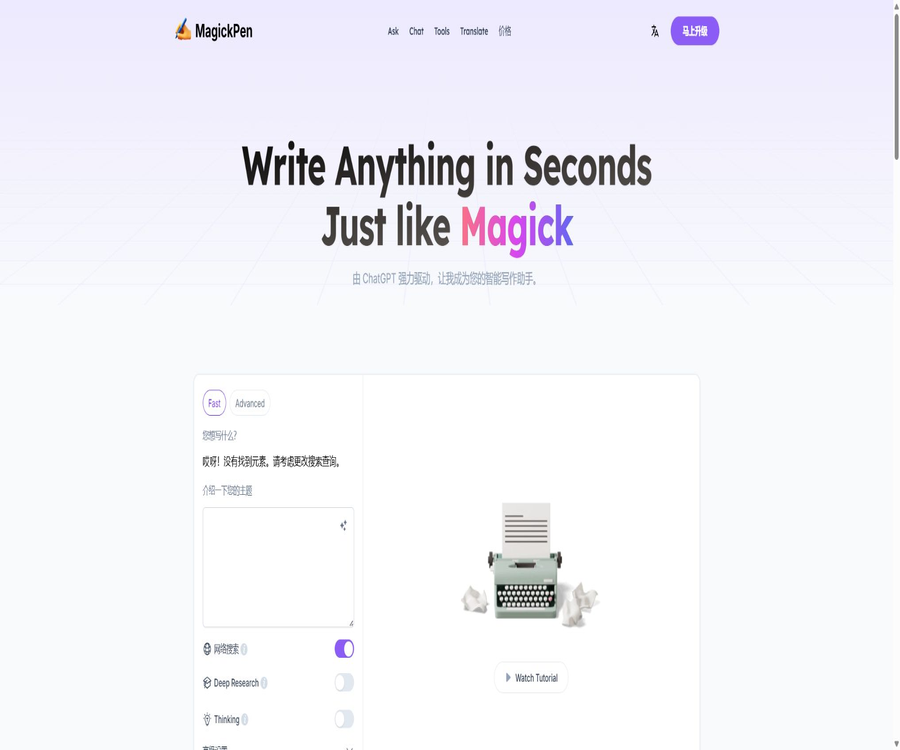
magickpen
magickpen, an intelligent tool focused on AI-driven writing.
Tags:AI writing toolsWhat is MagickPen?
MagickPen is an AI writing assistant designed for use in various scenarios such as general writing, learning, marketing, and office work. Users can choose templates, roles, tones, languages, lengths, and formats to create articles, essays, reports, emails, advertisements, stories, and more.
It also offers tools such as conversation, online searching, translation, grammar checking, rewriting, and code correction, and is available for Web, Chrome, Windows, and Mac. Free users can use it for a daily trial period without needing to log in.
Core functions
Writing templates for multiple scenarios
The platform organizes common tasks into categories such as articles, social media, marketing, education, careers, development, and other templates. These templates guide users in filling in the topic, target audience, and requirements, thereby reducing the difficulty associated with starting from a blank prompt.
Long texts and continuous generation
The current price page for the paid package indicates that a maximum of 6,000 words can be generated in a single instance, with continuous generation also being possible. For longer texts, it is still necessary to first create an outline, and then generate and review the content section by section.
Roles, tone, and format
Advanced settings allow you to choose the writing role, tone, language, length, and output format. Specifying these parameters helps to ensure that the draft fits better with the intended use case.
AI dialogue and Q&A
In addition to template generation, users can ask questions continuously, modify text, or discuss ideas through the chat interface. Long conversations provide more context, and it is important to summarize and set constraints for key tasks on a regular basis.
Online search
All current subscription plans include web search as one of the benefits, which can be used to supplement publicly available information. Both online search results and AI-generated summaries may omit or misinterpret the sources, so manual verification is still required before anything is published.
Translation, proofreading, and rewriting
The tool offers multilingual translation, grammar checking, tone adjustment, summarization, expansion, and rewriting. When dealing with professional contracts, medical, or academic content, the alterations made by AI should not be considered as professional editing.
Code assistance
Some templates can generate, explain, or fix code, as well as create regular expressions, SQL statements, and configuration files. The code generated must be tested in an isolated environment and undergo a security review.
List of main functions
- Generate articles, blogs, papers, reports, stories, and creative texts.
- Create advertisements, product descriptions, social media content, and SEO copy.
- Drafting business emails, job application materials, and work-related communications.
- Use roles, tone, language, length, and format to control the output.
- Reduce the effort required to craft prompts by using predefined templates.
- Perform rewriting, expansion, summarization, and grammar checking.
- Translate multilingual texts and adjust the style of expression.
- Update the currently available information through online searches.
- Use AI chat for continuous Q&A and iteration.
- Generate, explain, or fix code snippets.
- Use it across Web, Chrome, Windows, and Mac.
What use cases are suitable?
- Content creators: Generate topic ideas, outlines, drafts, and social media copy.
- Marketers: Create ads, landing pages, emails, and product descriptions.
- Student: Organizing thoughts for learning, explaining concepts, and refining expressions.
- Teacher: Creates lesson plans, questions, handouts, and class activities.
- Workplace users: Draft emails, reports, meeting summaries, and work plans.
- Job seeker: Prepare key points for a resume, a cover letter, and questions for interviews.
- Developer: Ideas for generating code, regular expressions, SQL, and error explanations.
- Multilingual users: Translate and adapt expressions for different markets.
What situations are not very suitable
- News releases that require absolute accuracy of the facts and do not allow for manual verification.
- High-risk tasks that require the advice of qualified lawyers, doctors, or financial advisors.
- Formal papers that require complete citation of management practices and academic evidence chains.
- Organizations are not allowed to send confidential information to third-party AI services.
- Teams that wish to use the official API for batch integration but do not find clear development documentation on the relevant page.
- Organizations that need open-source code, private deployment, or the ability to choose their own underlying models.
MagickPen usage guide
Generate a draft using a template.
- Select the writing template that is closest to the target.
- Fill in the topic, audience, background, and the information that must be included.
- Set the language, tone, length, and output format.
- After creating the draft, check the structure, facts, and any repeated content.
- Add real-world examples, data, and personal opinions.
- I request once again that the AI refine only the specified paragraph, rather than rewriting the entire text indiscriminately.
- Publish after completing plagiarism checks, copyright verification, and manual proofreading.
Generate long articles
- First, let the tool generate a detailed outline that includes the objectives for each chapter.
- Provide materials, arguments, and the expected word count for each chapter.
- Generate them chapter by chapter to avoid overly long output at once.
- Standardize terms, characters, timelines, and narrative perspectives.
- Remove duplicate points and add transitions between paragraphs.
- Verify each piece of data, citation, and external fact individually.
- Finally, unify the title, abstract, format, and call to action.
Rewriting and proofreading
- Paste the text that needs to be processed and specify the audience and purpose.
- Select the goal: error correction, simplification, expansion, or tone adjustment.
- It is required to retain the unchangeable facts, terms, and numbers.
- Compare the original text with the revised version to ensure that the meaning has not changed.
- Restore the mistakenly deleted constraints and necessary details.
- Human review is carried out for contracts, policies, and professional content.
Comparison between the free version and subscription plans
| Plan | Monthly reference price | Integration | Number of characters per instance | Primary interests |
|---|---|---|---|---|
| Free | $ | 10 trial points per day | Up to 500 words | Basic version available for trial without the need to log in. |
| Basic | $ | Infinite Fast Integration | The current price page shows a maximum of 6,000 words. | Online searching, continuous generation, ad-free, dedicated support |
| Premium | $ | 600 Advanced points per month, plus unlimited Fast points | The current price page shows a maximum of 6,000 words. | Unlock all features; around 20 Advanced points per day. |
| Ultimate | $ | 1,800 Advanced points per month, plus unlimited Fast points | The current price page shows a maximum of 6,000 words. | Unlock all features; around 60 Advanced points per day. |
All three subscription plans offer a 7-day free trial, with the option to cancel at any time. The annual payment option claims to save 20%, while the actual amount charged in one go, along with any taxes and renewal fees, are specified on the settlement page.
Fast and Advanced integration
On the current pricing page, the generation quotas are divided into Fast and Advanced categories; the Basic category only offers unlimited Fast quota, while the Premium and Ultimate categories also include Advanced credits. The page does not clearly specify in the public pricing section which exact models and priorities correspond to each of these two categories of requests.
| Integration type | Basic | Premium | Ultimate | Precautions |
|---|---|---|---|---|
| Fast | Infinity | Infinity | Infinity | It may be subject to limitations related to fair use, concurrency, and service rules. |
| Advanced | Not included | 600 per month | 1,800 per month | It shows approximately 20 and 60 points per day, respectively. |
| Free trial points | Not applicable | Not applicable | Not applicable | Free users get 10 per day. |
\"Infinity\" generally does not imply the possibility of automated abuse or unlimited concurrent usage; it is necessary to check the fair use policies and account restrictions before making a purchase. Whether Advanced points are reset on a monthly basis, how they are allocated daily, and what resources are consumed by various functions can be found on the account page.
Difference between Pro one-time points and subscriptions
The official FAQ also mentions that it is possible to purchase Pro accounts with 100, 300, or 1,000 points at once, and there is no time limit on the validity of these points; the specific prices can be viewed in real time on the purchase page. Subscriptions are more suitable for those who need to use the service frequently on a continuous basis, while one-time purchases of points are appropriate for users with variable usage levels.
| Method | Payment structure | Validity period | Suitable for users | Refund |
|---|---|---|---|---|
| Free | No payment is required. | Refresh daily | Experience occasionally | Not applicable |
| Pro Points Package | Buy 100, 300, or 1,000 points at a time | The FAQ states that there is no time limit. | Intermittent use | A request can be submitted if it is used at less than 10% within 30 days. |
| Subscribe | Basic, Premium, or Ultimate – on a monthly or annual basis | Current billing cycle | Continuous high-frequency writing | The FAQ states that subscriptions are non-refundable. |
Rules for refunds and cancellations
Users who purchase credits on a one-time, as-needed basis and use less than 10% of those credits within 30 days of purchase can request a full refund via email. Subscription users can cancel their subscription at any time; the cancellation takes effect at the end of the current billing cycle, although the FAQ states explicitly that refunds are not available for subscriptions.
- Before starting the trial, confirm whether it is necessary to link a payment method.
- Record the end time of the trial period and the amount of the first deduction.
- Cancel automatic renewal before it expires if you stop using it.
- Before a one-time refund of points, the usage threshold should not exceed 10%.
- Save order details, cancellation confirmations, and records of customer service interactions.
- App stores or regional distribution channels may have different refund policies.
Discounts for students and teachers
Students or teachers who have an educational email address can contact the authorities to request a 40% educational discount code. It is up to customer service to determine whether their school is eligible for this discount, which packages it applies to, and whether it can be combined with other promotions.
Platform support
| Platform | Usage method | Explanation |
|---|---|---|
| Web | Direct access via browser | It has the most complete set of functions and requires no installation. |
| Chrome | Browser extensions | Called within the web page workflow |
| Windows | Desktop application | Download it from the official page. |
| macOS | Desktop application | Download it from the official page. |
| iOS and Android | No official download link is available at the moment. | Do not consider third-party apps with the same name as the official version. |
Online searching and fact-checking
Online searches can help generate summaries of current topics and available information, but they do not guarantee that the answers are correct. The search results may be outdated, out of context, or come from low-quality pages.
- It is explicitly required to specify the name of the source and the date to which the facts correspond.
- Give priority to verifying primary sources such as government documents, company materials, research papers, and standards.
- Check the statistical criteria, geographical area, and time range of the numbers.
- Medical, legal, and investment-related content must be reviewed by professionals.
- Do not treat the generated citation format as an actual reference record.
Content quality and copyright
The output generated by AI may be similar to existing text, or it may include facts, citations, or characters that do not exist. Users are responsible for the accuracy, originality, and copyright status of the content that is ultimately published.
- Treat the AI output as a draft and do not publish it in its entirety right away.
- Include real-world experience, data, and brand expression.
- Manually simplify long sentences, clichés, and repetitive paragraphs.
- Verify citations, book titles, authors, links, and statistics.
- Use copyright detection and an organized review process.
- Do not ask for reproductions of living authors or copies of protected content.
Privacy and sensitive information
Writing tools are required to send the user’s input to online services for processing; the public pages do not provide sufficient information regarding the underlying models behind each function, as well as the policies related to data retention and training. Enterprise users should conduct a privacy assessment before submitting confidential content.
- Do not paste passwords, API keys, ID card details, or bank card information.
- Anonymize customer, employee, and patient data first.
- Contracts and unreleased product materials use tools approved by the organization.
- Export the content that needs to be retained before deleting the account or its history.
- Check the web access permissions for the extension before installing it.
Product advantages
- There are many templates available, covering writing, marketing, education, and development tasks.
- Free users can obtain a daily trial quota without needing to log in.
- Supports control over role, tone, language, length, and format.
- Integrates chat, online searching, translation, and grammar checking.
- The paid version supports longer outputs and continuous generation.
- Versions for Web, Chrome, Windows, and macOS are available.
- It offers two payment options: subscription and one-time credits.
- Students and teachers can apply for educational discounts.
Usage restrictions and precautions
- The free version provides only 10 points per day, with a maximum of 500 words per submission.
- The price page and the FAQ specify two different limits for the number of characters per paid entry: 6,000 and 3,000.
- The explanations regarding the models and priorities associated with Fast and Advanced are not clear enough.
- Subscriptions are non-refundable according to the FAQ rules; be mindful of the end date of the trial period.
- Unlimited Fast may still be subject to fair use, speed, and concurrency restrictions.
- AI can generate false facts, fabricated citations, and unsafe code.
- Search results from the internet still need to be checked against the original sources.
- Academic, medical, legal, and financial information cannot replace professional advice.
- No official public API documentation for developers was found.
- No verifiable official source code repository was found.
GitHub and the open-source status
The real-time search did not yield any official source code repository that could be accessed through a direct link on the MagickPen website and whose ownership could be verified. The projects listed in the search results, such as Teach Anything, are related to the operator’s ecosystem, but they do not represent the complete source code for MagickPen’s products.
Therefore, MagickPen should be classified as a closed-source online service and desktop application. Third-party repositories with the same name, template projects, or sponsored links cannot serve as evidence of its open-source status.
Basic information
| field | Content |
|---|---|
| Tool name | MagickPen |
| Tool type | AI assistance for writing, copywriting, translation, and coding |
| Free quota | 10 points per day, up to 500 words per submission |
| Subscribe | Basic, Premium, Ultimate |
| Single output | The pricing page currently shows a maximum of 6,000 words. |
| Platform | Web, Chrome, Windows, macOS |
| Online search | Paid plan support available |
| Educational discounts | A 40% discount can be applied for after verification. |
| Whether a public API is provided | No official documents were found. |
| Is it open source? | No |
Recommendation score
4.3 / 5. The MagickPen template library is extensive, the entry cost is low, and it supports multiple platforms as well as various writing aids; however, the rules regarding points, word counts, subscription refunds, and data processing need to be carefully reviewed before making a purchase.
Frequently Asked Questions
Is MagickPen free?
Free users receive 10 points per day and can generate up to 500 words per submission; they can try the service without logging in. More credits and the ability to work with longer texts require a credit package or a subscription.
How much is the membership?
During verification, the monthly rates are $6.9 for Basic, $19 for Premium, and $59 for Ultimate. The annual payment option indicates a 20% savings; the actual amount charged will be as stated on the settlement page.
Will a 7-day trial period result in an automatic charge?
The pricing page offers a 7-day free trial; users should decide on the page where payment is processed whether to link a credit card and what amount will be deducted after the trial. If they no longer wish to use it, they should cancel it in advance.
What is the difference between Fast and Advanced integration?
The pricing page distinguishes between two types of points, but it does not fully disclose the corresponding models and service priorities. It is necessary to check the specific rules regarding their usage in the account settings or by contacting customer service before making a purchase.
How many characters can be generated at a time?
The free version allows for up to 500 words; the current pricing page states that the paid version supports up to 6,000 words. The FAQ still mentions 3,000 words as the limit, but it should be the actual limit indicated in the account and on the generation page that counts.
Can a subscription be refunded?
According to the FAQ, subscriptions are non-refundable; cancellation is the only option, which stops automatic renewal at the end of the current period. Refunds can be requested for one-time credits if they have not been used yet and within 30 days, provided that less than 10% of them have been utilized.
Is Chinese supported?
It supports a Chinese interface and Chinese-language generation; the language can also be selected in the advanced settings. Professional terms and local expressions still require manual proofreading.
Is MagickPen open source?
No verifiable official source code repository was found; it should be marked as a closed-source service.
Tools similar to MagickPen




 Guigong Network Security Registration No. 45132202000164