






KeywordSearch
KeywordSearch: an intelligent tool focused on AI-powered searching.
Tags:AI search engineA one-sentence summary
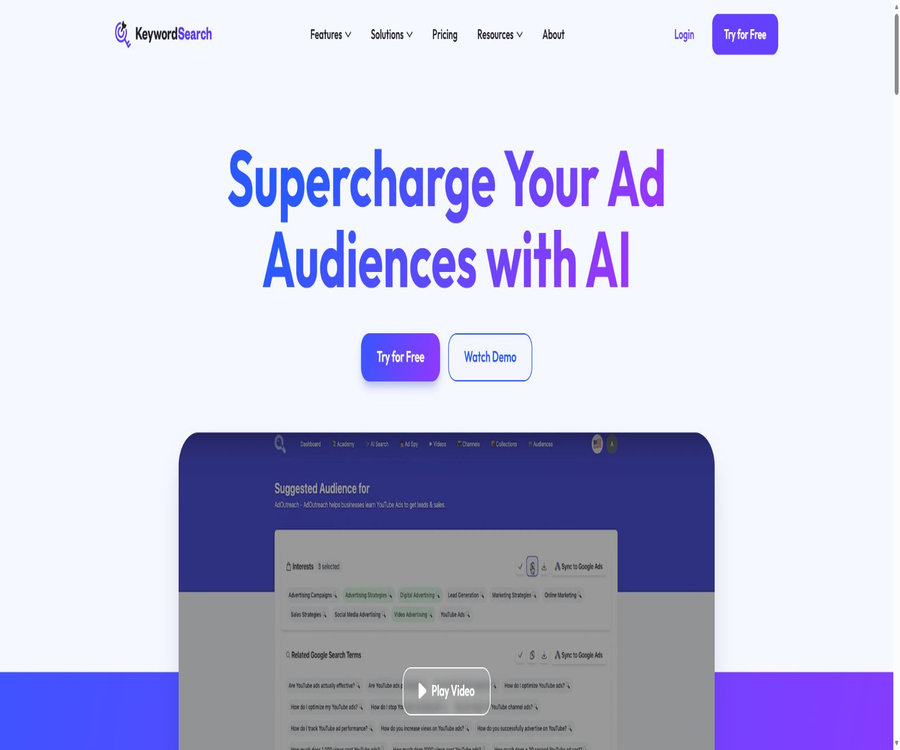
KeywordSearch is an AI-based audience research platform designed for use with Google and YouTube ads; it enables the creation of actionable audience insights based on business needs, ideal customers, or advertising objectives, and it allows these selected audiences to be integrated into Google Ads.
What is KeywordSearch?
KeywordSearch is operated by KeywordSearch LLC and serves advertisers, content creators, businesses, and marketing agencies. It brings together functions such as AI-driven audience generation, YouTube keyword research, topic expansion, ad material monitoring, and customer reports in a single web-based workspace.
The product’s name might lead one to think that it is merely a traditional keyword search tool, but its actual purpose is more focused on identifying advertising audiences and conducting research for YouTube marketing. Its value lies in organizing various keywords, interests, websites, apps, and channels into audience groups that can be used for further testing.
Overview of Core Competencies
| Functions | Main inputs | Main output | Suitable for tasks |
|---|---|---|---|
| AI Audience Builder | Business description, customer profile, keywords, or competitors | Interests, keywords, websites, apps, and channel audiences | Advertising audience planning |
| Google Ads synchronization | Filtered audience segments | Google Ads Custom Audiences | Reduce manual copying and configuration |
| YouTube keyword research | Topic or seed keyword | Keywords, search volume, competition, and related suggestions | Video SEO and advertising targeting |
| Topic Auto Expansion | Set of keywords or topics | Extended terms and topic grouping | Discover the long-tail direction |
| YouTube Ad Spy | Industry, brand, or keyword | Ads, metadata, and potential target keywords | Competitor creativity research |
| Smart Collections | Keywords, videos, ads, and project materials | Reusable collection | Organization of multiple projects |
| Agency Reports | Customer business and audience research | PDF and white-label reports | Proposals and client reports |
AI Audience Builder
AI Audience Builder accepts information such as a business description, target customers, a list of keywords, or competitors, and generates candidates related to the advertising strategy. A single analysis can take into account various aspects such as interests, search terms, relevant websites, apps, and YouTube channels.
- Generate the target audience based on a business description.
- Identify relevant interests based on the profile of the target customers.
- Expand Google search terms and YouTube keywords.
- Discover related websites, apps, and channels.
- Automatically organize potential audiences by theme.
- Continue to expand the selected keyword group.
- After being saved in a collection, it can be used for different advertising campaigns.
The audience generated by AI represents assumptions regarding targeting, not a guarantee of conversion rates. Advertising teams still need to consider factors such as region, language, purchasing intent, audience size, and brand safety, and they should test actual performance through experiments with small budgets.
AI audience creation process
- Create an account and select a plan that matches the expected volume of research.
- Enter a brief description of the business, the products, the target customers, and the advertising objectives.
- Select templates such as business description, customer profile, keywords, or competitors.
- Generate candidates for keywords, interests, websites, apps, and channels.
- Remove items that are irrelevant, ambiguous, sensitive, or pose a high risk to the brand.
- Organize the candidates into audience groups based on themes and purchasing intent.
- Save to Collection and record the research hypotheses.
- Synchronize the selected audience after connecting to Google Ads.
- Test click-through rates, conversion rates, and customer acquisition costs using small-scale ads.
- Retain, split, or deactivate audiences based on real data.
One-click synchronization for Google Ads
Plans Pro and above allow connection to a Google Ads account, enabling the creation of the audience segments selected on the platform within that ad account. This process helps to reduce the time required for manually copying keywords as well as configuring website and app targets.
| Steps | Platform operations | Manual confirmation is required. |
|---|---|---|
| Connection | Authorize Google account and ad account | Select the correct customer account and the minimum required permissions. |
| Select | Select one or more audience groups. | Exclude irrelevant and sensitive locations |
| Synchronization | Create the corresponding custom audience. | Check the name, region, and campaign affiliation. |
| Deployment | Use in Google or YouTube ads | Set budget, frequency control, and conversion tracking. |
| Optimization | Adjust the audience based on the results. | Don’t rely solely on platform recommendations. |
The synchronization feature carries out the actions specified by the user on external advertising accounts; therefore, it is necessary to verify the account details, the customer center, and the write permissions before granting authorization. Organizations should especially avoid accidentally synchronizing the audience of one client to another client’s account.
YouTube keyword research
Keyword research tools identify search terms related to YouTube content and advertisements, and they assist users in making selections by taking into account factors such as search volume, competition level, and relevance. These relevant keywords can be used in video titles, descriptions, tags, and topic choices, as well as in customizing ad audiences.
- Search for YouTube keywords related to the topic.
- Compare search volume, competitiveness, and relevance.
- Generate new words related to the semantics of the current topic.
- Continue to carry out progressive research along with the associated keywords.
- Copy the selected keywords to the deployment workflow.
- Save the research results by project.
Search volume and competition metrics are indicators to be considered; they do not guarantee that a video will rank well or receive views. The choice of keywords ultimately also depends on the quality of the content, the profile of the channel, search intent, region, and date of publication.
Topic Auto Expansion
Topic Auto Expansion is used to continue searching for relevant topics based on an existing set of keywords, while maintaining the semantic relationship with the original topic. It is suitable for expanding the list of target audiences, identifying long-tail topics, and creating more detailed ad groups.
| Usage | Enter | Output | Precautions |
|---|---|---|---|
| Long-tail expansion | Core keywords | More specific related terms | Check whether there is still a commercial intent. |
| Theme grouping | Mixed keyword list | Collections organized by topic | Avoid mixing together the intentions of different users. |
| Content selection | Channel theme | Related video categories | Judgment is made by combining real channel data. |
| Advertising audience | Products and customer terms | Testable search phrases | Filter out synonyms and sensitive attributes. |
The so-called continuous expansion does not mean that every suggestion is worth implementing. The broader the topic, the more likely it is that relevance will decline and budget will be wasted; therefore, manual screening should be carried out after each round of expansion.
YouTube Ad Spy
YouTube Ad Spy provides a database of ads; users can search for competitive ads by industry or keyword, and view ad metadata, target keywords that may be used, viewing statistics, and metrics such as Spend Trend. The results can be sorted by the number of views or spending trends.
- Public and unlisted YouTube ads were found.
- Examine the creative approaches adopted by competing brands.
- Study ad titles, videos, and metadata.
- Find the keywords that advertising might be targeted toward.
- Sort by view count or spending trend.
- Include valuable keywords in your research.
Ads in databases do not necessarily indicate that a particular creative approach is effective, and views alone cannot prove profitability. Using materials from competitors can serve only for insight and comparison; it is not permissible to copy expressions and materials protected by copyright, trademarks, or advertising regulations.
Collections and project organization
Collections allows keywords, video locations, video ads, and other research items to be grouped together in separate collections, making it easier to switch between different campaigns or clients. It is useful for storing candidate options, reducing duplicate searches, and creating materials for team reviews.
| Collection type | Content that can be saved | Common uses |
|---|---|---|
| Audience set | Interests, keywords, websites, apps, and channels | Ad campaign planning |
| Keyword set | Core words, extended words, and competitive words | Video SEO and advertising targeting |
| Ad collection | Competitor videos and metadata | Creative Research |
| Customer collection | Research results for different brands | Isolation of institutional projects |
| Experimental set | Hypotheses regarding the target audience to be tested | Record the test version |
Agency reports and white labeling
The Agency plan includes three users; it allows for the export of AI-driven advertising targeting research in PDF format, and enables the creation of branded reports using the agency’s logo and links. Marketing agencies can use it to present reports to existing clients, or to prepare analyses of potential customer opportunities for prospective clients.
- Conduct separate audience research for different customers.
- Generate a PDF report that can be shared.
- Replace the platform’s brand with the organization’s logo and link.
- Explain to customers the keywords, channels, and website audience.
- Retain customer approval before deployment.
- Combine the conclusions of the report with actual advertising data.
White-labeling only changes the way the reports are presented; it does not mean that the organization owns the source code or algorithms of the platform. External reports should indicate the data timing, assumptions, and limitations, and AI recommendations cannot be presented as audit conclusions that guarantee conversion rates.
Prices and packages
The price information was verified on August 23, 2026; the actual amounts, taxes, exchange rates, and discounts may vary, and the final figures will be those displayed on the settlement page.
KeywordSearch offers three monthly subscription plans: Starter, Pro, and Agency. The annual payment option indicates a 25% discount, but the total cost for each annual plan is not listed in the pricing section. All plans come with a trial period; the exact number of days available for testing, whether a payment is required, and the timing for automatic renewal can be found on the registration and payment page.
| Package | Monthly price | Amount of research on AI audiences | Primary interests | Suitable for users |
|---|---|---|---|---|
| Starter | $ | 10 times per month | YouTube channels, video search, Smart Collections, and unlimited keyword research | Small businesses and introductory research |
| KeywordSearch Pro | $ | 1,000 times per month | All features of Starter, Ad Spy, one-click synchronization with Google Ads | Advertising pitchers and growth teams |
| Agency | $ | Based on the account balance. | Pro-related capabilities, 3 seats, PDF customer reports, and white labeling | Marketing agencies and multi-client teams |
| Annual | Displayed on the settlement page | Follow the corresponding plan. | Relative to monthly payment, a 25% savings is achieved. | Identify teams for long-term use |
The unlimited keyword research option in Starter is not the same as unlimited AI audience research; different quota rules apply to each. Once the quota for AI Audience Searches is exhausted, it is possible to upgrade to obtain more credits, and before making such a purchase it is necessary to estimate the number of customers per month and the frequency of research.
Refund rules
Users who submit a valid refund request within 14 days from the date of purchase will receive a full refund; after 14 days, they generally no longer qualify for a refund. The request must include the name and customer number, and it should be submitted under the topic specified in the refund rules.
Suggestions for package selection
| Demand | Suggested solution | Reason for selection |
|---|---|---|
| Occasionally research YouTube keywords. | Starter | There is no limit on the number of keyword searches, and the number of times the AI audience is accessed is limited. |
| A large amount of AI-generated content is required. | Pro | 1,000 AI audience research sessions per month |
| To synchronize Google Ads | Pro or Agency | Includes one-click synchronization capability. |
| Research on competitor YouTube ads is required. | Pro or Agency | Includes Ad Spy |
| Three-person collaboration and customer reporting | Agency | Includes three seats and a PDF report |
| A report on the own brand is required. | Agency | Supports logo and link whitelisting |
There is a significant difference in price and the amount of AI research between the Starter and Pro versions; it is advisable to test the relevance of the AI model for real business applications before making a purchase. Organizations should also find out the actual pricing for more than three seats, additional customers, and extra amounts of research.
Which users are it suitable for
- The person in charge of placing ads for Google and YouTube.
- Marketing teams that need to quickly develop assumptions about their audience.
- Content creators who study YouTube keywords and topics.
- An advertising agency that creates marketing plans for multiple clients.
- Brand teams that focus on monitoring YouTube ads of competitors are needed.
- Those who wish to synchronize the audience directly with Google Ads.
- Consultants and service providers who need white-label PDF proposals.
Product advantages
- Multiple audience dimensions are generated directly from the business description.
- It also covers research on Google and YouTube ads.
- The audience results include keywords, websites, apps, and channels.
- It can be grouped by topic and continue to expand automatically.
- Pro supports one-click synchronization with Google Ads.
- YouTube Ad Spy makes it easy to analyze competitive ads in a centralized manner.
- Collections is suitable for organizing project and client materials.
- Agency offers three seats, PDFs, and branded reports.
Main limitations
- AI-generated audience suggestions cannot guarantee ad conversions or a return on investment.
- Starter offers only 10 AI audience research sessions per month.
- Google Ads Sync and Ad Spy require a Pro or higher plan.
- The public page does not display the total annual cost for each plan at the same time.
- The price listed by the agency is the starting price; additional requests may incur extra charges.
- Advertising inventory metrics alone cannot prove the profitability of competing ads.
- The number of keywords and competition data are still influenced by location and time.
- It has not been confirmed whether a public developer API or an official SDK is available.
- It has not been confirmed that the core platform will be released under an open-source license.
API, GitHub, and open-source status
It has not been confirmed that KeywordSearch provides public APIs, SDKs, Webhooks, or official developer documentation to ordinary customers. The one-click synchronization feature in Google Ads is an integrated part of the product, and it cannot be considered equivalent to open interfaces that allow external developers to make calls.
| Project | Current status | Correct understanding |
|---|---|---|
| Google Ads connection | Built into the product | Used to add audiences to authorized advertising accounts. |
| Public API | Not confirmed | It cannot be marked as providing a development interface. |
| Official SDK | Not confirmed | There are no verifiable installation packages or user manuals available. |
| Official GitHub | Not confirmed | Warehouses with the same name cannot be automatically assigned to each other. |
| Core platform | Closed-source SaaS | Available through accounts and subscriptions |
| White-label report | Commercial functions | It does not mean that the algorithm or source code is open source. |
Privacy and Google Account permissions
The platform handles data such as accounts, subscriptions, transaction records, files, user profiles, analytics metrics, devices, and access logs. Once users authorize their Google accounts, it is also possible to access their name, email address, profile picture, as well as other Google data related to the service.
When connecting to Google Ads, the platform states that it will carry out actions such as creating custom audiences based on the user’s instructions, and may store relevant data on servers. The privacy policy does not specify a fixed deadline for deleting various types of advertising data; instead, such data is retained depending on the account’s duration of existence, the needs of the service, and compliance requirements.
- Connect only to the ad accounts that need to be managed.
- Verify that the correct customer center and sub-account are connected.
- Avoid including client confidential information or personal sensitive data in the business description.
- Regularly check and revoke any unused Google authorizations.
- Remove seats promptly when team members leave or a project comes to an end.
- Process audience research and targeting data in accordance with the client’s contract.
- Keep a record when submitting requests to the platform for deletion or correction.
Advertising compliance and usage boundaries
Audience research takes into account the rules of advertising platforms, as well as issues related to privacy, anti-discrimination measures, and restrictions on sensitive topics. Users cannot rely on AI suggestions to create targeted campaigns that deal with health, politics, financial difficulties, minors, or other sensitive categories.
| Risk | Typical problems | Suggestions |
|---|---|---|
| Sensitive attributes | AI-generated audience tags that are not suitable for use | Removed in accordance with legal and advertising policies. |
| Regional differences | The same keyword has different meanings in different markets. | Study language and region separately. |
| Trademark | Using competing brand terms in misleading advertisements | Verify trademark and advertising rules |
| Copyright | Directly copy the content of competing ads | Only analyze strategies and create original content. |
| Waste of budget | Automatic scaling results in an overly broad audience. | Test with a small budget and set stop conditions. |
| Attribution error | Treating correlation as causal effect | Combining transformation and incremental experiments |
Practical optimization methods
- For each product, specify the target customers, the problems they face, and the purchase stage.
- Operate the business, customer profiling, keyword, and competitor templates separately.
- Separate and organize brand terms, issue-related terms, category terms, and competitor terms.
- Check whether websites, apps, and channels truly cater to the target audience.
- Record assumptions, regions, and exclusion criteria for each audience group.
- Check the Google Ads account and campaign names before synchronization.
- Compare different audience groups using a unified concept and a low budget.
- Decisions are made based on conversion rate, customer acquisition cost, and incremental impact.
- Regularly deactivate ineffective audiences and update outdated keywords.
- Reports on the timing of data retention for customers, along with explanatory notes based on manual judgment.
Frequently Asked Questions
Is KeywordSearch a regular SEO tool?
Not quite. It includes skills in researching YouTube keywords and selecting content topics, but its primary purpose at present is to create and expand audiences for Google and YouTube ads, as well as to analyze competing ads.
Can it be used for free?
The page provides a way to try out the service, but it does not specify the number of days available for the trial, the payment methods required, or the timing for automatic renewal in the section showing the public prices. It is necessary to check the terms displayed on the settlement page at the time of registration.
How much do the three options cost respectively?
The Starter plan costs $97 per month, the Pro plan is $297 per month, and the Agency plan starts at $497 per month. An annual payment entitles you to a 25% discount; the exact amount for annual payment will be indicated on the settlement page.
Can it be synchronized with Google Ads?
Yes, the Pro and Agency plans include a one-click synchronization feature. It is necessary to select the correct advertising account before granting permissions, and to limit the customer data that can be accessed.
Is support for YouTube ad research available?
Supported. Ad Spy allows users to search through advertising databases, view metadata and target keywords, and sort results based on metrics such as views or spending trends.
Does KeywordSearch provide an API?
It has not been confirmed that developer APIs or SDKs will be made available to ordinary users. The integration with Google Ads built into the product is not equivalent to an open API.
Is KeywordSearch open source?
It is not an open-source tool that has been verified; the core platform, the AI audience-algorithms, and the institutional reporting system are provided as closed-source SaaS solutions.
What is the deadline for a refund?
A full refund can be requested in accordance with the refund policy within 14 days from the date of purchase; after that period, eligibility for a refund is usually no longer available. Users must provide the required account information.
Summary
KeywordSearch is suitable for marketers who need to quickly convert descriptions of their products or services into assumptions about the target audience for Google and YouTube ads. AI Audience Builder, keyword expansion, Ad Spy, Collections, and synchronization with Google Ads together form a complete workflow that spans from research to actual ad placement.
Before adopting it, it is important to compare the number of AI research sessions per month, the permissions available with Google Ads, the starting price for hiring an agency, and the actual number of clients. All target audiences must be tested through real advertising experiments, and compliance with rules regarding privacy, sensitive data, trademarks, and advertising platforms is required.
Tools similar to KeywordSearch




 Guigong Network Security Registration No. 45132202000164