






AI Solutions Built For Your Business
AI Solutions Built For Your Business – intelligent tools focused on AI-driven search.
Tags:AI search engineWhat is myReach?
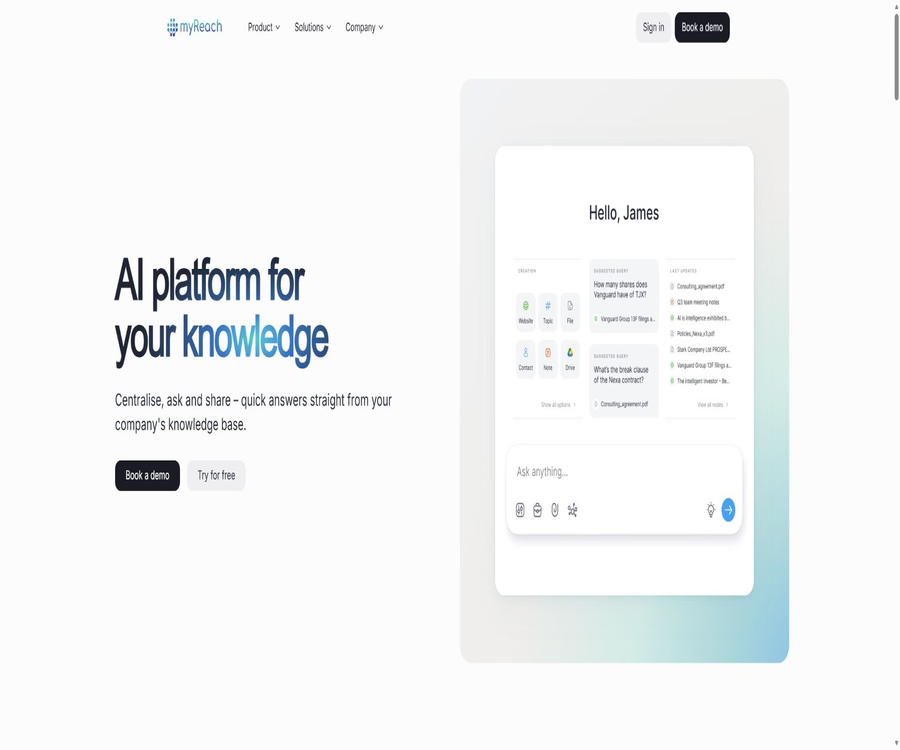
myReach is an enterprise AI knowledge management platform developed by the Swiss company myReach SA. It aggregates documents, web pages, notes, data sources, and business knowledge into a single knowledge base, and then uses semantic search, AI-powered Q&A, and custom agents to help teams find and utilize information.
A one-sentence summary
myReach functions as an AI search and knowledge assistant built around a company’s own data, and it is suitable for teams that need unified searching capabilities, internal Q&A functions, and support for external customers.
Core functions
- Import files, web pages, notes, and business data in bulk.
- Use semantic search to find knowledge nodes with similar meanings.
- Ask questions of the knowledge base using AI, and it will show the source.
- Create myGenie agents tailored for different departments.
- Automatically extracts text, summaries, attributes, and content relationships.
- Use a 3D relationship diagram to view the connections between nodes.
- Connect to external tools such as Google Drive and SharePoint.
- It supports team collaboration, sharing, roles, and access control.
Knowledge nodes and relationships
MyReach refers to the stored data as Nodes; files, websites, notes, contacts, and other elements can all serve as nodes. Relationships, tags, and custom attributes can be established between these nodes, allowing knowledge to be organized beyond the limitations of folder structures.
- Use tags to represent topics, items, or original folders.
- Connect people, documents, meetings, and tasks using relationships.
- Customer information, status, and date are recorded using custom attributes.
- Use similarity-based recommendations to discover related materials.
- View knowledge using lists, tables, and 3D views.
- When there are too many relationships, it is necessary to establish unified naming and governance rules.
AI semantic search
- Matching is based on meaning rather than just exact keywords.
- Use a unified search interface across multiple data sources.
- Use advanced filtering to narrow down the workspace and the range of content.
- Search for materials with different phrasings but similar themes.
- Use metadata and attributes to improve the accuracy of results.
- The quality of searches still depends on the imported content and permission settings.
Knowledge base Q&A
- Ask natural language questions regarding the company’s information.
- The answer can show verifiable sources and in-text citations.
- It is possible to define the scope of knowledge applicable in chats.
- It supports follow-up questions and continuous conversations.
- It is possible to summarize the content and compare different sources.
- Important conclusions still require verification by checking the original nodes.
- Pro allows 2,500 queries to the knowledge base per month.
myGenie AI agent
- It is not necessary to use code to create agents for specific tasks.
- Create roles for internal support, onboarding training, or customer service.
- Select the knowledge and categories that the agent can access.
- Adjust the tone, personality, and response rules.
- View usage patterns, real-time statistics, and user feedback.
- Limit the visible content through secure access control.
- Pro allows for the creation of 5 Genies, with 5,000 Genie messages per month.
File and content processing
- Use OCR to extract text from images and scanned documents.
- Transcribe audio content into searchable text.
- Clean the webpage HTML and extract the main content.
- Parse file metadata and generate a summary.
- Generate a textual description for the image.
- Custom attributes are automatically filled in by AI.
- The size of a single file uploaded is limited by the package size.
Supported data sources
The official pricing page states that Pro supports an unlimited number of data sources, listing more than 15 available integrations; Enterprise also offers the possibility of custom integrations. The various methods of connection include continuous synchronization, one-time import, and automation via third-party services.
- Google Drive files and folders.
- Microsoft SharePoint corporate data.
- Websites and their sub-pages.
- Local files, images, audio, and video.
- Google Docs and other note contents.
- CSV files or database data.
- Websites, text, and images saved in the browser.
- Other applications connected through Zapier.
Google Drive synchronization
- Select a specific file or an entire folder to import.
- Folders can be converted into knowledge base tags.
- Once automatic synchronization is enabled, updates will be reflected in myReach.
- Moving and renaming will update the corresponding relationships and attributes.
- Folders with the same name may be merged into a single tag.
- Before making the connection, it is necessary to confirm the permission boundaries for the shared drives and personal files.
SharePoint and corporate knowledge
- Integrate SharePoint data into a unified AI search.
- Reduce the need for employees to repeatedly search through sites and folders.
- Let AI answer questions based on the company’s information.
- Suitable for companies that already have a knowledge base of Microsoft products.
- Before deployment, verify that the source permissions are correctly mapped.
- The synchronization range, refresh frequency, and deletion behavior should be tested first.
Browser extensions
- Extensions for Chrome and Firefox browsers are available.
- Save the website you are viewing with one click.
- Save the selected text and convert it into a note.
- Add images and web content to the knowledge base.
- Search for the saved materials in the browser.
- Before installing an extension, check its current permissions and privacy policy.
Team collaboration
- Share nodes and workspaces in the common knowledge base.
- Set roles and access controls for members.
- A unified context is created through attributes, tags, and relationships.
- Use analysis and feedback data to understand knowledge usage.
- Pro includes a team and up to 10 users.
- Enterprise supports customized arrangements for an unlimited number of teams and users.
Platforms and devices
- It can be used via a web browser.
- It supports Windows and Mac operating systems.
- iOS and Android mobile apps are available.
- Knowledge can be synchronized across multiple devices.
- Extensions for Chrome and Firefox are available.
- The specific functions of the mobile version and the extensions may differ from those of the web version.
myReach Usage Guide
Create the first enterprise knowledge base
- Register an account and verify your email.
- Create a workspace to represent a team or project.
- First, define the tags, attributes, and access rules.
- Import a small number of high-quality files and web pages.
- Check OCR, summaries, attributes, and node relationships.
- Test semantic search and question-answering using real business problems.
- Expand the scope of import after correcting the data and permissions.
Connect to Google Drive
- Enter the Import and Integration section.
- Select Google Drive and initiate a connection.
- Log in to the Google account that needs to be connected.
- Select a specific file or folder.
- Start the import and wait for the content to be processed.
- Check the folder labels and node relationships.
- Enable automatic synchronization when continuous updates are required.
Create the myGenie agent
- Identify the users and tasks for the agent service.
- Select the knowledge categories and nodes to allow access to.
- Set the name, tone, role, and response rules.
- Add an escalation path for when a question cannot be answered.
- Use real-world problems to test the answers and their sources.
- Check whether sensitive information has been exposed accidentally.
- After publishing, check the statistics, gather feedback, and make ongoing adjustments.
Which users are it suitable for
- Companies that need a unified entry point for their corporate knowledge.
- A R&D team that manages a large volume of research materials.
- The customer service department that needs to quickly access product information.
- A human resources team that aims to improve the onboarding process for employees and provide internal support.
- Organizations that use Google Drive or SharePoint.
- Teams need to be established to create external knowledge Q&A intelligent agents.
- Knowledge workers who wish to use relationship diagrams to manage complex knowledge.
Typical use cases
- Search for information on systems, products, and projects across departments.
- Provide standard answers with their sources for customer service.
- Allow new employees to access procedures, policies, and training materials.
- Integrate research and development literature, experimental records, and project knowledge.
- Centralize website content and cloud storage in a single search interface.
- Analyze users’ questions and feedback regarding Genie.
- Use AI summarization and attributes to reduce manual sorting.
It’s not very suitable for which situations
- Just free personal notes with a limited budget.
- I don’t want to hand over my data to any cloud service.
- All data sources are required to undergo real-time two-way synchronization.
- It is necessary to use open-source code in order to modify the entire platform by oneself.
- It is hoped that AI-generated answers can be used for high-risk decisions without the need for manual verification.
- No time can be allocated to managing permissions, tags, and outdated knowledge.
Packages and prices
MyReach currently offers two corporate plans: Pro and Enterprise. The Pro plan is priced based on the number of teams and includes a one-month free trial, while for the Enterprise plan, it is necessary to contact sales for a customized quote.
| Package | Price | Suitable for | Main limit |
|---|---|---|---|
| Pro | 500 euros per month per team | Growth-oriented team | 5,000 nodes, 2,500 database queries per month |
| Enterprise | Contact sales | Enterprises that require additional control and flexibility | There are no limits on storage or messages; the specifics are specified in the contract. |
Comparison of Pro and Enterprise quotas
| Project | Pro | Enterprise |
|---|---|---|
| Node | 5000 | No restrictions |
| Storage | 25GB | No restrictions |
| Knowledge base query | 2500 times/month | No restrictions |
| Number of chats | 100 pieces | No restrictions |
| Maximum size for a single file | 50MB | 100MB |
| Node relationships | No restrictions | No restrictions |
| Number of Genies | 5 | No restrictions |
| Genie messages | 5,000 per month | No restrictions |
| Team | 1 | No restrictions |
| User | 10 people | No restrictions |
| Integration | More than 15 types | Full customization and integration |
| Private server | Not included | Provide |
Free trial
- Pro offers a 30-day free trial.
- The trial period starts from the time of registration.
- The official help documentation states that a credit card is not required.
- During the trial period, you can use the AI assistant and create Genie.
- After the trial period ends, payment details must be provided to continue using it.
- Before large-scale import, the quality of the questions and answers as well as the permissions should be verified first.
Excess and upgrades
- There are limits on Pro nodes, storage, queries, and messages.
- Once the limit is reached, you can contact the authorities to apply for an increase.
- Whether an additional quota is charged and what the price is must be confirmed separately.
- Enterprise offers higher benefits or unlimited access.
- Unlimited usage may still be subject to fair use, contractual, or technical restrictions.
- Before making a purchase, it is necessary to estimate the consumption based on the actual monthly peak levels.
Cancellation and refund
- Once canceled, it can be used until the end of the current billing cycle.
- No proportional refund will be given for the remaining billing cycle.
- Unsubscribing does not mean deleting the account.
- Data can be exported before deleting the account.
- The termination of corporate contracts and the issuance of refunds are subject to the terms of the contract.
- It is recommended to save the cancellation confirmation records and data export records.
Data export and deletion
- You can request to export myReach data in the account settings.
- The export format is CSV, and a download link is provided via email.
- CSV may not be able to preserve files, relationship diagrams, and agent configurations in their entirety.
- Before deletion, the original file and key configurations should be saved separately.
- After disengaging the integration, check whether the external authorization has been revoked.
- Enterprise should stipulate in the contract complete proof of migration and deletion.
Safety and compliance
According to the myReach official website, it has obtained ISO/IEC 27001 certification; its data is encrypted using AES-256 and transmitted via TLS 1.3. It also offers security features such as SSO and MFA. The specific scope of the certification, the options related to SSO, and the structure for private deployment should be verified at the time of purchase.
- Connect the cloud storage and business systems with the minimum required permissions.
- Have the administrator review the members and the sharing scope.
- Set up separate work areas and access policies for sensitive data.
- Enable SSO, MFA, and role control.
- Regularly review the scope of knowledge to which Genie has access.
- Apply for the latest safety and compliance materials before production and use.
Accuracy of AI answers
- The answer may omit information or misinterpret the context.
- Just because the source exists does not mean that the conclusions drawn from it are necessarily correct.
- Repetition, conflicts, and outdated information reduce quality.
- For important conclusions, the original node should be checked.
- Medical, legal, financial, and personnel decisions require professional review.
- Continuously record error types through feedback and the test set.
Recommendations for knowledge governance
- Assign a responsible person and update time for the data.
- Establish unified tagging, attribute, and naming standards.
- Remove duplicates and mark expired content.
- Distinguish between official policies, drafts, and discussion materials.
- The visible range is determined by the job position.
- Periodically sample-check the search results and Genie’s answers.
- Transform questions that cannot be answered into tasks for acquiring additional knowledge.
Product advantages
- Combine search, knowledge bases, relationship graphs, and AI agents.
- Semantic search is more suitable for scattered information than pure keyword search.
- Q&A can display the source and in-text citations.
- It supports OCR, transcription, summarization, and automatic attribute extraction.
- Covers the Web, mobile devices, and browser extensions.
- Pro publicly lists the main capacity and usage limits.
- Enterprise offers private servers and customized integrations.
- It offers ISO certification, encryption, SSO, and MFA capabilities.
Product restrictions
- Pro costs 500 euros per team per month, which is expensive for individual users.
- Pro has only 5,000 nodes and 25GB of storage.
- The number of queries to the knowledge base per month for Pro is 2,500.
- The maximum size for a single Pro file is 50MB.
- Partial integration involves a one-time import rather than continuous synchronization.
- The quality of AI-based Q&A depends on the quality of the knowledge base and the permission settings.
- No refund will be given for the remaining billing cycle after cancellation.
- A complete data migration cannot rely solely on CSV exports.
- The product platform is not an open-source software that can be deployed on one’s own.
APIs and automation
The public page of myReach highlights ready-made integrations, import via CSV or databases, as well as custom integrations using Zapier and Enterprise. A universal developer API for all Pro customers is not offered under the standard pricing scheme; if API, Webhook, or batch synchronization is required, it is necessary to contact the authorities to determine the available interfaces, permissions, and costs.
GitHub and the open-source status
myReach has an official GitHub organization linked to its website, but the publicly available information is not sufficient to prove that a complete knowledge base platform, AI search capabilities, or the source code for myGenie have been made available. The product should be classified as a closed-source SaaS solution; moreover, the private servers used in the Enterprise version do not equate to open-source technology.
Basic information
| Project | Content |
|---|---|
| Tool name | myReach |
| Development company | myReach SA |
| Location of the company | Switzerland |
| Tool type | Enterprise AI knowledge base and agent platform |
| Core products | AI Search, Knowledge Base, myGenie |
| Free trial | 30 days, no credit card required |
| Pro price | 500 euros per month per team |
| Enterprise | Custom quote |
| Supported platforms | Web, Windows, Mac, iOS, Android, and browser extensions |
| Open-source status | The product is not open-source. |
Recommendation score
Recommendation score: 4.4 / 5. myReach offers a comprehensive set of functions including semantic search, source citation, knowledge relationships, and the myGenie agent, making it suitable as a unified knowledge portal for enterprises; however, its Pro version is designed more for team purchases, and aspects such as import synchronization, data migration, and AI accuracy need to be tested before use.
Frequently Asked Questions
Is myReach free?
There is no long-term free plan; Pro offers a 30-day free trial without the need for a credit card.
How much is myReach?
Pro costs 500 euros per team per month, while Enterprise customers need to contact sales for a customized quote.
How many users are there in Pro?
Pro includes a team and up to 10 users.
What types of data can be imported?
It is possible to import files, web pages, notes, images, audio and video files, as well as content from Google Drive, SharePoint, CSV files, and databases.
Will the answer show the source?
Yes, the myReach knowledge base’s Q&A function allows for citation of sources and inclusion of references within the text, but users still need to consult the original materials to verify the information.
What is myGenie?
myGenie is a code-free AI agent that can be configured by department, area of knowledge, tone, and task.
Can I get a refund after cancellation?
Once canceled, it can be used until the end of the billing cycle, but no proportional refund will be provided for the remaining time.
Can the data be exported?
You can request CSV export in the account settings; for complex relationships and configurations, the method of migration needs to be determined separately.
Is private deployment supported?
The Enterprise pricing page lists dedicated private servers and databases; the specific architecture and scope of responsibilities need to be confirmed by contacting sales.
Is myReach open source?
The product is not open source; the existence of an official GitHub repository does not mean that the complete source code of the platform has been made available.
Tools similar to AI Solutions Built For Your Business



 Guigong Network Security Registration No. 45132202000164