






Liner
An AI search assistant that offers citation searching, in-depth research, and text highlighting.
Tags:AI search engineWhat is a liner?
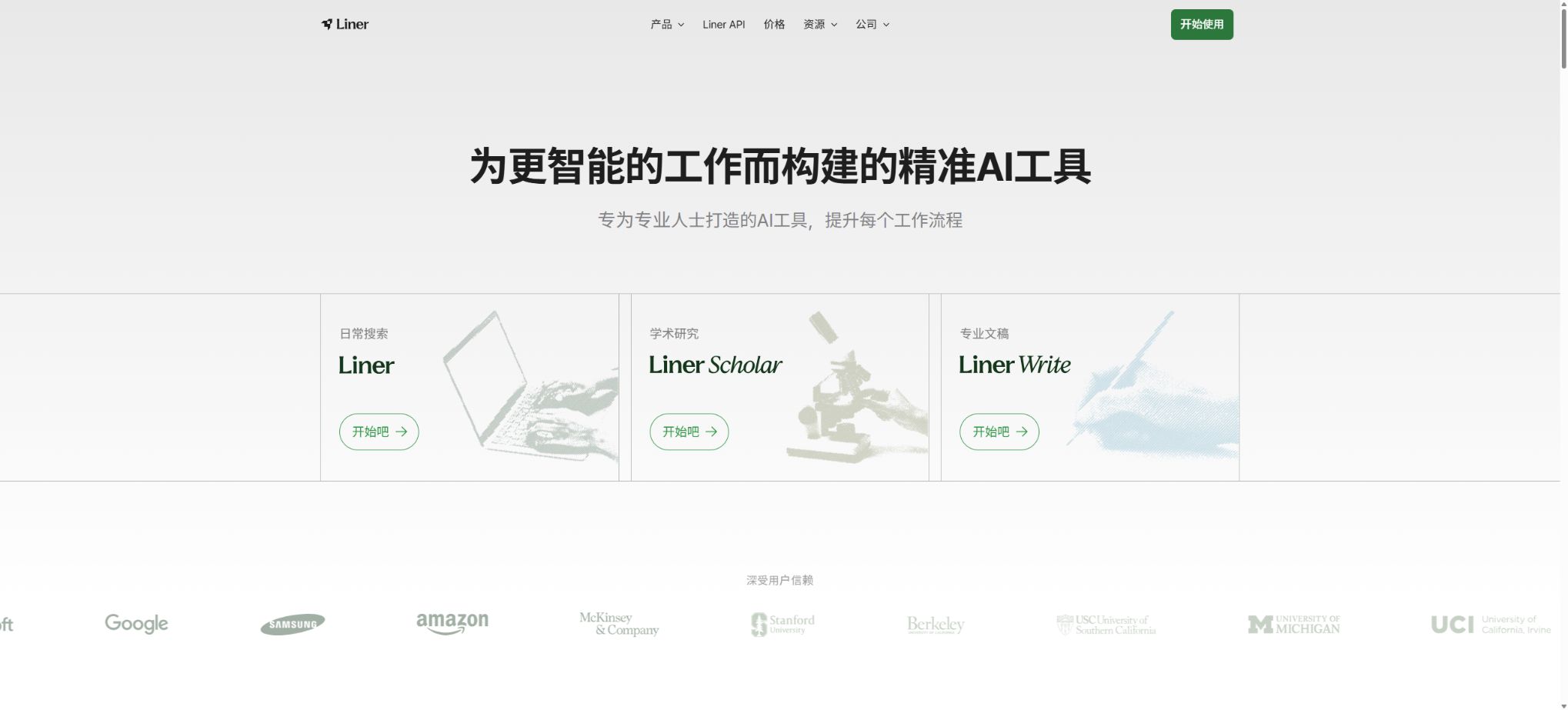
Liner is an AI search and research platform designed for students, researchers, and knowledge workers. Its core products include regular searching, Liner Scholar, and Liner Write. It emphasizes the use of real web pages and academic papers as sources for answers, allowing users to carry out searching, research, and writing within the same workflow.
Liner first gained attention as a tool for highlighting text on web pages and saving information; it has since been expanded to include functions such as in-depth research, paper comparison, citation recommendations, literature reviews, question-answering related to documents, and developer APIs. Users can access it through web browsers, browser extensions, as well as desktop and mobile devices.
Main functions of Liner
- AI search:Answer everyday and professional questions, and provide verifiable sources for the key conclusions.
- Advanced Search:Retrieving evidence from multiple web pages or academic sources is suitable for fact-checking and further investigation.
- Deep Research:Break down complex problems into sub-tasks to produce lengthy research reports with multiple sections and citations.
- Liner Scholar:Search for papers, conduct comparative studies, read abstracts, and manage a personal academic database.
- Literature review:Summarize the methods, findings, limitations, and research gaps of multiple papers related to the research question.
- Recommended citation:Find supporting literature for the specific claims in the draft and generate common citation formats.
- Research Agent:It provides tools for hypothesis generation and evaluation, research tracking, questionnaire creation, simulation, and peer review.
- Liner Write:Draft emails, briefings, reports, and articles based on the theme, and continue to edit and review them.
- Document Q&A:Upload PDFs or other documents, extract key points, compare contents, and ask questions based on the documents.
- Mind maps and visualization:Convert complex topics into mind maps, tables, and real-time graphics to aid in understanding the relationships.
- Web page highlighting:Save highlights and annotations in web pages, PDFs, and certain video formats, and organize them together.
- Multi-model access:Paid plans allow the use of popular models such as ChatGPT, Gemini, and Claude in the Liner workflow.
Comparison of Liner, Scholar, and Write
| Products | Main tasks | Representative function | Suitable for users |
|---|---|---|---|
| Liner Search | Find facts and understand complex topics | Includes quoted Q&A, follow-up questions, mind maps, and in-depth research | Workplace, consulting, and content research |
| Liner Scholar | Complete the academic search and research process | Paper search, comparison, review, citation, and databases | Students, teachers, and researchers |
| Liner Write | From data to professional documents | Drafting, editing, polishing, verifying, and formatting | Marketing, operations, and professional writers |
| Browser highlighting | Save evidence while reading | Highlighting, annotating, and bookmarking for web pages and PDFs | Users who have accumulated data over a long period of time |
The current individual subscription plan can be used for Liner, Liner Scholar, and Liner Write simultaneously, eliminating the need to subscribe to each of these products separately. The regions where these functions are available, as well as the number of models and agents allowed, may still change depending on the account and version used.
Liner individual and team prices
The following are the prices in US dollars as displayed on the official pricing page. The annual price is shown on a monthly basis, but it is usually paid in one lump sum for the entire year. Taxes, exchange rates, prices for mobile devices, and any promotions may vary; the actual amount to be paid upon renewal will be indicated on the payment page.
| Package | Monthly payment | Average monthly amount for annual payment | File upload | Primary interests |
|---|---|---|---|---|
| Free | $ | $ | 1 per day, with a maximum file size of 25MB | Advanced Search, Limited Deep Research, and Answers with Ads |
| Pro | $ | $ | 20 per day, with a maximum size of 100MB per file | Three product options: universal versions, mainstream models, and an ad-free experience |
| Max | $ | $ | No limit on the number of days; each file can be up to 200MB in size. | Enhanced research and document handling capabilities |
| Team | $ | Refer to the team settlement page. | Inherit Max direction capability | 2 to 20 people, centralized billing, management controls, and dedicated space |
| Enterprise | Customization | Customization | In accordance with the contract | Dedicated manager, training, audit logs, and higher discounts |
The official page may display either Agent credits or the number of Deep Research sessions per month at different entry points; these limits can change as the product is updated. Before making a purchase, it is necessary to check the real-time quotas for Deep Research, external models, Research Agents, and file uploads while logged in.
Liner API pricing
| API | Price per 1,000 requests | Main output |
|---|---|---|
| Web Search | 1 dollar | Fast structured web search results |
| Scholar Search | 0.30 dollars | Results of academic paper searches |
| Visualization | 10 dollars | Generate visualizations for own search results |
| Web Search + Visualization | 20 dollars | Web search and automatic visualization |
| Quick Answer Agent | 3 dollars | Quick stream-based answers with a small number of references |
| Search Agent | 20 dollars | Iterative search, answers, and references |
| Deep Research Agent | 200 dollars | Long, multi-step research reports |
| Visual Answer Agent | 150 dollars | Search, answer, cite, and visualize |
The API is charged based on the number of requests that are processed successfully, and it is possible to top up credits in advance. Customers with high usage levels can inquire about bulk discounts, annual commitments, custom QPS levels, SLAs, support options, and data retention policies.
Deep Research Usage Tutorial
- Narrow the topic:Define the time frame, region, target audience, evaluation criteria, and the final format of delivery.
- Write down the question:Formulate the goal as specific questions that require evidence for comparison, rather than single, broad keywords.
- Initiate research:Select Deep Research to have Liner break down the task into sub-tasks and search from different perspectives.
- Inspection plan:Verify that the sub-tasks cover the background, main arguments, counterexamples, limitations, and recent developments.
- Read the report:Open each citation one by one to verify whether the source indeed supports the corresponding conclusion.
- Additional question:Requests include adding missing areas, opposing evidence, sample limitations, or updates to the timeline.
- Export and organize:Format the references according to APA, MLA, Chicago, or other styles, and then finalize them manually.
Liner Scholar Paper Research Tutorial
- Rewrite the research topic as core concepts, synonyms, key terms related to the research subject, and methods.
- First, search for highly relevant reviews and key papers, and then expand by examining citations and references.
- Save the candidate papers in Scholar Library and create folders by topic or chapter.
- Compare research questions, samples, methods, indicators, conclusions, and limitations; do not just read the abstracts.
- Use Citation Recommender to find evidence for specific claims and verify the original text of the paper.
- After drafting the literature review, identify research gaps, detect conflicts, and conduct a quality assessment.
- Before exporting the citation, check the author, title, journal, year, page numbers, and identifier.
How to use highlighting for files and web pages
- Install the official browser extension or open the Liner web version and log in with the same account.
- In web pages or PDFs, mark only arguments, evidence, and key definitions, avoiding highlighting entire pages.
- Add brief annotations to each highlight to indicate which question it supports or refutes.
- Organize the relevant pages and papers into theme folders, using consistent naming and tagging.
- Upload the files that require centralized analysis, and ask the AI to compare them rather than generating summaries for each one separately.
- Regularly delete obsolete, duplicate, or untraceable items from the collection to maintain the quality of the database.
Scholar MCP and developer integration
- Paper search:Find papers by title and abstract, and conduct in-depth searches within the text of the papers.
- Paper reading:Obtain the content of the selected paper to view the methods, experiments, results, and references.
- Citation tracking:Check paper citations and references to help establish the context of the research.
- Database operations:List folders, search for existing papers, read their content, and save new papers.
- Zotero import:Import the existing collection of papers into Scholar Library to continue organizing them.
- Remote connection:By leveraging AI clients that support MCP and OAuth authentication, it is not necessary to expose account passwords.
Liner also offers a platform for independent developers as well as a Deep Research API; this API provides research plans, search steps, quoted excerpts, reasoning processes, and the text of reports through streaming events. API keys should be stored only on the server side, and Scholar MCP requires that its authorization scope be carefully reviewed and that it be disconnected when it is no longer in use.
Which users are suitable for Liner?
- Student:Search for papers, understand course materials, and prepare a literature review.
- Researchers:Compare methods, track citations, and identify research gaps.
- Consulting and marketing staff:Conduct research on the industry, companies, and competitors from which the content originates.
- Content creator:Verify facts, find evidence, and complete a draft with citations.
- Product Manager:Organize user, market, and technical information to create decision briefs.
- Development team:Access research capabilities through the Search, Agent, Visualization APIs, or MCP.
Product advantages
- Searching, academic research, and writing are all integrated within one account and workflow;
- The answer emphasizes citing each item individually, which facilitates returning to the webpage or paper for verification;
- Scholar covers paper discovery, comparison, reviews, citations, and database management;
- Deep Research can organize complex topics into multi-chapter reports;
- The highlighting feature of the browser extends to AI-driven data organization, making it suitable for long-term knowledge accumulation;
- It offers MCP and multi-layer APIs, serving both individuals and enabling product integration.
Usage restrictions and precautions
- The fact that a citation is available does not mean that the corresponding conclusion is necessarily correct; it is necessary to examine the original source and the context.
- Paper metadata, the number of citations, and full-text availability are affected by external databases.
- Deep Research may overlook key studies, repeat existing viewpoints, or overgeneralize controversial issues;
- External AI models, Agent credits, and the number of research attempts may vary depending on the package chosen;
- The prices may differ between the mobile version and the web version, and subscriptions should be managed through the original purchase channel.
- Before uploading unpublished research, interviews, and corporate documents, it is necessary to check the privacy and confidentiality requirements.
- The reference formats generated by AI still need to be verified item by item using the metadata from the original paper.
Privacy, Copyright, and Academic Integrity
The official description of the team package highlights that dedicated work areas, management controls, and team data are not used for AI training; the enterprise version also provides audit logs and customized security provisions. Individual users should still avoid uploading unauthorized paid papers, personal data, and confidential documents.
- When writing a paper, it is important to clearly distinguish between one’s own analysis, the views of the original author, and content generated by AI.
- One must read the original text in order to cite it; do not draw conclusions based solely on AI summaries.
- Comply with the rules set by schools, journals, and institutions regarding the use and disclosure of generative AI;
- Web page highlighting and saving do not automatically grant rights for republication or commercial use;
- API and MCP outputs that contain third-party content must still comply with copyright and database terms.
Liner open-source documentation
The Liner platform, the search system, and the core models are not open-source products; projects with the same name on GitHub cannot be considered official services as a result of that. Scholar MCP is an officially hosted remote tool interface, but it does not mean that its backend code or paper indexes are made available to the public.
Developers should obtain the API specifications from the official developer documentation, and should not use third-party scripts for web scraping or simulated login. For real projects, it is also necessary to determine the API costs, usage rates, data retention policies, and service levels.
Frequently Asked Questions
Is Liner free?
A free plan is available, which allows use of Advanced Search as well as limited access to Deep Research and file uploading. Free responses may contain advertisements, and the number of research sessions and the amount of credits allocated to the agent are displayed in real time on the account dashboard.
What is the difference between Liner Pro and Max?
Pro is suitable for routine academic and professional research, while Max offers greater research capabilities, more options for uploading files, and a higher limit for the size of individual files. High-frequency Deep Research or projects involving multiple documents are better suited to Max.
Can Liner search for academic papers?
Yes, Liner Scholar offers functions for searching for papers, comparing them, recommending citations, providing literature reviews, and maintaining databases. Scholar MCP also enables the integration of paper searches and personal databases with AI-compatible clients.
Are the references generated by Liner reliable?
Citation enhances verifiability, but improper source selection, contextual discrepancies, and metadata errors can still occur. Original texts must be consulted for formal papers and reports.
Does Liner have an API?
There are APIs such as Web Search, Scholar Search, Visualization, Quick Answer, Search Agent, and Deep Research. The pricing is based on the number of successful requests; for high usage levels, enterprise solutions can be contacted.
Tools similar to Liner




 Guigong Network Security Registration No. 45132202000164