






Chatterdocs.ai
Chatterdocs.ai – makes AI-driven conversations more efficient and simpler.
Tags:AI dialogue chatWhat is Chatterdocs?
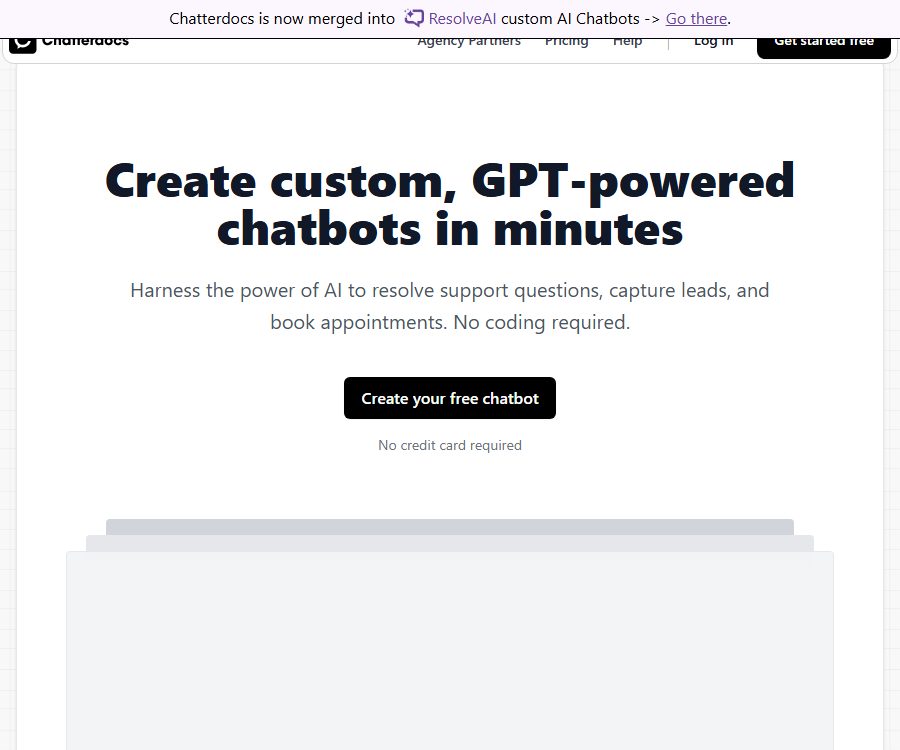
Chatterdocs was once a code-free, GPT-driven platform for creating custom chatbots; it allowed companies to use their own websites and documents to answer customer questions, as well as to handle lead collection, scheduling, and transfers to human customer service representatives.
Chatterdocs has now been integrated into ResolveAI. The old website still contains product descriptions, but the registration link redirects to ResolveAI; therefore, new users should consider ResolveAI’s features, prices, and policies as the current standards.
Current status after merging
| Project | Chatterdocs old service | Current ResolveAI services |
|---|---|---|
| Brand status | The introduction page remains unchanged; it has been marked as being incorporated. | Accept new account registrations and subscriptions |
| Registration portal | Automatic redirection | Create an account through the ResolveAI app for unified access. |
| Main positioning | Code-free GPT chatbot | Enterprise knowledge chatbots and task agents |
| Old package | The page example stated that it was free up to 499 dollars. | It should no longer be considered as the current purchase price. |
| Current package | No separate settlement interface available. | Basic, Enhanced, Expert |
| Operating entity | The old page indicated Chatterdocs, Inc. | The legal document indicates OnClick Solutions Ltd |
\"Integration\" indicates that the brand and product entry points have been combined, but the public page does not provide information regarding company equity transactions, automatic migration of old accounts, inheritance of remaining credits, or how historical data is preserved.
Chatterdocs’ original capabilities
Train robots using corporate content
- Old products can be imported onto website pages to monitor changes in their content; it also supports PDF, CSV, rich text, Markdown, audio, and Notion workspaces.
- Users use the help center, product documentation, and frequently asked questions as source materials of knowledge, and the robot responds to visitors based on this information.
- The list of old formats cannot be considered as representing all the formats that ResolveAI currently supports; users who migrate should retest file parsing and synchronization.
- Expired prices, policies, and product descriptions in the training materials can directly affect the responses provided; therefore, it is necessary to designate someone responsible for maintaining these contents and to establish a schedule for their updates.
Website customer service, leads, and reservations
- Branded chat components can be embedded on websites to provide 24/7 Q&A services and collect names, email addresses, and phone numbers in accordance with established rules.
- Robots can guide visitors through the process of making appointments during conversations, and they are suitable for sales consultations, product demonstrations, and service reservations.
- The team can view conversations, identify knowledge gaps, and route visitors to human customer service when complex issues arise.
- When gathering clues, it is necessary to have clear mechanisms for informing people and obtaining their consent; privacy obligations cannot be ignored just because the information is collected by robots.
Team and external systems
- The older version provided website components and Slack integration, and it was mentioned that responses could be sent to external APIs.
- Internal robots can assist customer service agents in accessing the knowledge base, while external robots are intended for website visitors directly.
- The API description in the old version refers to data push capabilities; it is not equivalent to the public, general-purpose developer APIs, and there are no verifiable SDKs or documentation regarding usage rates.
Current main functions of ResolveAI
Knowledge base training and synchronization
- It is possible to connect to website pages, documents, text files, as well as services like Google Sheets, in order to create a distinct knowledge base for each robot.
- Google Drive can serve as a source for training data, and it is suitable for allowing robots to use files that are maintained on a regular basis by a team.
- Basic allows up to 20 training data items and 500,000 characters, while Enhanced supports an unlimited number of data items and 5 million characters.
- When Expert uses its own OpenAI API key for training, the character limit is set to infinity; otherwise, the limit is 10 million characters.
Brand, character, and response control
- The team can define the purpose of the robot, specific instructions, the style of communication, and the brand’s identity, so that the responses reflect the tone appropriate for the business.
- Different robots can handle pre-sales, customer support, internal knowledge searches, or scheduling tasks separately, rather than sharing the same mixed set of data.
- Web components can be embedded on corporate websites; there is no need to pay extra for removing the platform’s branding, and this is not part of the standard subscription benefits.
- Custom roles are listed as having full privileges only in the Expert comparison table; for lower-tier packages, it is necessary to confirm the range of adjustments available before making the purchase.
Multi-channel customer service with manual intervention
- The current integrations include WhatsApp, Facebook Messenger, Slack, WordPress, Shopify, Wix, Google Drive, Zapier, and Make.
- When a visitor requests to speak with a real person, the system can notify a team member and hand over the AI conversation to a human for further handling.
- A summary of the conversation is generated during the handover, which helps customer service staff understand the issue quickly and prevents visitors from having to describe it again.
- Channel permissions, message templates, platform review processes, and the costs associated with each channel may apply separately; it is not possible to rely solely on the ResolveAI subscription budget.
Appointments, leads, and automation tools
- The booking assistant can schedule meetings based on the available times in the calendar, and it is suitable for presentations, consultations, and pre-sales discussions.
- Robots can collect email addresses, filter potential customers, answer questions prior to a purchase, and initiate subsequent processes when necessary.
- Expert’s API-based tools are used for querying and triggering remote data within conversations, and they can be connected to real-time business information or actions.
- When high-risk actions such as placing orders, processing refunds, or making account changes are carried out, confirmation steps, access controls, idempotency mechanisms, and manual approval processes should be in place to prevent errors caused by the model.
Input and output
| Process | Enter | Output | Typical uses |
|---|---|---|---|
| Knowledge training | Websites, documents, text, tables, and cloud storage files | Searchable robot knowledge | Customer Service FAQ and Internal Knowledge Base |
| Visitor conversation | Natural language questions and conversation context | Answers based on knowledge materials | Pre-sales and after-sales self-service |
| Clue collection | Name, email, phone number, and requirements | Visitor information that can be downloaded or followed up on | Sales leads and qualification assessment |
| Reservation | Visitor hours and calendar availability | Scheduling of meetings or calls | Product demonstration and consultation |
| Manual takeover | Switch to manual request and historical sessions | Notifications, summaries, and real-time chat | Escalation of complex issues |
| Tool invocation | Dialogue parameters and external business data | Remote query of results or process triggering | Expert Automation |
Setup and Migration Tutorials
- Old Chatterdocs users should first export the available knowledge materials, robot instructions, leads, and key conversations, and note down the locations where the old components are placed.
- Access the new ResolveAI account page via the old registration link to check whether you can log in using your old email address; if you are unable to log in, do not assume that your account has been migrated.
- Create robots and define their purposes for customer service, pre-sales support, or internal knowledge management, in order to avoid putting unrelated data all in the same knowledge base.
- Connect to website pages, documents, Google Sheets, or Google Drive to check the character count, update status, and access permissions of each item.
- Set the role, tone, range of responses that can be declined, conditions for transferring to a human agent, and clue fields; use known questions to test whether the responses are consistent with the provided material.
- Select a web component or a channel such as WhatsApp, Messenger, Slack, etc., and complete the authorization and message configuration as required by that channel.
- When accessing reservation services or Expert tools, test accounts and credentials with limited permissions are used; verification fails, repeated requests are made, and an manual approval process is required.
- Before going live, check the privacy notice, Cookie settings, consent for data collection, options for data deletion, and the process for manual upgrades; also save the current billing and plan pages.
- Regularly review unanswered questions, incorrect answers, the rate of referrals to human agents, and the conversion results, and revise the documents rather than simply adding more prompts.
Price packages
ResolveAI currently offers three tiers: Basic, Enhanced, and Expert. The monthly fees are 9, 29, and 79 dollars respectively, while the annual fees are 90, 290, and 790 dollars respectively; the website states that this equates to two months of service free of charge.
| Package or version | Price | Billing cycle | Core benefits or quota | Suitable for users |
|---|---|---|---|---|
| Basic | 9 dollars | Monthly | 1 robot, 20 pieces of training data, 500,000 characters, 2,000 AI messages per month, ChatGPT 3.5 Turbo tag | Small FAQ and basic customer support |
| Basic | 90 dollars | Every year | The same as the monthly plan. | Long-term basic use |
| Enhanced | 29 dollars | Monthly | 1 robot, unlimited data entries, 5 million characters, 4,000 messages per month, ChatGPT 4 and 3.5 Turbo versions, as well as options for channels and appointments. | Growth-oriented customer service and sales teams |
| Enhanced | 290 dollars | Every year | The same as the monthly plan. | Long-term use across multiple channels |
| Expert | 79 dollars | Monthly | 1 robot; when there is a proprietary key, the characters and messages are marked as unlimited; custom roles, API tools. | Complex automation and advanced knowledge bases |
| Expert | 790 US dollars | Every year | The same as the monthly plan. | Long-term advanced automation |
- When no own OpenAI API key is used, the maximum number of characters that can be processed during Expert training is 10 million, and the maximum number of AI messages per month is 6,000.
- The monthly fee for additional robots is 9, 19, and 49 dollars for the Basic, Enhanced, and Expert versions respectively, while the annual fees are 90, 190, and 490 dollars respectively.
- Removing the platform brand incurs an additional charge of $39 per month or $390 per year; none of these options are available for free by default.
- The package page still uses old labels such as ChatGPT 3.5 Turbo and ChatGPT 4; no specific model versions are indicated, and the actual models available should be checked within the account.
- Fees, costs associated with the use of proprietary model APIs, and expenses related to third-party services such as WhatsApp may be charged separately.
Trial, cancellation, and refunds
| Matters | Current page | Earlier provisions | Purchase recommendations |
|---|---|---|---|
| Trial period | 10-day full-featured trial | Write for 14 days, and it will be charged according to the selected plan upon completion. | The expiration date and deduction conditions shown at the time of registration shall prevail. |
| Cancel | It can be canceled at any time, and renewal can be stopped as well. | It takes effect at the end of the current period. | Cancel and save the confirmation email and invoice. |
| Refund | A full refund is available if you change your mind within 7 days after payment. | There is no equally clear paragraph regarding refunds. | Before applying, confirm whether the initial payment, renewals, and annual payments all apply. |
The information regarding the 10-day trial period on the price page and the home page has been updated in line with the terms for 2023, but the legal documents have not been revised accordingly; therefore, one should not rely solely on the marketing materials. When registering, it is also necessary to check whether a payment method is required, which plan will be selected automatically after the trial period, and what is the time frame for processing refund requests.
Platforms and integration
| Channels | Current status | Explanation |
|---|---|---|
| Web management dashboard | Already provided | Create, train, monitor robots, and take over manually |
| Website components | Already provided | Copy the embedded code to regular websites, WordPress, Shopify, or Webflow |
| WhatsApp and Messenger | Enhanced and Expert are listed as benefits. | The Meta channel account and template rules must be satisfied. |
| Slack | Enhanced and Expert are listed as benefits. | Used for team knowledge lookup and collaborative dialogue |
| Google Drive and Sheets | Already supported | As continuously updated training data |
| Zapier and Make | Already listed | When connecting workflows, fees for external platforms may apply separately. |
| Native mobile or desktop apps | Not confirmed yet | The main products are web management consoles and channel bots. |
API, GitHub, and open-source status
- The official GitHub organization for Chatterdocs still exists, but there are no public repositories at the moment; therefore, it cannot be concluded that the platform is open source.
- The older version of the product involved pushing responses to external APIs; currently, Expert provides API-based tools for remote querying and triggering actions.
- Currently, no public REST API references, SDKs, authentication procedures, rate limits, or example repositories are available.
- Website embedding codes and third-party integrations involve the use of interfaces, but they do not equate to the open-sourcing of server-side components, search systems, or models.
- Enterprises that need to manage robots in bulk, export data, or achieve deep integration should request information regarding the current range of interfaces, pricing, and service commitments before making a purchase.
Privacy and data security
The privacy policy for ResolveAI is managed by OnClick Solutions Ltd, a company registered in Israel; the document was last updated in December 2022. This policy collects names, email addresses, phone numbers, device information, IP addresses, location data, log files, and usage details. Payment-related data is handled by Stripe.
- Personal information is used for accounts, support, administrative notifications, feedback, marketing, fraud prevention, and product improvement.
- The Google Calendar integration is used to create and update events initiated by the platform, to check available times, and it guarantees that no details of personal events outside this scope are read or saved.
- According to the policy, once an account is closed, personal information is generally not retained for the purposes specified for more than 3 months; however, legal requirements and restrictions on deleting backups may extend this period.
- The service employs technical and organizational measures, but no guarantee is provided for absolute security in internet transmission or storage.
- The platform is not intended for users under 18 years of age, and the terms specify that the service was not developed in accordance with industry regulations such as HIPAA, FISMA, or GLBA.
- Training materials, visitor messages, leads, and appointments may contain customer personal information; companies need to establish their own procedures for notifying customers, obtaining their consent, storing such information, and deleting it.
- The policies and terms are outdated, dating back to a time prior to the current version of the page after the merger with Chatterdocs; businesses purchasing services should request updated data processing and security documents.
Data, copyright, and commercial usage considerations
- The terms state that users retain ownership of the content they contribute as well as the related intellectual property rights; the platform may access, store, process, and use this information in accordance with the privacy policy and the settings specified by the users.
- Users must have the right to upload websites, documents, audio files, tables, and customer records, as well as obtain the necessary permissions to identify individuals.
- The platform carries out regular backups, but the terms still require users to be responsible for transferring and managing their business data, and the platform assumes no responsibility for any loss or damage to such data.
- Chat responses may be incorrect or beyond the scope of available knowledge; medical, financial, legal, and security issues should not be handled entirely automatically.
- When using your own OpenAI API key, the provider’s pricing, data policies, and usage rules apply as well; it is necessary to use a dedicated key with limited permissions and to keep an eye on the associated costs.
- Robots intended for customers should clearly indicate their AI nature, the methods for human intervention, and any limitations, in order to avoid misleading visitors with expressions that mimic those of humans.
Suitable for users and typical use cases
- E-commerce and SaaS: Answering questions regarding products, prices, and accounts, collecting leads, and handing over complex matters to human agents.
- Local service companies: Handle reservations, business hours information, and pre-sales inquiries via websites or messaging channels.
- Customer service team: Use robots to handle the first level of FAQs, with human supervision to take over when necessary.
- Sales team: Filters visitors, records contact information, schedules demonstrations, and initiates subsequent workflows.
- Internal team: Convert policies and business documents into Slack or web-based knowledge assistants.
- Agent: Creates separate robots for different clients, but must include the costs associated with additional robots and brand removal in the quote.
Advantages and limitations
| Aspect | Actual judgment |
|---|---|
| Migration status | New registrations have been integrated into ResolveAI, but the rules for migrating old accounts and data have not been made public. |
| Set up barriers | It can be trained and embedded without code; the Expert tool is suitable for more complex actions. |
| Channel coverage | Websites, WhatsApp, Messenger, Slack, and automation platforms are fairly comprehensive. |
| Price | The price starts at 9 dollars; however, additional robots, brand-free versions, model APIs, and distribution channels come at an extra cost. |
| Model transparency | The page still uses the old model labels, lacking information on the current version, quality, and context. |
| Policy consistency | There is a discrepancy between the number of trial days shown on the current page and those specified in the old terms; the legal documents were updated earlier. |
| Developing openness | There are tools that facilitate the connection between concepts, but no public SDKs, universal APIs, or source code for the products is available. |
Summary
Chatterdocs is no longer a standalone product with its own registration and billing process; both existing users and new users should use ResolveAI as the platform for their activities. It is suitable for teams that wish to quickly set up multi-channel customer service, booking, and sales robots using websites and documents.
Before migrating, it is necessary to verify the old account and its data; before making a purchase, one should check out the 10-day trial period, the version of the model, the cost of proprietary API keys, as well as any fees associated with additional robots and brand removal. The privacy and terms documents are outdated, and companies that handle customer personal information or regulated data need to conduct an additional review.
Tools similar to Chatterdocs.ai




 Guigong Network Security Registration No. 45132202000164