






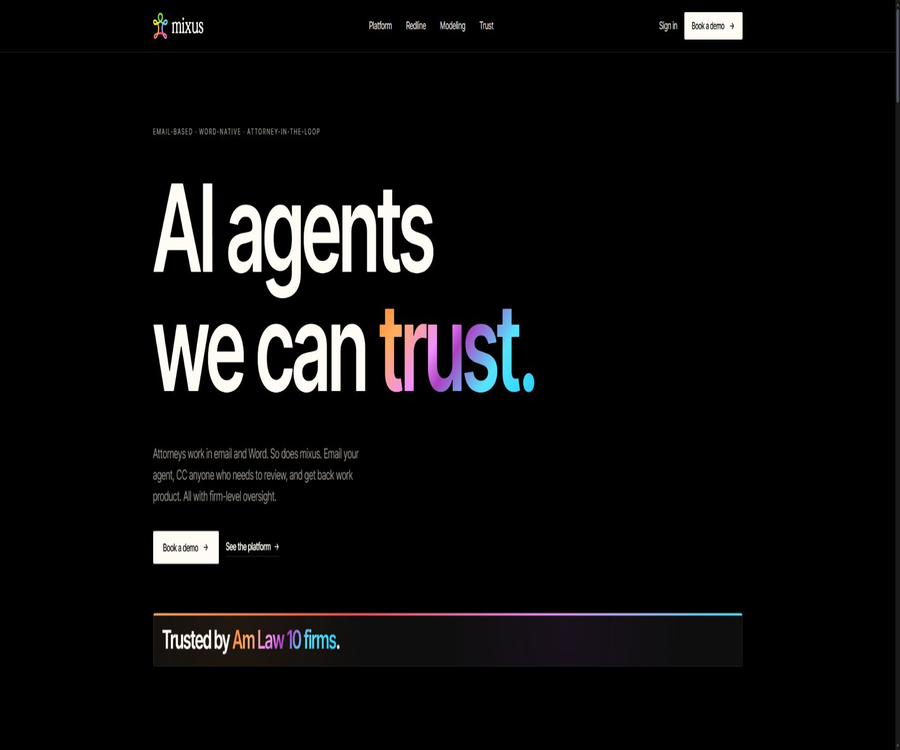
mixus.ai
mixus.ai: an intelligent tool focused on AI-driven conversations
Tags:AI dialogue chatWhat is mixus.ai?
Mixus.ai is an AI agent platform developed by Mixus Inc. for law firms and legal transaction teams; it focuses on tasks carried out via email and Microsoft Word. Lawyers can assign tasks through email and include reviewers in the correspondence, after which the agent returns editable documents and waits for the lawyer’s approval before delivering them to others.
In its early stages, the product appeared as a general-purpose intelligent agent for human-computer collaboration and a self-service chat platform; currently, its main focus is on legal-related applications. The general chat functions, token packages, and automation features mentioned in the older documents can still be used to understand the technical background, but they cannot be considered as part of the features offered by the current legal-related products.
Current main functions
- Native email agent: The lawyer sends the relevant details, attachments, and requirements to the agent, and adds reviewers to the same email thread. The agent analyzes the information, extracts the necessary data, drafts documents, or creates models, and then returns the results – without the need to learn a new task interface first.
- Lawyer approval: It is possible to designate a specific lawyer or legal professional to conduct the review; the system will not send the final result to the client until approval is granted. The responsibility for reviewing the content remains with the lawyer, and the approval process cannot be considered a guarantee of accuracy.
- AI Redline: It generates Word files for contracts that show the traces of revisions, provides a reason for each change, and creates a list of issues. Reviewers can accept, edit, or reject the suggestions.
- Transaction modeling: Create capital structure tables, M&A allocation frameworks, dilution analyses, and custom models based on term sheets, equity documents, or historical models; the result is an XLSX file containing real-time formulas. Lawyers and financial professionals need to verify the formulas, cell references, and assumptions.
- Word Add-in: Allow users to view, accept, edit, or reject suggestions within Microsoft Word, thereby reducing the need to copy content back and forth between the chat interface and the document. The scope of use and deployment permissions for this add-in are controlled by the enterprise administrator.
- Playbooks: Convert the firm’s past agreements and models into executable review rules, documenting preferred languages, compromise points, mandatory terms, and unacceptable conditions. These rules can be specified by client, contract type, or business area.
- Review of decision-making learning: The system keeps track of signals that are accepted, modified, or rejected, identifies recurring patterns, and proposes new rules. These new rules must be approved by lawyers; the system cannot automatically change the firm’s standards.
- Office memory: It keeps track of the approved positions, versions, and review decisions, so that similar matters can build upon existing standards. When using it, it is necessary to isolate them by client and matter, to prevent the terms applicable to one client from being applied to another matter.
- Issue tracking and explainability: It is recommended to associate red lines with the Playbook rules that were triggered, so as to facilitate the review of the reasons behind an issue and carry out audits. This is because the explanations generated by the system still need to be checked to ensure they are consistent with the facts stated in the documents.
- Organizational-level visibility: Managers can view tasks, usage levels, approval processes, and results, which helps in regulating the use of legal AI. Access rights should be in line with principles of professional confidentiality, information segregation, and minimum necessary knowledge.
- Multi-model layer: Models from Anthropic, OpenAI, and Google can be used, with a verified list of models available for legal processes; different workflows may opt for different models.
- Slack and external tools: The platform’s navigation bar includes Slack integrations, and it is claimed that it can connect to more than 200 different tools such as Microsoft 365, Google Workspace, Salesforce, HubSpot, Notion, Jira, Linear, and others. Specific connectors, permissions, and available versions need to be checked in a demonstration or contract.
Input, processing, and delivery
| Work stages | Enter | Agent processing | Delivered results | Manual control |
|---|---|---|---|---|
| Contract red lines | Agreements, customer positions, and Playbook | Identify differences, propose modifications and provide reasons. | DOCX files with revision marks and a list of issues | Accept, edit, or reject each item individually |
| Financing documents | List of terms and transaction details | Draft a set of transaction documents | Draft agreement for review | The lawyer verifies completeness and consistency. |
| Transaction modeling | Shareholding structure, securities terms, and assumptions | Calculating dilution and distribution scenarios | XLSX model with formulas | Review formulas, units, and assumptions |
| Due diligence | File sets and inspection rules | Extract information, identify issues, and organize the results | List of issues and analysis documents | Check for citations and omissions. |
| Standard accumulation | Historical documents and review decisions | Propose Playbook rules | Versioning rules and firm memory | Approval prior to the release of the rules |
Processes used by the legal team
- Choose a process that is repetitive, has well-defined boundaries, and involves a responsible lawyer, such as NDA redlines, financing documents, or balance sheet modeling.
- Organize the approved agreements, models, positions, compromise options, and unacceptable conditions by customer, contract type, or business area.
- A Playbook is created, with the partners or designated supervisors responsible for reviewing the rules, scope of application, versions, and conditions for upgrades.
- For the testing tasks, files are submitted via email or Word, a specific reviewer is designated, and any unauthorized actions are prohibited.
- Check the reasons for the red lines, citations, omissions, consistency of definitions, numbers, formulas, and attachments – not just the final conclusion.
- Record the reasons for acceptance, modification, and rejection, so that the system can suggest improvements to the rules, which are then approved by an authorized lawyer.
- Configure customer isolation, roles, single sign-on, auditing, keys, and data retention, and test employee departures and permission revocation.
- Gradually expand to more matters, while continuously monitoring error types, the rate of manual corrections, the cost per operation, and model changes.
Suitable for users and scenarios
- Large law firms: Convert approved positions into actionable playbooks, while maintaining oversight at the partner level.
- Company Transactions and Financing Team: Reviews term sheets, drafts financing documents, and prepares capital structure models.
- M&A Team: Generates lists of issues related to the allocation waterfall, dilution scenarios, and transaction documents.
- Business Contract Team: Conducts regular compliance checks on MSA, NDA, and other frequently used agreements.
- Legal Operations Team: governance workflows, usage, permissions, approvals, and organizational knowledge.
- Lawyers who need to work with Word and email: receive DOCX and XLSX files as well as carry out review tasks using these tools.
- It is not appropriate to provide legal advice to clients directly without the review of a practicing lawyer, nor can it replace conflict checks and professional responsibilities.
Price and product status
| Package or version | Price | Billing cycle | Core benefits or quota | Suitable for users |
|---|---|---|---|---|
| Current legal AI platforms | Contact sales | Corporate contracts | Email, Word, Playbooks, Red Lines, transaction modeling, approval processes, as well as governance and security capabilities – all in accordance with the plan. | Law firms and legal teams |
| Old version of Free document | Historical marker: 0 dollars | Monthly | The old Universal Platform listed 1,000 tokens, GPT-4o mini, and 5 file uploads. | It cannot be used as a basis for current purchases. |
| Old Pro documentation | Historical marker: 20 dollars | Monthly | The old Universal Platform allowed for 100,000 tokens, all types of models, and unlimited file uploads. | It cannot be used as a basis for current purchases. |
| Old version of Team documentation | Historical marker: 50 dollars | Monthly | The old Universal Platform included 500,000 tokens, team spaces, as well as tools for management and analysis. | It cannot be used as a basis for current purchases. |
The current legal products page only offers the option to schedule a demonstration; it does not display public information regarding self-service pricing, free quotas, or standard seat options. The old documents still show the pricing for the general platform packages and models, but the layout of the page and the purchase process have changed. As a result, the actual prices, minimum contract terms, seat allocations, usage levels, and implementation costs must be confirmed by a sales representative.
The current terms of service state that subscriptions are billed in advance on a monthly or annual basis, with automatic renewal, and the fees are generally non-refundable; cancellation takes effect at the end of the current billing cycle. MSA, DPA, orders, or refund agreements signed by enterprises may take precedence over these self-service terms.
Platforms and integration
| Entrance | Current status | Uses | Boundary |
|---|---|---|---|
| Core entrance | Assign tasks, CC reviewers, and receive documents | It is necessary to manage senders and automatic deliveries. | |
| Microsoft Word | The Add-in has been provided. | Suggestions for on-site inspection and handling of red lines | Deployed and authorized by the administrator. |
| Excel file | Output is now supported. | Transaction and Equity Models | The formulas and assumptions need to be reviewed. |
| Slack | Platforms listed for integration | Team collaboration entry point | Old documents still indicate some capability tests. |
| Web management interface | Organization management and viewing | Playbook, tasks, reviews, and usage management | The scope of permissions is determined based on the enterprise plan. |
| Native mobile apps | Not confirmed yet | The scope of functionality available via email and mobile websites needs to be tested. | Do not consider it a native app. |
API, SDK, and open-source status
- The old documentation described over 200 different services, tool calls, and automation mechanisms, but the current legal platform does not provide public detailed instructions for accessing its APIs and SDKs.
- The page for API-triggered agents is still marked as “Coming soon”; it cannot be described as featuring already available real-time Webhooks or external triggering capabilities.
- Word Add-ins and third-party connections are part of product integration; they do not mean that the core services have their source code made available publicly.
- It has not been confirmed that the Mixus legal platform possesses a public product repository or open-source licenses; therefore, it should be regarded as proprietary enterprise software for now.
- When a company needs to customize the connection, it should specify in the contract the authentication procedures, permissions, auditing requirements, handling of failures, data flow, and any additional costs.
Privacy, security, and professional responsibility
- The current security certifications include SOC 2 Type II, ISO 27001:2022, GDPR, HIPAA, TLS 1.3, AES-256, customer-managed keys, and zero data retention by the model provider.
- For the model layer, Anthropic, OpenAI, and Google can be used; the red-line workflow relies on validated checklists, and the specific models and regions must be determined in the enterprise configuration.
- Users retain ownership of the files they upload and of the content they create, and they grant Mixus the authority to carry out any necessary processing in order to provide and improve the services. After the account is deleted, shared content, anonymized aggregated data, and backups may remain available for a certain period of time.
- The privacy policy outlines information such as accounts, communications, devices, usage patterns, error logs, AI session contexts, and files; it may also make use of services like AWS S3, MongoDB Atlas, vector databases, and analysis tools.
- The current comparison page states that Anthropic employs a strategy of zero data retention and no training, but companies should still verify for each model whether input and output data are retained, as well as the regional and contractual commitments.
- Playbooks, historical agreements, matters, review decisions, and models may contain highly sensitive customer information; therefore, customer isolation, information barriers, principle of least privilege, and auditing mechanisms must be implemented.
- Public security identifiers should be verified against Trust Center reports, HIPAA attestations, certificate scopes, and expiration dates; supplier evaluation cannot be based solely on marketing icons.
- There may be errors in the reasons specified by AI, in the citations, in the drafting of documents, and in the formulas; the regulations require human oversight for any actions related to data dissemination, changes to external systems, or handling of sensitive information.
- Lawyers still need to consider professional confidentiality, conflicts of interest, authority, the authenticity of citations, client disclosure, and local regulatory requirements.
Advantages and limitations
- Advantages: Email and Word provide native delivery methods that are in line with lawyers’ existing working practices, reducing the need for copying and pasting as well as switching between different tools.
- Advantages: Playbooks, rules and rationale, review decisions, and approval chains provide stronger organizational governance than single prompts.
- Advantages: RedLine DOCX and XLSX with formulas are professional files that can be further edited, rather than being merely text-based chat messages.
- Limitations: The current pricing is not available publicly; a corporate sales process is required, and the old self-service pricing method is no longer reliable.
- Limitation: Systematic review of decisions may lead to the entrenchment of errors or biases specific to certain cases; all new rules must be approved by lawyers.
- Limitations: Some of the older general documentation documents do not align with the current legal product offerings, and features such as API triggers are still part of future plans.
- Limitations: Multiple models and external integrations lengthen the data processing path; zero retention and authentication requirements necessitate contract-level verification.
Summary
Mixus.ai is suitable for legal teams that wish to incorporate AI into emails and Word documents, while still adhering to the firm’s rules and the approvals required by lawyers. The procurement process should focus on the key aspects of actual contracts and transaction models, including the editability of documents, the interpretation of rules, approval mechanisms, client isolation, data processing related to models, auditing, and overall costs.
Tools similar to mixus.ai




 Guigong Network Security Registration No. 45132202000164