






Macha
Macha, an intelligent tool focused on AI-driven conversations
Tags:AI dialogue chatWhat is Macha?
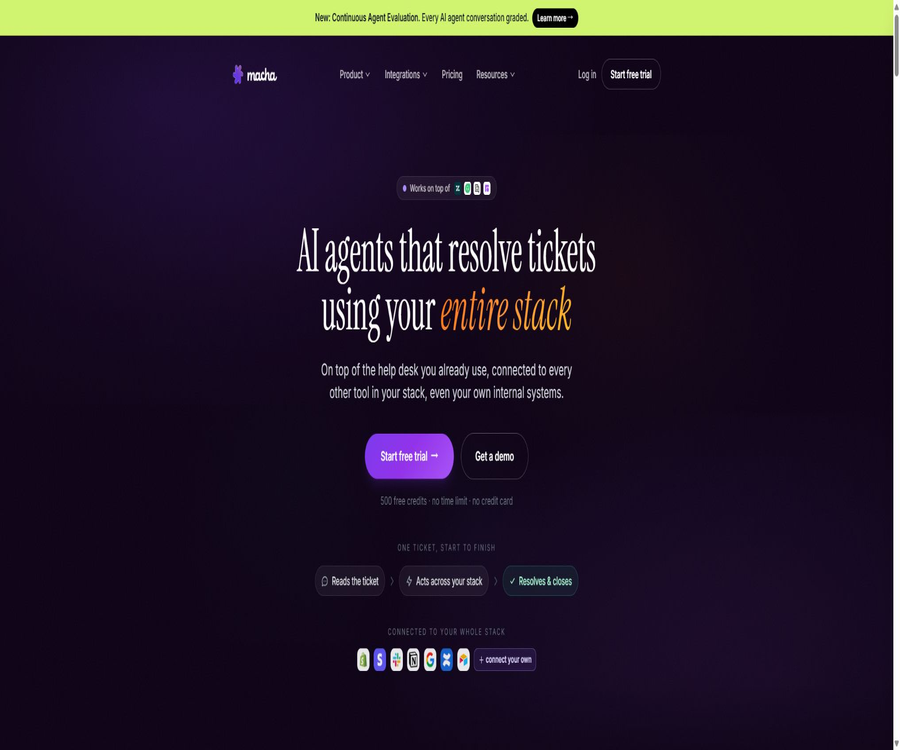
Macha is an enterprise AI agent and customer service automation platform operated by Indian company AGZ Technologies Private Limited. It connects existing help desks, e-commerce systems, payment platforms, communication tools, and knowledge management systems; it enables agents to access business data, draft responses, and carry out actions such as updates, refunds, and task routing when authorized.
The focus of this product is not to provide a generic chat box, but rather to assign specific instructions, available tools, knowledge resources, models, and triggers to each intelligent agent. It is suitable for adding supplementary responses or end-to-end automated processing capabilities while maintaining existing customer service systems.
Main functions
- Customer service ticket processing: The agent can read the full details of a ticket as well as custom fields, search through past records and macros, draft public responses or internal notes, and update the ticket’s status, tags, priority, and assigned owner.
- Manual assistance and automatic operation: Copilot provides summaries, search functions, and draft responses within the customer service workspace, which are sent after being reviewed by a human operator; once triggers are set, the agent can also operate automatically when new tickets are created, in web chats, or when specific events occur.
- Cross-system operations: After connecting to Shopify, it is possible to view products, orders, and customers; by connecting to Stripe or Razorpay, payments can be checked and refunds processed. Connecting to Slack, Notion, Confluence, or Google Workspace allows access to team knowledge and the ability to carry out authorized actions.
- Agent orchestration: The parent agent can first identify the issue and then assign it to sub-agents responsible for refunds, logistics, or technical tasks. Each sub-agent has more limited permissions and instructions, which helps to contain risks.
- Sidekick Build Assistant: Users can describe their goals in natural language, allowing the build assistant to create agents, connect tools, and adjust settings – without the need to configure each field from scratch.
- Knowledge and memory: The help center, historical tickets, documents, and collaboration spaces can all be used as data sources in a synchronized manner, and user-managed preferences, processes, and context information can be saved; the quality of responses still depends on the relevance of the knowledge available and the user’s permissions.
- Analysis and quality control: Studies are used for batch analysis of session or business data; the simulation feature allows testing of scenarios before they go live. Continuous evaluation helps to score conversations and to check for issues related to command compliance as well as the risk of version rollback.
- Custom tools: It is possible to configure one’s own interfaces as agent tools, by specifying the inputs, outputs, and read/write properties, thereby enabling these agents to query internal systems or trigger specific business actions when handling tasks.
- Website chat and browser assistant: It is possible to integrate intelligent agents into websites to handle customer conversations; moreover, the Chrome sidebar can be used to read the current page, summarize its content, answer questions, or draft responses.
Typical tasks
| Task | Required inputs and connections | Execution result | It is recommended to exercise control. |
|---|---|---|---|
| Automatic classification and routing | New tickets, fields, tag rules, and team queues | Set type, priority, tags, and owner | First, simulate using historical tickets and retain the rollback rules. |
| Draft reply | Conversations, knowledge base, past replies, and tone instructions | Generate responses in the same language or internal suggestions. | High-risk content is sent after being verified by staff. |
| Order status inquiry | Help desk tickets and Shopify order data | Returns information on fulfillment, logistics, and estimated arrival time. | Only the necessary fields are displayed, and handling is done in cases where no order exists. |
| Refund processing | Orders, payment records, and refund eligibility policies | Verify the conditions and initiate a refund using the payment tool. | Set thresholds for amount transactions and maintain audit records. |
| Internal knowledge Q&A | Notion, Confluence, Google Docs, or files | Search system, procedures, and relevant document contents | Restrict data access by department and perform regular synchronization. |
| Batch session research | Ticket collection, issue description, and analysis dimensions | Topics, trends, quality issues, and suggestions for improvement | Review the findings of sampling checks and avoid using correlation as a substitute for causation. |
Configuration and deployment process
- Create an organization and the first agent, specifying whether it is intended to act as a support staff member, for automatic classification, for automated responses, or to carry out business tasks; also define the objectives, tone of communication, things that are prohibited, and conditions under which escalation is necessary.
- Connect to the help desk, store, payment systems, or knowledge tools, granting only the read or write permissions necessary to complete tasks. When it comes to responses visible to customers or financial transactions, an approval requirement should be implemented first.
- Select the knowledge content and check the synchronization scope; remove outdated articles, duplicate policies, and conflicting macros to prevent the agent from referencing incorrect rules.
- Select a model for the agent. For tasks that involve a large number of labels and summaries, it is possible to start by testing models with lower accuracy; for complex policy decisions and customer responses, then compare the accuracy and cost of more advanced models.
- Simulations are carried out using real but anonymized historical tickets, covering normal requests, missing information, user emotions, refund disputes, permission errors, and connection failures.
- Set up triggers, routing rules, manual escalation procedures, and shutdown conditions, and implement them on a small scale within the test queue; verify that responses, field updates, internal notes, and external actions all meet the expected standards.
- After going live, continuous evaluations are carried out to assess quality, command compliance, and failure cases; accordingly, the knowledge base, permissions, and prompts are adjusted, while versions of the configurations as well as rollback plans are maintained.
- Monitor the monthly points and number of tickets, and set up alerts for when usage approaches the limit. If that limit is approached, it is possible to reduce the cost associated with the simple intelligent agents, purchase additional points, or upgrade to a higher plan.
Integration and usage platform
| Category | The platform or method has been verified. | Executable capability | Precautions |
|---|---|---|---|
| Help desk | Zendesk, Freshdesk, Gorgias, Front | Search, reply, notes, fields, assignment, and status updates | The actions enabled by different connectors are not exactly the same. |
| E-commerce and payment | Shopify, Stripe, Razorpay | Query product orders, customers, payments, receipts, and refunds | Financial transactions are subject to constraints imposed by payment accounts, regions, and merchant policies. |
| Collaboration and knowledge | Slack, Notion, Confluence, Google Workspace, Document360 | Search documents, synchronize knowledge, send messages, or update content | Write operations should have restricted permissions and require confirmation logging. |
| Productivity and data | Airtable, Cal.com, file management tools | Read records, schedule meetings, create tables and documents | Data structures and the number of available package tools limit the process. |
| Networks and audio | Tavily, ElevenLabs | Search web pages, read pages, and transcribe audio | External content and audio must be subject to lawful processing. |
| client | Web console, help desk application, website chat, Chrome extension | Build management, internal collaboration among customer service teams, and page-contextual Q&A. | The official native mobile app has not been confirmed. |
Chrome extensions read the content of the current page that the user has chosen to send, from the sidebar; the page context can be removed before sending. The installation options available in the Zendesk marketplace are free, but the actual use of AI is still subject to the trial or subscription limits of a Macha account.
Prices and packages
| Package or version | Price | Billing cycle | Core benefits or quota | Suitable for users |
|---|---|---|---|---|
| Trial | 0 dollars | No fixed expiration date | 500 free points, no credit card required; allows access to the entire platform, with few restrictions on actual connections and resources. | The team responsible for verifying workflows and the quality of responses |
| Starter | $ | Monthly or annual payment | 3,000 points per month, 3 agents, 3 integrations, 3 knowledge items, 3 custom interface tools, and an unlimited number of team members. | Pilot projects for small-scale customer service and automation |
| Professional | $ | Monthly or annual payment | 10,000 points per month, 25 agents, 10 integrations, 10 knowledge items, plan triggers, and 5 custom interface tools | A growing multi-process customer service team |
| Enterprise | Contact sales | Customization | No restrictions on points, agents, integrations, or knowledge content; 20 plan triggers, 20 custom interface tools, priority support, and customized data options. | Organizations with a high volume of work orders and strict requirements for governance |
| White-Glove Launch | 799 dollars | One-time use | Engineers build and optimize up to 4 agents, as well as integrate various tools, and provide 6 sessions of guidance; this is already included in the Enterprise version. | Teams that need assistance with going live |
The price page shows different monthly amounts depending on whether payment is made on a monthly or annual basis; the actual amount, taxes, and the timing of deductions are indicated on the account settlement page. An annual payment option indicates a 20% discount, and the discounted annual price should not be construed as a rate that can be canceled at any time on a monthly basis.
Points and ticket-based billing
- The current pricing is based on tickets as the billing unit: each email ticket, each instance of real-time chat, and each Copilot session counts as one ticket; a single ticket can contain up to 50 messages exchanged between the two parties.
- The number of points consumed per ticket depends on the model selected by the agent, rather than on the number of tool calls. The example on the pricing page shows that the lightweight model, the standard model, and the more powerful model cost 1, 2, and 3 points respectively.
- With 3,000 points available for Starter plans, 1,000 tasks can be handled per task at a rate of 3 points per task, while 3,000 tasks can be handled when there is 1 point per task. For Professional plans, the corresponding numbers range from 3,333 to 10,000 tasks.
- When the monthly points are used up, the agent’s operation is suspended; however, its settings and knowledge are not lost, and no additional charges are generated automatically. The quota can be reset on the next settlement date, upgraded proactively, or by purchasing additional packages.
- The additional packages cost 1000 points for $99, 5000 points for $449, and 10000 points for $799; the current pricing indicates that these additional points do not expire.
- Old documents still use the phrase of points being deducted based on the full response, while the current price page clearly states that billing is done on a per-ticket basis. For procurement and cost accounting purposes, it is necessary to refer to the account’s current billing details and compare them with past usage patterns.
API, development capabilities, and open-source status
- Macha offers a REST API that enables the creation and management of agents, sessions, knowledge content, custom tools, and triggers. The interface uses organization-level, revocable keys with defined permission scopes for authentication.
- The listing interface uses cursor-based pagination; write operations support idempotent keys to prevent duplicate resources from being created as a result of retries, and it provides the OpenAPI 3.1 specification for generating typed clients.
- Building or managing configurations through the API does not consume any credits; points are deducted only when the agent actually processes a ticket. API operations are still subject to the resource limits and rate limits set by the plan.
- Custom tools allow connection to any compatible interface, while open APIs are used for managing Macha resources from outside; their purposes are different.
- There is no confirmation regarding official SDKs or product source code licenses available for mainstream languages. The existence of public interface specifications and the ability to generate clients does not mean that the Macha platform is open-source; it should be regarded as a proprietary cloud service.
Privacy and security
- Macha handles account information, usage records, agent instructions, prompts, tickets in connected services, messages, documents, orders, as well as data submitted by end customers.
- The privacy policy states that customers’ content will not be used to train Macha or any third-party AI models; the content transmitted to the model providers is used to generate responses, and a zero-retention policy is applied whenever possible.
- The security guidelines state that sensitive tickets and agent fields are encrypted using AES-256-GCM, while system communications take place over TLS 1.2 or higher versions. Professional offers optional controls for anonymizing personal information; it allows for the replacement of email addresses, phone numbers, credit card numbers, identification numbers, IP addresses, and page addresses before the data is sent to the model.
- Conversations expire automatically after 45 days of inactivity. Internal AI logs are retained for 7 days, while chat attachments are kept for 30 days; Enterprise plans allow for the setting of a retention period for conversations at the organizational level.
- There is a 30-day waiting period after which an account can be deleted; during this time it can still be revoked. Once the period expires, the associated data is permanently removed. Billing records are retained for up to 7 years, as required by law.
- The services are operated from India, with some models and infrastructure located in the United States and the European Union. When handling cross-border customer service data, it is necessary to review the data processing agreements, the list of sub-processors, and the transmission mechanisms required.
- Websites use analysis and advertising technologies; some cookie identifiers are shared, and under certain privacy laws this can constitute cross-context advertising sharing, though users can opt out by setting their preferences or using signals from supported browsers.
Copyright, Commercial Use, and Refunds
- Users retain ownership of the intellectual property related to the content they develop themselves, but they must ensure that tickets, knowledge bases, images, and other inputs have legitimate rights for use.
- The terms require users to grant Macha a non-exclusive, royalty-free, transferable, and sub-licensable global license to their own content for use in promotional and marketing purposes. Organizations that deal with sensitive customer content should verify whether the corporate contract limits this provision before signing.
- The platform, code, design, and other product materials belong to the operating company or its licensors; the account license does not grant the right to copy or resell the platform itself.
- Subscriptions can be canceled at any time, and access remains valid until the end of the current billing cycle. Refunds are not provided as a rule; the company may decide to issue a refund only in cases where the problem is entirely caused by Macha and cannot be resolved.
Capacity limits and usage recommendations
- Agents are able to read from and modify multiple business systems, which means their capabilities as well as the associated risks are higher than those of ordinary question-and-answer tools. Actions such as public customer service responses, refunds, creating charges, and deleting records should require manual confirmation or be subject to strict automation constraints.
- The knowledge base may become outdated, and historical tickets might contain incorrect methods of handling issues. It is necessary to clean up this content before going live, and to use evaluations and simulations for continuous checking; connecting data does not equate to obtaining the correct answers.
- Multiple model selection helps to balance cost and quality, but the model names, default settings, and integration factors will change. It is necessary to rely on the information displayed in the current account, and fixed regression tests should be conducted for key processes.
- Connectors rely on third-party interfaces and permissions; failures of external platforms, rate limits, or changes in fields can disrupt automation. It is necessary to implement error alerts and procedures for manual intervention.
- There is no time limit on the free trial credits, but it is not a permanently free service; before launching a full-scale customer service operation, it is necessary to use actual ticket distribution data to estimate the monthly costs.
Summary
Macha is suitable for teams that already use help desks, e-commerce platforms, and collaboration tools, and that wish to reduce the number of tickets, inquiries, and cross-system operations by leveraging controlled intelligent agents. Its advantages lie in the fact that it provides connectors, permission-based tools, evaluation mechanisms, and open interfaces, all of which work together to create a comprehensive workflow. When purchasing it, it is important to carefully examine the prices for monthly and annual subscriptions, the current billing rules for tickets, the arrangements for data transfer across borders, as well as the criteria for approving automatic data writes and financial transactions.
Tools similar to Macha




 Guigong Network Security Registration No. 45132202000164