






Legaliser
Legaliser: an intelligent tool focused on AI-driven conversations
Tags:AI dialogue chatWhat is Legaliser now?
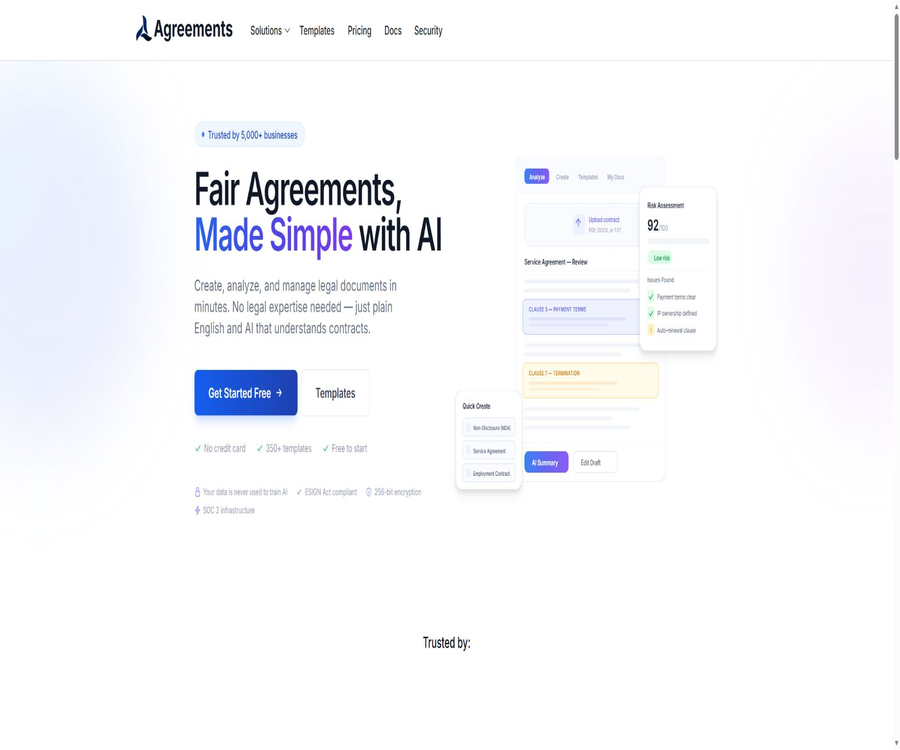
Legaliser has now been rebranded as Agreements.ai; it is an online platform used for creating, analyzing, negotiating, signing, and managing contracts. The original domain name is still in use to provide services, but the pages, product interfaces, and packages all use the Agreements.ai name.
It brings together AI-based contract review, legal templates, document editing, electronic signing, and contract lifecycle management in a single workspace. Users can draft agreements using templates, or they can upload existing contracts to obtain summaries, explanations of various clauses, risk warnings, and suggestions for revisions.
Main functions
- Summarize the contract terms and key obligations in plain language.
- Identify high-risk clauses, missing content, and potential ambiguities.
- Assign a risk score to the contract and its specific terms.
- Provide suggestions for modifications regarding the wording of the terms and their fairness.
- Use legal templates and AI to generate new draft agreements.
- Modify the contract text in the WYSIWYG editor.
- Compare versions, retain history, and collaborate on comments.
- Send electronic signature files with an audit trail.
- Track the status of documents and signings through the contract lifecycle panel.
- Use APIs, Webhooks, and MCP to connect with external automation systems.
AI contract analysis
After a user uploads or opens a contract, it is possible to generate a summary of the key points and to pose questions related to the document. Paid analysis services provide a more in-depth examination of the risks associated with the terms, the fairness of the contract, potential liabilities, and any aspects that require negotiation.
- Identify elements such as the parties involved, deadlines, payment terms, renewal, and termination.
- Rewrite complex legal expressions into easier-to-understand explanations.
- It highlights the risks related to clauses on liability limits, compensation, confidentiality, and intellectual property rights.
- Conduct targeted analysis based on the terms or topics of interest to the users.
- Provide actionable suggestions for modification and alternative phrasing.
- It allows further questions about the details of the document to be asked within the conversation.
- The batch analysis capacity and the amount of text that can be processed are limited by the package plan.
How to use the analysis results
AI analysis is suitable for gaining a preliminary understanding, identifying issues, and preparing a list of points to discuss in negotiations; it cannot replace the advice of qualified lawyers. In cases involving litigation, regulation, major investments, labor relations, or cross-border transactions, it is necessary to have professional legal experts review the original documents and the applicable laws.
| Analysis content | Actual use | Matters that require manual confirmation |
|---|---|---|
| Contract summary | Gain a quick understanding of the transaction structure and key obligations | Are there any attachments, definitions, and cross-references missing? |
| Risk score | Arrange review priorities | Do the scoring criteria align with the organization’s risk appetite? |
| Clause review | An imbalance in responsibilities, deadlines, and rights has been identified. | Local laws, industry practices, and negotiation context |
| Rewriting suggestions | Prepare the red-line version and negotiated wording. | Recommendation on whether to change business intentions or incur new responsibilities |
| Document Q&A | Specify the date, amount, notification requirements, and restrictions. | Answer whether it is possible to match each item with the original text of the contract. |
Contract creation and templates
The platform offers a library of templates covering various scenarios such as business, employment, leasing, real estate, finance, family matters, technology, and services. The free version provides access to 50 templates, while the Pro and Business versions give access to more than 370 templates; the Enterprise version even allows for the creation of custom templates.
- Non-disclosure agreements and confidentiality clauses.
- Service agreements, consulting agreements, and freelance contracts.
- Employment contracts, remote work agreements, and termination agreements.
- Residential rental, commercial rental, and property management agreements.
- Software development, SaaS subscriptions, and intellectual property licensing agreements.
- Purchasing, distribution, partnership, and revenue sharing agreements.
- Loans, guarantees, financing, and payment arrangements.
- Privacy policy, website terms, and other operational documents.
Editor and clause library
Documents can be edited in a WYSIWYG editor, and fields such as names, companies, dates, and amounts can be reused by merging variables. Plans Pro and above include version history, attachments, and an unlimited number of custom clauses, making them suitable for repeatedly creating similar agreements.
- Edit the title, paragraphs, clauses, and signature area directly.
- Use variables to replace repeated information in contracts in bulk.
- Save common terms and insert them into other documents.
- View the version history and compare the changes.
- Additional supporting documents or supplementary materials.
- Export to PDF; the paid version also supports formats such as DOCX.
Intelligent negotiation and version comparison
The platform allows for sharing documents, commenting in threads, submitting modification suggestions, and comparing different versions; it also enables the consolidation of all discussions that take place via email in a single document. When it comes to collaboration across entire teams, there are still differences regarding available packages and deployment status, so companies should verify whether their current account has the necessary permissions before making a purchase.
- Invite the other person to view or edit the document.
- Add comments and replies around specific clauses.
- View the locations where text has been added, deleted, or replaced.
- Use AI suggestions to prepare new wording for the clauses.
- Retain the negotiation process and the final version.
- Anonymous comments, role permissions, and team features are subject to the package limitations.
Electronic signature
Agreements.ai enables the creation of signing envelopes, facilitates multi-party signatures, tracks the status of transactions, and generates audit trails. The platform’s signing process is designed to comply with the U.S. ESIGN and UETA requirements, but users still need to verify the identities of the signers, the methods of consent used, and the validity of the jurisdiction in question.
- Signatures can be collected by typing, handwriting, or uploading.
- Add a signature, name, date, checkboxes, and dropdown fields.
- Set the signer, witnesses, and other participating roles.
- Send automatic reminders and access codes.
- Preserve SHA-256 information for document integrity and audit records.
- Generate an anti-tampering completion certificate.
- Advanced packages support bulk sending, on-site signing, and assignment of signers.
Differences in signature feature packages
The price information was verified on August 23, 2026; the actual amounts, taxes, exchange rates, and discounts may vary, and the final figures will be those displayed on the settlement page.
| Ability | Free | Pro | Business | Enterprise |
|---|---|---|---|---|
| Monthly electronic signatures | 5 times | 50 times | No restrictions | No restrictions |
| Signature method | Enter | Handwrite, type, upload | Handwrite, type, upload | Handwrite, type, upload |
| Participating roles | Only the signer | Signer and witness | All characters | All characters |
| Batch sending | Not included | Up to 10 copies | Up to 50 recipients | No restrictions |
| Custom brand | Not included | Basic brand | Complete brand and logo | Complete brand and logo |
| On-site signing and appointment | Not included | Not included | Includes | Includes |
Contract management
The contract lifecycle management panel is used for organizing documents, handling signing processes, tracking status, conducting analyses, and performing bulk exports. Business version offers more comprehensive management and signing analysis functions, while Enterprise version is designed for cross-team collaboration, custom integrations, and advanced analytics.
- Store drafts, sent documents, signed documents, and revoked documents in one place.
- View the signing progress, participants still needed, and completion time.
- Locate contracts using search and status filtering.
- Retain comments, versions, attachments, and audit trails.
- Export as CSV, PDF, or a bulk compressed package.
- The steps of review, approval, and signing are connected through a workflow.
Standard usage process
- Decide whether to review the existing contract or create a new agreement.
- Upload a document or start drafting using an appropriate template.
- Add variables such as the parties involved, dates, amounts, and applicable regions.
- Run AI summarization, risk scoring, and clause review.
- Return the original text item by item to provide verification suggestions and modification recommendations.
- Invite colleagues or trading partners to provide comments and finalize the negotiations.
- Add signers, signature fields, order, and reminders.
- Send for signing and track the completion status.
- Archive the final version, completion proof, and audit trail.
Free version and paid plans
The platform offers four subscription tiers: Free, Pro, Business, and Enterprise, with both monthly and annual payment options available. The annual payment option is stated to save around 17%; the exact annual fee, taxes, and currency used for settlement are specified on the payment page.
| Package | Monthly price | Analysis quota | Documents and templates | Signing and openness capabilities | Suitable for users |
|---|---|---|---|---|---|
| Free | $ | 5,000 words per month, with 5 basic analyses per day | 3 documents, 50 templates | 5 signatures per month, PDF export | Individuals who occasionally review or create simple agreements |
| Pro | $ | 100,000 words per month, with no limit on AI conversations and analysis | Unlimited uploads, over 370 templates | 50 signatures per month, DOCX format, version history, and collaboration features | Freelancers, small businesses, and frequent individual users |
| Business | 100 dollars per month | 500,000 words per month, with no limit on AI analysis | Unlimited uploading and comprehensive contract management | No restrictions on signatures, APIs, Webhooks, batch sending, and priority support | Legal, operations, and growth teams |
| Enterprise | Custom quote | No limit on the number of words for analysis | Custom templates and team collaboration | Advanced analytics, custom integration, dedicated manager, and support | Procurement in large organizations and complex processes |
How is the quota calculated?
- The free version allows for the analysis of up to 5,000 words per month.
- Pro includes 100,000 analysis terms per month.
- Business includes 500,000 analysis terms per month.
- Enterprise offers customized solutions with no limit on the number of words.
- The number of documents uploaded and the number of words analyzed are two separate limits.
- The free version allows up to 5 basic AI analyses per day.
- The number of sign-offs is calculated based on the monthly package quota.
- Prices and package features may change; it is necessary to verify them again before renewing.
How to choose a package
| Actual demand | Recommended package | Reason |
|---|---|---|
| Process a small number of simple contracts each month | Free | Basic analysis, 3 documents, and 5 signatures are available for use. |
| Contracts are reviewed on a continuous basis and DOCX is required. | Pro | Unlimited uploads, comprehensive AI analysis, various versions, and more templates |
| Unrestricted signature and contract management is required. | Business | Provides CLM panel, signing analysis, and batch processing capabilities. |
| Through program management documents and signatures | Business or higher | API keys and Webhooks start with Business. |
| Large-scale teams and custom integration are required. | Enterprise | It needs to be customized according to the organization’s size and permissions. |
| Single sign-on is required. | Contact the sales team first. | The Enterprise list and comparison table do not present the online status in exactly the same way. |
APIs and Webhooks
Plans starting with Business offer REST APIs that use Bearer token authentication, enabling the management of documents, templates, signing envelopes, account usage, and Webhook subscriptions. The development page lists around 25 endpoints, and it sets different frequency limits on a minute-by-minute basis for read, write, and notification operations.
| Development capability | Support status | Primary uses |
|---|---|---|
| Document interface | Support | Create, read, update, delete, and search documents |
| Template interface | Support | Query templates and generate documents from them. |
| Sign envelope interface | Support | Create, send, remind, invalidate, and view audit trails |
| Account interface | Support | Query plans, usage, and limits |
| Webhooks | Support | Receive real-time events such as signature completion. |
| Webhook verification | HMAC-SHA256 | Verify event signatures and prevent forged requests |
| API package | Business and above | The Free and Pro versions do not include access to official APIs. |
MCP and proxy capabilities
The product page lists Agentic MCP, which enables AI assistants that support the model context protocol to access contracts and take part in review, approval, or compliance processes. The specific clients, callable operations, package permissions, and production availability are not fully detailed in the public price list; these details should be confirmed during an account consultation or sales demonstration before deployment.
- Only expose the contracts and fields required to complete the task to the agent.
- Manual confirmation is required for sending, signing, deleting, and approving actions.
- It records the audit trail of agents reading and modifying documents.
- Restrict key permissions and rotate them regularly.
- Do not let agents treat AI opinions as final legal conclusions.
GitHub and the open-source status
No official public GitHub repository maintained by Agreements.ai or Legaliser was found, nor is there any fully accessible server-side code for download. The platform should be classified as a closed-source commercial SaaS product; the code examples and interface documentation available on its development page do not indicate that the product is open source.
| Project | Status | Label correctly |
|---|---|---|
| The Agreements.ai platform | Closed-source commercial services | Whether it is open source is marked as no. |
| AI contract analysis model | Unpublished code and weights | It cannot be marked as a model that can be deployed locally. |
| REST API | Provide | It falls under the Business category and above in terms of business capabilities. |
| Official SDK | No independent public SDK was found. | It can be integrated directly according to the interface documentation. |
| The warehouse with the same name, Legalize | Irrelevant items | Do not associate legal text data items. |
Privacy and data processing
The platform handles account information, contact details, billing data, usage records, as well as the personal data contained in contracts uploaded by users. The processors listed in the privacy policy include Firebase, OpenAI, Stripe, and various analysis services; it is necessary to ensure that there is a legitimate basis for processing such data before uploading contracts to third parties.
- Users need to obtain the necessary authorization to access data of the contract parties or third parties.
- The contract may contain names, addresses, signatures, and financial information.
- Payment information is processed by the payment service providers.
- Data may be transferred across borders as part of the service’s operation.
- Individuals may apply, in accordance with applicable laws, to access, correct, or delete their data.
- Data is usually retained based on the account’s duration and legal obligations.
- The platform states that customer data will not be used to train AI models.
- Before discontinuation, the contract, certification documents, and audit records should be exported.
Safety and compliance
The product page mentions 256-bit encryption, SHA-26 for ensuring document integrity, a complete audit trail, as well as security measures based on SOC 2 infrastructure. This information should not be taken as an indication that Agreements.ai itself possesses an auditable SOC 2 report; customers should request current proof of such certification.
- Access to the production environment is restricted to authorized personnel only.
- Internal access makes use of separate accounts, two-factor authentication, and secure connections.
- The development process checks for common risks such as those listed in OWASP Top 10.
- The system implements continuous monitoring, incident response, and regular security assessments.
- Electronic signatures retain integrity hashes and transaction trails.
- Business Webhooks are verified using HMAC-SHA256.
- Data processing protocols can be used for corporate compliance assessment.
Legal boundaries of electronic signatures
The signing technologies and audit records provided by the platform help to create evidence of electronic transactions, but they do not guarantee that all documents can be electronically signed in all regions. Wills, notarizations, real estate transfers, consumer notices, and certain regulatory documents may require additional formatting requirements.
- Verify that the signatory has the legal capacity and authority to sign.
- Record the electronic signature of consent and the authentication method.
- Check whether electronic signatures are permitted by law for the document in question.
- Use access codes or stronger authentication methods for important transactions.
- Save the final PDF, complete the certification, and retain the full audit trail.
- Cross-border contracts should specify the applicable law and dispute resolution provisions.
Which users are it suitable for
- Individuals and freelancers who need to quickly understand contracts.
- Small businesses that frequently draft service, confidentiality, and employment agreements.
- Operational teams that require a unified process for review and signing.
- Startups that prefer to conduct a risk assessment first before turning to lawyers.
- A legal team that manages contracts with numerous suppliers and clients.
- Organizations that require batch signing, as well as brand and contract panels.
- Development teams that wish to connect CRM or internal systems via APIs.
Product advantages
- It covers the entire process, from drafting and review to signing and archiving.
- Provides hundreds of legal templates and reusable clauses.
- AI summaries and document Q&A reduce the complexity of initial reading.
- The risk scoring and clause recommendations facilitate the arrangement of manual review.
- Centralized management of electronic signatures, versions, comments, and audit trails.
- The Free plan allows for testing basic analysis and signing.
- Business offers interfaces, Webhooks, and batch processing capabilities.
- It supports DPA as well as the compliance materials required for enterprise security assessments.
Restrictions and Precautions
- AI-generated results are not legal advice, nor do they guarantee that a contract is valid or fair.
- The free version provides only 3 documents and 5,000 words of analysis per month.
- Pro still lacks a formal API and unlimited electronic signatures.
- Interfaces, Webhooks, and full CLM start primarily from Business.
- The packages and current availability of MCP need to be confirmed separately.
- The public status of Enterprise single sign-on varies.
- Processors and cross-border data transfers can affect compliance with sensitive contracts.
- No official public SDK or core GitHub repository was found.
- The templates must be modified according to jurisdiction, industry, and actual transactions.
- The terms for automatic renewal, cancellation, and refunds should be confirmed before making the payment.
Pre-purchase checklist
- Use a low-risk contract to test summary, Q&A, and clause identification.
- Check whether the AI suggestions correspond to each item in the original contract.
- Estimate the number of documents per month, as well as the word count and the number of signatures.
- Confirm whether DOCX is required, batch sending, and custom branding.
- When an interface is required, the rate of Business operations and Webhook events must be verified.
- Verify whether the template covers the target country and contract type.
- Inquire about data storage, cross-border transfers, deletion, and arrangements with processors.
- When making purchases, companies should verify the status of SOC 2, DPA, and single sign-on.
- Check the rules for monthly, annual payments, automatic renewal, cancellation, and refunds.
- Reserve lawyer review and final approval for high-risk contracts.
Frequently Asked Questions
Has Legaliser changed its name?
The current products are primarily operated under the Agreements.ai brand; the Legaliser domain name is still in use and displays content related to the new brand. The tool catalog can retain Legaliser as the old name, while using Agreements.ai as the name for the current products.
Is Legaliser free?
There is a free package that includes 3 documents, 5,000 words of analysis per month, 5 basic AI analyses per day, 50 templates, and 5 electronic signatures per month. For frequent use and advanced risk assessment, an upgrade is required.
How much is Pro?
The monthly price for the Pro plan is $20; it includes 100,000 words for analysis per month, unlimited document uploads, comprehensive AI analysis, over 370 templates, and 50 electronic signatures per month. A discount of around 17% is available when paying annually.
Can it replace a lawyer?
No, AI is suitable for summarizing information, identifying risks, and preparing draft revisions; it cannot guarantee compliance with the laws of specific regions or cover all relevant facts. Major contracts and contentious documents still require review by qualified lawyers.
Is an API provided?
For Business and higher-tier plans, API key management documents, templates, signing envelopes, and Webhooks are available. Free and Pro plans do not include official interface access.
Is the product open source?
No, the platform and AI contract analysis services are closed-source commercial products; there is no official public repository or separate SDK available. Developers can integrate them by using their public API documentation.
Are electronic signatures always valid?
The platform designs the signing process in accordance with the requirements of ESIGN and UETA, and preserves integrity and audit evidence; however, its actual effectiveness depends on the type of document, the method of consent, authentication procedures, and the applicable laws. For important documents, it is necessary to first verify the local formal requirements.
Summary
At the current stage, Legaliser can be understood as the old brand name for Agreements.ai; it has evolved from a tool solely for AI-based contract analysis to a platform that offers functions for template creation, editing, negotiation, electronic signing, and contract management. The Free version is suitable for those who want a basic experience, the Pro version is intended for individuals who use such tools frequently, while the Business version includes features such as unlimited signatures, CLM capabilities, as well as interfaces and automation options.
It can reduce the need for initial reading of contracts and for routine operational tasks, but it cannot replace legal judgment. The most prudent approach is to have AI handle summarization, verification, and process automation, while business managers and lawyers oversee the original text, the business intentions, the applicable laws, and the documents required for final signing.
Tools similar to Legaliser




 Guigong Network Security Registration No. 45132202000164