






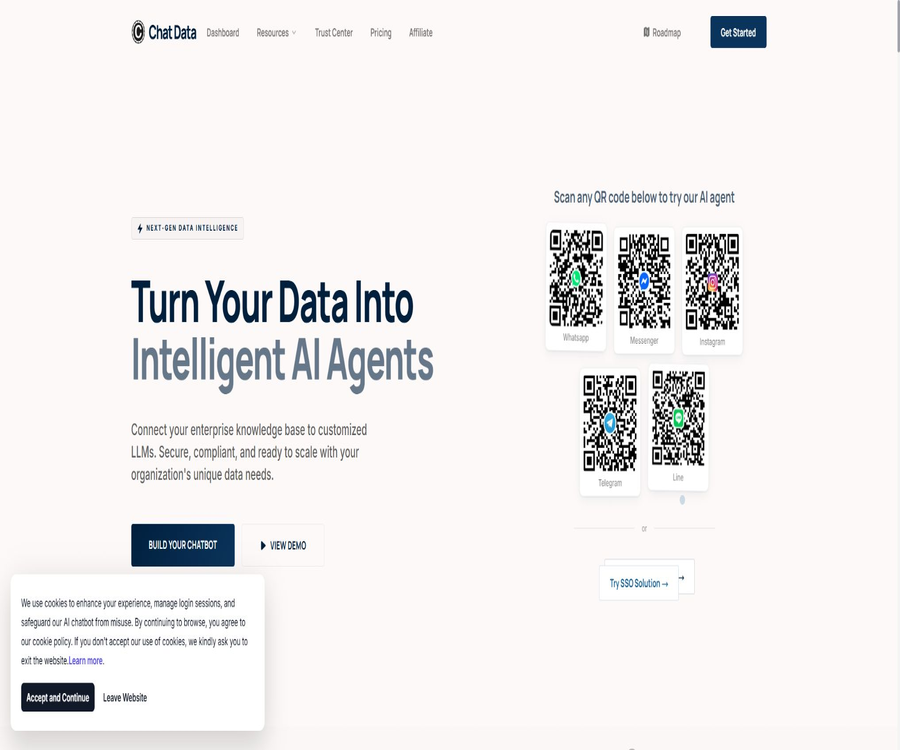
Chat Data
Chat Data, an intelligent tool focused on AI-driven conversations
Tags:AI dialogue chatWhat is Chat Data?
Chat Data is an AI-powered platform designed for enterprise customer service, sales, and business automation. Users can integrate websites, documents, text, Q&A sessions, product catalogs, and cloud-based data into a knowledge base, after which they can deploy intelligent agents on websites or across various messaging channels.
It offers not only question-and-answer functions based on data, but also covers AI-driven actions, natural language workflows, real-time voice communication, human customer service intervention, lead collection and analysis, as well as white-labeling and public APIs. This product is suitable for teams that need to integrate knowledge-based Q&A systems with their actual business systems, rather than simply creating a demo chat interface.
A one-sentence summary
Chat Data enables the conversion of corporate data into multi-channel AI customer service agents, which can handle queries, leads, notifications, and business operations through APIs, MCP, workflows, and human intervention.
Main functions
Train the knowledge base using corporate data
The platform allows for the import of PDF, TXT, HTML, and DOCX files; it also enables text pasting, the creation of Q&A pairs, and website scraping. The paid version supports Google Drive, Notion, YouTube, as well as video and audio files, and it includes regular retraining of the website models.
Multiple models and custom backend
The package page lists model series such as OpenAI, Anthropic, Google, and DeepSeek; different models require varying amounts of message credits. Teams can also connect the chat component to their own model backend, thereby maintaining the front-end experience while controlling the inference services.
Chat bubbles and search bar on the website
Agents can be integrated into websites through chat bubbles, search bars, or iframes, and their name, avatar, color, prompt messages, and response instructions can be adjusted. The agents created by default are private; they can only be accessed via a link after being set to public.
Multi-channel customer service
The paid plans are compatible with Slack, Discord, Telegram, WhatsApp, Messenger, Instagram, Line, Zendesk, as well as various e-commerce and automation platforms. Each channel has different requirements regarding message format, account verification, privacy, and platform fees; therefore, the results obtained from deploying the website cannot be applied directly to all channels.
AI actions and workflows
Agents can call custom interfaces, perform searches, send files, collect information, trigger buttons, or execute workflows. Natural language workflows are used to define repeatable steps, while MCP connections enable access to email accounts, documents, calendars, CRM systems, and other business tools.
Real-time human customer service takeover
Plans at Standard and above include real-time human intervention; the team can monitor visitors and take over the conversation when necessary. Human intervention can also be purchased as an additional feature, allowing common questions to be handled by AI while complex complaints are dealt with by customer service staff.
Voice and multimodal input
The platform supports image and file uploads, and offers real-time voice communication as well as the ability to use custom voices in higher-tier plans. Custom voices can be integrated with external voice services; before using them, it is necessary to check the licensing requirements, costs, latency, and rules regarding the handling of sensitive data.
Interactive interface and PDF generation
In addition to plain text and Markdown, responses can also include interactive components, charts, and dynamic interfaces. The paid version allows for the creation of documents based on conversations and PDF templates, which is useful for generating quotes, reports, or forms; however, manual verification of the data is still required.
Analysis, clues, and pay-per-use billing
The platform offers session analysis, customer data collection, and public analysis dashboards; advanced versions also allow setting usage limits, quotas, and payment barriers through Stripe. When it comes to charging customers, it is necessary to define rules for measurement, handling of refunds, tax matters, and failed transactions.
How Chat Data works
| Phase | Main operations | Output | Risk control |
|---|---|---|---|
| Create an agent | Select the name, model, and basic instructions. | Configurable AI agents | Limit the scope of responses and prohibit certain actions. |
| Import knowledge | Upload files, scrape websites, or connect to cloud data | Searchable corporate knowledge base | Remove expired, duplicate, and sensitive content. |
| Test optimization | Pose genuine questions and examine the context. | Adjust prompts, slices, and responses | Create a standard test set and refusal rules. |
| Connection action | Configure MCP, workflows, or custom interfaces | Executable business processes | Adopt the principle of least privilege and manual approval. |
| Distribution channels | Embed in websites or connect to messaging platforms | Customer service portal for visitors | Check the channel terms and identity verification. |
| Operational improvement | View sessions, leads, churn, and manual intervention | Quality and business metrics | Conduct sample reviews and protect customer privacy. |
Steps to create a knowledge base agent
- Register an account and create an agent by first selecting a model that fits your budget and risk profile.
- Write basic prompt instructions that clarify the identity, scope of responses, tone, requirements for citations, and the approach to take when a question cannot be answered.
- Upload authorized files, or add websites, text, Q&A, and product data that allow scraping.
- After the training is complete, a test set is created using real customer service questions, ambiguous questions, and malicious prompts.
- Check the evidence, timeliness, rejected responses, and sensitive information for each answer, then revise the materials or make the necessary adjustments.
- Only after confirming the quality is it embedded on the testing website, and it is gradually made available to real visitors.
Steps to deploy website customer service
- In the agent settings, select website display methods such as chat bubbles, search bars, or iframes.
- Configure the brand name, avatar, colors, welcome message, suggested questions, and lead form.
- Decide whether to save the session, and configure authentication and personalized information for the logged-in user.
- Place the embedded code in the testing environment to check the desktop interface, mobile devices, page navigation, and content security.
- Configure manual takeover, notifications, working hours, and an escalation path for issues that cannot be resolved.
- After going live, sessions are periodically inspected, the knowledge base is updated, and limits, latency, and conversion rates are monitored.
Steps for connecting via API
- The subscription that includes API access allows you to create and securely store a Bearer token in your account.
- The interface should be called from the server side; never store the keys in browsers, mobile applications, or public code.
- Create or retrain agents as needed, and poll the training status until the task is completed.
- It provides interfaces for sending messages, querying sessions, handling files, performing actions, and conducting analyses.
- Handles authentication failures, insufficient quota, rate limits, timeouts, and server errors.
- Record call and business audit information, and regularly rotate keys as well as remove permissions that are no longer needed.
Which users are it suitable for
- Customer service team for small and medium-sized enterprises: Answers common questions using website information and help documents, with the option to connect with a live representative.
- E-commerce operations team: connects products, orders, stores, and communication channels, and handles pre- and post-sale inquiries.
- SaaS companies: Offer personalized Q&A and lead collection on the product page as well as within the application after logging in.
- Healthcare institutions and health technology teams: After signing the BAA and configuring it properly, they handle the workflows that fall within the defined scope.
- Agents and software providers: They offer agents to customers by using white labeling, SSO, APIs, and usage-based billing.
- Development and automation team: Connects business systems via REST APIs, Webhooks, SDK events, n8n, and MCP.
Typical use cases
- Answer pre-sales inquiries based on the help center and product documentation, and add highly interested visitors to the lead list.
- Recommend products for e-commerce websites, explain the rules regarding delivery and returns, and forward complex order issues to human agents.
- Search for procedures, training materials, and policies in the internal knowledge base, while restricting access levels for different employees.
- Handle common issues on WhatsApp, Instagram, or Messenger and follow up with the users.
- Convert natural language requests into auditable workflows, invoking CRM, calendars, emails, or custom interfaces.
- A white-label agent management interface is created for software customers, with charging based on usage through Stripe.
Product advantages
- It forms a complete customer service workflow that includes knowledge introduction, RAG-based Q&A, as well as business actions and manual intervention.
- It supports multiple models, custom backends, and various types of knowledge sources, offering relatively flexible technical options.
- Websites, messaging platforms, e-commerce sites, automation tools – all have a wide range of connections via MCP.
- It offers REST APIs, Webhooks, SDK events, and official n8n nodes, making it suitable for deep integration.
- It supports PII anonymization, private agents, improved login user experience, and white-labeling capabilities.
- The public pricing details information, training, crawling, agents, teams, and storage quotas in greater detail.
- Customers at the Standard level and above can sign a BAA for medical use cases, but they are still responsible for ensuring compliance with relevant regulations.
Usage restrictions and precautions
- The message quota is not a fixed amount per query; the cost of the model, the length of the text, files, reordering, and the medical knowledge base all influence the amount consumed.
- Different plans impose restrictions on messages, characters used for training, the number of pages that can be crawled, the number of agents, the total capacity, and the number of team members; when making a choice, one should not consider only the monthly price.
- AI customer service agents may make errors in searches, omit information, or take inappropriate actions; human approval should be required for refunds, medical matters, legal issues, and account changes.
- MCP, messaging channels, custom backends, and external voice services transfer data to other services; Chat Data is not solely responsible for ensuring the security of that data.
- The Free agent may be deleted if it remains inactive for 60 consecutive days, making it unsuitable for use in a long-term production environment.
- The retention period for conversations varies depending on the package, ranging from about six months to five years; a longer retention period does not necessarily correspond to better adherence to the principle of minimization.
- Web scraping consumes page quotas and may be subject to restrictions related to logging in, anti-scraping measures, dynamic content, copyright issues, and site terms.
- For Enterprise’s own servers or databases, separate negotiations are required; the scope of delivery cannot be determined based on the standard SaaS packages.
Prices and packages
The prices listed below were verified on August 21, 2026, and are expressed in US dollars. The figures for Entry, Standard, and Professional represent the average monthly cost when opting for an annual payment plan, with two months included as a bonus with this option; the monthly prices as well as any applicable taxes and fees are indicated on the purchase page.
| Package | Average monthly price for annual payment | Message quota/month | Agent | Team members | Suitable for users |
|---|---|---|---|---|---|
| Free | $ | 100 | 1 | Not provided | Individual testing and low-volume prototypes |
| Entry | 15.83 dollars | 2,000 | 2 | 5 people | Small websites, channel integration, and API prototypes |
| Standard | 82.50 dollars | 10,000 | 7 | 20 people | Teams that require manual intervention, Webhook, voice, or HIPAA mode |
| Professional | 332.50 dollars | 40,000 | 20 | 1,000 people | Agents, white-label solutions, and large-scale multi-agent operations |
| Enterprise | Contact sales | In accordance with the contract | In accordance with the contract | In accordance with the contract | Own servers, databases, or dedicated management pages |
Comparison of package capacities
| Indicators | Free | Entry | Standard | Professional |
|---|---|---|---|---|
| Characters trained/month | 1.6 million | 88 million | 220 million | 440 million |
| Website scraping pages/month | 100 | 1,500 | 7,500 | 24,000 |
| Account capacity | 400,000 characters | 33 million characters | 44 million characters | 55 million characters |
| AI actions/agents | 1 | 5 | 10 | 20 |
| Multimodal storage | None | None | 2.5GB | 10GB |
| Conversation history is retained. | About half a year | About 1 year | About 3 years | About 5 years |
| API access | Not included | Includes | Includes | Includes |
| Real-time manual takeover | Additional purchase | Additional purchase | Includes | Includes |
| HIPAA BAA | Not available | Not available | Application is possible. | Application is possible. |
| Complete white-label reselling | Not included | Additional purchase | Additional purchase | Include or configure as needed |
Common additional items
| Additional items | Price | Billing method | Explanation |
|---|---|---|---|
| Additional message quota | 7 dollars | Monthly, per 1,000 units | Suitable for a steady increase in the volume of conversations. |
| Automatic message replenishment | 9 dollars | Per 1,000 units | Purchase when the balance is low; the credit limit can be carried over to the next month. |
| Additional agent | 7 dollars | Each month | Only the paid plan is available for purchase, and it increases the training capacity of the account. |
| Additional file storage | 10 dollars | Every 10GB per month | Used for multi-modal inputs such as images, files, and audio. |
| Real-time manual takeover | 20 dollars | Monthly | Includes visitor monitoring and email notification limits. |
| Webhook delivery | 10 dollars | Monthly | Used for Webhook and SDK events; suitable as an addition for Entry and lower levels. |
| Remove the platform brand | 39 dollars | Monthly | Replace the brand text; custom domain names and sender email addresses are not included. |
| Reseller | 59 dollars | Monthly | Add custom embedded domain names and notification email addresses |
| SSO login | 99 dollars | Monthly | A Reseller or Professional plan is required. |
How is the message quota calculated?
The message quota is determined first by the base cost set according to the model, and then multiplied by the number of content units. Each 8,000 characters of text counts as one unit, and each file of 3 elements counts as one unit; the use of features such as reordering, medical knowledge bases, or lengthy user profiles further increases the consumption.
Therefore, a quota of 2,000 messages does not necessarily correspond to 2,000 complete customer service conversations. Before going live, it is necessary to conduct tests using the actual length and the target model, and to set up alerts for usage levels, automatic mechanisms for increasing the quota, and strategies for reducing service quality in such cases.
Supported knowledge materials
| Channels | Support status | Precautions |
|---|---|---|
| PDF, TXT, HTML, DOCX | Support | Remove headers, duplicates, and scan-related quality issues. |
| Paste text and Q&A | Support | Suitable for fixed policies and standard answers |
| Public website | Supports scraping | Use the amount permitted on the success page and abide by the site’s rules. |
| Google Drive and Notion | Support | Regularly check the authorization scope and synchronization status. |
| YouTube, videos, and audio | Entry and above | The quality of transcription affects the results of searches. |
| Products from Shopify and WooCommerce | Support | It is necessary to handle product updates and the boundaries of order data. |
| Custom backend | Support | The customer is responsible for backend security, availability, and compliance. |
Deployment channels and integration
| Type | Representative channels | Primary uses |
|---|---|---|
| Website | Chat bubbles, search bar, iframe | Public customer service, knowledge search, and login user experience |
| Team communication | Slack, Discord, Telegram, Line | Internal Q&A or community support |
| Social messages | WhatsApp, Messenger, Instagram | Customer inquiries, manual intervention, and follow-up contact |
| Customer service and e-commerce | Zendesk, Shopify, WooCommerce, Magento, and others | Ticket, product, and store scenarios |
| Automation | Zapier, Make, n8n | Trigger cross-system processes and event delivery |
| Development and integration | REST API, Webhook, JavaScript SDK events | Customized interface, backend management, and data synchronization |
| MCP ecosystem | Built-in applications and custom remote MCP | Allow agents to invoke enterprise tools and data. |
APIs and developer capabilities
Chat Data has released the REST API for version 2.0.0, which uses JSON and Bearer tokens; the unified rate limit is 600 requests per minute per user. This API enables tasks such as creating, retraining, and querying/deleting agents, sending messages, managing files, sessions, leads, actions, Webhooks, performing analyses, and handling sub-users.
API keys should be stored only on the server side; they must not be included in browser HTML, mobile applications, or public repositories. Multiple keys belonging to the same user share the same resource permissions and rate limits, which is why it is still necessary to implement principles of least privilege, key rotation, and call auditing within that system.
SDK, Webhook, and GitHub
The official GitHub organization has made available repositories such as demonstrations of the Chat Data SDK, examples of Webhooks, examples of SSO, and n8n nodes; the pages related to the SDK demonstrations and n8n nodes indicate that they are licensed under the MIT license. These resources are intended for integrating with commercial platforms, and they do not include the complete backend code, models, data pipelines, or hosting service codes associated with Chat Data.
The official organization has also made available medical chat evaluation tools, OpenSchemaExtract, and other independent projects; the licenses for these tools need to be checked on a per-repository basis. The correct way to describe such open-source components is to state that \"the platform itself is not open source, but some integration examples and tools are\", rather than claiming that the entire product is an open-source customer service system.
Privacy and data storage
The official website’s FAQ states that the main servers are located in Switzerland, and file objects are also stored in Swiss cloud storage. The platform handles data related to accounts, training materials, chats, leads, devices, logs, and payments; when connected to third-party services, it is also subject to the data rules of those services.
The platform offers features such as PII anonymization and the ability to restrict access to chat history, but the company remains primarily responsible for how its customer data is used. It is necessary to define the consent procedures, retention periods, deletion requests, export options, data processing protocols, and rules for cross-border data transfer before the system goes live.
HIPAA and medical environments
The HIPAA mode is available only for plans at the Standard level and above; it is necessary to sign a BAA first before the platform can activate the workspace. Once activated, workspace members are required to use two-factor authentication, and certain models, channels, and third-party actions are restricted. However, this does not constitute an automatic compliance certification for the specific use cases of the customers.
- The HIPAA workspace allows the use only of OpenAI and Anthropic models that are covered by the relevant protocols; other models are subject to restrictions.
- Channels that lack a BAA, such as WhatsApp, Messenger, Instagram, Telegram, Discord, and Line, cannot be connected to HIPAA workspaces.
- Slack and Zendesk are suitable for integration only when the customer signs a BAA with the respective provider.
- Reading via public REST APIs does not generate complete, exportable access audit records on the platform side; customers must keep such records themselves.
- The custom backend, MCP servers, and custom voices represent the external boundaries that are under the customer’s control; the customer is responsible for ensuring compliance with the relevant BAA agreements.
- Enabling HIPAA does not automatically delete conversations or files; retention and automatic deletion must be configured separately.
Basic information
| Project | Information |
|---|---|
| Tool name | Chat Data |
| Development company | Chat Data LLC |
| Tool type | Enterprise AI customer service agents, knowledge base Q&A, workflows, and multi-channel chatting |
| Price pattern | Free version, subscription, additional items, and quotes for Enterprise |
| Free quota | 100 messages per month, 1 agent |
| Main platforms | Web backend, website components, messaging channels, APIs, and automation platforms |
| Chinese support | Supports multilingual materials and Q&A, with an option to display the interface in Simplified Chinese. |
| Public API | Yes, REST API v2 |
| API rate limiting | 600 requests per minute per user |
| Official SDK | Provides JavaScript SDK events and demonstrations. |
| Official GitHub | Yes |
| Is it open source? | The platform is not open source; some examples, nodes, and tools are available under open-source licenses. |
| Compliance capability | Workspaces for GDPR, SOC 2 Type II, and HIPAA BAA signing |
| Data area | The official website states that the main data is stored in Switzerland. |
Recommendation score
The recommendation score is 4.5 out of 5. It offers a comprehensive set of resources related to Chat Data, including knowledge materials, channels, models, actions, APIs, and human intervention options; it is particularly suitable for companies that wish to expand their customer service capabilities from websites to workflows and multi-channel operations.
The main shortcomings are the complexity of quota calculation and package structures; moreover, when external models, MCPs, and messaging channels are integrated, the security boundaries expand rapidly. Medical and high-risk scenarios require professional compliance assessments – it is not sufficient to simply rely on labels such as HIPAA or SOC 2 in order to launch a system.
Frequently Asked Questions
Is Chat Data free?
There is a permanent free plan that provides 100 messages per month, 1 agent, and 400,000 characters of storage space. The free agent may be deleted if it remains inactive for 60 consecutive days.
Can it be trained using one’s own data?
Yes. The platform supports files, text, Q&A, websites, Google Drive, Notion, and product information; for some video and audio inputs, a paid plan is required.
Is Chinese supported?
It supports multilingual knowledge materials and multilingual queries; the package page also indicates the availability of a Simplified Chinese interface as well as message translation. Professional terms, mixed languages, and local regulations still need to be tested using actual data.
Can it be connected to a website?
It can be implemented through chat bubbles, an AI search bar, or iframe embedding; custom interfaces can also be created using APIs. Personalization for logged-in users requires further configuration of SDKs or authentication mechanisms.
Is it possible to have human customer service take over?
Support is available; both Standard and Professional versions include real-time human intervention, and lower-tier plans allow for the purchase of additional features. It is necessary to set working hours, notification rules, and transfer protocols before going live.
Does Chat Data offer an API?
REST API v2 is available; access to this API is included in the Entry and higher plan tiers. The API uses Bearer authentication, and a limit of 600 requests per minute is imposed on each user.
Are SDKs and Webhooks provided?
JavaScript SDK events, Webhooks, and official examples are provided; plans at Standard level and above include these features, while lower-tier plans allow customers to purchase Webhook add-ons.
Is Chat Data open source?
The platform itself is not open source. The official GitHub repository provides SDK demonstrations, n8n nodes, and other examples under the MIT license, but these repositories do not contain the complete source code of the commercial platform.
Can it be used for medical information?
Versions Standard and above allow the HIPAA mode to be enabled after signing a BAA, but compliance is a shared responsibility. The customer remains responsible for controlling the data, personnel, models, channels, APIs, custom backends, and data retention.
Is the message quota equal to the number of messages?
It’s not exactly equal. The model, the length of the text, the number of files, reordering, and any additional knowledge bases can all affect the amount of resources consumed per request.
Is it possible to do a complete white-labeling?
Different levels of white labeling can be achieved by removing additional features such as brands, Resellers, and SSO; the Professional version is designed for large-scale reselling scenarios. Custom domain names, email addresses for sending messages, and management interfaces need to be checked individually.
Summary
Chat Data is a comprehensive platform that evolves from enterprise knowledge-based Q&A systems to automated customer service solutions; it covers website components, multi-channel messaging, model selection, MCP, APIs, workflows, voice functionality, as well as the option for human intervention. It is suitable for teams that possess the capabilities for ongoing operation and system integration.
To make the right selection, it is necessary to take into account the costs associated with messages, training, data extraction, storage, agents, teams, as well as additional functions. It is advisable to start by using the free version to create a small knowledge base and a test set, and then gradually introduce capabilities that allow interaction with external sources; this approach helps to ensure better control over quality, security, and budget.
Tools similar to Chat Data




 Guigong Network Security Registration No. 45132202000164