






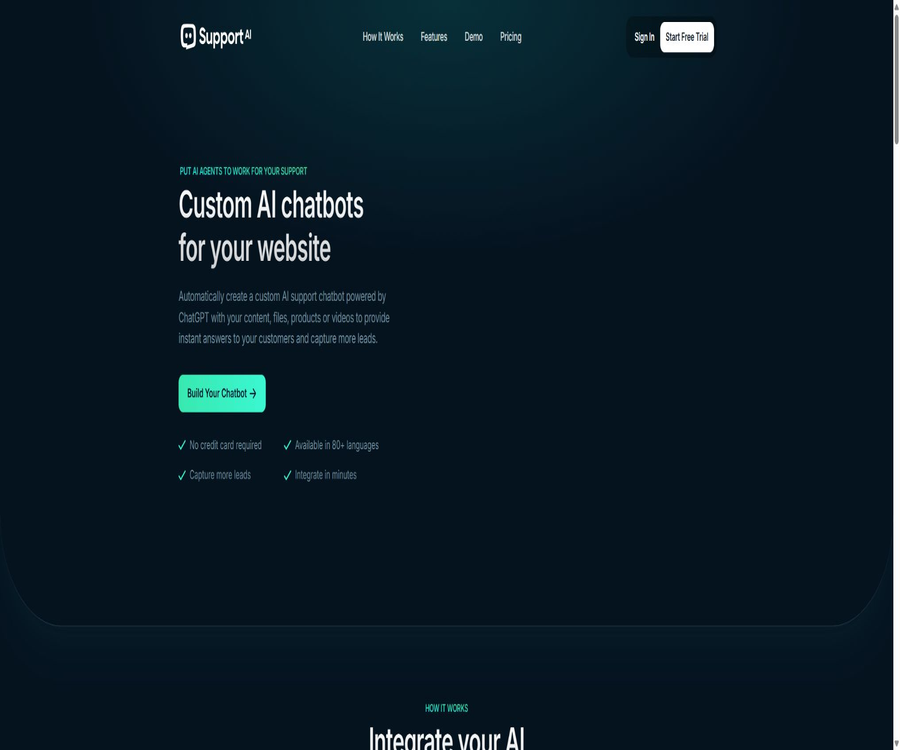
AI Chatbots For Your Website
AI Chatbots For Your Website – intelligent tools focused on AI-driven conversations
Tags:AI dialogue chatWhat is Support AI?
Support AI is an AI-powered customer service platform designed for corporate websites, enabling communication with customers. Users can train custom chatbots using website pages, files, text, or video, and then integrate these chatbots into their websites or connect them to other communication channels.
The product also integrates real-time chat, email, text messages, and AI bots into a unified workspace. Companies can use AI to handle common questions, while transferring more complex conversations to human customer service representatives.
A one-sentence summary
Support AI helps businesses train multilingual AI customer service agents using their own content, and it provides round-the-clock question answering, lead collection, and human intervention through website components, WordPress, APIs, and multi-channel inboxes.
Core functions
- Knowledge base training: Import web pages, text, files, and video content.
- Website AI customer service: Answers visitors’ questions based on the company’s information.
- Real-time chat: Human customer service agents can view and take over conversations that need to be handled.
- Unified inbox: Centralized handling of website chats, emails, and text messages.
- Lead collection: Obtaining the contact information of potential customers during conversations.
- Brand customization: Adjust colors, avatars, welcome messages, and robot behavior.
- Multilingual support: Provides natural language Q&A for visitors from different regions.
- Dialogue analysis: Evaluate the effectiveness of responses, visitors’ needs, and team performance.
- Developer API: Manage bots, training content, conversations, and leads.
Knowledge base and training content
Support AI uses the content provided by enterprises as a basis for its responses. The training materials can be web links, plain text, PDF files, Word documents, Excel files, PowerPoint presentations, or video content.
- Product page, help center, and frequently asked questions.
- Returns, deliveries, privacy, and service policies.
- Internal operation manuals, training materials, and technical documents.
- Product catalogs, course materials, or specialized knowledge.
- Standard responses and supplementary explanations written manually.
Answer optimization and retraining
Administrators can view the historical conversations between visitors and robots in order to identify incorrect responses or knowledge gaps, and then add additional training material. When the content of a website link changes, it is necessary to carry out retraining manually; the system does not automatically synchronize with each page update.
- Give priority to updating frequently asked questions and key information that affects transactions.
- Remove expired prices, policies, and promotional content.
- Establish clear standard responses for questions that cannot be answered.
- Use real user queries to test synonyms and multi-turn context.
- Regularly check the quality of the sources to avoid duplicate or conflicting information.
Omni-channel customer communication
The official help center positions Support AI as a customer experience platform, rather than just a tool for providing web-based answers to questions. Teams can handle real-time chats, emails, and text messages in a single inbox, and integrate AI with human-led services.
- AI first answers common questions that can be resolved directly from the knowledge base.
- If it cannot be resolved, the conversation is routed to the appropriate team member.
- Keep the chat context during manual takeover to reduce the need for customers to repeat their descriptions.
- View messages from various channels in one place, avoiding the need to switch between multiple interfaces.
- Follow up on sessions that require manual handling through notification and collaboration mechanisms.
Website component and appearance customization
A website can incorporate floating chat bubbles using a script, or it is possible to place robots within embedded frames on specific pages. Administrators can set colors, icons, avatars, welcome messages, and the style of responses, so that these components match the brand’s visual identity.
WordPress plugins
Support AI offers an official WordPress plugin; after installation, simply enter the component identifier to display the chat interface. The plugin itself needs to be connected to Support AI’s hosting service and account, as it cannot generate responses independently outside of this platform.
| Project | Currently available public information |
|---|---|
| Plugin name | Support AI – AI Chatbot for WordPress |
| Current version | 1.2 |
| Minimum WordPress | 5.2 |
| Tested version | 6.6.7 |
| Minimum PHP | 7.2 |
| Last updated | April 30, 2025 |
| Working method | Connect the Support AI account to the interface and load the website bot. |
Developer API
Support AI offers REST APIs, which are authenticated using API keys. Developers can read robot configurations, add or remove training items, retrieve conversations and messages, manage leads, and integrate these functions into their own applications.
- Robot: Lists the robots in the account and reads the configuration of a specified robot.
- Training topics: Managing knowledge content such as web pages, text, and files.
- Dialogs: View the session list, message history, or delete dialogs.
- Clue: Obtain the potential customer information collected by the robot.
- Authentication: Supports query parameters or Bearer tokens.
Which users are it suitable for
- Websites of small and medium-sized enterprises that wish to reduce repeated customer service inquiries.
- An e-commerce team that needs to be available 24/7 to answer questions regarding products and policies.
- It is hoped to gather the marketing and sales teams of potential clients through conversations.
- Local service providers that require reservations, consultations, and traffic management.
- Teams that manage courses, member content, or online education platforms.
- Corporate departments that require internal employee knowledge quizzes.
- Website agents that manage chatbots for multiple clients.
- Developers who wish to integrate robot capabilities through APIs.
Typical use cases
- Customer support: Answers questions regarding product usage, accounts, shipping, and after-sales service.
- Sales consultation: Explaining the differences between options, recommending products, and guiding the customer on next steps.
- Clue generation: Collect names, email addresses, and specific requirements.
- Reservation service: Answers questions regarding available reservation options and assists customers in completing the reservation process.
- Product recommendations: Products that are suitable based on the questions asked by visitors.
- Feedback collection: Asking about the experience and compiling common suggestions.
- Internal support: Assists employees in finding information on policies, procedures, and operational guidelines.
- Study guidance: Answering questions related to the courses and teaching materials.
Support AI usage guide
- Create a Support AI account and define the scope of services provided by the robot.
- Create a new robot and set its name, avatar, language, tone, and welcome message.
- Import verified website pages, files, text, or video materials.
- Configure the handling methods for questions that cannot be answered, sensitive questions, and cases that require manual transfer.
- Use real customer questions to test accuracy, citation scope, and multi-turn conversations.
- Copy the website component code, or enter the component identifier using a WordPress plugin.
- After publication, check the historical conversations to continuously add knowledge and refine the responses.
WordPress installation guide
- Install and activate the official Support AI plugin in the WordPress admin area.
- Log in to the Support AI console and create a robot or select one that has already been trained.
- Copy the website component identifier from the console and paste it into the plugin settings page.
- After saving the configuration, open the website’s front end to verify that the chat bubbles load correctly.
- Test the display, welcome message, responses, and manual takeover on both desktop and mobile versions.
- Update the privacy policy before going live, and check whether cache and script optimizations affect the components.
API Integration Tutorial
- Create an API key in the account settings and save it on the server side.
- First, call the robot list interface to verify that the account and permission settings are correct.
- Read the identifier of the target robot, and then synchronize web pages, text, or files via the training interface.
- Dialogs and clues are retrieved as required by business needs, with keys not exposed in the browser frontend.
- Implement logging and retry mechanisms for failed requests, rate limits, timeouts, and field changes.
- Rotate keys regularly and remove integration permissions that are no longer in use.
Pre-launch testing checklist
- Covers common questions regarding products, prices, refunds, privacy, and contact information.
- It will admit uncertainty when there is no answer in the knowledge base.
- Verify that manual routing, notifications, and team routing are functioning properly.
- Check whether the robot leaks system messages or internal information that should not be made public.
- Verify the loading performance on mobile devices, in incognito mode, and across different browsers.
- Ensure that the collection of clues is carried out with clear communication and in compliance with local privacy regulations.
- Manual review is implemented for high-risk areas such as healthcare, law, and finance.
Package price
Support AI offers four subscription tiers: Free, Starter, Pro, and Enterprise. The starting prices are shown on the monthly payment page; for annual payment, you pay for 8 months but get 12 months of use, which is equivalent to 4 months free.
| Package | Monthly price | Message quota | Robot | Training content |
|---|---|---|---|---|
| Free | $ | 20 per month | 1 | 10 items |
| Starter | $ | 2,000 pieces/month | 5 | 200 items |
| Pro | $ | 5,000 per month | 10 | 500 items |
| Enterprise | $ | Options: 10,000, 25,000, 50,000, or 100,000 items | No restrictions | No restrictions |
Annual price
| Package | Annual payment estimated according to public rules | Compared to monthly payments |
|---|---|---|
| Free | $ | No change |
| Starter | $ | Underpaid by 4 months |
| Pro | $ | Underpaid by 4 months |
| Enterprise | $ | The final price varies depending on the message tier. |
Common capabilities of the package
- Collect information on potential customers.
- It can be integrated into an unlimited number of websites.
- The Support AI brand logo can be removed.
- The pricing page lists API access.
- Enterprise offers unlimited robots and an unlimited range of training content.
- The Enterprise page lists access to higher-level models.
Message and billing details
The official FAQ defines a message as a question posed by a visitor to the robot. The Enterprise page offers various pricing tiers; the price may change depending on the tier chosen, and the amount shown in the control panel should be taken as the reference before making a payment.
The official website’s pricing table lists API access as part of all packages, but another section in the help center’s FAQ states that it is available only to paid members; there is a discrepancy between these two official sources. If using the API is a factor in your decision to make a purchase, you should first test it with a free account or verify the information with the officials.
Multilingual abilities
The home page of the official website claims to support over 80 languages, and the FAQs in the help center are available in more than 50 languages. It is clear that the platform covers common languages such as Chinese, English, French, Spanish, German, Japanese, and Korean; however, the quality of support for each specific language needs to be assessed through actual use.
Product advantages
- A complete customer service process is established, covering training, deployment, conversation monitoring, and manual intervention.
- It supports various sources of knowledge such as web pages, text, office documents, and videos.
- It can be launched quickly using scripts, embedded frameworks, or WordPress plugins.
- It covers customer communication channels such as website chats, emails, and text messages.
- It supports lead collection, sales Q&A, booking, and internal knowledge scenarios.
- It provides developer APIs for managing robots, content, conversations, and leads.
- The package provides information on messages, robots, and training volume, which facilitates an initial estimation.
- An annual payment is equivalent to 4 months free, and there is a significant discount for long-term use.
Usage restrictions and precautions
- The accuracy of the responses depends heavily on the quality, completeness, and timeliness of the training data.
- After the web page content changes, manual retraining is required at the moment.
- Free offers only 20 messages per month, making it suitable only for basic testing.
- The complete prices for the various message plans at Enterprise are not displayed on the static page at the same time.
- The pricing on the official website and the FAQ section do not provide consistent information regarding the free API access rights.
- There are version differences in the information provided regarding the number of supported languages on the home page and the help page.
- The hosting service handles visitor inquiries, sessions, and potential lead data.
- AI may produce errors or inappropriate responses; important issues still require human intervention.
- The most recent official update for WordPress plugins was in April 2025; it is therefore necessary to pay attention to compatibility issues.
- The older version of the WordPress plugin with the same name was discontinued due to security issues; it is necessary to check the current official plugin version when installing it.
Privacy and security
Support AI handles account information, usage data, visitor conversations, as well as any details collected by customers themselves. Before activating such robots, website operators should clarify their roles relative to the platform, and include provisions regarding the processing of chat data in their privacy policies.
- Only data that is truly necessary for customer service and permitted for use in AI processing should be imported.
- Avoid including passwords, keys, identification documents, and sensitive internal documents in the knowledge base.
- Before collecting clues, explain their purpose, the retention period, and the way to withdraw consent.
- Restrict team members’ access to sessions, leads, and API keys.
- Periodically delete expired training data, test sessions, and personal data that is no longer needed.
- High-risk industries should conduct further verification of the data locations, service providers, and contract terms.
GitHub and open source
The Support AI official website and documentation do not provide links to any verifiable official GitHub repository; the core chatbot, unified inbox, training, and API services are hosted on commercial platforms. It is not correct to label the entire product as open source just because API interfaces or WordPress plugins are available.
The current WordPress connection plugin is made available for public download in the WordPress directory; its primary function is to establish connections to hosting platforms. There is also an older chatbot plugin with the same name in that directory, which was discontinued in 2024 due to security issues – these two plugins should not be confused with each other.
Basic information
| field | Content |
|---|---|
| Tool name | Support AI |
| Product type | Website AI customer service and omnichannel customer experience platform |
| Core competencies | Knowledge base Q&A, real-time chat, unified inbox, leads, and API |
| Sources of knowledge | Websites, text, files, and videos |
| Deployment method | Website scripts, embedded frameworks, WordPress plugins, and APIs |
| Price pattern | Free version, monthly payment, annual payment, and upgrades based on message volume |
| Chinese support | Supported; testing with business-related data should be carried out before official launch. |
| Is it open source? | The core platform is not open-source; no official GitHub repository with a link on the official website was found. |
Recommendation score
4.3 / 5. Support AI is suitable for small and medium-sized enterprises that wish to quickly set up a knowledge-based customer service system, handle website messages in a unified manner, and collect sales leads; it offers various options for training data and deployment methods. However, there are slight discrepancies in the information provided on the official website regarding usage quotas, and automatic updates, plugin maintenance, and data management also need to be verified before making a purchase.
Frequently Asked Questions
What is Support AI mainly used for?
It trains AI customer service using the company’s own web pages, files, and text, and answers visitors’ questions through website components or other channels.
Is Support AI free?
A Free plan is available, offering 20 visitor messages per month, 1 robot, and 10 training items.
How much does Support AI cost?
The Starter plan costs 29 dollars per month, the Pro plan costs 49 dollars per month, and the Enterprise plan starts at 89 dollars per month; payment on an annual basis entitles users to 4 months of free service.
How is a message calculated?
The official FAQ defines a message as a question posed by a visitor to the robot.
What types of training content can be uploaded?
It supports content in formats such as web pages, plain text, PDF, Word, Excel, PowerPoint, and videos.
Is Chinese supported?
It supports multiple languages including Chinese, but the quality of responses still depends on the performance of the model and the availability of knowledge related to Chinese.
Is WordPress supported?
Supported: You can install the current official Support AI plugin and enter the component identifier.
Does Support AI offer APIs?
REST APIs are provided for managing robots, training projects, conversations, and leads; the official description of the permissions available in the free plan varies.
Is Support AI open source?
The core platform is not open-source, and the official website does not provide a link to an official GitHub repository containing the core code.
Tools similar to AI Chatbots For Your Website




 Guigong Network Security Registration No. 45132202000164