






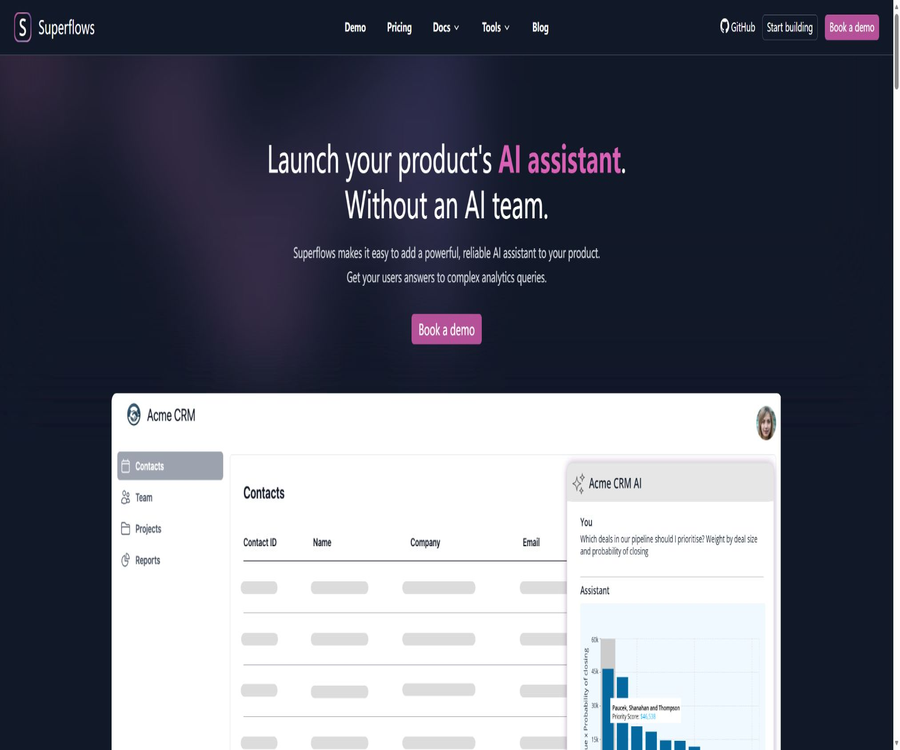
AI Assistant for your software product
An AI Assistant for your software product, an intelligent tool focused on AI-driven conversations
Tags:AI dialogue chatWhat are Superflows?
Superflows is a set of embedded AI assistant tools designed for SaaS product teams. Users can use natural language to query product data, obtain answers from documents, generate analysis charts, and once confirmed, have the assistant call the product’s API to carry out the necessary actions.
The project offers managed cloud services, a developer console, React-based interface components, as well as an open-source backend under the Apache-2.0 license. The official website is still accessible, but the official documentation site is not available; moreover, the code has not been updated recently. It is necessary to verify the status of maintenance and support before deciding to use it in production.
A one-sentence summary
Superflows combines OpenAPI, product documentation, code analysis, and a chat interface to create an AI Copilot that can be integrated into SaaS applications.
Core components
| Components | Main function | Delivery format |
|---|---|---|
| Superflows backend | Plan API calls, retrieve knowledge, and analyze data | Open source or hosted |
| Developer Dashboard | Configure, test, debug, and view usage. | Cloud console |
| Chat UI | Embed chat buttons, windows, or sidebars within the product | Open-source React components |
| Playground | Verify responses and actions before going live | Console testing environment |
| Cloud API | Connects the frontend with the hosting assistant | Charged based on the query volume |
Calling product APIs via natural language
Superflows reads the OpenAPI specifications of a product, understands the available endpoints, parameters, and responses, and then selects the appropriate call based on the user’s query. It is suitable for SaaS products that already have stable APIs.
- Upload OpenAPI specifications for quick import of endpoints
- Select the API operations that the assistant is allowed to use.
- Convert natural language questions into endpoint calls.
- Combine multiple responses to carry out complex queries.
- Organize the call results into readable answers.
- Provide explanations for failures, permissions, and the absence of data.
- View the plan and invocation process in developer mode
Data analysis and charts
Assistants can write code based on the data returned by the API to perform calculations and generate the charts required by users. As a result, the product team can avoid having to develop separate dashboards for each occasional issue.
- Calculate summaries, trends, proportions, and rankings
- Compare time periods, customer segments, and business channels
- Combine and analyze data from multiple endpoints.
- Generate visual charts suitable for the question.
- Explain the key results and anomalies in words.
- Limiting the resources available for code execution and the permitted dependencies
- Verify the amounts, time zones, and metrics used.
Document-based Q&A
Superflows uses retrieval-enhanced methods to answer questions related to static product knowledge, and it can incorporate both API data and documentation. Users can ask how to use certain functions as well as retrieve their own business data.
- Import product descriptions and help content
- Search for relevant segments based on the user’s query.
- Generate answers that are consistent with the product’s functions.
- Combining knowledge with real-time data in a conversation
- Reduce the frequency at which users leave the product search documents.
- Identify missing or expired content from the feedback.
Perform product operations
The assistant not only answers questions but can also handle tasks such as creating, updating, or moving data. For actions that may have an impact, Superflows first presents a plan and asks the user for confirmation.
- Create tasks, reminders, or business records
- Update customer, transaction, or workflow status
- Batch adjust data that meets the criteria.
- Display actions and parameters before execution
- Users are required to give explicit confirmation for any potentially destructive actions.
- Record the call results and reasons for failure.
- Set additional permission controls for sensitive endpoints.
Behavior control and answer format
The product team can approve the format of responses that the assistant is allowed to generate, as well as control the endpoints it has access to. This helps to reduce the risk of random outputs that deviate from the product’s logic.
- Specify that responses can be in the form of text, tables, or charts.
- Limit the range of endpoints, methods, and parameters.
- Apply different permissions to different users or tenants.
- Set up confirmation, rejection, and manual support pathways.
- Compare expected and actual behavior in Playground
- Collect users’ positive and negative feedback on the responses.
- Gradually expand capabilities through testing and configuration.
Developer Dashboard
The developer console is used to upload API specifications, configure actions, handle authentication, use testing tools, and view usage statistics. It serves as the main entry point for quickly deploying hosted solutions.
- Upload or manually enter the API endpoint
- Select the actions that the assistant can perform.
- Configure authentication and multi-tenant parameters.
- Send test questions in Playground
- Use Mock responses to verify unreachable endpoints.
- Check the planning process via developer mode
- View query volume and user feedback
React chat component
The official chat-ui repository offers pre-built React components that can be integrated using buttons, chat windows, modal dialogs, or sidebars. These components are easy to incorporate, and they also allow product teams to customize the interaction experience.
- Use SuperflowsButton for quick connection.
- Use SuperflowsChat to achieve greater customization options.
- Use Modal or Sidebar to control the entry point.
- Match the product color, layout, and brand style.
- Pass the current user and tenant context.
- Handle streaming responses, confirmations, and feedback interactions
Multi-tenant SaaS support
The Scale solution provides multi-tenant APIs and an unlimited number of seats. It is essential to ensure that each invocation includes the correct tenant identity during implementation, in order to prevent data leakage between different customers.
- Map logged-in users to the correct tenant.
- Short-term access credentials are issued by the backend.
- Perform server permission checks at each endpoint.
- It is prohibited to rely on models to determine data permissions on their own.
- Record tenants, users, endpoints, and operation results
- Use automated testing to cover attempts at unauthorized access.
Model support
The open-source repository indicates that the project has supported various models such as those from the GPT series, Mixtral, and Llama; open-source models can also be used in self-hosted setups. The specific compatible versions need to be confirmed through code and deployment tests.
- Choose different models based on planning, analysis, and cost considerations.
- Comparing quality between managed and open models
- Control the context, output length, and call costs
- Design fallback strategies for model unavailability.
- Create an evaluation set using real API tasks.
- Avoid considering the models listed in the old README as part of a commitment to ongoing support.
Typical use cases
- CRM users can query transactions and create follow-up tasks.
- Analyze product users by generating temporary charts through conversations
- Financial software users can query income, costs, and anomalies.
- Batch updating of workflow status for users on the operation platform
- Complex B2B software provides built-in guidance for using the product.
- Data products enable non-technical users to leverage natural language analysis.
- Vertical SaaS transforms common API operations into dialogue interfaces.
CRM Copilot example
The official website uses CRM Copilot to illustrate the value of the product: users can ask which transactions should be pursued first, compare different customer acquisition strategies, and have the assistant create reminder tasks.
- Sort opportunities by transaction amount and probability of completion.
- Analyze historical connections and recommendations for the next steps
- Create a follow-up call or task
- Comparing the contribution of leads from different outreach strategies
- Use confirmation steps to prevent incorrect batch modifications.
- Let permissions and auditing follow the CRM backend rules.
Which teams are suitable?
- SaaS companies that offer stable product APIs and OpenAPI specifications
- Product teams that wish to quickly test embedded AI assistants
- Applications that require answering questions related to both documents and real-time data simultaneously
- Engineering teams willing to maintain permissions, conduct assessments, and implement security controls
- Companies that need open-source code or self-hosting options
- Teams that do not want to develop from scratch the infrastructure for messaging and feedback.
Superflows prices
The official website currently offers three plans: Testing, Scale, and Enterprise. The Scale plan costs $999 per month, while for the Enterprise plan it is necessary to contact sales. The description of the enterprise features on the website reads “All Growth features”, which differs from the name of the Scale plan; therefore, a written confirmation should be obtained at the time of purchase.
| Package | Price | Chat-to-API | Chat-to-Docs | Primary interests |
|---|---|---|---|---|
| Testing | Free | 50 queries in the testing environment | Not specified separately | Single seat, community support, Playground |
| Scale | $ | 10,000 times | 200,000 times | Multi-tenant, unlimited seats, custom settings, priority email support |
| Enterprise | Custom quote request | Over 10,000 times | Over 200,000 times | Audit logs, custom settings, priority feature requests |
Query the metering method
The official website defines a Chat-to-API Query as a message sent by the user to the chat interface that triggers a query of the product’s API. How to measure consecutive queries, multiple endpoints, retry attempts in case of failures, and messages that do not trigger an API should be specified in the contract.
- Distinguish between API query quotas and document query quotas
- Verify whether calling multiple endpoints in a single message is counted only once.
- Calculation method for verification failure, retry, and test traffic
- Confirm excess pricing, speed limits, and shutdown policies
- Monitor consumption by tenant and user
- Estimate whether peak concurrent usage and model costs are included.
Concept validation service
The official website offers workshops as well as a two-week PoC process: the team evaluates the requirements, creates a prototype tailored to the customer’s needs, and then the customer tests it and makes any necessary adjustments before deciding whether to launch it. The actual time required depends on the quality of the API, the authentication processes, and the scope of the requirements.
- Completed a requirements workshop with the Superflows team.
- Select a small number of high-value queries and operations.
- OpenAPI specifications, test accounts, and documentation are provided.
- The team develops a PoC within about two weeks.
- Evaluation is carried out using representative user tasks.
- Adjust the format, endpoints, and validation rules.
- It will be launched only after passing safety and product inspections.
Quick Start Guide for Managed Version
- Clean up and upload the latest OpenAPI specifications.
- Only the read-only endpoints required for the pilot are enabled.
- Verify the planning using mock responses in Playground.
- Connect the test API with short-term authentication credentials.
- Upload the reviewed product documentation.
- Install the React chat component and pass the user context.
- Configuration confirmation, feedback, and error recovery.
- Launch with low traffic and monitor queries as well as business results.
Self-hosted tutorial
- Review the Apache-2.0 code, dependencies, and current submission status.
- Prepare the Docker and Node environments as well as a local Supabase instance.
- Create an independent environment variable configuration from the sample file.
- Configure the database, identities, email, and model keys.
- Start the backend and related services in the isolated network.
- Import the API specifications and run security tests.
- Establish processes for logging, backing up, upgrading, and fixing vulnerabilities.
- Complete the approvals, performance, and disaster recovery assessments prior to production.
API Security Tutorial
- Classify the read and write endpoints by risk level.
- By default, only the minimum necessary read-only operations are enabled.
- User and tenant permissions are verified by the product’s backend.
- Clear confirmation is required for the write action.
- Add idempotent keys, parameter validation, and rate limiting.
- Record each plan, invocation, and the final result.
- It covers privilege escalation, prompt injection, and malicious parameter testing.
- Regularly review changes in endpoints and OpenAPI specifications.
Testing and evaluation
The product team should create separate test sets for document queries, data analysis, and write operations. Success only in demonstrations is not sufficient to prove reliability in production environments.
- Verify endpoint selection and parameter integrity
- Check numerical calculations, time zones, and indicator definitions.
- Compare the consistency between charts and raw data
- Tests for no data, timeout, and permission denial.
- Confirming dangerous actions always requires approval.
- Simulate prompt injection and cross-tenant access
- Record user feedback and manual corrections
- Run regression tests after updating models, APIs, or documentation
Safety and privacy
Superflows handles product API specifications, user inquiries, business responses, and authentication contexts; it represents a highly sensitive integration. The official documentation site is currently unavailable, so companies should request the latest information on security, privacy, and data processing directly.
- Do not put long-term secrets directly into browser components.
- Use short-term, minimally privileged server tokens.
- Re-verify all permissions for the business API.
- Personal and commercial sensitive data that limits the visibility of the model
- Set retention and masking rules for logs and feedback.
- Confirm the model provider and the data storage location.
- Establish processes for deletion, export, and security events.
- Self-hosted customers are responsible for providing patches and ensuring the security of their infrastructure.
Effect evaluation
| Indicators | Measuring content | Suggestions |
|---|---|---|
| Task completion rate | Has the user’s goal been successfully achieved? | Results from the control business system |
| Endpoint selection accuracy | Is the correct API being called? | Hierarchize by task category |
| Parameter error rate | Proportion of missing or incorrect parameters | Analyze failure logs |
| Analysis accuracy rate | Check whether the calculations and charts are accurate. | Compare with the standard script |
| Verify compliance rate | Should high-risk actions be confirmed first? | Set as a mandatory threshold |
| Response time | From the problem to a viable solution | Observing multi-endpoint tasks simultaneously |
| User adoption rate | Activity, reuse, and feedback | Combining retention and support levels |
| Unit task cost | Platform, model, and infrastructure costs | Calculate based on successful completion. |
Product advantages
- Designed specifically for AI assistants integrated into SaaS products
- Product actions can be quickly imported from the OpenAPI specification.
- It also supports API calls, document-based Q&A, and data analysis.
- It is capable of writing code to perform calculations and generate charts.
- Require user confirmation for potentially destructive operations
- The developer console supports mocking and debugging.
- Provides customizable open-source React chat components
- The core backend is licensed under Apache-2.0.
- Both managed and self-managed paths are available for selection.
Usage restrictions and precautions
- The Scale plan costs $999 per month, which is relatively expensive for small teams.
- The free tier offers only a testing environment and 50 queries.
- The package descriptions on the official website use different names for Growth and Scale.
- The official documentation site is currently unavailable and its certificate has expired.
- The most recent updates to the main open-source repositories occurred in 2024.
- The website footer indicates that the company has changed its business focus.
- The self-hosting guidelines are still incomplete and require strong engineering skills.
- AI-generated code and analysis may contain computational errors.
- API writing and multi-tenant isolation must be strictly controlled by the backend.
- Before making a purchase, it is necessary to check the available support, the roadmap, and the current level of customer service.
GitHub and open source
Superflows has an official GitHub organization. Both the core superflows repository and the chat-ui repository are licensed under the Apache-2.0 license, which permits use, modification, and distribution in accordance with the terms of that license.
Public repositories also include stores for documents, model agents, browser extensions, and more. Although the core repository is open source, there have been few submissions recently; before deployment, it is necessary to audit the dependencies, security vulnerabilities, and compatibility with current model interfaces.
| warehouse | License | Primary uses |
|---|---|---|
| superflows | Apache-2.0 | Backend, console, and API capabilities of the AI assistant |
| chat-ui | Apache-2.0 | React chat interface components |
| rollup-plugin-tailwindcss | MIT | Front-end build plugin |
| openapi-llm | MIT | Generating and enhancing API specifications from applications |
| docs | Not declared | Historical product documentation source code |
Basic information
| field | Content |
|---|---|
| Tool name | Superflows |
| Development company | Learney AI Ltd. |
| Product type | SaaS products incorporate AI assistants and the open-source Copilot framework. |
| Key capabilities | API calls, RAG, code analysis, charts, and actions |
| Primary users | SaaS products, engineering, and data teams |
| Price pattern | Free trial, $999 per month, and enterprise quotes available |
| Access method | Cloud API, OpenAPI, and React components |
| Is it open source? | Yes; the core and chat components use Apache-2.0. |
| Maintenance tips | The document site is unavailable; the warehouse data was updated earlier, so it is necessary to verify them before making a purchase. |
Recommendation score
3.9 / 5. Superflows’ OpenAPI-driven assistant, data analysis tools, verification mechanisms, and Apache-2.0 code still hold value for SaaS teams in terms of reference and self-hosting; however, the lack of a documentation site, stalled repository updates, and inconsistent package descriptions require additional due diligence when making procurement decisions.
Frequently Asked Questions
What does Superflows do mainly?
It acts as an AI assistant that helps SaaS products integrate callable business APIs, answer document-related questions, and analyze data.
Can Superflows perform operations?
Yes, it can call the write endpoint and request user confirmation before performing any potentially destructive operations.
Does Superflows support OpenAPI?
Supported: It is possible to upload OpenAPI specifications in order to quickly configure the endpoints available to the assistant.
How much is Superflows?
Testing is free; Scale costs $999 per month, and for Enterprise versions, you need to contact sales for a quote.
What is Chat-to-API Query?
It is a message sent by the user to the chat interface, which triggers a query of the product’s API.
Can Superflows be self-hosted?
It is possible, but the official self-hosting documentation is incomplete; the team needs to set up Supabase, the models, email services, and maintenance tasks on its own.
Is Superflows still being maintained?
The official website is still online, but the documentation site is unavailable and the main repositories have been updated some time ago; it is recommended to verify with the officials before making purchases or deployments.
Is Superflows open source?
It is open source; both the core backend and the React chat components are licensed under the Apache-2.0 license.
Tools similar to the AI Assistant for your software product




 Guigong Network Security Registration No. 45132202000164