






Jamie
Jamie, focus on the intelligent tools for AI conferences.
Tags:AI conference toolsA one-sentence summary
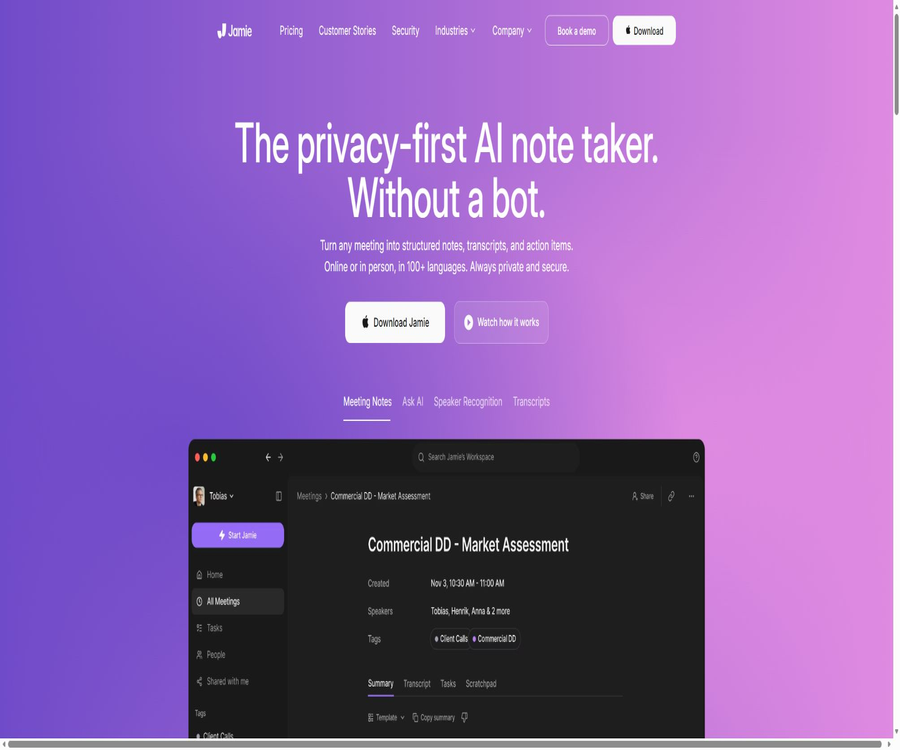
Jamie is an AI meeting assistant that captures audio from meetings on users’ devices, without the need for virtual robots to be involved in the calls; it can generate transcripts, structured summaries, speaker labels, and action items.
Tool Introduction
Jamie is operated by the German company wespond UG, and it is designed for individual professionals, sales teams, managers, as well as corporate work environments. It can record any online meeting platform, as well as handle conversations that take place in offices, at client sites, and in other offline settings.
The absence of robots means that no additional recording accounts will appear in the list of attendees, but this does not imply that secret recording is allowed. Users still need to inform all participants and determine the legal basis in accordance with local laws and the organization’s policies.
Main functions
| Functions | Key capabilities | Suitable for tasks | Precautions |
|---|---|---|---|
| Meeting Notes | Organize the dialogue into a structured summary. | Regular meetings, client interviews, and project discussions | Important conclusions still require manual verification. |
| Transcript | Generate word-for-word transcripts in over 99 languages | Search for the original text and save meeting minutes. | Accents, noise, and terminology can affect accuracy. |
| Action Items | Identify tasks, responsible persons, and decisions. | Follow-up after the meeting | The deadline and the person responsible may need to be specified. |
| Speaker Recognition | Automatically identify and label speakers. | Multi-person meeting | Check the speaker’s memory after the first labeling. |
| Ask Jamie | Ask questions related to a single meeting or multiple meetings | Search for historical decisions and trends | The answer may miss the context. |
| Templates | Customize the summary structure according to the meeting type | Sales, recruitment, one-on-one meetings, and project reviews | The number of templates is determined by the package. |
| Integrations | Synchronize documents, CRM, and task systems | Reduce copying and pasting | Different packages have different availability ranges. |
| MCP and Webhook | Let AI tools and automated systems read the outcomes of meetings. | Cross-tool search and subsequent workflows | Permission control and recipient security are required. |
No robot-generated meeting minutes
The Jamie desktop application captures the content of meetings using the computer’s audio and microphone, without the need to use any special robot account. As a result, it can be used across Zoom, Microsoft Teams, Google Meet, Webex, and other platforms; it is also suitable for offline situations where there is no meeting link available.
- No recording robot will appear in the list of participants.
- Robots can enter a meeting without the need for host approval.
- Different meeting platforms can use the same recording process.
- Offline discussions can be recorded using a computer or mobile phone microphone.
- The computer must have the permissions for the microphone and system audio properly enabled.
- The responsibility for recording remains with the user who started Jamie.
Meeting minutes process
- Install Jamie and create an account using Google, Microsoft, Apple, or your email.
- Connect to the calendar to receive meeting reminders and send audio notifications.
- Inform all participants before the meeting starts and obtain the necessary consent.
- Start recording via microphone alerts, desktop applications, or the menu bar.
- Recording stops after the meeting ends, and waiting is required for transcription and summary generation.
- Check for speakers, proper nouns, numbers, decisions, and action items.
- Select the template, tags, and sharing scope, then sync it to external tools.
- Delete or restrict access to sensitive meetings in accordance with the retention policy.
Summary, Transcription, and Action Items
After stopping the recording, Jamie will generate a meeting summary, a full transcript, and action items. The summary helps to quickly understand the outcomes, the transcript allows one to refer to specific statements, while the action items help to define responsibilities after the meeting.
| Output | Included content | Key points of manual inspection |
|---|---|---|
| Abstract | Topics, discussions, decisions, and conclusions | Have any opposing opinions and constraints been overlooked? |
| transcription | Text sorted by time and speaker | Names, numbers, negative sentences, and technical terms |
| Action items | Tasks, responsible persons, and possible deadlines | Has responsibility been clearly established? |
| Short summary | Summary of the meeting in one sentence | Is it oversimplifying complex discussions? |
| Meeting information | Calendar guests and actual speakers | Being invited does not mean actually attending. |
| Labels | Project, client, and meeting type | Do not use public tags to reveal sensitive topics. |
Speaker recognition and memory
The system assigns the transcription segments to different speakers, and users can replace “Speaker 1” with the actual name. Speaker Memory keeps track of the identified voices and tries to match them in subsequent meetings.
- After the first meeting, the speaker is confirmed paragraph by paragraph, rather than only modifying one section.
- Similar voices among multiple people, cross-talk, or hands-free devices can lead to incorrect labeling.
- The same person may need to re-verify after changing the microphone or the environment.
- Remove the names and identity details of unrelated persons before sharing externally.
- Teams should include voice recognition in their assessments of privacy and data processing.
Custom vocabulary
Jamie provides personal vocabularies and team-shared vocabularies to improve the accuracy of transcribing names, products, abbreviations, and industry terms. Each entry can be up to 100 characters long.
| Package | Maximum size of personal vocabulary list | Maximum team vocabulary size | Content suitable for maintenance |
|---|---|---|---|
| Free | 50 | 50 | Common names and basic terms |
| Plus | 50 | 50 | Terms for individual customers and projects |
| Pro | 50 | 50 | Terms for high-frequency individual meetings |
| Team | 100 | 100 | Team products, customers, and internal abbreviations |
| Enterprise | 250 | 250 | Large-scale organizational and industry lexicons |
Over 99 languages
The pricing page specifies that summaries and transcriptions are available in over 99 languages, while the homepage uses summaries in more than 100 languages. However, this multilingual coverage does not mean that the same level of accuracy is achieved for all languages, accents, and mixed contexts.
- Select or confirm the main language for the meeting in the account.
- Add a custom glossary for proper nouns.
- In multilingual conferences, different speaker segments need to be sampled separately.
- A translated abstract should be reviewed by reverting to the original language transcription.
- Official citations or legal records cannot rely solely on AI transcription.
Ask Jamie Q&A Session
Ask Jamie allows one to search through the history of meetings in order to find decisions, customer feedback, tasks, and past discussions. It is suitable for asking follow-up questions regarding a single meeting, as well as for exploring a particular topic across multiple conversations.
- Find out the specific requirements raised by the customer at a particular meeting.
- Summarize the recurring congestion issues that have occurred over the past month.
- Review the discussion process surrounding a decision regarding price, time, or product.
- List the pending action items and related meetings.
- Compare the feedback from multiple customers on the same feature.
- Click on the original meeting and the transcription verification response, rather than directly quoting the chat results.
Templates and meeting types
Users can choose or create meeting template files to ensure that different meetings are formatted using predefined sections. Free allows for 1 custom template, Plus allows for 3, while Pro, Team, and Enterprise offer an unlimited number of custom templates.
| Meeting type | Suggested sections | Primary value |
|---|---|---|
| Sales Insights | Pain points, budget, decision-makers, timeline, and next steps | Improve CRM record consistency |
| Customer Success | Goals, issues, risks, commitments, and follow-up | Reduce missed customer requests |
| Recruitment interview | Experiences, capabilities, evidence, doubts, and follow-up | Structured evaluation |
| One-on-one | Current status, achievements, obstacles, feedback, and actions | Create a continuous record of development |
| Project regular meeting | Progress, decisions, risks, dependencies, and responsible parties | Facilitates team execution |
| Board of directors or management committee | Key metrics, resolutions, risks, and responsibilities | Maintain the official decision-making trail |
Document and business integration
| Integration level | Public tools | Applicable packages | Primary uses |
|---|---|---|---|
| Basic notes | Notion, Google Docs, OneNote | Free and above | Automatic synchronization of minutes and transcripts |
| Task management | Asana | Key benefits for Pro and higher tiers | Convert action items into tasks. |
| CRM | Salesforce, HubSpot, Attio, Affinity, Dynamics 365, DealCloud, Pipedrive | Premium package | Synchronize client meetings and next steps |
| Webhook | Custom encryption endpoints and Make | Plus and above | Automation is triggered after the meeting is completed. |
| MCP | Claude, ChatGPT, Cursor, Windsurf and Copilot | Pro, Team, Enterprise | Retrieving meeting information using AI tools |
| API | The price list shows the integration options for developers. | Specific qualifications require account verification. | Custom integration |
MCP connection
Jamie offers remote MCP services based on the streaming protocol and OAuth 2.0, which enable connection to AI assistants that support MCP. This feature is available only for Pro, Team, and Enterprise plans; it is not available for Free and Plus plans.
| MCP tool category | Executable actions | Permission reminder |
|---|---|---|
| Meeting | List, read, and perform semantic search on meetings | It may expose the history of long-term meetings. |
| transcription | Read the full transcript page by page. | Sensitive original text will be included in the external AI context. |
| Staff | Search for contacts, roles, and companies by email. | Respect the privacy of contacts. |
| Task | List or create action items | Check the responsible person and deadline before starting the writing task. |
| Template | List, create, or update templates | Avoid overriding team standards. |
| Labels | Create, modify, delete, share, and apply in bulk | Deleting a tag is irreversible. |
Third-party AI tools obtain authorization to access Jamie’s account through OAuth, without the need to copy Jamie’s API keys. Once connected, such access should be enabled only in trusted workspaces, and the access rights should be revoked when they are no longer needed.
Webhook automation
Users at the Plus tier and above can create personal or workspace Webhooks; currently, the only publicly available event is meeting.completed. Once a meeting is processed, Jamie sends summary, transcription, task, participant, calendar, and tag data to the encrypted endpoint.
| Webhook project | Current specifications | Safety recommendations |
|---|---|---|
| Endpoint | Only encrypted connections are accepted. | Use separate reception services and access control. |
| Event | meeting.completed | Do not assume support for real-time or more events. |
| Personal scope | Only send meetings created by the owner | Suitable for personal automation |
| Workspace range | To send a meeting to all members, an administrator is required. | Enable with caution in highly sensitive environments. |
| Authentication | Custom API key header or HMAC-SHA256 signature | Prioritize signature verification and prevent replay attacks. |
| Key | It is displayed only once during creation. | Stored in a secret manager with regular rotation. |
| Content | Markdown and HTML summaries, transcripts, tasks, and metadata | The receiving end saves it according to the permissions set for the conference. |
Agreement to record
Jamie asks users to inform all meeting participants, considering them as the data controllers who decide on how the data will be processed. The system offers three ways of sending notifications: verbal explanations, emails before the meeting, and in-session chat messages.
| Notification method | How to use it | Advantages | Restrictions |
|---|---|---|---|
| Provide verbal notification manually | It was stated at the start of the meeting that Jamie was being used. | Direct and clear | The host needs to carry out this action each time. |
| Automatic emails | Send 10 minutes to 48 hours in advance after connecting to the calendar | It is possible to retain records of pre-meeting notifications. | Colleagues in the workspace are excluded by default. |
| Meeting chat prompt | Send a message automatically once recording starts. | Available for online meetings | Offline meetings are not applicable. |
The default time for automatic email notifications is 4 hours in advance; however, it is also possible to choose 10 minutes, 30 minutes, 1 hour, 12 hours, 24 hours, or 48 hours. Sending a notification does not necessarily equate to obtaining valid consent, and the relevant legal requirements must be determined by the user.
Supported platforms
| Platform | Current capabilities | Suitable scenarios | Restrictions |
|---|---|---|---|
| macOS | Complete desktop logging, viewing, and management | Online and offline meetings | Microphone and system audio permissions are required. |
| Windows | Complete desktop logging, viewing, and management | Online and offline meetings | Enterprise deployment can be carried out using MSI. |
| iOS | Official mobile app | Record in-person meetings, view tasks, and ask AI questions | It is not equivalent to audio capture in desktop systems. |
| Android | Google Play Beta | Offline recording, viewing, and Q&A | Functions and stability may change. |
| Web App | Accounts, meeting content, and management interface | Browse and Share | Primary recording still relies on device applications. |
Mobile version
Mobile apps are synchronized with desktop accounts; meetings recorded on the phone appear on the desktop, and vice versa. It currently supports recording in-person meetings, viewing meetings and tasks, as well as using Ask AI.
- The iPhone app has been officially released.
- The Android version is still marked as Beta in the documentation.
- Mobile devices are suitable for on-site interviews, field visits, and computer-free meetings.
- When recording in public places, avoid capturing the voices of unrelated people.
- Ensure the security of the mobile network and device storage before uploading.
Monthly and annual pricing
The price information was verified on August 23, 2026; the actual amounts, taxes, exchange rates, and discounts may vary, and the final figures will be those displayed on the settlement page.
| Package | Monthly price | Annual price converted to monthly rate | Meeting quota | Single-match limit | Suitable for users |
|---|---|---|---|---|---|
| Free | 0 euros | 0 euros | 10 events per month | 30 minutes | Mild experience |
| Plus | 25 euros per month | 21 euros per month, paid annually | 20 events per month | 2 hours | Regular one-on-one meetings |
| Pro | 47 euros per month | 39 euros per month, paid annually | No limit on the number of sessions | 5 hours | High-frequency individuals and advanced integration |
| Team | 39 euros per seat per month | 33 euros per seat per month, payable annually | No limit on the number of sessions | 5 hours | Teams of 2 to 10 people |
| Enterprise | Customization | Annual contract signing | No limit on the number of sessions | 5 hours | Groups of 10 or more people |
The price for teams includes value-added tax; the price for individuals may also show taxes depending on the location of settlement. The annual amount is an equivalent of the monthly price, and the actual cost to be borne is for the whole year.
Meeting quota rules
Recording a meeting for which a summary can be generated consumes 1 Meeting Credit, regardless of the actual duration of the meeting; no credit is deducted if the meeting is too short to allow for the creation of a valid summary.
- Free offers 10 sessions per month, with each session lasting up to 30 minutes.
- Plus offers 20 sessions per month, with each session lasting up to 2 hours.
- For Pro, Team, and Enterprise plans, there is no limit on the number of sessions, with each session lasting up to 5 hours.
- Once the number of sessions or the duration of a single session exceeds the limits, the generated meeting minutes will be locked.
- Upgrading to a higher package will unlock the excess usage record.
- All packages currently indicate unlimited storage, but companies can set a specific retention period.
Differences in package features
| Functions | Free | Plus | Pro | Team | Enterprise |
|---|---|---|---|---|---|
| Custom template | 1 | 3 | No restrictions | No restrictions | No restrictions |
| Synchronization of basic documents | Support | Support | Support | Support | Support |
| Webhook | Not supported | Support | Support | Support | Support |
| MCP | Not supported | Not supported | Support | Support | Support |
| Advanced CRM and task integration | Not listed | Not listed | Support | Support | Support |
| Shared workspaces and tags | Individuals | Individuals | Personal priorities | Support | Support |
| SAML SSO and SCIM | Not supported | Not supported | Not supported | Not listed as a standard | Support |
| Custom retention and IP allowlist | Not supported | Not supported | Not supported | Not listed as a standard | Support |
Corporate security and management
Enterprise is designed for organizations with 10 or more users, and it offers SAML 2.0 single sign-on, SCIM user management, administrator controls, audit logs, custom retention options, fine-grained access controls, and an IP allowlist. The page also lists features such as DPA, personalized onboarding, and enterprise deployment support.
- Use SSO for unified authentication and deactivation upon departure.
- Members are automatically created and removed via SCIM.
- Restrict system-level settings and workspace management permissions.
- Set different data retention periods depending on the type of meeting.
- Use audit logs to track sharing and administrator actions.
- Domain verification simplifies the process for members of the same organization to join.
Privacy and data security
Jamie stated that the audio from meetings is used solely for transcription and is deleted once the transcription is completed; what remains are the text transcripts, summaries, and relevant meeting data. Customer data is not used by Jamie or the model providers for training models.
| Security projects | Current public description | Use reminders |
|---|---|---|
| Data area | Storage and processing take place in the EEA, Switzerland, and the UK. | Website analysis tools may have separate cross-border processing. |
| Transmission encryption | TLS 1.2 encrypted connection | The Webhook receiver must also be secure. |
| Static encryption | AES-256 | Sharing permission errors can still lead to leaks. |
| Audio | Deleted after transcription; not stored for an extended period. | The transcribed text still contains sensitive content. |
| Model training | Customer data is not used for training. | It is affected by the policies of external tools after connecting to an external MCP. |
| Authentication | ISO 27001 | Verify the valid certificates in the Trust Center. |
| SOC 2 Type II | The price list shows “Pending”. | It cannot be considered as having completed authentication. |
| DORA | The product page states that it meets the requirements. | Financial institutions still need to carry out evaluations of their own suppliers. |
Data retention and sharing
Text-based meeting data is stored in the account and workspace, and companies can set custom retention rules. The fact that all plans claim unlimited storage does not mean that sensitive meetings should be retained indefinitely.
- Set different time limits for customer-related meetings, HR meetings, legal meetings, and regular internal meetings.
- Share meetings and tags only with the members who truly need them.
- Remove irrelevant personal information and confidential content before sharing externally.
- Upon leaving the position, access is revoked immediately through SCIM or by the administrator.
- Cancel or migrate the necessary export summaries and verify the deletion process.
- After connecting MCP, Webhook, and CRM, synchronize and check the downstream replicas.
Cancel and renew
Monthly and annual plans are automatically renewed. A monthly plan can be canceled at least one day before the start of the next billing cycle, while for annual plans, cancellation must be requested at least two weeks before the end of the current year.
Cancellation can be done through the management interface in the Billing settings; once it is carried out, the account will have its status reduced or restrictions will be imposed on it. The official documentation does not provide any guarantee of immediate refund for all situations, and it is necessary to verify the core procedures before opting for an annual payment.
GitHub and the open-source status
Jamie has an official GitHub organization; its public repositories are used for distributing desktop installations, enterprise MSI versions, and an Obsidian synchronization project. The code related to recording meetings, transcribing them, generating summaries, and providing cloud-based services is not made public.
The Obsidian synchronization repository is licensed under the MIT license; this only indicates that this integration component is open source, it does not mean that the entire Jamie product is open source. The core product should be labeled as a closed-source SaaS solution.
Which users are it suitable for
- Individual professionals who need unified recording across different meeting platforms.
- Sales and consultants who do not want robot accounts to participate in customer calls.
- Teams that need multilingual transcription, speaker memory, and action items.
- It is desired to sync the outcomes of the meetings with the operators of CRM, task, and knowledge management tools.
- AI power users who need to query long-term meeting knowledge through MCP.
- Companies that place emphasis on EU data residency, SSO, SCIM, and retention policies.
Product advantages
- Any online or offline meeting can be covered without the need for a meeting robot.
- It simultaneously generates a summary, a verbatim transcript, speaker tags, and action items.
- Supports over 99 languages and customizable vocabulary for easy maintenance.
- Ask Jamie allows you to search across meetings for decisions and long-term trends.
- MCP and Webhook enable the integration of meeting-related data into AI and automation tools.
- The audio is deleted after transcription, and the meeting data is not used for model training.
- Beta versions for Mac, Windows, iOS, and Android cover a variety of scenarios.
Usage restrictions
- Without a robot, it is not possible to automatically meet the requirements regarding consent for recording and local laws.
- The desktop version requires continuous access to the microphone and system audio.
- Noise, cross-talk from multiple speakers, accents, and technical jargon can affect transcription.
- Free offers only 10 sessions, each lasting 30 minutes, and Plus also has a limit of 20 sessions.
- Records that exceed the specified number of sessions or duration will be locked and can only be accessed after an upgrade.
- MCP is available only to users on the Pro plan and above; Webhooks require at least the Plus plan.
- Android is still in beta version, and it offers fewer features on mobile devices compared to desktop versions.
- SOC 2 Type II is still marked as pending; it cannot be considered certified.
- AI-generated summaries and Q&A responses may be inaccurate, and they cannot replace the review of official meeting minutes.
Recommended usage method
- First, use Free to test the compatibility of the microphone, system audio, voice, and the conference platform.
- Establish a process for oral, email, or chat notifications and document the consent.
- Maintain custom vocabulary for names, products, and industry terms.
- Create templates based on the type of meeting and define the fields that require manual verification.
- After the meeting, check the spokesperson, figures, decisions, tasks, and responsible persons.
- First, connect the low-risk document tool, and then gradually enable CRM, Webhook, or MCP.
- Select a package based on the actual number of sessions, duration, and advanced integration requirements.
- Regularly review sharing, retention, downstream copies, and third-party permissions.
Frequently Asked Questions
Will Jamie join the meeting as a robot?
No. Desktop applications capture audio from the computer and microphone directly; as a result, there are no additional robot accounts in the list of participants, but it is still necessary to inform them.
Is Jamie free?
There is a Free plan that offers 10 meetings per month, with each meeting lasting up to 30 minutes; it also provides basic note synchronization and unlimited storage. Minutes exceeding the allotted limit or duration will be locked.
Is Chinese supported?
Minutes and transcripts are available in over 99 languages, including many major languages. The accuracy of Chinese-language meetings still needs to be tested using genuine accents, specialized terminology, and mixed-language scenarios.
Will the recordings be stored for a long time?
Meeting audio is not stored for an extended period; it is deleted after transcription. Text transcriptions, summaries, and meeting data remain in the account and must be managed in accordance with the workspace policies.
Can questions be asked across multiple meetings?
You can use Ask Jamie to view the history of long-term meetings, and you can also employ MCP to have compatible AI assistants search for meetings, people, tasks, templates, and tags.
In which packages is MCP available?
MCP is available only for Pro, Team, and Enterprise plans. Plus allows the use of Webhooks, but it cannot connect to Jamie MCP.
What can be done on mobile devices?
The official iOS version and the beta version of Android support recording in-person meetings, viewing meetings and tasks, as well as using Ask AI. Complete cross-platform online meeting recording is still primarily available on desktop versions.
Is Jamie open source?
The core products are not open source. What is made available on GitHub are the release repositories and a few integration projects; the MIT license applied to the Obsidian synchronization component does not apply to the entire platform.
Summary
Jamie is suitable for individuals and teams who wish to record meetings across different platforms without having robot accounts appear in the calls. It combines transcription, summaries, speaker notes, action items, cross-meeting Q&A, and business integration into a complete post-meeting workflow.
When selecting a package, it is necessary to take into account factors such as the number of sessions, the duration of each session, MCP, Webhook, team management, and security requirements. It is especially important to establish clear rules regarding recording notifications, manual verification, and data retention, so as to avoid mistaking hidden recording methods for something that does not require compliance measures.
Tools similar to Jamie’s



 Guigong Network Security Registration No. 45132202000164