






Drawanything
Drawanything: an intelligent tool focused on AI conferences
Tags:AI conference toolsA one-sentence summary
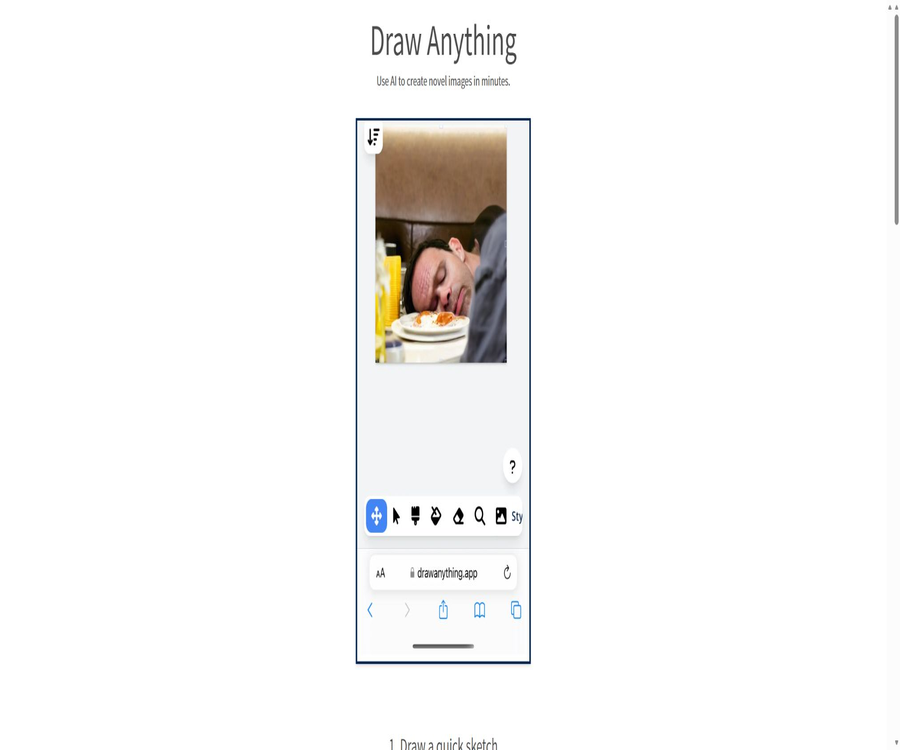
Draw Anything is an online platform for converting sketches into images, based on the principles of Stable Diffusion. Users first draw a rough outline, then enter a textual description; the AI uses this to create a more complete image, allowing for further iterations.
Tool Introduction
Draw Anything features a minimalist web interface; its core workflow consists of sketching, entering prompts, generating the image, and making further adjustments. It relies on Replicate for its backend processing capabilities, so users do not need to install models locally or set up any graphics card infrastructure.
The current website does not provide information on the development company, a help center, update logs, pricing, privacy policy, or terms of service. It is better suited as a demonstration of early generative image technologies, and should not be regarded as a mature design platform or enterprise service.
Core working method
| Phase | User input | System function | Results |
|---|---|---|---|
| Draw a sketch | Lines, color blocks, and general positions | Provides references for space layout and composition. | Basic image input |
| Describe the scene | Subject, environment, style, lighting, and camera language | Adding sketches to convey meanings that cannot be expressed otherwise | Text prompt |
| AI-generated | Combination of sketches and prompt words | Redrawn using cloud-based diffusion models | More complete image generation |
| Selected results | Generated candidate frames | As input for the next round of image generation | Version that can still be modified |
| Repeated iteration | New prompt or new sketch | Gradually change the style and content. | Final draft of the idea |
Main functions
Browser sketch canvas
Users can draw simple outlines directly on the web page; no advanced drawing skills are required. Sketches are used primarily to indicate the position, size of objects and the relationships between them, rather than to provide detailed information.
Text prompt
The description box can be used to add information such as theme, season, medium, artistic style, atmosphere, lighting, and camera distance. The more specific the details provided, it doesn’t necessarily mean that the result will be more accurate; on the contrary, conflicting descriptions can reduce the reliability of the outcome.
Convert sketch to a complete image
The tool uses sketches and text to generate images from them, transforming rough lines into visuals with a greater sense of quality. The intensity of generation, random seed values, and specific model parameters are not specified on the current website.
The results are iterated further.
Users can use the results of the previous AI iteration as input for the next round, and modify the prompts to change the style or details. Continuous iterations may gradually deviate from the initial layout, so it is necessary to keep the version that satisfies one’s needs.
Example emoji experiment
The home page includes an interactive example that allows users to add expressions to characters and trigger generation, thereby showing how slight changes in the sketch affect the resulting output. This example is more of a technical demonstration and is not equivalent to a full-fledged portrait editor.
Cloud-based inference
The task generation is handled by the infrastructure related to Replicate; therefore, an internet connection is required to send the input data to a third-party cloud service. The official website does not specify the current version of the model in use, the queue priorities, or the method for storing data.
Usage tutorial
Generate images from sketches
- First, identify the main subject, foreground, background, and primary light source, avoiding starting directly with a complex image.
- Use lines and simple color blocks on the canvas to indicate the positions of the objects and their approximate proportions.
- Describe the subject, environment, material, style, mood, and camera distance in one or two sentences.
- Click on \"Dream Generate\", wait for the task to be completed in the cloud, and check whether the core composition is retained in the output.
- If the content deviates, simplify the prompt, strengthen the relationship between the main elements, or adjust the sketch accordingly.
- Save the satisfactory results before proceeding with further iterations, to prevent the next round from overriding better directions.
Iterative style modification
- Select the image from the previous round that is closest to the target as the new input.
- Only one main variable is modified, such as the medium, era, lighting, or mood.
- Retain the composition and subject description to reduce the need for the model to reinterpret the entire image.
- Generate multiple versions and compare the consistency of the main elements, structure, details, and image noise.
- When deviations accumulate, revert to an earlier version; do not continue generating results based on incorrect data indefinitely.
Write more effective prompts.
- First, describe the main elements of the scene and their actions; do not just use abstract terms.
- Add visual information such as scenes, time, weather, materials, and lighting.
- It explains camera angles such as panoramic, medium shot, close-up, or top-down view.
- Test a small number of style elements at a time, to avoid having conflicting artists and media stacked together.
- Make modifications based on the specific issues in the output, rather than rewriting the prompt entirely in each round.
Which users are it suitable for
- Beginners in AI art: You can understand the process of generating images from sketches and prompts without needing to install any software.
- Concept creator: Quickly transforms simple compositions into atmospheric images or drafts of story scenes.
- Learners of illustration and design: Observe how line layout, prompt words, and style descriptions influence the output.
- Instructors and presenters: Used to demonstrate how diffusion models redraw content based on both visual elements and text.
- Ordinary users who experiment occasionally: carry out simple creative tasks that do not involve any privacy or commercial secrets.
Typical use cases
- Transform the stick-figure composition into a concept art featuring a science fiction city, a fantasy scene, or a painting style.
- First, determine the positions of the characters and objects, then use AI to add lighting, textures, and backgrounds.
- Use the same sketch to test realism, oil painting, comics, or other visual styles.
- Redraw the results from the previous round to explore different versions for various eras, weather conditions, and moods.
- Quickly test whether an idea is viable before officially using local models or professional tools.
Situations that are not very suitable
- Professional workflows that require fixed models, random seeds, samplers, and precise parameters for reproducibility.
- Users who need masks, ControlNet, local redrawing, zooming, layers, or batch generation.
- Enterprises that require account permissions, team collaboration, asset management, version history, and audit logs.
- Scenarios involving the handling of customer data, unreleased designs, medical images, or other sensitive content.
- Projects that require a defined service level, stable interfaces, clear commercial terms, and data processing protocols.
Price and usage quota
As of August 2026, the Draw Anything website does not contain any page indicating fees, subscription plans, points, free usage limits, or registration requirements. The site allows users to access the creation interface directly, but this does not mean that the service is guaranteed to be free forever or that there are no limits on the number of uses.
| Project | Current public information | Explanation |
|---|---|---|
| Web page access | It can be opened directly. | No prompts for logging in or making a purchase are visible. |
| Free quota | Not disclosed | It is not possible to determine the number of times per day or per month. |
| Paid plans | Not disclosed | There are no verifiable monthly fees or per-use prices. |
| Generate excess rules | Not disclosed | It may be affected by backend quotas, queues, or operational strategies. |
| Enterprise solutions | No findings were detected. | There is no information regarding sales, contracts, or service commitments. |
Why can’t it be marked as permanently free right away?
The fact that there is no payment portal at the moment only indicates that no prices are displayed when accessing the service; it does not prove that the service provider has committed to offering it free of charge in the long term. Cloud-based inference incurs costs, and in the future access may be restricted, discontinued, or the way in which it can be accessed may change.
Supported platforms
| Platform | Support status | Explanation |
|---|---|---|
| Desktop browser | Support | Suitable for drawing sketches with a mouse. |
| Mobile and tablet browsers | The page is accessible. | The touch experience and canvas accuracy need to be tested in practice. |
| Windows, macOS, and Linux | Use via a browser | There is no standalone desktop client. |
| iOS and Android | No official native applications were found. | Do not confuse it with applications that have similar names. |
| Use offline | Not supported | Generate dependencies for cloud-based inference |
Input and output
| Type | Currently available capabilities | Restrictions |
|---|---|---|
| Sketch input | Web canvas rendering | Insufficient drawing tools, layers, and advanced control options. |
| Text input | Natural language scene description | The current model and prompt parsing rules are not publicly available. |
| Iterative input | Images generated in the previous round | Multiple rounds of generation can lead to content drift. |
| Image output | AI-redrawn results and candidate changes | Resolution, format, and metadata are not specified. |
| Project file | No findings were detected. | There are no public cloud projects or local project formats. |
APIs, SDKs, and open-source status
| Project | Verification results | Explanation |
|---|---|---|
| Public API | No findings were detected. | There is no key, request document, or usage rules. |
| Official SDK | No findings were detected. | No language packs or integration instructions available. |
| Official GitHub | No product warehouse that can be confirmed was found. | Projects with the same name cannot be considered official. |
| Open-source product | It cannot be proven. | Using Stable Diffusion or Replicate does not mean that the web application is open source. |
| Backend services | Inference provided by Replicate. | Replicate is an external service; it does not mean that the source code of this application is made public. |
Product advantages
- The entry process is simple; users do not need to configure a graphics card, a Python environment, or model files.
- Combining sketches with prompt words makes it easier to indicate the position of objects and the composition than using only text.
- It supports the continuation of generating results from the previous round, making it suitable for exploring visual directions at a low cost.
- The webpage displays complete examples directly, making it easy for new users to understand the basic process.
- It has few interface options, making it suitable for teaching demonstrations and for first-time use of image-to-image generation.
Usage restrictions and precautions
- There is very little information available on the official website, making it impossible to determine the entity responsible for its operation, the frequency of maintenance, and the stability of the service.
- There are no real-time details regarding prices or quotas, and generation may be restricted or halted at any time.
- In the absence of a privacy policy and guidelines regarding data retention, it is not advisable to upload facial images, identification documents, or confidential sketches.
- The model version, parameters, and random seed are not disclosed, making it difficult to reproduce the results consistently.
- AI may make mistakes in understanding character structure, text, perspective, details, and instructions.
- Content filtering is influenced both by models and backend policies, and legitimate content can also be blocked.
- The commercial license for using the generated results is not publicly available; it is necessary to conduct a rights verification on one’s own before carrying out any commercial use.
Privacy and data security
To generate the content, it is necessary to send the sketch, prompt words, and any images from the previous round to the cloud backend. The official website does not specify how long the data is stored, whether it is included in logs, whether it is used to improve the model, or how to request its deletion.
The Replicate identifier merely indicates the provider of the inference infrastructure; it cannot replace Draw Anything’s own privacy policy. Users should treat all content submitted as something that may leave their local device.
Suggestions for safe use
- Only use public, fictional, or non-sensitive sketches and prompts.
- Do not upload photos of real customers, unreleased product designs, identification documents, or medical information.
- Do not include names, addresses, account numbers, keys, or contract details in the prompt.
- Commercial creations retain records of manual modifications, and are reviewed using formal tools with clearer rights and terms.
Copyright and Commercial Use
The current website does not contain any provisions regarding ownership of the content, commercial licensing, model licenses, or procedures for dealing with infringement issues. The name of the Stable Diffusion technology alone does not constitute proof that the current models or all outputs can be used for unlimited commercial purposes.
Be aware that well-known artists, brands, or protected characters can pose risks related to style, trademarks, copyrights, and image rights. A similarity check should be conducted before any public release to avoid misleading uses.
Basic information
| Project | Content |
|---|---|
| Tool name | Draw Anything |
| Tool type | Converting online sketches into AI images using Stable Diffusion Playground |
| Working method | Cloud-based image generation from sketches along with prompts |
| Reasoning provider | Replicate |
| Current price | Not disclosed |
| Is registration required? | Forced registration is not displayed on this page. |
| Is Chinese supported? | Natural language can be entered, but the performance with Chinese has not been specified. |
| Whether API is provided | No findings were detected. |
| Is it open source? | There is no evidence to show that web-based products are open source. |
| Main platforms | Modern web browsers |
Recommendation score
Recommendation score: 2.9 / 5. Draw Anything illustrates in a straightforward manner the concept of using sketches and prompts together to control images, making it suitable for quick testing and teaching purposes.
The lack of pricing information, privacy policies, developer documentation, model parameters, and operational details limits its suitability for long-term use and commercial deployment. Professional creators would be better off choosing tools that are still regularly updated and come with comprehensive control options.
Frequently Asked Questions
Is Draw Anything free?
The current page does not show any pricing information, but it neither specifies a free usage limit nor offers a guarantee of permanent free access. The absence of a payment section alone does not mean that access is unlimited and free.
Is it necessary to install software?
It’s not necessary; you can draw a sketch in the browser and generate it there. It relies on the internet and cloud-based processing.
Is it necessary to be able to draw?
No detailed drawing is required; simple outlines and the relationships between elements are sufficient as a guide for composition. Clear sketches generally yield more controllable results than random doodles.
Can the same image be modified repeatedly?
The results of the previous round can be used as input for the next round, with the prompt being modified accordingly. Repeating this process multiple times may cause the subject and composition to gradually drift.
Are APIs or SDKs available?
No public APIs, SDKs, or development documentation were found. The fact that the website indicates it is driven by Replicate does not mean that users can use the Draw Anything interface.
Is Draw Anything open source?
No official product repository that can be verified was found, nor is there any open-source license. The availability of the underlying models or third-party platforms does not indicate that the web application is open source.
Can the generated images be used for commercial purposes?
The official website does not provide clear information regarding commercial usage terms, model versions, and rights related to the outputs. Before using such materials for commercial purposes, it is necessary to turn to platforms that offer transparent licensing information, and to assess the risks associated with the materials, models, and content in question.
Will the uploaded sketch be saved?
It cannot be confirmed. The official website does not disclose a privacy policy or a retention period, so sensitive and confidential materials should not be uploaded there.
Summary
Draw Anything remains an intuitive tool for converting sketches into images: first, you draw the composition, then write a description, and hand it over to the AI to redraw it; you can then proceed by building on the results of the previous step. Its advantage lies in its simplicity, rather than offering professional control or enterprise-level support.
Regular users can try it with non-sensitive materials, while professional and commercial users should proceed with caution. In the absence of information regarding real-time prices, privacy issues, licensing terms, and stability, it should not be used as part of an official content production pipeline.
Tools similar to Drawanything



 Guigong Network Security Registration No. 45132202000164