






Supernormal
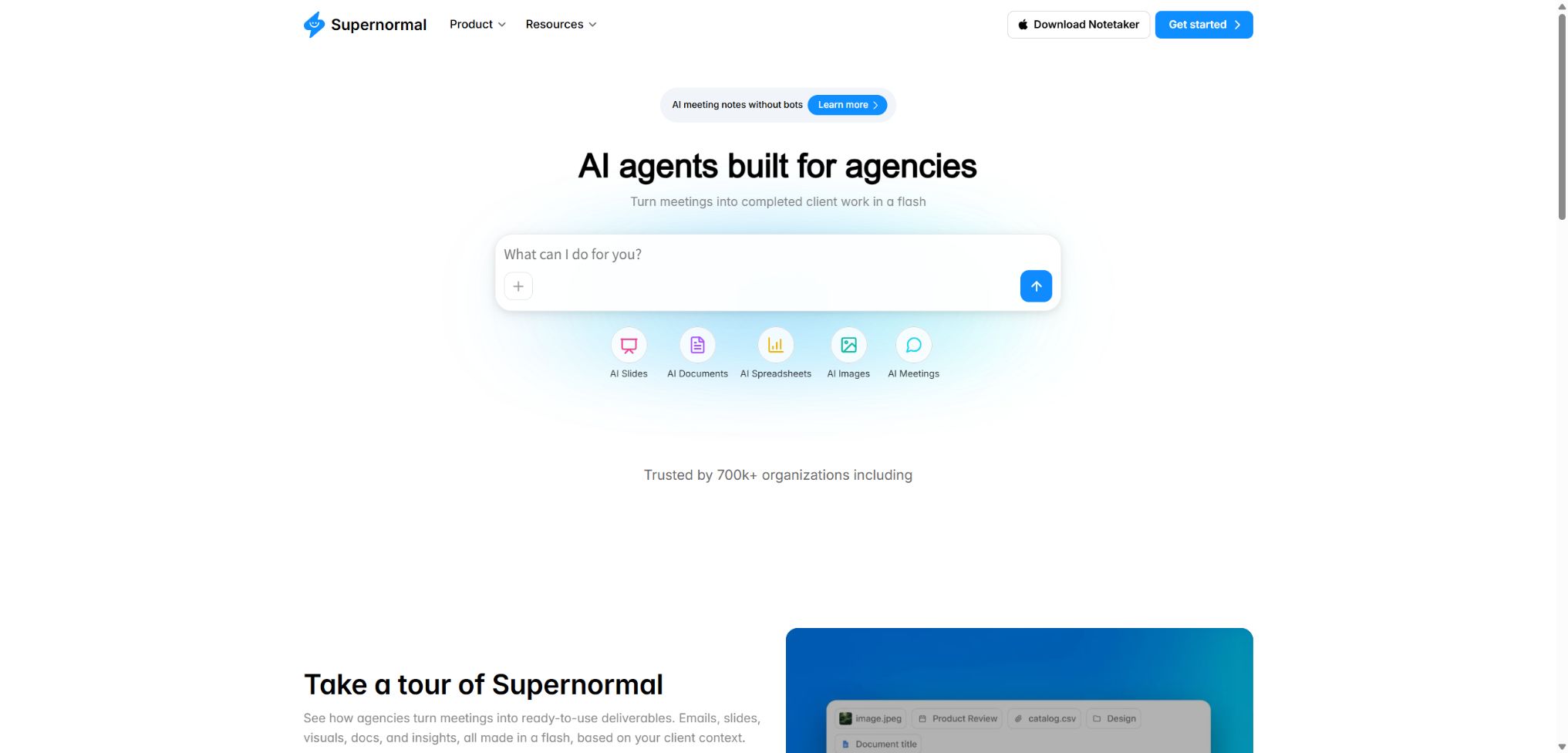
An AI-based work platform that quickly converts meeting notes into documents, presentations, and client deliverables
Tags:AI conference toolsWhat is Supernormal?
Supernormal is a productivity platform that combines AI-powered meeting transcription with task management agents. It uses desktop applications to capture audio from the computer’s microphone and system speakers, generating complete transcripts, summaries, and action items; it then utilizes the context of the meeting to carry out further tasks.
By 2026, Supernormal 2.0 will not be limited to just taking meeting notes. Users will be able to have the Agent generate presentations, spreadsheets, strategy documents, emails, images, and work plans based on either a single meeting or an entire project.
Main functions of Supernormal
- It automatically detects and captures online meetings, without the need to arrange for a visible robot to join;
- Record temporary calls, in-person meetings, voice notes, and brainstorming sessions;
- Generate transcripts, summaries, decisions, and action items with speaker information;
- Use different meeting templates to generate structured minutes suitable for the specific scenario;
- Generate emails, documents, images, tables, and slides directly from meetings;
- Group multiple related meetings under Projects to maintain a consistent context;
- Upload the file and submit it along with the meeting materials to the Agent for processing.
- Export to Google Drive, Microsoft Office, or a local file;
- Share meetings and generated results through public links or permission settings;
- Use MCP to provide meeting history to tools such as Claude and Cursor.
No robot-based desktop capture
New Mac and Windows desktop applications can detect meetings on the local device and access the microphone as well as the system audio; there is usually no need to add a visible robot to the meeting room. They are also able to capture calls from Slack Huddle, Discord, WhatsApp, and other platforms, even those that are not listed in the calendar.
The absence of robots does not mean that it is not necessary to inform the participants; recording or transcribing audio also may be subject to legal requirements such as mutual consent. It remains the user’s responsibility to provide clear instructions before the meeting begins and to obtain the necessary consent.
Meeting minutes, templates, and personal notes
Each capture generates a full transcript, a summary, and action items; users can employ different templates depending on the context, such as one-on-one meetings, client meetings, interviews, or project updates. Manual notes taken during the meeting are saved along with the results, which helps the system identify the topics that are of most interest to the user.
AI may mishear names, terms, numbers, and responsible persons; minutes are not formal contracts or evidence of facts. Before sending them to clients or entering them into the project system, attendees should verify the key decisions, dates, and commitments.
Supernormal Agents
The agent can start from “New Task”, or it is possible to choose to continue working directly on the meeting minutes page. After the user provides brief instructions, the system will plan and carry out various steps in order to generate slides, spreadsheets, documents, images, research results, or email drafts.
The project can be set up so that agents can reference only meetings related to specific clients or topics, thereby reducing context-related confusion. It is still necessary to check the numbers, references, brand styles, and client information; in particular, automatically generated outputs should not be considered the final version.
Projects and MCP
Projects is used to consolidate multiple meetings and documents related to the same client or project, enabling Agents to keep track of goals, feedback, and tasks across different meetings. MCP allows external AI tools to access the meeting history in Supernormal, thereby reducing the need for copying and pasting.
The MCP connection expands the scope of access to meeting data; it is necessary to verify the permissions of the client, account, and project. Sensitive projects should not, by default, make their entire history available to all external AI tools.
What use cases are suitable?
| Scene | Meeting output | Subsequent Agent tasks |
|---|---|---|
| Customer meeting | Needs, feedback, decisions, and next steps | Proposals, follow-up emails, presentations, and work plans |
| Project regular meeting | Progress, blocking issues, responsible persons, and deadlines | Status reports, task lists, and risk tables |
| Sales interview | Pain points, goals, objections, and purchasing signals | Account summary, personalized follow-ups, and draft plans |
| User research | Opinions, needs, behaviors, and representative feedback | Theme categorization, insight documentation, and research reports |
| Recruitment interview | Questions, answers, and structured observations | The candidate summaries and subsequent questions are reviewed, with the final decision made manually. |
| Offline discussions | Voice notes, brainstorming, and action items | Policy documents, emails, or executable plans |
Price of Supernormal 2.0
Starting in April 2026, the 2.0 version will adopt a billing system based on shared Credits among teams, rather than charging primarily per seat. Credits are used for Agent tasks, and their actual consumption depends on the type and complexity of those tasks.
| Package | Monthly fee | Monthly Credits | Primary interests |
|---|---|---|---|
| Free | $ | 15 | Up to 5 credits per day, capture of desktop meetings, creation of presentations/images/tables, no limit on the number of projects, MCP |
| Team | 20 dollars | 50 | No daily limit; monthly payments roll over to the following month, annual payments can be rolled over for up to two years; no limit on the number of seats; brand identifiers are removed. |
| Business | 40 dollars | 50 | All rights related to the Team are included, in addition to SSO, audit logs, data retention, member visibility, and administrator controls. |
According to the official information, Teams and Business plans allow for an increase in Credits based on monthly usage, with team members sharing the available quota. The old Starter, Pro plans as well as the Business plan based on seats are part of the previous pricing structure; existing users may still enjoy certain benefits under these old plans.
Credits and Seat Rules
| Rules | Free | Team | Business |
|---|---|---|---|
| Team members | It is subject to the current account settings. | No limit on seats; Credits are shared. | No limit on seats; Credits are shared. |
| Daily consumption | Up to 5 credits | There is no daily limit. | There is no daily limit. |
| Balance carryover | No indication of carry-over. | Monthly payments are rolled over for 1 month; annual payments cover a maximum of 2 years. | Follow the rules of the current purchase page. |
| Additional Credits | Upgrade plan | Purchases can be adjusted according to the quantity needed. | It can be adjusted according to the team’s needs. |
| Governance capacity | Foundation | Team sharing | SSO, auditing, retention, and administrator controls |
The monthly fee cannot be directly converted into a fixed number of slides or documents, as the resources required for complex tasks vary. Teams that use the service frequently should first observe their actual usage over a few weeks before deciding whether to upgrade their quota or enhance their business management capabilities.
Supernormal usage guide
Set up desktop meeting recording
- Download the desktop application suitable for your system and create an account;
- Enable both the microphone and system audio permissions; both are required to be turned on.
- Connect to Google Calendar or Outlook Calendar;
- Choose Automatic Capture, Only Prompt, or Manual New Capture;
- Participants are informed in advance of the meeting, and consent for any recording or transcription is obtained where applicable;
- After it’s over, check the summary, transcript, responsible person, and action items.
Generate customer deliverables from meetings
- Place related meetings for the same customer in separate Projects;
- Select a meeting and use “Work with this meeting”;
- Describe the type of deliverable, target audience, purpose, format, and brand requirements;
- Have the Agent generate drafts of presentations, tables, documents, or emails;
- Verify facts, figures, citations, customer names, and confidential information;
- Export to Office, Google Drive, or your local device for further editing.
Secure connection to MCP
- First, determine the range of meetings that the external AI tool needs to have access to;
- Add the connection in the MCP or Connectors settings of the trusted client;
- Complete the authorization and use non-sensitive meeting tests for queries;
- The verification tool can only read the content of the intended accounts and items.
- Avoid requesting all customer history in external prompts;
- When a member leaves or the project comes to an end, the connection is terminated and the logs are checked.
The advantages of Supernormal
- Extending from meeting capture to subsequent tasks such as documents, tables, and presentations;
- On the desktop version, meetings can be recorded without the use of a robot in most scenarios;
- Automatically detects scheduled meetings, ad-hoc calls, and in-person discussions;
- Projects enables multiple meetings to create a context that can be used sustainably;
- There is no limit on the number of members in a Team or Business account, making it suitable for teams that share quotas;
- MCP allows the meeting context to be transferred to other AI work environments;
- Business offers SSO, auditing, and data retention controls.
Usage restrictions and changes
- Meetings held after April 2026 will require the use of desktop applications and Web accounts.
- The desktop version does not support the recording of audio and video files; it only generates meeting content and notes.
- Macs are only supported with Apple Silicon and macOS 14.4.1 or later;
- Windows only supports Windows 11 and does not support Windows 10 or earlier versions.
- The current desktop languages are English, Spanish, Italian, German, French, Swedish, and Portuguese;
- Old Chrome extensions, bots, and various native integrations have been modified;
- AI-generated transcriptions, summaries, and outputs must be reviewed manually.
Privacy, Recording, and Security
The official statement indicates that new meeting notes are set to be private by default, in compliance with SOC 2 standards; TLS 1.2 or higher is used for transmission, while AES-256 encryption is employed for static data.
Business also offers SSO, audit logs, data retention, and administrator visibility controls.
- Participants are clearly informed and their consent is recorded before each capture;
- Do not record meetings that are prohibited by law, refused by the client, or involve highly private matters;
- Set the minimum sharing scope based on the customer and project.
- Before sending the public link, check whether it contains sensitive transcriptions or attachments;
- MCP and external exports expand the data boundaries, and therefore require separate approval;
- Establish deletion procedures for employee departures, customer closures, and retention periods.
The interface without the robot mode appears more natural, but it also reduces the chances that other participants will see the recording prompt. Organizers should use verbal cues, instructions in the meeting invitation, or other clear mechanisms to fulfill their notification obligations.
API, GitHub, and open-source information
Supernormal provides API documentation, but the official help center indicates that API access is primarily available to Business and Enterprise customers; it is necessary to contact support to enable it. The API can be used in scenarios such as reading user and meeting details, with specific permissions depending on the account type.
The official GitHub organization has made available a small number of projects related to screen captures and login integration, but the Supernormal platform, the transcription system, and the Agent are not open-source products. The CVPR 3D reconstruction project with the same name on GitHub has no connection to this conference tool.
Frequently Asked Questions
Is Supernormal free?
The Free plan costs $0 and includes 15 credits per month, with a limit of 5 credits per day. It allows for the use of features such as desktop meeting recording, Agent creation, Projects, and MCP.
How much is the Team package?
Supernormal 2.0 Team costs $20 per month and includes 50 shared credits among team members, with no limit on the number of users. The amount of credits can be increased based on actual usage.
Will robots be present at the meeting?
New desktop applications typically capture audio directly from the computer, without the need for a robot to be present in the meeting. Whether or not a robot is used, users must inform the participants in accordance with local laws.
Can meeting videos be recorded?
The new robot-free desktop application does not support the recording of video and audio files; its focus is on transcription, summarization, and assigning follow-up tasks. The recordings made by the older version of the robot may be outdated.
Is Supernormal open source?
No, the core meetings and the Agent platform fall under commercial services. The few projects available on the official GitHub do not represent the complete source code of the product.
Tools similar to Supernormal



 Guigong Network Security Registration No. 45132202000164