






GoalsGPT
GoalsGPT: an intelligent tool specialized in the processing of AI table data.
Tags:AI table data processingA one-sentence summary
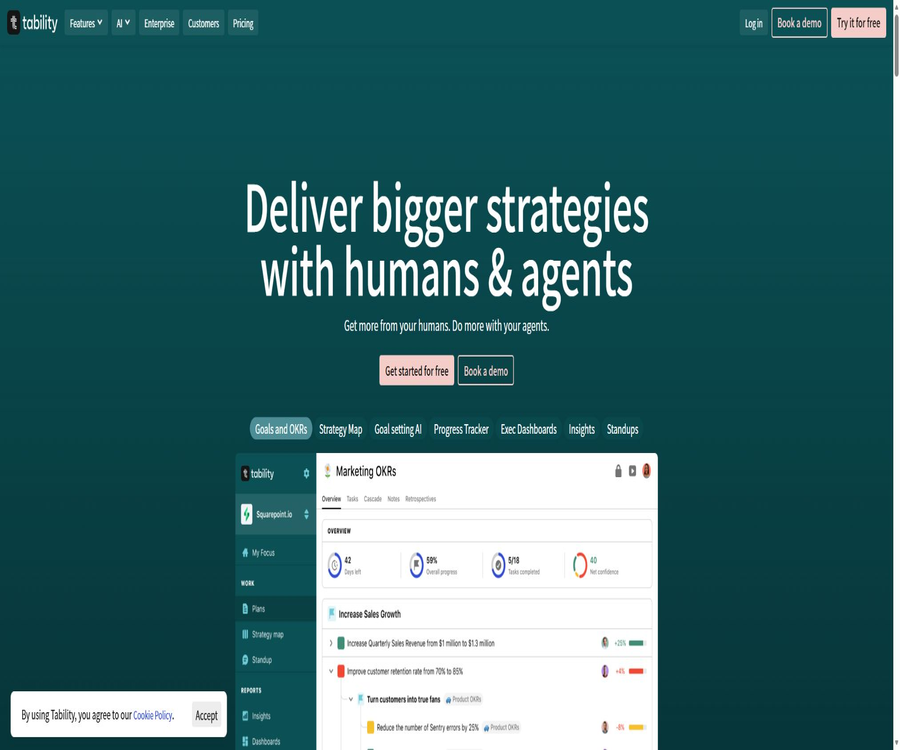
GoalsGPT was the name used by Tability to promote its AI goal generator; nowadays, those functions have been integrated into Tability’s OKR planning, tracking, and reporting platform.
Current product status
As of August 23, 2026, the original entry point for the GoalsGPT application will be redirected to the Tability login page; standalone generators that do not require logging in will no longer be available. Users must create or edit plans within the Tability workspace in order to use AI to generate goals and feedback.
The official website still uses the names GoalsGPT or GoalGPT on some pages to describe AI-based goal generation, but the current products, accounts, pricing, and documentation all refer to Tability. In the menu, GoalsGPT should be listed as a former feature of Tability, rather than as a separate tool that operates independently.
| Project | Past form | Current form | Conclusion |
|---|---|---|---|
| Product name | GoalsGPT – an independent AI goal generator | Tability features built-in Goal-setting AI. | Use Tability as the current product. |
| Access method | Public generation entry point | The original entrance has been redirected to the login page. | A Tability account is required. |
| Primary uses | Generate an OKR draft from the prompt. | Planning, tracking, reporting, and AI analysis | The range of capabilities has clearly expanded. |
| Model representation | The old page mentioned GPT-3 or GPT-4. | The current policy only promises the OpenAI API. | Do not stick to using a certain old model. |
| Price | The history page used to state that it was free. | Available via user subscription with a trial period. | It is no longer considered a standalone free tool. |
Tool Introduction
Tability is operated by Australian company Tability Pty Ltd, and it is designed for teams that need to create, align, and track OKRs, KPIs, and quarterly goals. It brings together goals, quantifiable results, action items, responsible persons, weekly check-ins, confidence levels, and reports in a single workspace.
AI is responsible for transforming vague directions into editable draft objectives; it can also analyze existing objectives, progress, and attendance records. Users still need to decide on strategic priorities, metrics, target values, responsible persons, and available resources – the text generated by AI cannot be considered as a final management decision.
Main AI features
AI-generated SMART goals and OKRs
After the user enters the overall goal, time frame, and background information, Tability can suggest an objective, measurable key results, as well as action items. The generated results can be previewed; the user can continue the discussion to make adjustments before finalizing the plan.
Importing AI objectives and structuring them
Users can paste documents, presentations, or messy lists so that the AI can identify the underlying structure and convert it into a Tability plan. CSV imports can also have their OKR values automatically identified; however, it is still necessary to verify the fields, hierarchy, and numbers after the conversion.
AI feedback and target scoring
The editor can analyze existing Objectives and Key Results, identifying those that are too vague, unmeasurable, or poorly structured. It is possible to accept or ignore each of these items individually; there is no automatic confirmation that the objectives can be achieved.
Automated identification metrics
Tability identifies the indicators, starting values, and target values in the target text, thereby reducing the need for manual configuration. Amounts, percentages, cumulative values, and decreasing indicators are prone to being misinterpreted; it is necessary to check each of them carefully before publishing.
AI-generated action items
The system can suggest Initiatives based on a certain Outcome or Key Result, thereby helping the team to move from defining outcomes to taking action. Each action item should include a responsible person, a deadline, dependencies, and required resources; it shouldn’t remain just a generic list of tasks.
Coaching AI
Tabby Coach analyzes the target metadata and historical sign-in records to produce progress assessments and recommendations for the next steps. It is useful for identifying areas of stagnation and potential risks, but it cannot replace the decision-making of those in charge regarding the business environment and data quality.
AI Mode
AI Mode allows users to summarize multiple plans using natural language, identify risks and obstacles, prepare weekly reports, and ask follow-up questions. The official guide still classifies it as Beta; the responses provided may be incomplete or inaccurate, so it is necessary to refer back to the original records and metrics in order to obtain accurate conclusions.
Tabby AI assistant
The current product describes Tabby as an AI assistant that handles tasks such as goal setting, automatic logging in, and generating reports. The available actions and the number of prompts that can be used vary depending on the package selected, the scope of the Beta version, and the settings of the workspace.
MCP server
Tability offers remote MCP servers that enable compatible clients to read plans, goals, check-ins, and action items, as well as to write updates based on their permissions. According to the official information, it supports 27 different tools; however, it is still advisable to use the minimum necessary permissions when connecting, and to review each write operation.
Native AI Agents
The official website is promoting native Agents that can be assigned targets, generate tasks, execute them, and provide reports. On the current pricing page, the Agentic package is still marked as “Coming soon”; therefore, a fully functional Agent Manager along with agent collaboration cannot be considered available in a general and official capacity yet.
Core goal management functionality
Plan Editor
Teams can start creating plans from a blank template, an existing template, CSV data, or content generated by AI, and assign owners at the Objective, Outcome, and Initiative levels. The editor is suitable for OKR frameworks, and it allows for the customization of terms to support NCT or other goal frameworks as well.
Weekly Check-ins
The person in charge fills in the current values, confidence level, and relevant notes on a periodic basis, so that the team can stay aware of the health status of the goals. It is generally recommended to update quarterly goals on a weekly basis, while annual goals can be updated less frequently.
Strategy map and dependencies
A Strategy Map is used to illustrate the hierarchy and relationships between the goals of different teams, while a Dependencies Map shows the dependencies among the outcomes. These maps can reveal any misalignments, but it is still up to the teams to maintain the proper relationships.
Initiatives and Kanban
Action items can be linked to outcomes, and it is possible to set statuses, responsible persons, and deadlines for them; moreover, the Kanban method can be used to view the execution process. Tability is designed to link outputs with results, and it should not replace project management systems that require complex workflows, approvals, or engineering processes.
Automatic reminders and Standups
The platform sends reminders for sign-in via email, Slack, Microsoft Teams, and app notifications; it also offers asynchronous standups. These reminders help maintain a consistent rhythm, but too many notifications can cause fatigue, and they should be adjusted according to the role of each user.
Reports, dashboards, and presentations
Users can view target trends, confidence levels, Workspace Insights, and custom dashboards, and they can export data in CSV, PDF, PowerPoint, or Google Slides formats. The public sharing and presentation modes are suitable for use in management reports, but sensitive data should be checked before it is shared externally.
Retrospectives
The team can summarize the progress made, the experiences gained, and the adjustments needed for the next phase at the end of a month or quarter; AI can also assist in preparing drafts for these reviews. When conducting a review, it is not sufficient to focus only on the percentage of tasks completed – it is also necessary to keep track of any changes in the metrics used and any external influences.
Input and output
| Task | Typical input | Main output | Manual inspection |
|---|---|---|---|
| Generate OKRs | Goals, background, timeline, and constraints | Objective, Key Results, and Action Items | Strategic relevance and measurability |
| Import plan | CSV, document, or pasted text | Structured Plan | Hierarchy, owner, date, and metrics |
| AI feedback | OKRs are already in place. | Problem analysis and rewrite suggestions | Does it correspond to real business operations? |
| Progress analysis | Sign-in, numbers, and confidence | Risks, obstacles, and next steps | Are the data timely and complete? |
| Weekly reports and reviews | Multi-team planning and historical updates | Abstracts, reports, charts, or presentations | Facts, missing data, and permissions |
| MCP operation | Natural language requests and account authorization | Read or write workspace data | Tool permissions and write scope |
GoalsGPT current usage tutorial
Generate an OKR plan from a single sentence
- Register for Tability and create a workspace, selecting the target terms that suit your team.
- Create a new plan, and choose to use AI to generate the target rather than typing it from scratch.
- Enter the business objectives, planning period, team background, constraints, and definition of success.
- Generate a preview to check whether the Objective is clear and has a definite direction.
- Check each Key Result for its initial value, target value, unit, and deadline.
- Through dialogue, one can ask the AI to narrow down the scope, add missing indicators, or remove certain output indicators.
- After accepting appropriate suggestions, join the plan and then assign Owners and Initiatives.
- After obtaining the reviewer’s approval, it is published, along with the setting of signing-in schedules and notifications.
Improve existing OKRs
- Open Plan and go to Edit Content; first, correct any obviously outdated or incorrect data.
- Run AI feedback and wait for the analysis of Objectives and Key Results.
- Review each suggestion individually; do not accept all the revisions at once.
- Check whether the new wording still preserves the original strategic intent and responsibility boundaries.
- Definitions of supplementary indicators, data sources, baseline, objectives, and owner.
- Reject Key Results that only describe the completion of tasks without assessing the outcomes.
- After saving, have the person in charge and the reviewer confirm it again before releasing the new version.
Establish a weekly goal check-in system
- Assign an Owner for each Outcome who is responsible for obtaining data and driving action.
- Set the sign-in schedule and the channels for reminders; quarterly goals are usually set on a weekly basis.
- Each time, enter the current value, the confidence color, a brief reason, and the next step.
- When connecting to data tools, verify the synchronization metrics and filtering criteria.
- Before using AI for analysis, make sure there are no missing or incorrect recent sign-ins.
- In team meetings, address red and yellow goals as well, not just report on green goals.
- After the cycle ends, conduct a Retrospective and update the plan for the next round.
Which users are it suitable for
- Startup management team: Quickly establish the first set of quarterly OKRs and weekly schedules.
- Product and Operations Leader: Connect business outcomes to project initiatives.
- Remote and asynchronous teams: Use sign-ins, reminders, and standups to reduce follow-up questions.
- Multi-departmental organization: Goal alignment through strategy maps, cascading, and dependency checks.
- Reporters to management and the board of directors: Automatically generates progress summaries and presentations.
- Data team: Automatically updates metrics via connectors, APIs, or Webhooks.
- AI workflow users: Read and update OKRs from externally compatible clients.
Typical use cases
- Convert a company strategy into editable Objectives, Key Results, and action items.
- Import existing OKRs from spreadsheets or documents and automatically organize their structure.
- Collect team sign-ins on a weekly basis to promptly identify drops in morale and any obstacles.
- Use Jira or Linear task statuses to explain the relationship between project execution and business outcomes.
- Target metrics are automatically synchronized from databases, BI tools, or SaaS tools.
- Generate weekly management reports, quarterly reviews, and shareable presentations.
- Query the workspace via MCP in compatible clients such as ChatGPT and Claude.
Product advantages
- It covers the entire process, from AI goal generation to execution, logging in, analysis, and review.
- The generated results are retained in the editable plan, facilitating ongoing improvement by the team.
- Strategy maps, dependencies, and dashboards are suitable for cross-departmental alignment.
- Integration with Slack, Teams, and project tools reduces context switching.
- Premium offers data connectors, public APIs, and MCP servers.
- The 14-day trial does not require a credit card, making it easy to assess how well the solution works within a team first.
- AI can be turned off by the administrator, or one can use their own OpenAI account provided the necessary conditions are met.
Usage restrictions and precautions
- GoalsGPT is no longer a standalone, publicly available generator; the original application entry point has been redirected to the Tability login page.
- AI may generate metrics and target values that appear quantitative but lack a business basis.
- AI Mode is still in beta, and complex cross-plan analyses may be incomplete or inaccurate.
- Expired input data, missing sign-ins, or incorrect metric definitions can directly affect the AI’s conclusions.
- The current pricing page includes both old and new components, and there are discrepancies in the presentation of some prices and AI benefits.
- The Agentic package is still listed as “Coming soon”; it should not be purchased as if it already possessed all its full features.
- Public APIs, MCP, and data connectors require a Premium or higher plan along with the appropriate permission settings.
- External integration expands the scope of data processing, and it is necessary to examine permissions and sub-processors separately.
- Tability does not provide a formal SLA; critical business operations should have procedures in place for data export and failover.
Prices and packages
The dollar amounts listed at the top of the official pricing page as of August 23, 2026, will be given priority. Older price information remains at the bottom of the page; the price applicable to the account shall prevail before making a payment.
| Package | Annual payment conversion | Monthly payment | Primary interests | Status |
|---|---|---|---|---|
| Basic | $ | $ | OKR, sign-in, strategy map, Initiatives, and basic integration | Available for trial |
| Premium | $ | $ | Advanced reports, data connections, SAML SSO, SCIM, AI Mode, and APIs | Available for trial |
| Agentic | $ | $ | More AI credits, Agent Manager, and agent collaboration | Coming soon |
| Enterprise | Contact sales | Contact sales | Regional hosting, customized deployment, and dedicated customer success support | Custom contract |
All subscriptions are calculated based on the number of paying users, and adjustments can be made to the billing amount later on. The official website offers a 14-day trial period; no credit card is required, and annual payment saves two months’ worth of cost.
AI quota and user seats
| Project | Basic | Premium | Agentic |
|---|---|---|---|
| AI Credits | The current comparison table does not include this. | 4,000/user/month | 10,000/user/month |
| AI Mode prompt | The current comparison table does not include this. | 25/users/month | 500/per user/month |
| AI Assistant | The current comparison table does not include this. | 30 times/user/month | 500 times/user/month |
| MCP Server | Not included | Includes | Includes |
| Paid users | No restrictions | No restrictions | No restrictions |
| Free read-only seats | Not included | 2 per paid seat | 2 per paid seat |
The FAQ on the pricing page states that Slack and all AI functions are included in the Basic plan; the old guidelines also listed Goal-setting AI as part of the Basic plan, which is inconsistent with the Credits column in the current table. Before making a purchase, it is necessary to check in the trial workspace the capabilities related to AI goal generation, as well as the monthly quota and any fees for exceeding that quota.
Explanation for inconsistencies on the price page
| Page area | Basic | Premium | Other differences |
|---|---|---|---|
| New top-tier package card | $ | $ | Add Agentic and indicate it will be released soon. |
| Lower old-year paid components | $ | $ | The total price placeholder that has not been replaced still appears. |
| Lower old moon payment component | $ | $ | Does not match the amount at the top. |
| Current feature comparison table | No AI Credits or AI Mode prompts available | 4,000 Credits and limited hints | The Agentic column shows a higher limit. |
| Current FAQ and old guidelines | It is said that Goal-setting AI is available. | Complete AI and automation | There is a conflict with the comparison table. |
These differences may be due to the ongoing migration of products and the Agentic package. Do not rely on the prices listed on the old blog for procurement decisions; instead, verify them on both the billing page and the trial workspace.
Platform support and integration
| Category | Support status | Representative capabilities |
|---|---|---|
| Web applications | Support | Complete plan, sign-in, reporting, and management |
| iOS and Android | The official guide includes information on mobile push notifications and applications. | The details of the current store version have not been verified this time. |
| Slack | Support | Reminders, sign-ins, and weekly channel reports |
| Microsoft Teams | Support | Access Tability within Teams |
| Project management | Support | Jira, Linear, Asana, ClickUp, and Shortcut |
| Document | Support | Embedding or connecting Notion, Confluence, and Miro |
| Data connection | Premium | Airtable, databases, BI, product, and revenue management tools |
| Zapier | Support | Connect to more third-party apps |
| MCP | Premium and above | Two-way tool invocation compatible with external AI clients |
API, Webhook, and MCP
Public API
Tability offers a formal public API; the current setup guidelines require that users in the Premium workspace and administrators enable API access for specific users, using Personal API tokens for authentication. These tokens inherit the permissions of the corresponding users within the workspace.
Check-ins API
The remote signing-in interface allows the submission of score, body, and confidence in JSON format; it is also possible to increase or decrease the previous value using an increment approach. For each Outcome, remote signing-in must be enabled separately, and the Token must be protected.
MCP Server
The remote MCP server is designed for compatible clients and enables reading and writing of targets, plans, action items, as well as attendance records. It offers greater privileges than read-only summary access; administrators should control its activation scope and audit any updates made.
SDK and GitHub
There are no official Python or JavaScript SDKs maintained on the official website, nor are any repositories containing the source code of the core products available. The GitHub data connector is used solely for synchronizing metrics; it does not mean that Tability is open-source.
| Developer capabilities | Is it available? | Packages or conditions | Precautions |
|---|---|---|---|
| REST API | Yes | Premium workspace | Personal token and user permissions |
| Check-ins API | Yes | The current document suggests Plus or Premium. | Enable per Outcome |
| Webhooks | Yes | The current comparison table shows Premium and above. | The scope of the event is determined by the document. |
| MCP Server | Yes | The current comparison table shows Premium and above. | Read-write workspace |
| Official SDK | Not found | Not applicable | Use REST interfaces |
| Core source code | Not public | Commercial SaaS | Self-hosting is not supported. |
AI data and privacy
The current AI policy states that the OpenAI API is used as the LLM provider; customer data is not utilized for training, and the data sent to OpenAI is deleted after 30 days. Workspace administrators can disable the AI feature or connect their own OpenAI API key among the supported options.
The OpenAI integration guide lists the AI inputs as the plan title, target title, date, starting value, target value, and sign-in details, stating that personal identification information, workspace name, and certain explanatory texts should not be sent. Teams should still avoid including unnecessary personal or customer-sensitive information in the target title or sign-in details.
- In the workspace settings, decide whether to enable OpenAI and MCP.
- Do not include customer names, medical, HR, or security-related information in the AI prompts.
- When connecting to a custom API Key, an administrator-controlled key management method is used.
- Treat the AI output as a draft and have the designated owner approve it before releasing it.
- Set the minimum permissions appropriate for the position for external MCP clients.
- Immediately disable user, API, and integration access when leaving the job or there is a change in role.
Safety, Legal, and Commercial Guidelines
Tability claims that customer data is encrypted both during transmission and when stored statically, and it offers support for 2FA, Google SSO, as well as SAML for Premium plans; in addition, IP and email domain restrictions are available. Enterprise clients can choose to have their data hosted in the United States, the European Union, or Australia – the exact options depend on what is specified in the contract.
The terms state that the customer owns the data it uploads, and only grants the platform limited permissions necessary for providing the services; Tability does not sell Customer Data. The services are provided as they are, without any formal SLA, and the applicable law is that of New South Wales, Australia.
- Enable 2FA and prioritize using organizational SSO to manage members.
- Only paid users who truly need editing are invited; the rest use read-only access.
- Remove salary, HR information, customer data, and unreleased strategies before sharing the report publicly.
- Regularly export key objectives and reports to avoid relying entirely on a single cloud service.
- During procurement, confirm the data area, sub-processors, backup, deletion, and event response.
- Strategic texts and reports generated by AI still require fact-checking, copyright assessment, and compliance verification before they can be used commercially.
Basic information
| Project | Content |
|---|---|
| Historical name | GoalsGPT, GoalGPT |
| Current products | Tability |
| Operating entity | Tability Pty Ltd |
| Tool type | AI-assisted OKR, KPI, and strategic execution platform |
| Core structure | Objective, Outcome or Key Result, Initiative |
| Main AI | Goal generation, feedback, metric identification, Coach, AI Mode, and MCP |
| LLM providers | The current policy specifies the OpenAI API. |
| Price pattern | By user subscription, 14-day trial, and Enterprise quote |
| Main platforms | Integration with web and collaboration tools |
| Public API | Yes, Premium. |
| MCP Server | Yes, the current comparison table includes levels Premium and above. |
| Official SDK | Not found |
| Is it open source? | No |
| Self-hosting | Not supported |
| Date of information verification | August 23, 2026 |
Recommendation score
Recommendation score: 4.3 / 5. Tability combines goal generation in the style of GoalsGPT with features such as check-ins, strategy maps, action items, data synchronization, reporting, APIs, and MCP; it is suitable for teams that wish to maintain a consistent OKR process.
The main points deducted stem from the coexistence of old and new content on the current pricing page, inconsistencies in the descriptions related to AI benefits, and the fact that the Agentic solution is still marked as “Coming soon”. It is recommended to use a 14-day trial period to verify the AI quota as well as the accuracy of its adoption and integration by the team.
Frequently Asked Questions
Can GoalsGPT be used independently?
The original entry point for GoalsGPT now redirects to the Tability login page. AI goal generation is now a feature within the Tability workspace, and it is no longer considered a separate, standalone tool.
What is the relationship between GoalsGPT and Tability?
GoalsGPT was the name used in the early stages of Tability for the AI goal generator; Tability is now the full-fledged product. It also includes features such as goal tracking, check-in, reporting, integration, APIs, and MCP.
Is GPT-3 or GPT-4 being used?
Old documents and previous marketing pages listed different model names; the current AI policy specifies the use of only the OpenAI API. Do not consider historical models as permanent commitments.
Is there a permanently free version of Tability?
The current top-tier plan cards offer Basic, Premium, the upcoming Agentic, and Enterprise options, along with a 14-day trial period. The option labeled “Get started for free” refers to this trial period; it should not be described as a permanently free solution.
Is a credit card required for the trial?
The current official website states that a 14-day trial period is available without the need for a credit card. After registration, it is still necessary to check the expiration date of the trial period and the features available.
Does Basic include AI goal generation?
The old guidelines and price FAQs stated that Basic included Goal-setting AI, but the current comparison table indicates that the AI Credits associated with Basic are not included. It is necessary to verify this directly using a trial account; one should not rely solely on a particular module.
Is AI Mode stable?
The official guide is still marked as Beta, with a reminder that the responses may be incomplete or inaccurate. It is suitable for assisting in analysis, but not for making management decisions without verification.
Has the Agentic solution been officially released?
The current price page still shows “Coming soon”. The capabilities of the agents listed on the marketing page do not necessarily mean that they are available for purchase and use by all customers.
Does Tability provide an API?
Available. Public APIs require a Premium workspace; API permissions must be enabled for the user, and a Personal API token must be used, with permissions corresponding to the respective account.
Is MCP supported?
It supports remote MCP Servers, enabling AI-compatible clients to read from and write to Table data. The current price table lists it in the Premium category and above.
Is Tability open source?
It is not an open-source product, and no official core source code repository has been identified. The public APIs, MCP, and GitHub connectors do not indicate that the platform’s source code is available publicly.
Will AI use target data to train models?
According to current AI policies, Tableau and OpenAI do not use customer data to train their models, and it is stated that the data sent to OpenAI is deleted after 30 days. Companies should still review their existing contracts as well as the sub-processors they employ.
Summary
GoalsGPT has evolved from a simple AI-based OKR generator to become part of the Tability goal management system. It is most suitable for teams that need to continuously transform draft goals into assigned responsibilities, sign-ins, action items, data synchronization, and management reports.
Before making a purchase, it is essential to verify the actual AI permissions of Basic, as well as the quota and API scope of Premium; the Agentic function should be regarded as something that still needs formal confirmation. Whether using Target Generation, AI Mode, or MCP, the team must bear the ultimate strategic decisions and data responsibilities.
Tools similar to GoalsGPT





 Guigong Network Security Registration No. 45132202000164