






Genius Sheets
Genius Sheets, an intelligent tool focused on AI-driven spreadsheet data processing.
Tags:AI table data processingA one-sentence summary
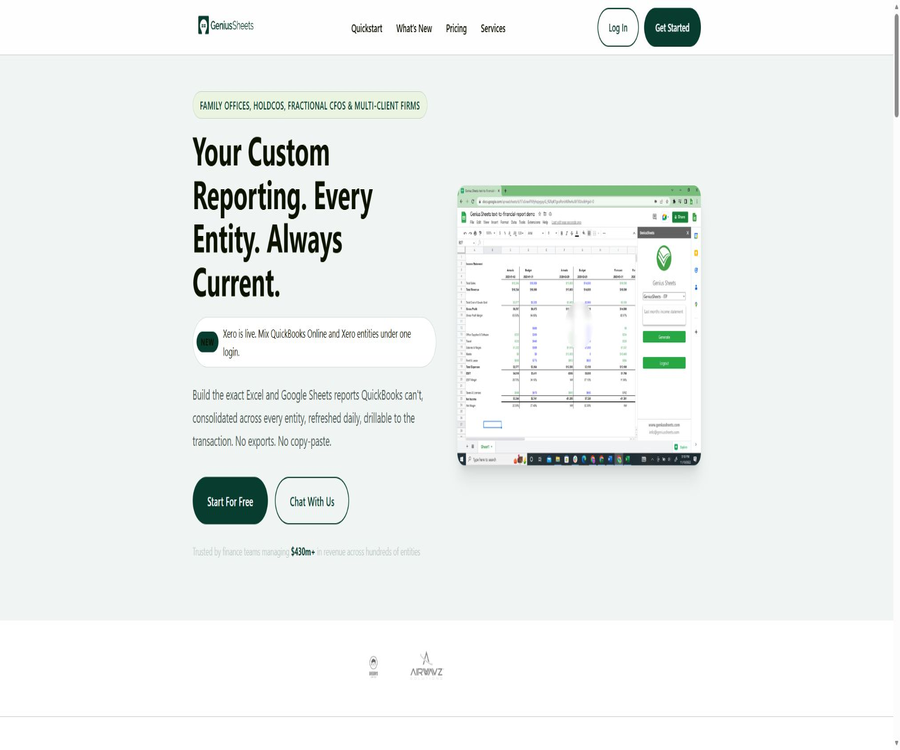
Genius Sheets is a plugin for Excel and Google Sheets designed for financial teams; it allows data from QuickBooks Online and Xero to be imported into custom workbooks, thereby generating financial statements that are continuously updated and can be traced back to individual transactions.
Tool Introduction
Genius Sheets is operated by Genius Sheets Inc., and it serves family offices, holding companies, fractional CFOs, multi-client accounting firms, as well as financial teams that manage multiple entities. It allows users to retain their existing table formats, eliminating the need to repeatedly export and copy accounting data.
The current product has evolved from its initial form as an AI-based report generation tool to include functions such as financial data integration, formula-based reporting, consolidation of multiple entities, and a web-based AI analysis platform. QuickBooks Online and Xero can be connected simultaneously under the same login credentials.
Main functions
Native connection between QuickBooks Online and Xero
After authorizing QuickBooks or Xero in the web dashboard, users can retrieve financial data using Excel or Google Sheets add-ons. The official version emphasizes a direct connection, without the need to export data in CSV format or use any intermediate tools for transferring it.
Custom financial formulas
The three core formulas are GS.IS, GS.BS, and GS.CF, corresponding to the income statement, balance sheet, and cash flow statement respectively. Users can set categories, dates, companies, and filtering criteria in any cell to maintain their own layout for the reports.
Consolidated financial statements for multiple entities
The Business and Firm capabilities support multiple accounting sets, allowing companies, properties, funds, or customer entities to be integrated into the same workbook. Teams can generate summaries at the entity level, property level, and group level, without having to copy data manually each month.
Categorized filtering
The results of the formulas can be filtered by dimensions such as Class, Customer, Product or Service, Location, Department, and Vendor. Whether these filtering options are available depends on the data that actually exists in the accounting system and that has corresponding names.
Transaction-level drill-down
Users can view the underlying transactions that make up a particular figure in the formula cells, thereby enabling them to verify unusual amounts and keep track of the reports. This hierarchical approach reduces the number of steps required to navigate between the aggregated figures and the original records.
Automatic refresh and caching
Connection data is synchronized on a daily basis; Google Sheets supports overnight updates, while Excel can automatically refresh formulas when the workbook is opened. Updates in 2026 also improved the \"Refresh All\" function and the caching of formulas, reducing the likelihood of old data or blank values appearing in multiple sheets.
AI Analyst
The AI Analyst in the web dashboard enables users to ask financial questions in natural language and receives formatted responses. The current release notes specify that QuickBooks covers information related to profits and losses, balance sheet, cash flow, invoices, and customer data; it cannot be assumed that Xero offers the same range of AI-powered query capabilities.
Prepared and specialized reports
In addition to the three main financial statements, the platform now offers reports such as Spend by Vendor and 1099 Vendor. The 1099 report is intended to help identify suppliers that meet the requirements specified by QuickBooks; it should not be used as a substitute for tax filings or professional audits.
Budget and batch range formulas
Budget formulas can retrieve budget amounts from QuickBooks Online to enable comparison between actual figures and budgets; Range formulas allow for the specification of categories or date ranges and return a two-dimensional array. Before using them, it is necessary to check the specific syntax of these functions in Excel and Google Sheets according to the documentation provided for the respective plugins.
Core report formulas
| Formula | Report type | Common uses |
|---|---|---|
| GS.IS | Income statement | Comparison of revenue, expenses, profits, and periods |
| GS.BS | Balance sheet | Periodic reporting of assets, liabilities, and equity |
| GS.CF | Cash flow statement | Analysis of cash flows from operations, investing, and financing |
| GS.IS.BUDGET | Profit and loss budget | Comparison of QuickBooks actual figures with the budget |
| GS.IS.RANGE, etc. | Range array | Pull categories or date ranges in batches to reduce duplicate formulas. |
Formulas generally require a category, start date, end date, company name, and filtering criteria. The specific parameters vary depending on the function and the spreadsheet platform; when setting things up for the first time, it is possible to obtain the accurate account names and numbers by using the List Categories option.
Comparison of capabilities between Excel and Google Sheets
| Ability | Excel | Google Sheets |
|---|---|---|
| Official plugins | Support | Support |
| QuickBooks Online | Support | Support |
| Xero | Support | Official support is now available. |
| GS financial formulas | Support | Support |
| Refresh All | Support | Support |
| Automatically refresh when the workbook is opened | Available by 2026 | Automatic synchronization at night is employed. |
| Transaction-level drill-down | Support | Support |
| Permission method | Microsoft plugin and Genius Sheets login | Authorization for Google Marketplace and login to Genius Sheets |
Both platforms are designed around the same accounting connections and formula workflows, but their refresh mechanisms and authorization rules differ. Teams should standardize plugin versions, account identities, and report templates to avoid discrepancies in formulas or caching across platforms.
Usage tutorial
Connect to the accounting system and create the first report.
- Select a package and register an account; new users can enjoy a two-week free trial without the need for a credit card.
- Install Genius Sheets from the Google Workspace Marketplace or the Microsoft Add-ins Store.
- Connect QuickBooks Online or Xero to the web dashboard and complete the authorization process for that respective platform.
- Open the add-on in Excel or Google Sheets and log in using the same Genius Sheets account.
- Check the exact name of the account category using List Categories, and then insert the GS.IS, GS.BS, or GS.CF formula.
- Set the company, date, and filtering criteria, run the refresh, and compare the results with the reports generated by the accounting system.
- After confirming that the numbers match, copy the layout, add columns for differences, or expand it to other entities.
Prepare consolidated financial statements for multiple entities
- Connect each QuickBooks or Xero entity to the dashboard, and assign a clear and unique nickname to the company.
- First, verify the account mapping, period, and accounting basis for individual entities, in order to prevent structural differences from affecting the consolidated results.
- Arrange formulas in the workbook by entity column or aggregation level, and maintain separate validation areas.
- Use the consolidated reporting feature to aggregate companies, properties, funds, or customers, and then set rules for handling transactions between them.
- Execute Refresh All and conduct a detailed review of key amounts to verify the general ledger, exchange rates, and offsetting adjustments.
- Lock the formula area in the template, leaving only the necessary input cells available, so that it can be reused by the team.
Use AI Analyst to examine financial issues.
- In the AI Analyst Web dashboard, first select the QuickBooks company that needs to be analyzed.
- Pose questions that include a time period, indicators, and a benchmark for comparison; for example, inquire about last month’s expenses or overdue invoices.
- Check the company and time range used in the response; do not rely solely on vague expressions in natural language.
- Return to the workbook or the original QuickBooks report to verify key figures and transactions.
- AI-generated answers can be used to identify clues and draft explanations, but they should not be used directly as a basis for tax filing, auditing, or payments.
Which users are it suitable for
- Family office: Manage the financial statements of companies, properties, funds, and other entities through a single login.
- Parent company: Generates consolidated statements of profit and loss, assets and liabilities, and cash flows across entities, while maintaining its own format.
- Score CFO: Enables rapid updating of management reports and models for multiple clients, reducing the need for repeated exports.
- Accounting firms: Connect multiple client accounts and create consistent monthly closing and reporting templates.
- Multiple stores or property teams: View summaries and details by company, location, department, or supplier.
- Financial analysts: Continue to conduct analysis of differences and trends using the familiar Excel or Google Sheets.
- Users of QuickBooks and Xero: They need more flexible layouts and combinations than those provided by the built-in fixed reports.
Typical use cases
- Automatically update the monthly profit and loss, balance sheet, and cash flow reports into the management reporting package.
- Compare the current period with the previous period and the corresponding period from last year, and calculate the differences in your workbook format.
- Create consolidated summaries of groups or customer portfolios across multiple QuickBooks and Xero entities.
- Drill down from the aggregated figures to individual transactions to identify spikes in costs, incorrect categorizations, and abnormal payments to suppliers.
- Place QuickBooks budgets and actual results in the same table to conduct variance analysis.
- Generate a checklist for comparing supplier expenses with 1099 records, which is then reviewed by the finance and tax staff.
- Leverage custom services to feed accounting data into Tableau, Power BI, or the enterprise data stack.
Product advantages
- Connect QuickBooks Online and Xero directly to eliminate the need for manual exporting, copying, and reformatting.
- The reports remain in Excel and Google Sheets, allowing the team to continue using the existing models and formats.
- The three types of core formulas convert the financial period, company, and classification filters into reusable cell logic.
- Business and Firm support the merging of multiple entities, making them suitable for complex company structures and the service of multiple clients.
- Transaction-level drilling allows the aggregated figures to be traced, facilitating monthly reviews and the identification of issues.
- Daily automatic refresh and Refresh All reduce the need to update each worksheet individually.
- AI Analyst offers a natural language interface, enabling non-technical users to quickly pose financial questions.
Usage restrictions and precautions
- The Starter plan allows only 20 queries and 20 Category Filters per month; frequent updates or complex reports can quickly exhaust this quota.
- Genius Sheets primarily connects QuickBooks Online and Xero; it should not be assumed that it supports the desktop version of QuickBooks or other ERP systems.
- The term “real-time” or “live” used on the home page refers to the status of the connection; however, the officials also state that the data is updated on a daily basis, at night, or whenever the workbook is opened, and it is not updated in real time for each individual transaction.
- The current update notes for AI Analyst explicitly mention QuickBooks data; the scope of AI-based Q&A functions in Xero needs to be verified separately.
- Financial formulas rely on account names, dates, accounting principles, and classification mappings; incorrect parameters can produce numbers that appear reasonable but are actually inaccurate.
- Inter-company eliminations, currency issues, as well as tax and accounting policies in consolidated financial statements still require the expertise of professionals to handle.
- The 1099 form does not include amounts paid by card or through third-party online payment services and reported separately as 1099-K; such amounts cannot be used directly in the final tax filing.
- The terms of service stipulate that fees are non-refundable in principle, with price adjustments allowed upon 30 days’ notice.
Prices and packages
The following are the official prices as of August 22, 2026. All packages include the ability to connect QuickBooks Online and Xero data to Excel and Google Sheets; actual bills, taxes, and corporate rates will be determined based on the settlement terms or contract agreements.
| Package | Price | Connection and seating | Query and filter | Primary interests | Suitable for users |
|---|---|---|---|---|---|
| Free trial | 14 days free | Up to 2 connections; no credit card required | For trial use | Verify plugins, formulas, and data connections | Evaluate the user for the first time |
| Starter | $ | 1 user, 1 QuickBooks or Xero connection; $10 per additional user per month | 20 queries per month, 20 Category Filters | Real-time data connection, integration with QuickBooks and Xero | Single entity and lightweight reports |
| Business | 75 dollars per month | 1 user, up to 5 connections; $10 per month for additional users | Queries are not restricted by Category Filter. | Consolidated financial statements for multiple entities | Teams that manage a small number of entities |
| Firm | Custom quote | Priced by entity and seat; can be connected to all entities. | There are no restrictions on queries. | Multiple entity consolidation, custom report creation, priority support, and custom integration | Family offices, holding companies, and firms |
Users can cancel at any time and manage their packages through their account. The price of Firm depends on the number of locations and seats; customized ERP solutions, reports, data warehouses, and integration projects are evaluated separately based on their specific requirements.
Platforms, Integration, and Output
| Category | Supported content | Explanation |
|---|---|---|
| Spreadsheet | Microsoft Excel, Google Sheets | It works through official plugins. |
| Accounting system | QuickBooks Online, Xero | Mixed connections from the same account are allowed. |
| Web dashboard | Accounts, Connections, Teams, Billing, and AI Analyst | The AI Analyst currently reads QuickBooks data directly. |
| Report output | Workbook cells, range arrays, and specialized reports | The company’s own format can be used. |
| BI and the data stack | Tableau, Power BI, and proprietary systems | It falls under custom services or integration projects. |
| Desktop system | Runs with Excel | There are no standalone Windows or macOS desktop applications. |
| Mobile version | Independent applications not verified | Complex reports are still better suited to a desktop spreadsheet environment. |
APIs, SDKs, and open-source status
| Project | Current conclusion | Explanation |
|---|---|---|
| Public API | No self-service documentation found. | Firm allows for the customization of third-party interfaces, but this does not mean that it provides public platform APIs. |
| Official SDK | Not found | The main ways to access it are through Excel and Google Sheets plugins. |
| Google Sheets plugin | Provided by the authorities | It belongs to the category of commercial service clients, and is not an open-source SDK. |
| Excel add-in | Provided by the authorities | Used to log in to a workbook and run formulas. |
| Official GitHub | The product warehouse has not been verified. | There is no open-source code or license to prove that the product is open source. |
| Is the product open source? | No | Managed data services and plugins are both provided under commercial terms. |
| Self-hosting | Not provided | Firm’s custom data layer is not equivalent to a downloadable private version. |
Teams that need to integrate financial data into internal repositories or business systems can consider customized integrations offered by Firm and its professional services. Before making a purchase, it is necessary to obtain written agreements regarding the scope of the interfaces, the frequency of updates, authentication procedures, error recovery mechanisms, and ownership of the delivered outputs.
Privacy, permissions, and security
The privacy policy states that the platform may collect information such as names, email addresses, employer details, account credentials, and billing data processed by payment service providers; it also records details about the device, browser, IP address, times of access, and usage data. In cases where personal information is provided by an organization, Genius Sheets acts as the processor, while the organization serves as the controller.
- The Google Sheets add-on allows users to request the creation of sheets, as well as to view, modify, and delete all of their Google Sheets. It is necessary to review the work account policies before granting permissions.
- The plugin also requests to run third-party web content within the Google app sidebar, connect to external services, and read account emails as well as public profiles.
- The platform uses cookies, logs, action tags, and Google Analytics to enable its functions, provide statistics, and facilitate improvements. Rejecting cookies may affect some of the services.
- External contractors may handle the necessary information for hosting, payment processing, fraud screening, and application development; companies should assess the requirements of their supply chain.
- Personal information may be transferred across borders, and the services are governed by the laws of the United States and the state of Massachusetts.
- The privacy policy grants rights such as access, correction, deletion, restriction, objection, and data transfer, but the actual scope of application depends on laws and retention obligations.
- Use dedicated financial accounts, minimize the scope of table sharing, and disconnect members when they leave or the project ends.
Data accuracy and financial control
No automatic synchronization or AI-based question-answering systems can replace monthly closing procedures, financial reviews, or audit processes. Official reports should include information such as the accounting period, entity, accounting basis, currency, filtering criteria, and refresh time.
- After the initial connection, verify the key totals of the three financial statements line by line using the native reports from QuickBooks or Xero.
- Set protected areas for formula templates to prevent collaborators from accidentally modifying the company name, dates, or filtering parameters.
- Re-run the mapping and merging tests each time a new entity is added or there is a change in the account structure.
- When blank or outdated numbers are encountered, first check the authorization status, refresh time, formula cache, and account category.
- The AI Analyst responds that it is necessary to go back to the transactions and the original accounting records for verification, especially with regard to overdue amounts, tax issues, cash flows, and payments.
- Before submission to the board of directors, lenders, investors, or tax authorities, it must be approved by the qualified financial staff.
Basic information
| Project | Content |
|---|---|
| Tool name | Genius Sheets |
| Development company | Genius Sheets Inc. |
| Tool type | Financial data integration, report automation, and AI analysis |
| Main accounting system | QuickBooks Online, Xero |
| Spreadsheet platform | Microsoft Excel, Google Sheets |
| Price pattern | 14-day free trial, monthly subscription, and enterprise customization |
| Is registration required? | It is necessary. |
| Merging multiple entities | Business and Firm support |
| AI natural language analysis | Supported; it currently covers QuickBooks explicitly. |
| Public API | Not found |
| Official SDK | Not found |
| Is it open source? | No |
| Self-hosting | Not provided |
| Date of entry into force of the terms | January 20, 2025 |
| Date of information verification | August 22, 2026 |
Recommendation score
Recommendation score: 4.4 / 5. Genius Sheets provides a clear structure for multi-entity financial teams using QuickBooks Online and Xero; its functions for formulas, consolidation, detailed analysis, and automatic updates address the common challenges associated with monthly closing processes and management reporting.
The main limitations are that the connection is limited to two types of cloud accounting systems; the Starter plan offers a low capacity, and there is a lack of public APIs as well as self-hosting options. AI Analyst still needs to be compared with the accounting records, and complex consolidation, tax, and auditing tasks cannot rely solely on plugins.
Frequently Asked Questions
What is Genius Sheets?
It is a financial reporting tool based on Excel and Google Sheets that connects QuickBooks Online and Xero; it allows for the creation of custom reports using formulas, with automatic updates.
Is there a free version?
There is no long-term free plan, but a 14-day free trial is available; up to 2 accounting accounts can be connected, and no credit card is required. After the trial period, a paid plan must be selected.
What is the difference between Starter and Business?
The Starter plan allows for a single connection, with 20 queries and 20 filtering operations per month; the Business plan supports up to 5 connections, and offers unlimited queries, filtering options, as well as the ability to generate consolidated reports.
Is Xero supported?
Supported. Xero will be officially launched in 2026, and it will be possible to connect it to QuickBooks Online accounts in the same account structure.
What financial statements can be generated?
The core formulas cover the income statement, balance sheet, and cash flow statement, and offer additional reports such as budgets, scopes, supplier expenses, and 1099 reports.
Does AI Analyst support Xero?
The current release notes explicitly state that it is possible to read QuickBooks data, but there is no confirmation regarding support for Xero. Users of Xero who need this functionality should test it using a trial account.
Will the data be updated in real time?
It offers connected updates, but different platforms use daily, nightly, upon opening the workbook, or manual refreshes. It should not be construed as providing real-time updates immediately after each transaction is recorded.
Can I see the transactions behind the numbers?
It is possible to drill down from the formula cell to the individual transactions, which facilitates the explanation of aggregated figures and the detection of anomalies.
Are APIs or SDKs provided?
No public API or SDK documentation is available at the moment. Custom integration can be arranged for Firm and professional services, but this falls under project-based services.
Is Genius Sheets open source?
It is not an open-source product, and no official public source code repository has been identified. The Excel and Google Sheets plugins are clients for commercial services.
Can financial statements be used directly for filing purposes?
It is not recommended to submit the information directly without verification. Users should check it against the original accounts, and the figures should be confirmed by qualified accountants, tax specialists, or auditors.
Summary
Genius Sheets enables QuickBooks Online and Xero users to create customized, continuously updated financial reports in familiar spreadsheet formats; it is particularly useful for consolidating data from multiple entities, generating monthly reports, and tracking transactions.
It is recommended to use a 14-day trial period to test account mapping, the stability of data updates, and the actual query performance, before choosing between the Starter, Business, or Firm plans. When using the service on a permanent basis, it is necessary to implement controls related to permissions, versions, verification, and approval processes, so as to enhance efficiency through automation without compromising financial reliability.
Tools similar to Genius Sheets





 Guigong Network Security Registration No. 45132202000164