






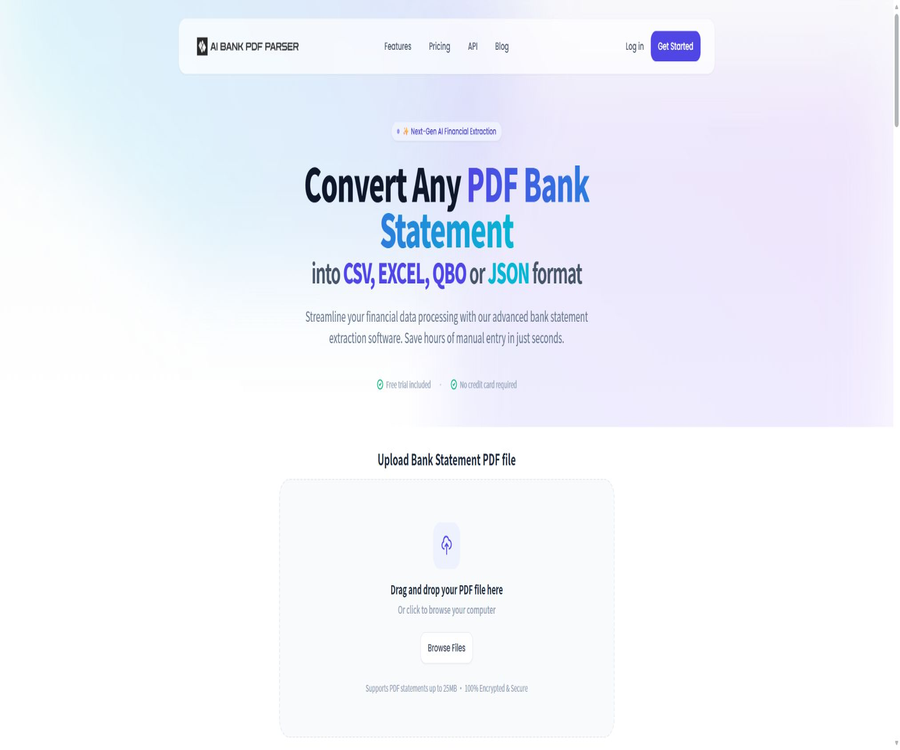
Convert PDF bank statements to CSV, XLSX, QBO and JSON
Convert PDF bank statements to CSV, XLSX, QBO and JSON – an intelligent tool focused on AI-driven table data processing.
Tags:AI table data processingA one-sentence summary
AI Bank Parser is an online PDF parsing tool designed for bank statements; it can identify the transaction tables within these statements and convert them into CSV, Excel, QBO, or JSON files.
Tool Introduction
AI Bank Parser integrates file uploading, table recognition, field extraction, and file downloading into a single web-based process; it is designed to serve accountants, financial professionals, business owners, as well as development teams that need to organize transaction data. The provider also offers conversion interfaces that allow these functions to be integrated into internal systems.
It addresses the issue of data entry, rather than accounting judgments or audit matters. The results of the conversion can be affected by the bank’s layout, the quality of scanning, tables that span multiple pages, and currency formats; therefore, each item must be reviewed carefully before it is recorded officially.
Main functions
Bank transaction statement recognition
After the user uploads a PDF bank statement, the system analyzes the table and extracts the transaction data. The processing time varies from a few seconds to a few minutes, depending on the file size and the complexity of its layout.
Four output formats
Currently, CSV, Excel, QBO, and JSON are publicly supported. Different formats are suitable for manual verification, spreadsheet analysis, import into accounting software, and system integration.
Batch processing and transaction consolidation
The platform can process multiple files at once and combine the transactions into a single result file. This method is suitable for organizing transaction records over several months, but it can also lead to duplicate entries or confusion regarding accounts; therefore, it is necessary to standardize the accounts, time ranges, and currency types first.
Automatically generate download files
Once the conversion is complete, the system will generate and download the target file, thereby reducing the need for manual copying and pasting. Automatic downloading does not mean that the data has been verified; the original PDF should still be kept as a reference for reconciliation.
Bank layout adaptation
If a particular bank’s format cannot be recognized properly, the official website recommends using the chat function to contact support and providing an email address, so that the team can adjust the parsing script. It should be noted that this process may need to be adapted for each individual bank, and not all formats can be processed successfully from the first attempt.
Conversion API
The official API allows for the uploading of PDF files containing bank transaction records, with results in CSV, Excel, QBO, or JSON format being returned; authentication is carried out using API keys. It is suitable for integrating file conversion into processes related to expense reporting, bookkeeping, loan approval, or financial data handling.
- Identify transaction tables from PDF bank transcripts
- Export as CSV, Excel, QBO, or JSON file
- Process multiple PDFs in batch and merge transactions.
- The download results are generated automatically on the web page.
- Provides conversion APIs for developers.
- The current maximum size for a single PDF file is 25MB.
Comparison of output formats
| Format | Suitable uses | Use reminders |
|---|---|---|
| CSV | Various financial tools for reconciliation, filtering, and import. | Confirm the encoding, delimiter, and amount format before opening. |
| Excel | Manual review, formula calculations, and classification | Issues with the date being automatically modified and long account names being displayed incorrectly |
| QBO | Import accounting software that supports this format. | First, back up the account set and check for duplicate transactions as well as account mappings. |
| JSON | Interface integration, database insertion, and automated processing | Verify field name, null values, numeric type, and currency. |
When choosing a format, it is necessary to consider the requirements of the downstream systems first, rather than merely focusing on whether the file can be opened. CSV and Excel are more convenient for manual inspection, while QBO and JSON are better suited for import and automation; however, errors may be amplified on a larger scale in these formats.
Usage tutorial
Converting bank transaction records on the web page
- First, copy the original bank statement, and then obscure any account numbers, addresses, and other personal information that are not relevant in the test file.
- In the upload area, select a PDF file that is no larger than 25MB, and confirm the account, currency, and payment term associated with the file.
- Select CSV, Excel, QBO, or JSON as the output format, then submit the conversion.
- After downloading the results, verify the total number of transactions, the start and end dates, the opening balance, the closing balance, the debit and credit directions, as well as the total amounts.
- After confirming that there are no missing rows, duplicate rows, or misalignments across pages, import it into the official system or hand it over to the next person.
Merge transactions from multiple months in bulk
- Organize file names by account, year, and month to prevent different entities or currencies from being combined in the same batch.
- Check whether adjacent months contain duplicate carry-over pages or overlapping dates, before uploading multiple PDFs.
- Enable batch processing to generate merged results, while maintaining the correspondence between each original file and the merged file.
- Establish duplicate check rules based on transaction date, summary, and amount, with special focus on inspections at the end of the month and the beginning of the month.
- Save the review results as a working draft; do not overwrite the original conversion files generated directly by the platform.
Check process before importing QBO
- Verify that the target accounting software, as well as the region and version of the account database, support QBO import, and back up the current account database.
- First, use a small amount of non-critical transaction data to test account matching, date format, income and expenditure direction, and transaction descriptions.
- Exclude duplicate transactions in the import preview, and verify the mapping between bank accounts and accounting accounts.
- After importing, verify the total number of transactions and amounts page by page against the original PDF.
- When a systematic bias is detected, cancel the import of the test; do not proceed with classification or matching using incorrect data.
API integration process
- Create dedicated API keys, and manage development, testing, and production environments separately.
- Upload PDFs in the form of files on the server side; do not include the keys in the web frontend, mobile applications, or public code repositories.
- Set checks, retries, and manual fallback options for file size, format, timeout, limits, and service errors.
- After parsing the returned file, checks are performed for field integrity, amount consistency, duplicate transactions, and page count accuracy.
- Record the task number and the necessary audit logs, but avoid storing complete account details, balances, and the original transaction records in those logs.
Checklist
Bank transaction records are highly sensitive financial information; a successful identification merely indicates that the document has been converted, but it does not prove that the accounting data is accurate. The following items should be checked before each formal use.
- Is the number of pages in the file equal to the number of pages charged for conversion?
- Are the transaction date, the booking date, and the value date being confused?
- Are the symbols for income, expenses, debits, and credits correct?
- Is the opening balance plus the net change equal to the closing balance?
- Are cross-page transactions, table continuation headers, and carry-over rows being misidentified?
- Does the same transaction appear repeatedly as a result of batch merging?
- Are the decimal point, thousand separators, negative sign brackets, and currency symbols correct?
- Have the account name, first name, and summary fields been misaligned or truncated?
Which users are it suitable for
- Accountants and bookkeepers: Organize clients’ PDF transaction records into filterable tables
- Corporate finance team: Provides data for bank reconciliations, cash flow analysis, and document preparation
- Audit and consulting team: reduce the time required for initial data entry and create review drafts
- Small and micro business owners: Convert monthly transaction records into spreadsheets for categorized analysis
- Fintech developers: Integrate transaction processing into business processes via APIs
- Lending and Risk Management Team: Prepares structured transaction data in accordance with regulatory requirements
Typical use cases
| Scene | Recommended output | Conduct a focused inspection. |
|---|---|---|
| Monthly bank reconciliation | CSV or Excel | Balance reconciliation, missing rows, duplicate rows |
| Import of accounting software | QBO | Account mapping, revenue and expenditure direction, duplicate transactions |
| Financial analysis | Excel or CSV | Date range, currency, and classification criteria |
| Internal data pipeline | JSON | Field types, null values, exceptions, and retries |
| Combining transactions over multiple months | CSV or Excel | Month boundaries, account ownership, and carry-over rows |
Product advantages
- Focus on bank transaction records; there is no need for users to manually create generic PDF extraction rules.
- It covers table analysis, accounting data import, and the development of integrated formats commonly used.
- There are few steps required on the web version, allowing non-technical users to carry out basic conversions as well.
- Supports batch processing of multiple files and transaction merging.
- A free quota of 3 pages per day is provided, allowing you to test the layout of your own bank version first.
- The paid tiers are categorized by the number of pages per month, making it easy to compare budgets and processing capacities.
Usage restrictions and precautions
- The maximum size of a single PDF file is currently 25MB; very large files need to be split or compressed.
- The official website does not guarantee that all banks, languages, scanned documents, and complex layouts can be recognized accurately.
- Information on OCR capabilities, support for handwritten content, PDF files protected by passwords, and image-based PDFs is not available.
- The converted results cannot replace accounting reviews, audit evidence, or the original bank documents.
- Batch merging may amplify the risks of duplicate transactions, account mixing, and currency mixing.
- The annual page only indicates a 20% savings rate; the total annual cost, which can be verified, is not shown publicly.
- There are no complete public details regarding API rate limits, concurrent usage, response structure, and service level.
- The registration page still shows generic company name placeholders; it is necessary to verify the contracting party and the official terms before making a purchase.
Prices and packages
As of August 22, 2026, the official website lists the free usage quota as well as three monthly subscription plans. The page also offers the option to switch to an annual payment plan, indicating a 20% savings; however, the available information does not show the actual total cost for each annual plan, so it is not advisable to calculate the costs independently based on the official figures.
| Plan | Public price | Page count metric | Suitable for |
|---|---|---|---|
| Free to use | $ | Up to 3 pages per day | Test the bank layout and perform a few temporary conversions. |
| Starter | 10 dollars per month | 200 pages per month | Individuals, small financial teams, and low-frequency processing |
| Premium | $ | 500 pages per month | Growth-oriented teams with stable monthly revenue streams |
| Expert | $ | 1,000 pages per month | High-frequency users in the accounting and finance fields |
| Annual payment | The page indicates a 20% savings. | Not made publicly available separately | It is necessary to verify the total amount and the duration of the credit limit on the settlement page. |
The package is based on the number of pages rather than the number of files as the key metric for determining the quota; longer statements will consume this quota more quickly. Before making a purchase, it is necessary to understand how failed conversions, repeated submissions, blank pages, and batch tasks are counted in terms of pages, as well as whether any unused quota is carried over.
Platform and deployment methods
| Method | Current status | Explanation |
|---|---|---|
| Web version | Support | Upload a PDF and download the converted result. |
| Batch processing | Support | It can process multiple files and merge transactions. |
| API | Support | Use API keys for server-side integration. |
| Desktop client | No findings were detected. | Currently, online services are the main focus. |
| Mobile apps | No findings were detected. | No official app store client was found. |
| Local or private deployment | Not disclosed | No offline installation or privatization options were found. |
Privacy and security
The official website claims that the conversion process is encrypted, secure, and confidential, but such marketing statements cannot replace a comprehensive description of the data processing procedures. The current public pages do not clearly specify the duration for which uploaded files and the resulting converted files are stored, the mechanisms for automatic deletion, the locations where data is stored, the third parties involved in the processing, the encryption standards used, or any security certifications.
Until the above information is confirmed in writing, it is recommended to use only anonymized samples for testing, and not to upload ID numbers, full account details, addresses, or unnecessary transaction notes. Corporate users should also verify the data processing agreements, the procedures for requesting deletion, event notifications, access controls, and employee permissions.
| Security projects | Public status | Suggestions |
|---|---|---|
| Transmission and processing security | The official website claims to offer encryption and security. | Specific agreements, scope, and responsibility details are required. |
| File retention time | Not clearly made public | Determine when the original file and the results are automatically deleted. |
| Data storage location | Not clearly made public | When cross-border requirements are involved, obtain a written explanation first. |
| Sub-processor | Not clearly made public | Confirm the list of cloud service and AI processing providers |
| Security certification | No public evidence has been verified. | Highly sensitive businesses should obtain audit or certification documents as required. |
| Account terms | There is placeholder text on the registration page. | Confirm the official contract party and applicable terms before making the payment. |
API, GitHub, and open-source status
AI Bank Parser offers an official conversion API, along with basic example calls for uploading files using API keys. As of now, no complete set of interface references, official SDKs, Webhooks, information on rate limits, error code lists, or service level commitments are available.
No official GitHub repository or open-source license associated with this product was found, so the platform should be classified as a commercial, closed-source service. Other projects for parsing bank transaction records available on the internet cannot be considered as the source code for AI Bank Parser; moreover, the existence of public interfaces does not mean that the product is open source.
| Project | Conclusion | Explanation |
|---|---|---|
| Web products | Commercial online services | The source code of the platform is not publicly available. |
| Conversion API | Already provided | Supports conversion from PDF to CSV, Excel, QBO, and JSON. |
| Official SDK | No findings were detected. | Currently, examples of generic interfaces are the main focus. |
| Official GitHub | No findings were detected. | No official organization or warehouse with a clear affiliation has been identified. |
| Open-source license | No findings were detected. | It cannot be marked as an open-source tool. |
Basic information
| field | Content |
|---|---|
| Tool name | AI Bank Parser |
| Tool type | Bank statement analysis and financial data extraction |
| Main inputs | PDF bank statement |
| Main output | CSV, Excel, QBO, and JSON |
| File size limit | The maximum size for a single PDF is 25MB. |
| Free quota | Up to 3 pages per day |
| Price pattern | Free quota plus monthly or annual subscription |
| API | Provide |
| Official SDK | No findings were detected. |
| Is it open source? | No, no official source code or open-source license was found. |
| Main platforms | Web interface and server-side APIs |
Recommendation score
The recommendation score is 3.6 out of 5. AI Bank Parser has well-defined functional boundaries; its output formats include spreadsheets, accounting import options, and system integration capabilities. The free version is suitable for testing the bank format first.
The points deducted are mainly due to insufficient disclosure of privacy details, company and term information, API documentation, and the scope of identification. Before handling actual financial data, it is necessary to conduct masking tests, obtain written security confirmations, and review the results of the conversion process.
Frequently Asked Questions
Is AI Bank Parser free?
It is possible to process up to 3 pages per day for free, which is suitable for testing a short statement or checking the bank’s layout. For higher volumes, a subscription with pricing based on the number of pages per month is required.
How much is the lowest priced subscription plan?
The current public price of Starter is $10 per month, which includes 200 pages per month. The price, taxes, renewal fees, and currency used for payment shall be as indicated on the purchase page.
What output formats are supported?
The official support includes CSV, Excel, QBO, and JSON. Before using QBO or JSON, it is necessary to verify the fields, version, and import rules of the downstream software.
Is scanned PDF supported?
The official website does not specify the extent of support for scanned images, files with low resolution, and handwritten text. It is recommended to use anonymized samples for testing and to compare each line with the original PDF.
Is there a limit on file size?
Yes, the current upload area specifies that a single PDF file may not exceed 25MB in size. When splitting files, it is necessary to retain the page numbers and account information to prevent loss of data due to cross-page transactions or balance transfers.
Is it possible to perform batch conversion?
Yes, the official website provides the ability to process multiple files simultaneously and to merge transactions. After merging, it is necessary to check for duplicate records based on account, date, summary, and amount.
Can it be imported directly into QuickBooks?
The product can generate QBO files, but whether they can be imported successfully depends on the version of the target software, the region, and the account mapping. It is advisable to back up the account database and conduct tests with small batches before performing the actual import.
Can the converted results be used directly for tax filing or auditing?
It is not recommended for direct use. It represents the results of data extraction, and is not an original document issued by the bank; it also cannot replace accounting judgments, audit procedures, or manual verification.
Are APIs provided?
The API allows for the uploading of PDF files and the generation of four different target formats. Before integrating it into production, it is necessary to consult the official sources regarding billing details, concurrency limits, speed restrictions, error handling, data deletion procedures, and service levels.
Is AI Bank Parser open source?
No official source code repository or open-source license was found; therefore, it should be considered a closed-source online service. The provision of API call examples does not imply that the model or platform code is made available.
Is it safe to upload bank transaction records?
The official website claims to offer encryption, security, and confidentiality, but it does not disclose sufficient information regarding the storage duration, deletion procedures, storage locations, or the details of any sub-processors. For sensitive data, a written explanation should be requested first, and anonymized versions of the files should be uploaded preferentially.
Summary
AI Bank Parser is ideal for quickly converting PDF bank statements into CSV, Excel, QBO, or JSON formats; it also enables batch processing and the use of APIs, thereby reducing the need for manual data entry. A free quota of 3 pages allows users to first test the format and quality of the fields in their own bank statements.
Its value depends on the verification process that takes place after conversion, rather than merely on the speed of processing. When dealing with actual financial data, it is necessary to include steps such as verifying privacy aspects, checking balance consistency, performing duplicate checks, and retaining the original documents as standard procedures.
Tools similar to Convert PDF bank statements to CSV, XLSX, QBO and JSON





 Guigong Network Security Registration No. 45132202000164